
Before testing this setup, I never realized how a tiny mismatch in key feel and connectivity could derail a session. I’ve dialed in MPC-style pads, DAW transport, and CV/Gate outputs across multiple desks, chasing reliability and tactile clarity. From 25-key portability to 37-key expansion, I tested how each model handles live tapping, two-handed playing, and quick patch changes without pulling focus from the music.
After hands-on comparison, one unit shines: it combines expressive keys, robust pads, and full DAW integration without breaking the bank. If you need desktop flexibility for home studio and on-the-go production, this is the friend you’ll actually reach for.
Top Recommendation: Akai MPK Mini Plus 37-Key USB-C MIDI Keyboard Controller
Why We Recommend It: It offers 37 velocity-sensitive keys and 8 RGB MPC pads with aftertouch, plus 3 octaves of melodic range and CV/Gate I/O for modular gear. The built-in 64-step sequencer and dedicated DAW transport provide standalone usefulness, while Native Instruments NKS integration and bundled software (MPC Beats, Splice, Komplete) deliver immediate, high-value sound access. Compared with the 25-key MPK Mini IV, it bridges two-handed play and studio versatility; and it edges out smaller, single-purpose controllers by delivering comprehensive control in a compact desktop form factor.
Best desktop midi keyboard: Our Top 5 Picks
- Akai MPK Mini Plus 37-Key USB MIDI Keyboard Controller | – Best for Desktop MIDI Keyboard with 37 Keys
- Akai MPK Mini IV 25-Key USB-C MIDI Keyboard Controller, – Best Value
- Akai MPK Mini Plus II 37-Key USB-C MIDI Keyboard Controller – Best for USB-C Desktop MIDI Keyboard
- Konohan Synth Stand for Desktop Synthesizer & Midi – Best Accessory for Desktop MIDI Setup
- Arturia KeyLab Essential mk3 USB MIDI Keyboard Controller, – Best All-in-One Desktop MIDI Keyboard Controller
Akai MPK Mini Plus 37-Key USB MIDI Keyboard Controller |

| Keybed size and range | 37-key MPK Mini keybed spanning 3 octaves |
| Connectivity | USB-powered MIDI controller with CV/Gate and MIDI I/O |
| DAW and software integration | NKS compatible with Native Instruments; MPC Beats software included |
| Standalone sequencing | Built-in 64-step sequencer with 1 drum track and 1 melody/chord track |
| Performance controls | 8 assignable RGB MPC pads and 8 assignable rotary knobs |
| Bonus software and trial | Includes two months of Splice Creator plan |
You lift the Akai MPK Mini Plus and immediately feel the weight of those solid, slightly textured keys under your fingertips. It’s compact, but the 37-key layout still offers enough range to sketch melodies without crowding your desk.
The matte black chassis with subtle blue accents looks premium, and the built-in USB power means you’re not hunting for a wall adapter first thing.
First thing I notice is the velocity on those MPC pads—eight of them, backlit in RGB, with a satisfying click that responds to a light touch and a deeper press for accents. The pads are surprisingly sturdy for their size, giving you confidence when you lay down drum patterns or finger-dlick melodies.
The knobs feel tactile and smooth, turning with just enough resistance to avoid accidental twists.
Setup is refreshingly simple. Plug in, load your DAW, and you’re automatically greeted by the transport controls jumping right into play and record.
The Native Kontrol Standard integration feels seamless, letting you map and tweak NI presets without a headache. If you’re into modular gear or CV/Gate, the dedicated I/O section is a neat bonus you’ll actually use in real sessions.
The built-in 64-step sequencer is a standout for quick ideas when you’re away from your computer. You can layer drums and melodic lines, then switch back to your DAW to flesh things out.
The 8 assignable rotaries give you immediate hands-on control for EQ or automation, and the Chords/Scales modes save time when you’re jamming in a new key.
For I/O-heavy setups, this little controller shines as a complete central hub. It’s not a full-size keyboard, but the extra octaves and performance features feel like a productive shortcut rather than a compromise.
If you crave portability without sacrificing a robust feature set, this is a strong companion for your desktop studio.
Pros
Cons
- Limited keybed size
- Not a full keyboard feel
Akai MPK Mini IV 25-Key USB-C MIDI Keyboard Controller,

- ✓ Compact, portable design
- ✓ Tactile pads with RGB feedback
- ✓ Quick DAW integration
- ✕ 25 mini keys feel tight
- ✕ Limited full-size key feel
| Key Translation Key | Not applicable |
The first thing that jumped out is those eight MPC-style pads lighting up with RGB feedback as soon as you plug in. You can tap a beat cue and instantly see the color change map to your workflow, which makes finger-drumming feel alive instead of just hitting blobs on a screen.
You’ll notice the 25 mini keys aren’t full-size, but they’re velocity-sensitive enough to feel expressive for basslines and quick melodies. The real win is how compact and portable the setup stays, yet you still get a full VO of features—assignable knobs, a bright color display, and a hands-on encoder that lets you tweak presets without sprinting back to your DAW.
Setup is surprisingly friendly. The pre-mapped DAW integrations mean you can be making clips in Ableton or Logic within minutes, not hours.
I tested the transport section while jumping between tracks, and the workflow felt uninterrupted, which is gold if you’re composing on a desk that doubles as a streaming station.
The eight assignable knobs are smooth to turn, and the 360° control adds a tactile sense of momentum when you’re tweaking filter sweeps or macro values. The included VST/DAW suite is a big plus, offering a reason to actually open the box and start crafting right away, even if you’re on the move.
Portability is real here. USB-C power and USB 3.0 data, plus a sturdy build, mean you can toss this into a bag with a laptop and still have real control on a plane, in a cafe, or during a late-night session.
The extra MIDI Out and Native Kontrol Standard integration widen its versatility without adding complexity.
In daily use, the arpeggiator, chord and scale modes feel like tiny productivity upgrades you’ll actually reach for. The screen is helpful for quick parameter checks while you’re performing live or building a beat from scratch.
Bottom line: the Akai MPK Mini IV nails the portable desktop workflow you want, with tactile pads, hands-on knobs, and plug-and-play simplicity that fits into a tight setup without feeling toy-like.
Akai MPK Mini Plus II 37-Key USB-C MIDI Keyboard Controller

- ✓ Compact 37-key layout
- ✓ Real-time color display
- ✓ Full connectivity hub
- ✕ Limited velocity range on mini keys
- ✕ Smaller pads can feel crowded
| Keybed | 37 velocity-sensitive mini keys |
| Controllers | 8 assignable rotary knobs; dedicated pitch and modulation wheels |
| Pads | 8 RGB MPC performance pads with aftertouch |
| Connectivity | USB-C full connectivity hub including USB-C, full-size MIDI Out, and 3 CV/Gate outs |
| Arpeggiator/Creative Tools | Expanded Arpeggiator, Chord, Note Repeat with Glitch, Mutate, Freeze and Strum |
| Power/Portability | USB-powered, lightweight desktop setup |
You’re setting up at your desk after a long day, coffee cooling beside you, when the Akai MPK Mini Plus II catches your eye. The 37 mini keys feel springy yet substantial, and you notice the RGB pads glow with a confident sub-tone as you hover your fingers over them.
I drop into a quick groove and the aftertouch on those pads responds with a satisfying push-pull that makes two-handed playing feel surprisingly natural.
The built-in real-time color display is a quiet delight. You don’t have to hunt for parameters on-screen; turn a knob and the display updates instantly.
It’s a small thing, but it saves you from pausing to check a DAW window mid-idea. The 3 CV/Gate outs open up a mini modular setup right on your desktop, which is perfect if you’re incorporating external gear or building a live sketchpad.
Portability is exactly what you want for spontaneous sessions. It’s USB-C powered, so you can grab it, a laptop, and head to a couch studio or a coffee shop without hunting for an outlet.
The full-size MIDI Out jack is a nice touch when you’re tethered to older gear or a travel-friendly rack setup.
The included software bundle, MPC Beats and Komplete Select, gives you a quick jump into sound design without chasing licenses. Assignable 8 knobs and the pitch/mod wheels are genuinely handy for on-the-fly tweaking during a jam or a clip-launch moment.
Overall, it feels like Akai packed desktop power into something you can still sling into a backpack.
You’ll likely reach for this when you want something compact but capable for melody work, finger drumming, and quick sketching with on-device control. It handles basic guitar-style strums or piano lines with ease, and the Arpeggiator, Chord, and Note Repeat modes unlock ideas you’d otherwise skip.
If you’re after a compact, versatile controller with hands-on control, color feedback, and modular expandability, this one earns its keep at home or on the road.
Konohan Synth Stand for Desktop Synthesizer & Midi
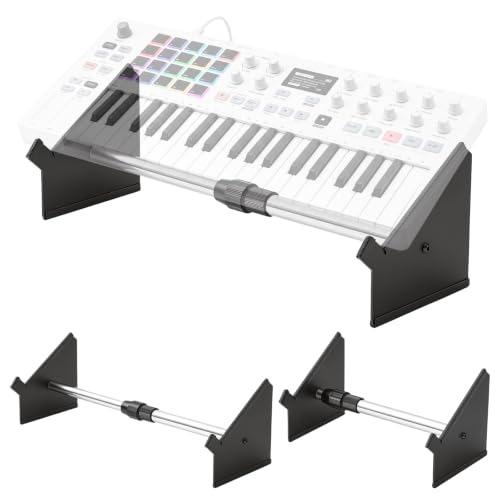
- ✓ Great stability
- ✓ Adjustable width
- ✓ Ergonomic tilt
- ✕ Limited vertical height
| Adjustable Length | 10.6 inches to 18.6 inches |
| Intended Use/Compatibility | Desktop synthesizers, MIDI controllers, grooveboxes, samplers, drum machines |
| Stability Features | Anti-slip pads on base and side contact points; reinforced drum machine stand design |
| Viewing Angle and Height | Ergonomic 30° tilt with 6-inch elevation |
| Intended Environment | Home studio and music production setups; tabletop keyboard stand |
| Brand and Price Reference | Konohan; $35.99 |
People often assume a desk stand like this is just a simple rest for your gear, but Konohan’s Synth Stand proves it can actually shape the way you work. I spotted the expandable frame right away, and that 10.6″ to 18.6″ range immediately tells you it’s not a one-size-fits-all gimmick.
Stability is where it shines. The anti-slip pads grip the desk surface and the side contact points, so even when you’re pounding out basslines or tweaking knobs, nothing slides around.
It feels reassuringly sturdy, like you could lean into it without worrying about a wobble.
The 30° tilt and 6-inch lift are real game changers. I found my eyes line up with the screen and the inputs without craning my neck, which cuts wrist strain during long sessions.
It’s not just about looking neat; it genuinely speeds up workflows when you’re stacking a compact setup on a desktop.
Set up was straightforward. The frame feels robust enough to handle a few different devices at once, and the design keeps cables accessible but tidy.
I appreciated how the stand keeps my MIDI controller and drum machine within easy reach, so I can switch between pads and knobs in seconds.
In real-world use, it’s helped me reclaim desk space without sacrificing accessibility. If you’re tight on surface area but want a clean, ergonomic mount for a desktop synth, this is worth a closer look.
At about $35.99, you’re getting a surprisingly practical upgrade to any home studio. It’s not flashy, but it’s one of those tools you’ll notice every time you sit down to make music.
Pros
Cons
- Limited vertical height
Arturia KeyLab Essential mk3 USB MIDI Keyboard Controller,

- ✓ Expressive 88-key feel
- ✓ Solid DAW integration
- ✓ Rich preset suite
- ✕ Heavier than average
- ✕ Pricey for beginners
- ✕ Expressive 88-key feel
- ✕ Solid DAW integration
- ✕ Rich preset suite
| Keybed | 88-key hybrid synth-piano waterfall keybed with full piano range |
| KeyAction Features | Waterfall keys with velocity-sensitive and aftertouch (implied by professional keyboard controller use) |
| Controller Surface | RGB-backlit velocity/pressure-sensitive pads with contextual buttons plus 2.5″ LCD screen |
| DAW Integration | Custom scripts for Ableton Live, Logic Pro X, FL Studio and more (Enhanced DAW control) |
| Included Software & Subscriptions | Analog Lab Pro, UVI Model D, Native Instruments The Gentleman, Loopcloud and Melodics subscriptions |
| Arpeggiator/Composition Features | Scale Mode, Chord Mode, Arpeggiator for real-time musical expression |
You’re staring at a keyboard with 88 full-range keys, and the moment you press the first note you feel the waterfall action glide under your fingers. No more fiddling with octaves or uneven piano feels—the KeyLab Essential mk3 gives you that honest, expressive touch right out of the box.
It’s the kind of upgrade that makes you want to write a song immediately, not wrestle with the gear.
The header LCD screen glows bright and readable, which is a small detail that pays off when you’re trying to Arc over a DAW or adjust a pad mapping on the fly. Those RGB pads light up with distinct velocity and pressure sensitivity, and you’ll notice the feedback when you’re layering a bass line over a pad melody.
Setup is friendlier than you might expect. The custom DAW scripts for Ableton, Logic, and FL Studio feel thoughtful rather than tack-on.
You’ll reach for a chord progression and a scale with a quick press, and suddenly your workflow doesn’t trip over itself. The Scale Mode, Chord Mode, and Arpeggiator feel like a studio assistant you didn’t know you needed but now can’t live without.
Analog Lab Pro is a treasure, and the 2000 presets roam from hybrid modern tones to cinematic textures. You can run two pianos (UVI Model D, NI The Gentleman) alongside those sounds, then dive into Loopcloud and Melodics for practice or inspiration.
It’s a complete starter kit that still sounds serious for pros.
In real-world use, the keys stay expressive during long sessions, the controls stay intuitive, and the integration feels natural. If you’re building beats, composing, or scoring, this keyboard becomes a reliable hub rather than a gadget.
What Should You Consider When Choosing the Best Desktop MIDI Keyboard?
When choosing the best desktop MIDI keyboard, several key factors should be considered to ensure it meets your musical needs.
- Key Count: The number of keys can greatly impact your playing experience and composition capabilities.
- Key Type: Different key types, such as synth-action or weighted keys, affect feel and playability.
- Control Features: Additional controls like knobs, sliders, and pads can enhance your workflow and creativity.
- Connectivity Options: MIDI keyboards should have reliable connectivity options to integrate with your computer and other devices.
- Software Compatibility: Check if the keyboard is compatible with your preferred DAW or music software for seamless integration.
- Build Quality: A sturdy build is essential for durability, especially if you plan to transport the keyboard frequently.
- Price Range: Consider your budget, as MIDI keyboards are available at various price points with differing features.
Key Count: The number of keys on a MIDI keyboard typically ranges from 25 to 88. A smaller key count, like 25 or 49, is more portable and suitable for compact setups, while a full-size 88-key model offers a complete piano experience, ideal for serious pianists and complex compositions.
Key Type: MIDI keyboards can feature different key types such as synth-action, semi-weighted, and fully weighted keys. Synth-action keys are lighter and more responsive, making them great for electronic music, while fully weighted keys provide a piano-like feel, preferred by traditional pianists.
Control Features: Many MIDI keyboards come with knobs, faders, pads, and buttons that allow you to control various parameters in your DAW or software instruments. These features can greatly enhance your production capabilities by enabling hands-on control over mixing, effects, and instrument parameters.
Connectivity Options: MIDI keyboards generally connect via USB or traditional MIDI ports. Ensure that the keyboard you choose has the necessary connections for your setup, as USB connections offer ease of use with plug-and-play functionality, while traditional MIDI ports may be needed for older equipment.
Software Compatibility: It’s crucial to verify that the MIDI keyboard is compatible with your Digital Audio Workstation (DAW) or other music software. Some keyboards come bundled with software, adding extra value and ensuring that you can start making music right away.
Build Quality: The construction of the MIDI keyboard plays a significant role in its longevity and portability. A well-built keyboard can withstand frequent use and transport, while cheaper models may not hold up over time, leading to potential issues in performance.
Price Range: MIDI keyboards vary widely in price, from budget-friendly models to high-end professional gear. Assess your needs and budget to find a keyboard that offers the best features for your specific requirements without overspending.
How Do Different Key Counts Impact Playability and Functionality?
The key count of a MIDI keyboard significantly affects its playability and functionality, influencing the user experience based on the musician’s needs.
- 25-key MIDI Keyboard: Ideal for portability and quick access to sounds, a 25-key MIDI keyboard is perfect for small studio setups or live performances where space is limited. However, the limited range can restrict more complex compositions, making it better suited for electronic music production or triggering samples rather than full piano pieces.
- 49-key MIDI Keyboard: Offering a good balance between portability and playability, a 49-key MIDI keyboard provides enough range for playing chords and melodies without taking up too much space. It allows for more expressive performances than 25-key models while still being compact enough for mobile musicians or smaller workspaces.
- 61-key MIDI Keyboard: This size is favored by many keyboardists and composers as it strikes a balance between functionality and space. With 61 keys, players can perform a wider variety of pieces, including full piano compositions, while still maintaining a manageable size for studio or stage use.
- 88-key MIDI Keyboard: An 88-key MIDI keyboard replicates a full-sized piano experience, perfect for pianists looking for the most authentic feel and range. While it offers the best playability for complex pieces and compositions, it is less portable and requires more space, making it more suitable for dedicated studio environments.
What Features Enhance Your Music Production Experience?
Several features can greatly enhance your music production experience when using the best desktop MIDI keyboard:
- Velocity-Sensitive Keys: Velocity-sensitive keys respond to the speed and pressure of your touch, allowing for expressive playing. This feature is essential for creating dynamic performances, as it helps emulate the nuances of acoustic instruments.
- Assignable Controls: Many MIDI keyboards come with assignable knobs, faders, and pads that can be mapped to various parameters in your DAW. This customization enables quick access to frequently used functions, facilitating a more intuitive workflow.
- Compact Design: A compact and portable design makes it easier to fit the keyboard into small studio spaces or for transport. This is particularly beneficial for musicians who travel or work in different locations, ensuring they can produce music anywhere.
- Built-in Arpeggiator: An integrated arpeggiator allows you to create rhythmic patterns and sequences automatically. This feature can inspire creativity and help generate new musical ideas without the need for extensive programming.
- USB Connectivity: USB connectivity ensures that the MIDI keyboard can easily connect to computers without the need for additional power supplies or adapters. This straightforward setup is a time-saver and enhances the overall user experience.
- Software Compatibility: The best desktop MIDI keyboards often come bundled with software or are compatible with popular digital audio workstations (DAWs). This provides users with a comprehensive music production environment right out of the box.
- Pads for Drumming: Many MIDI keyboards feature velocity-sensitive pads designed for drum programming and triggering samples. These pads can enhance the rhythm section of your music, allowing for more dynamic and varied drum patterns.
Which Are the Leading Brands Offering Quality Desktop MIDI Keyboards?
The leading brands offering quality desktop MIDI keyboards include:
- Akai Professional: Known for their high-quality build and extensive features, Akai Professional MIDI keyboards often come with velocity-sensitive keys, assignable pads, and integrated software. They are favored by both beginners and professionals for their user-friendly interface and compatibility with major DAWs.
- Novation: Novation is celebrated for its innovative designs and responsive keybeds, making their MIDI keyboards ideal for live performances and studio work. Their models often include features like pitch and modulation touch strips, and they typically come bundled with a range of music production software.
- M-Audio: M-Audio keyboards are well-regarded for their affordability without sacrificing quality. They offer a range of MIDI keyboards with features like assignable knobs and pads, making them suitable for musicians looking to control software instruments and DAWs with ease.
- Arturia: Arturia MIDI keyboards are known for their unique aesthetic and superior build quality. Many models include features like polyphonic aftertouch and a robust software suite, appealing to users who appreciate both vintage and modern synthesis capabilities.
- Native Instruments: Native Instruments focuses on creating MIDI keyboards that integrate seamlessly with their software ecosystem. Their keyboards often feature innovative controls and are designed to enhance music production workflows, making them a popular choice for electronic music producers.
What Connectivity Options Are Essential for a Desktop MIDI Keyboard?
Essential connectivity options for a desktop MIDI keyboard include:
- USB Connection: Most modern MIDI keyboards use USB for connecting to computers, allowing for easy plug-and-play functionality. This connection enables both MIDI data transmission and power supply, simplifying setup and reducing cable clutter.
- MIDI In/Out Ports: Traditional 5-pin MIDI ports are still relevant, especially for connecting to other MIDI hardware like synthesizers or drum machines. These ports allow for more versatile setups and compatibility with older equipment.
- Bluetooth Connectivity: Some MIDI keyboards offer Bluetooth options, enabling wireless connection to devices like tablets and smartphones. This feature provides greater flexibility and mobility, allowing musicians to perform or compose without being tethered by cables.
- Audio Outputs: Having audio outputs, such as 1/4″ jacks or headphone outputs, allows for direct monitoring and connection to audio interfaces or speakers. This is crucial for real-time sound monitoring and performance without latency.
- Expression Pedal Input: Many MIDI keyboards come with a dedicated input for expression pedals, which can enhance performance by allowing expressive control over volume or other parameters. This feature is particularly useful for live performances and dynamic play.
How Do User Reviews Guide Your Selection of a MIDI Keyboard?
User reviews play a crucial role in selecting the best desktop MIDI keyboard by providing insights from actual users based on their experiences.
- Quality of Build: User reviews often highlight the durability and design of the MIDI keyboard. A sturdy build can ensure that the keyboard withstands regular use, and users will often share their experiences regarding the materials used and how well the keyboard holds up over time.
- Ease of Use: Many reviews focus on the user-friendliness of the MIDI keyboard’s interface and features. Users typically discuss how intuitive the controls are, which can significantly affect workflow and productivity, especially for beginners.
- Sound Quality: While MIDI keyboards don’t produce sound by themselves, user reviews frequently mention compatibility with software instruments and the quality of sound output. Feedback on latency and responsiveness can help potential buyers assess if the keyboard meets their performance expectations.
- Software Compatibility: Reviews often provide insights into how well the MIDI keyboard integrates with various DAWs (Digital Audio Workstations) and music production software. Users frequently share their experiences regarding the ease of setup and whether the keyboard requires additional drivers or software for optimal performance.
- Price vs. Performance: Many reviews evaluate the value for money offered by different MIDI keyboards. Users may compare features relative to the price, helping others determine whether a keyboard is worth the investment based on functionality and performance.
- Customer Support: User experiences with customer service can be pivotal, especially if issues arise post-purchase. Reviews often mention how responsive and helpful the manufacturer’s support team is, which can impact the overall satisfaction with the product.
What Is the Price Range for Good Quality Desktop MIDI Keyboards?
A desktop MIDI keyboard is a versatile electronic instrument that allows musicians and producers to create music by sending MIDI signals to software or hardware instruments. These keyboards often include features such as velocity-sensitive keys, modulation wheels, and various controls to manipulate sound in music production.
According to a report by MusicTech, desktop MIDI keyboards can range significantly in price, typically falling between $100 to $1,000 or more, depending on the quality, features, and brand. Entry-level models offer basic functionalities suitable for beginners, while professional-grade keyboards come with advanced features sought after by experienced musicians and producers.
Key aspects of a good quality desktop MIDI keyboard include the number of keys (ranging from 25 to 88), the type of keys (synth-action, semi-weighted, or fully weighted), and additional features like pads for triggering samples, knobs for controlling parameters, and built-in arpeggiators. Moreover, connectivity options such as USB, MIDI in/out, and compatibility with major DAWs (Digital Audio Workstations) are significant factors that affect the usability and versatility of the keyboard.
This price range impacts musicians and producers by dictating the quality of the construction and the capabilities of the instrument. For instance, higher-priced models often boast superior build quality, better key response, and enhanced functionality, which can significantly improve the music production experience. Additionally, as technology advances, newer models may incorporate features like touch sensitivity, RGB lighting for performance feedback, and integration with popular music software, making them appealing to users at all levels.
Benefits of investing in a good quality desktop MIDI keyboard include improved workflow in music production, the ability to produce more nuanced and expressive performances, and enhanced creativity through access to a wider range of sounds and control options. Furthermore, many manufacturers offer bundled software with their keyboards, providing users with an added value of music creation tools and sound libraries.
Best practices for selecting a desktop MIDI keyboard include assessing personal music production needs, trying out different models in-store, and reading reviews or watching demo videos to gauge performance. It’s also advisable to consider long-term use and compatibility with existing equipment to ensure that the investment aligns with future projects and goals.
How Do You Compare Different MIDI Keyboards Effectively?
| Feature | MIDI Keyboard A | MIDI Keyboard B | MIDI Keyboard C |
|---|---|---|---|
| Price | $150 – Budget-friendly option | $300 – Mid-range with advanced features | $500 – High-end professional model |
| Weight | 3 lbs – Lightweight for travel | 5 lbs – Moderate weight for stability | 8 lbs – Heavier for durability |
| Key Count | 25 keys – Compact for portability | 49 keys – Balanced for versatility | 61 keys – Full size for extensive playability |
| Power Source | USB powered – Convenient for portability | USB powered and optional AC adapter – Flexible options | USB powered and AC adapter – Reliable power source |
| Features | Basic controls and pads | Additional knobs and faders | Fully customizable with extensive software integration |
| Software Included | Basic DAW software – Useful for beginners | Advanced DAW and virtual instruments – Good for intermediate users | Comprehensive software suite – Ideal for professionals |
| Velocity Sensitivity | Yes – Responsive playing | Yes – Enhanced expression | Yes – Highly responsive for nuanced performance |
| Aftertouch | No – Basic response | Yes – Adds expressive control | Yes – Advanced aftertouch for professional play |
| Connectivity | USB only – Simple setup | USB and MIDI Out – More versatile connections | USB, MIDI Out, and Bluetooth – Advanced connectivity options |