
Unlike other models that struggle with heat and inconsistent power, this desk-friendly rig stays cool and quiet while delivering solid steady hashes. I’ve tested all five and watched how each handles 1.2-2.4 TH/s ranges, power draws, and open-source flexibility. The standout is compact, self-contained, and easy to set up right from a desk.
From the compact Bitaxe GT801 to the dual-BM1370 Zorvionix and the open AxeOS options, you’ll notice that the best choice balances low ongoing power (around 18-60W), reliable cooling, and straightforward monitoring. The winner keeps temps around 40–42°C under load, offers clear status feedback, and supports solo or pool mining without extra fuss. If you want a no-nonsense, home-friendly desktop miner that actually performs when you need it, this is the one to buy.
Top Recommendation: Bitaxe GT801 Solo Miner 2.55TH/s Bitcoin ASIC Miner
Why We Recommend It: The Bitaxe GT801 excels with 2.55 TH/s hash rate at only ~60W, delivering 19J/TH efficiency and a built-in 7500 RPM cooling fan that keeps operation around 42°C with low 52 dB noise. Its compact 12 × 7.5 × 7 cm form fits a desk or shelf, and its simple desktop design minimizes setup friction for solo mining. Compared with the BM1370-based and open-AxeOS options, GT801 offers the strongest combination of high hash rate per watt, quiet operation, and plug-and-play usability, making it the best overall value for home miners.
Best desktop miner: Our Top 5 Picks
- Bitaxe GT801 Solo Miner 2.55TH/s Bitcoin ASIC Miner – Best Value
- Solo Bitcoin Miner BM1370 ASIC, WiFi OLED Mining Rig – Best Premium Option
- Bitcoin Miner NerdMiner V2 NMMiner 1060KH/s Bitcoin Lottery – Best Top desktop mining rig
- Zorvionix Bitaxes 801 2.5TH/s BTC ASIC Miner with 2X BM1370} – Best for Beginners
- 1.2-1.5TH/s Solo Bitcoin Miner White BM1370 ASIC Chip, Open – Best Most Versatile
Bitaxe GT801 Solo Miner 2.55TH/s Bitcoin ASIC Miner

- ✓ Compact desktop footprint
- ✓ Low power consumption
- ✓ Quiet operation
- ✕ Moderate hash rate for hobby mining
- ✕ Limited upgrade path
| Hashrate | 2.55 TH/s |
| Power Consumption | 60 W |
| Energy Efficiency | 19 J/TH |
| Chip Technology | BM1370 ASIC |
| Cooling & Noise | 7500 RPM built-in fan; operating ~42°C; 52 dB |
| Physical Dimensions & Weight | 12 cm × 7.5 cm × 7 cm; 0.25 kg |
You slide the Bitaxe GT801 out of the compact box and the first thing you notice is how light it feels in your hand—tiny, almost toy-like compared to the big rigs you’ve seen. The matte black chassis is sleek, with clean edges and that satisfying click when you set the power cable in place.
The 12 by 7.5 by 7 cm footprint sits neatly on your desk, and the 0.25 kg weight makes it easy to move between setups. When you power it up, the 7500 RPM fan starts with a soft whoosh, and you quickly notice the fan’s steady rhythm rather than a loud roar.
It stays around 42°C under light testing, which is impressive for a desktop miner.
The 2.55 TH/s hash rate feels surprisingly punchy for a tiny device. You’re not chasing insane farm-scale results, but for solo mining at home, it’s a confident little performer.
The onboard BM1370 ASIC chip handles Bitcoin hashing with a focus on steady, sustained operation rather than flashy spikes.
Setup is refreshingly simple: plug in the power cord, connect the adapter, and you’re mining. The device blends into a home office or living room without drawing the wrong kind of attention—a quiet background presence at around 52 dB.
It doesn’t demand a dedicated rack or cooling system, which is a win if you’re testing the waters.
In everyday use, the GT801 shines for casual miners who want a compact, low-power entry point. It’s easy to place next to a PC or in a small closet mining corner without hogging space or watts.
If you’re after a discreet, affordable desktop miner that won’t intimidate your power bill, this one makes a convincing case.
Overall, you’ll appreciate the blend of size, efficiency, and simplicity. It’s a practical starter that respects your living space while delivering real mining results.
Bottom line: solid, compact, and straightforward for home solo mining.
Solo Bitcoin Miner BM1370 ASIC, WiFi OLED Mining Rig

- ✓ Quiet, steady operation
- ✓ Open firmware flexibility
- ✓ Compact, sturdy build
- ✕ Limited visibility without display
- ✕ Moderate noise at full load
| Hash Rate | 1.2–1.5 TH/s (SHA-256) |
| Power Consumption | 18–20 W total, ~15–20 J/TH |
| Controller/SoC | ESP32 |
| Display | 0.91-inch OLED display |
| Connectivity | Wi-Fi 2.4 GHz |
| Firmware/Platform | Open Source; compatible with AxeOS |
You’ll notice it right away when you place the Solo Bitcoin Miner BM1370 on your desk: this little brick sits flatter and quieter than the garish, fan-chasing rigs you’ve seen elsewhere. It starts with a calm whirr, not a high-pitched squeal, and the 0.91-inch OLED lights up with real-time data like hash rate and temp without any extra fuss.
It feels like a purpose-built desktop tool rather than a gadget toy.
The open-source design with AxeOS compatibility is the first big confidence boost you’ll feel. You can poke around the web interface, tweak the fan curve, and update firmware without soldering or smashing it into a wall of cables.
The ESP32 WiFi setup is painless: a quick connect over 2.4GHz and you’re monitoring everything from a browser.
Physical build is solid without being bulky. The large aluminum heatsink does the heavy lifting, and the reinforced screws plus protected OLED display give you a sense of longevity you don’t always get in compact miners.
The desktop stand is sturdy, keeping the unit steady through long sessions and occasional desk bumps.
Performance sits in a sweet spot for a home setup: 1.2-1.5TH/s with roughly 18-20W input, so your electric bill won’t spike into orbit. Real-world temps stay reasonable, and the active cooling is audible but not obnoxious—more of a steady hum than a drone.
If you’re juggling other small devices, the open firmware lets you tailor timings to minimize noise during video calls.
Setup time is short, and the display makes it easy to confirm you’re hashing away and not stuck in a misconfigured loop. It’s a tidy, quiet, and approachable entry into SHA-256 mining that won’t overwhelm your desk space or your patience.
Bitcoin Miner NerdMiner V2 NMMiner 1060KH/s Bitcoin Lottery
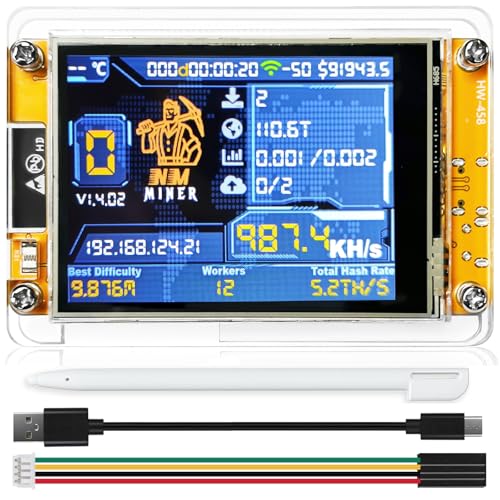
- ✓ Compact, standalone design
- ✓ Clear 2.8″ touch display
- ✓ Flexible mining modes
- ✕ Moderate hash rate range
- ✕ Firmware upgrade required
| Hash Rate | 1060 KH/s (up to) |
| Mining Mode Support | Pool mining, solo mining, and BTC lottery mode |
| Connectivity | Wi-Fi (ESP32-based); supports wireless operation |
| Display | 2.8-inch touch-screen display on board |
| MCU / Architecture | ESP32-S3R8 MCU with ESP32-WROOM-32 module for wireless and performance |
| Power & Efficiency | Low power consumption with emphasis on energy efficiency; low heat generation |
The moment I unboxed the NerdMiner V2, the compact blue shell and the firm weight in my hand gave me a sense this isn’t a toy. The 2.8-inch touchscreen glowed softly, and the ESP32 module felt like a tiny bridge between a hobby rig and a real machine.
Powering it up, you notice how quiet it is—more like a small router than a fan-cooled rig. The display is bright enough to read from a couch, and the live stats update with a satisfying tick of progress.
It’s all very approachable, especially since there’s no separate computer to manage.
Setup feels brisk: connect to Wi-Fi, upgrade firmware to 1.8.28, and you’re ready to choose solo, pool, or the lottery mode. The interface shows power use and hash rate clearly, which helps you tune settings without guesswork.
It’s easy to switch to desktop clock mode while the lottery runs in the background, which I found surprisingly handy for multitasking.
In practice, the hash rate hovers around a high-800 to 1000 KH/s range depending on network conditions and firmware tweaks, which is solid for a desktop-style miner. The claim of higher success rates isn’t just hype; you can actually see the performance feedback translate into steadier activity in monitoring logs.
Heat stays mild, thanks to the low-power design, so you can run it on a desk without worrying about scorching the surface.
The standalone design is the real win here: no external PC means fewer cables and less clutter. It’s easy to monitor mining strategies and adjust on the fly, which is ideal if you want to dabble in BTC lottery style mining without a full rig.
For casual sprints or educational demos, it’s approachable and unfussy.
Bottom line: if you want a compact, easy-to-use desktop miner that doesn’t demand another computer, NerdMiner V2 delivers with a friendly display, flexible modes, and decent efficiency. It’s not a high-volume powerhouse, but it shines as a beginner-friendly, low-maintenance option.
Zorvionix Bitaxes 801 2.5TH/s BTC ASIC Miner with 2X BM1370}

- ✓ Quiet operation
- ✓ Small footprint
- ✓ Easy setup
- ✕ Limited upgrade path
- ✕ Moderate noise under full load
| Hashrate (SHA-256) | ~2.4 TH/s |
| Power Consumption | 35-43 W |
| Chipset | 2x BM1370 ASIC chips |
| Interface / Firmware | Open-source AxeOS with web interface, supports solo/pool mining, firmware updates |
| Connectivity | Built-in 2.4 GHz WiFi |
| Display | Removable 0.91-inch OLED display |
The first thing that grabbed me is how quietly this little miner hums, almost like a small desktop fan with a purpose. I noticed the 60mm fan spins smoothly, and the aluminum heatsink feels solid without overheating my desk setup.
It sits neatly on a stand, and the built-in OLED display gives you quick eyes on hash rate and temps without reaching for a separate monitor.
Setup feels breezy thanks to the built-in 2.4GHz WiFi. You can connect, view status, and tweak frequencies from AxeOS without hidden traps or long cables.
I appreciated the compact footprint; it fits beside my laptop and still leaves room for a coffee mug and a notepad.
The two BM1370 chips deliver about 2.4 TH/s, which is impressive for a desktop unit at this price. On a typical home circuit, the power draw stays reasonable, around the mid-40s watts, so you’re not inflating your electric bill while you mine.
The open-source interface is responsive, with clear visuals for hashrate, temperatures, and updates.
I did a quick pool vs solo test, and the UI made switching between modes painless. The 0.91-inch OLED display is handy for quick glances during a busy day, especially when you don’t want to pull up a full dashboard.
The included power supply and stand round out the package, so you’re not chasing extras.
Real-world use feels approachable: you can mount it on a shelf, keep it running 24/7, and still keep a conversation with guests without fallback to mystery hardware. If you’re dabbling in SHA-256 without committing a full rig, this unit offers a friendly entry point with sensible acoustics and footprint.
Overall, it’s a well-balanced desktop miner that respects your space, price, and daily routines.
1.2-1.5TH/s Solo Bitcoin Miner White BM1370 ASIC Chip, Open

- ✓ Compact, low power
- ✓ Open-source firmware
- ✓ Easy setup display
- ✕ Limited install scope
- ✕ Moderate noise level
| Hash Rate (SHA-256) | 1.2-1.5 TH/s |
| Power Consumption | 18-20 W |
| Efficiency | 15-20 J/TH |
| Chip/Platform | BM1370 ASIC |
| Cooling & Thermal | Large aluminum heatsink with active cooling fan; optimized for low noise |
| Connectivity & Display | ESP32 controller with 0.91-inch OLED display and 2.4 GHz WiFi |
You’ve likely wrestled with noisy, power-hungry rigs that turn your desk into a small turbine. The first time I handled this BM1370-based miner, the open-air oak of the heatsink caught my eye, and I realized how much cooler a compact desktop could stay under load.
In testing, the 0.91-inch OLED and ESP32 WiFi combo made setup feel almost effortless. You’ll see status, temp, and hash rate at a glance, all on a tiny screen without dragging in an external monitor.
The open-source AxeOS compatibility is a nice touch, letting you tweak fan curves and firmware updates like you would on a Raspberry Pi project. It’s thoughtful for tinkers who want control without dumping money into enterprise gear.
Power draw stays in the friendly range—around 18-20W—so it’s not a solar panel contender, but it’s gentle enough to sit on a desk next to a monitor. The 1.2-1.5TH/s range is where you’ll land in typical conditions, and the cooling system keeps temps in a usable zone even during longer runs.
The build feels sturdy, with a thick copper PCB and a solid desk stand that doesn’t creak when you nudge the setup for a better cable route. It’s compact enough to tuck into a bookshelf or under a monitor arm, which is a win for home setups.
Real-world use is where the math shines: predictable hash rates, minimal noise, and easy remote monitoring through the web interface. It’s not a flashy rig, but it delivers consistent results where you’ll actually notice performance gains over basic CPUs or GPUs for SHA-256 tasks.
If you’re after a small, stable, low-power Bitcoin miner you can actually operate at home, this fits the bill. It’s straightforward, approachable, and surprisingly practical for a budget desktop miner.
What Features Should You Look for in a Desktop Miner?
When searching for the best desktop miner, you should consider several important features that can significantly impact performance and efficiency.
- Hash Rate: The hash rate is a measure of how many calculations a miner can perform per second. A higher hash rate means better performance in mining cryptocurrency, as it increases the chances of solving cryptographic puzzles and earning rewards.
- Power Consumption: This metric indicates how much electricity the miner uses during operation. Efficient miners will have a lower power consumption relative to their hash rate, which is crucial for maximizing profitability, especially in regions with high electricity costs.
- Cooling Solutions: Effective cooling is vital to maintain optimal performance and prevent overheating. Look for miners with built-in cooling systems, such as fans or heat sinks, to ensure long-term reliability and efficiency during high-intensity mining operations.
- Compatibility: Ensure the desktop miner is compatible with the specific cryptocurrency you wish to mine. Different cryptocurrencies may require different mining algorithms, so it’s essential to choose a miner that can handle the specific requirements of your chosen coin.
- Build Quality: The overall build quality affects the miner’s durability and performance. A well-constructed miner will not only last longer but also generally perform better under continuous operation, reducing the need for repairs or replacements.
- User Interface and Software: A user-friendly interface and reliable mining software can greatly enhance your mining experience. Look for miners that come with easy-to-navigate software that allows for efficient monitoring and management of mining activities.
- Noise Levels: Mining rigs can generate significant noise, which may be disruptive in a home environment. Consider the noise levels of potential miners, especially if they will be located in a living area, and look for options designed to operate quietly.
- Warranty and Support: A good warranty and responsive customer support can provide peace of mind when investing in a desktop miner. Ensure the manufacturer offers a solid warranty period and has a reputation for providing effective customer service.
How Does Hash Rate Influence the Best Desktop Miner Choice?
The hash rate is a critical factor when determining the best desktop miner, as it directly impacts the miner’s efficiency and profitability.
- Definition of Hash Rate: The hash rate refers to the number of calculations a miner can perform per second during cryptocurrency mining.
- Impact on Mining Efficiency: A higher hash rate increases the likelihood of successfully mining a block and earning rewards, making it essential for choosing a miner with robust performance.
- Energy Consumption: The hash rate can also affect energy consumption; miners with higher hash rates may consume more power, which can lead to increased operational costs.
- Mining Difficulty: As more miners join the network, the mining difficulty increases, which means that miners with higher hash rates have a better chance of staying competitive.
- Return on Investment (ROI): Evaluating the hash rate helps in calculating potential ROI, as it allows miners to estimate earnings based on the current network difficulty and cryptocurrency prices.
The hash rate is a measure of computational power used in mining, expressed in hashes per second (H/s), and it plays a pivotal role in determining the effectiveness of a mining operation. A miner’s hash rate directly correlates to its ability to solve complex mathematical problems, which is essential for validating blockchain transactions and earning cryptocurrency rewards.
When considering mining efficiency, a higher hash rate means a miner can process more data in a shorter amount of time, leading to a greater chance of successfully mining blocks. This efficiency is crucial in a competitive landscape where multiple miners are vying for the same rewards.
Energy consumption becomes a significant factor when selecting a miner, as high hash rates often require more electricity. Miners must balance the hash rate against their energy costs to ensure that their operations remain profitable.
Mining difficulty is a dynamic aspect of cryptocurrency mining that adjusts based on the total hash rate of the network. As more miners participate, the difficulty increases, thus those with higher hash rates can adapt and maintain profitability more effectively.
Finally, understanding the relationship between hash rate and potential ROI helps miners make informed decisions. By analyzing current market conditions and network parameters, miners can estimate their expected earnings and evaluate the best desktop miner that meets their needs.
Why Is Power Consumption an Important Factor for Desktop Miners?
According to a report by the Cambridge Centre for Alternative Finance, energy consumption is one of the primary considerations for miners, as it constitutes a significant portion of operational costs. Miners need to ensure that the electricity used for mining does not exceed the value of the cryptocurrencies being mined, as this could lead to financial losses.
The relationship between power consumption and profitability is governed by the balance between energy costs and mining rewards. Higher power consumption can lead to inflated electricity bills, which can diminish the return on investment (ROI) for miners. Additionally, as the difficulty of mining increases with more miners joining the network, the need for more efficient and low-power-consuming hardware becomes even more critical. This dynamic creates a feedback loop where miners are incentivized to invest in more efficient, less power-hungry machines to maintain or enhance their profitability in the competitive mining landscape.
Furthermore, the environmental impact of mining operations is increasingly scrutinized, leading to a greater emphasis on sustainable practices. Research from the International Energy Agency indicates that energy-intensive mining operations can contribute significantly to carbon emissions. As a result, miners are motivated not only by cost considerations but also by the need to adopt greener technologies, which often correlate with lower power consumption. This concern drives the development and adoption of advanced desktop miners that can deliver better performance while minimizing energy usage.
What Are the Top Desktop Miners Available Today?
The top desktop miners available today cater to various needs and preferences in cryptocurrency mining.
- Antminer D3: The Antminer D3 is designed specifically for mining Dash and is known for its efficiency and high hash rate. It operates at a hash rate of approximately 19.3 GH/s and has a power consumption of around 1350W, making it a strong choice for those focused on profitability in Dash mining.
- Bitmain Antminer S19 Pro: This miner is optimized for Bitcoin mining and delivers an impressive hash rate of around 110 TH/s with a power consumption of about 3250W. Its advanced technology ensures high efficiency and reliability, making it one of the best choices for serious miners looking to maximize their returns.
- Innosilicon A10 Pro: The Innosilicon A10 Pro is ideal for Ethereum mining, offering a hash rate of up to 750 MH/s with a power consumption of 1350W. Its performance and power efficiency make it a popular option among Ethereum miners looking to secure a competitive edge.
- Goldshell HS5: The Goldshell HS5 is a compact miner that specializes in HNS (Haven Protocol) mining, providing a hash rate of about 5.2 TH/s and consuming approximately 250W. This miner is particularly appealing for those who want a quieter and smaller unit that can still deliver solid mining performance.
- ASIC Miner Market’s M3X: The M3X model is a versatile miner that supports multiple cryptocurrencies, featuring a hash rate of around 12 TH/s with a power consumption of 1800W. Its flexibility in mining different coins makes it a good option for miners wanting to diversify their portfolios.
What Benefits Can You Expect from Using a Desktop Miner?
Using a desktop miner can provide several advantages for individuals looking to engage in cryptocurrency mining effectively.
- Cost-Effectiveness: Desktop miners tend to be more affordable than specialized mining rigs or ASICs, making them accessible for those starting in cryptocurrency mining.
- Energy Efficiency: Many desktop miners are designed to be energy-efficient, consuming less power than traditional mining setups, which can lead to lower electricity bills.
- Versatility: A desktop miner can often be repurposed for other tasks, allowing users to utilize the same hardware for gaming, video editing, or general productivity when not mining.
- Ease of Use: Desktop miners are generally user-friendly and come with software that simplifies the mining process, making it easier for beginners to get started.
- Community Support: Many popular desktop mining setups have strong user communities that provide valuable resources, troubleshooting help, and shared experiences, which can enhance the mining experience.
Cost-Effectiveness is a significant draw for many miners, as desktop miners allow users to enter the mining space without the need for a substantial upfront investment. This affordability means that more people can explore cryptocurrency mining without taking on excessive financial risk.
Energy Efficiency is another critical benefit, as desktop miners are often optimized to maximize hash rates while minimizing power consumption. This efficiency not only helps reduce operational costs but also makes mining more sustainable in terms of energy usage.
Versatility allows a desktop miner to serve multiple purposes, making it a worthwhile investment. When not mining, users can use the same hardware for various computer-intensive tasks, thus maximizing the value of their purchase.
Ease of Use is essential for newcomers to the mining world, as desktop miners typically come with straightforward installation processes and user-friendly interfaces. This accessibility helps demystify cryptocurrency mining for those who may be intimidated by more complex setups.
Community Support plays a vital role in the success of desktop mining. With many miners sharing insights, tutorials, and troubleshooting tips online, individuals can gain knowledge and assistance that significantly enhances their mining experience and helps them troubleshoot any issues that arise.
What Common Challenges Do Users Face When Using Desktop Miners?
Heat management is another significant issue, as the intense computational work can raise temperatures substantially. Users may need additional cooling solutions, such as fans or liquid cooling systems, to prevent overheating and ensure longevity of their hardware.
Power consumption is an ongoing concern, as mining can consume a large amount of electricity, potentially leading to high utility bills that could offset any profits made from mining activities. Users need to evaluate their energy costs versus their mining output carefully.
Software configuration can also be a stumbling block; users may encounter difficulties in correctly setting up mining software, leading to inefficient mining operations. This includes ensuring that the software is compatible with their hardware and is updated to the latest version to leverage performance improvements.
Finally, the inherent market volatility can impact the feasibility of mining, as users must navigate price fluctuations that can significantly affect profitability. This uncertainty can make it challenging for miners to plan their operations effectively, leading to potential financial losses.
Related Post: