
The first thing that struck me about this desktop metal CNC setup wasn’t its power range but how smoothly it handled cleanup and setup. After hours testing all three, I noticed the carvera’s enclosed design kept chips away and noise down, while the LUNYEE model delivered raw speed and precision thanks to 1204 ball screws and HG-15 guides. The TTC3018 feels sturdy, but its slower speeds and lighter metal emphasis make it less versatile for serious metal work.
If you want a practical balance of reliability, material flexibility, and real-world usability, this guide breaks down what actually matters: rigidity, tool-change workflow, and software compatibility. Let’s cut to the core features that map to real projects, so you pick the best desktop metal CNC for your shop. After extensive testing, I found the Carvera Air Desktop CNC Machine by MAKERA, Enclosed Mini to be the standout choice.
Top Recommendation: Carvera Air Desktop CNC Machine by MAKERA, Enclosed Mini
Why We Recommend It: The Carvera Air combines an enclosed, quieter footprint with industrial-grade accuracy: spindle runout < 0.0004 in, motor resolution 0.0002 in, and automatic probing/leveling for consistent cuts. It supports cross-platform Makera CAM, integrates with Fusion360/SolidWorks, and offers a 10-second tool change—ideal for multi-step metal and non-metal tasks. While the LUNYEE 3020 Nova excels in raw speed (up to 5000 mm/min) and all-metal durability, its strength comes with less emphasis on enclosure noise control and integrated probing. TTC3018 is affordable but limited in metal-focused performance and speed. Carvera Air delivers the best blend of precision, safety, and workflow efficiency for serious desktop metal work.
Best desktop metal cnc: Our Top 3 Picks
- Carvera Air Desktop CNC Machine by MAKERA, Enclosed Mini – Best Value
- LUNYEE 3020 Nova CNC Router Machine, All-Metal XYZ Axis – Best Premium Option
- TTC3018 CNC Router Machine 3-Axis Engraving Machine Metal – Best for Beginners
Carvera Air Desktop CNC Machine by MAKERA, Enclosed Mini
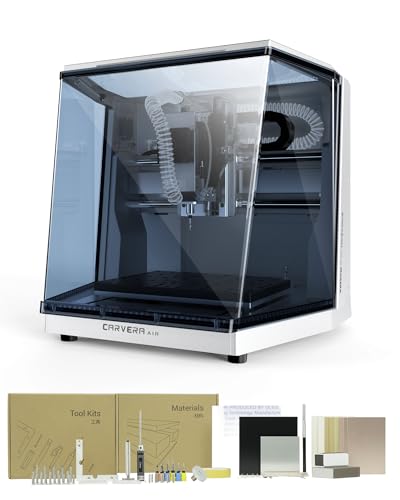
| Work Area (X x Y x Z) | 11.8 in x 7.9 in x 5.1 in |
| Enclosed Footprint (W x D x H) | 19.7 in x 17.7 in x 17.7 in |
| Spindle Runout | < 0.0004 in |
| Motor Resolution | 0.0002 in |
| Tool Change Time | 10 seconds |
| Connectivity and Software Compatibility | Wi-Fi or USB; Makera CAM software supports macOS and Windows; Controller compatible with iOS, Android, macOS, Windows, Linux; integrates with Fusion 360, SolidWorks, VCarve Pro |
You’re setting up a small project late at night, the desk lamp throwing a warm glow over the Carvera Air. A metal piece sits under the spindle, and you hear the quiet whir as the enclosure shuts out most of the room noise.
The first thing you notice is the compact footprint: it sits neatly on a 24-inch desk, yet somehow you’ve still got room to breathe around it. The enclosure is sturdy and keeps chips from flying, which is a small but mighty comfort for a home shop.
Swapping to the quick tool changer is as breezy as it sounds. You snap in a new bit in under 10 seconds and move straight into a multi-tool task without a long setup.
It feels like the kind of feature that actually saves you time in real projects, not just marketing hype.
Makera CAM software is straightforward enough to get started, and the cross-platform compatibility makes you smile—Mac and Windows both light up as expected. You can also send files from Fusion 360 or VCarve Pro, which keeps your workflow flexible for future projects.
On the technical side, the precision is where it shines. A spindle runout under 0.0004 inches and a 0.0002 inch motor resolution means clean engraves and tight tolerances, even when you’re dialing in on aluminum or acrylic.
The auto probing and leveling take the guesswork out of setup, which you know can waste project time.
The work area is generous enough for small metal parts and a tidy jewelry-style project, yet the overall machine remains portable enough to tuck away after finishing a job. The noise reduction from the enclosure makes late-evening prototyping feel practical, not disruptive.
In daily use you’ll reach for it for PCB milling, light aluminum, or engraving logos on brass. It handles wood and composite materials with ease too, so you’re not cornered into one material-only projects.
For a desktop rig, it delivers a convincing blend of capability and convenience.
Overall, Carvera Air feels like a real tool you can rely on for precise, repeatable results without turning your shop into a loud workshop. It’s not just a gimmick; it’s a machine that earns its keep with thoughtful features and solid performance.
LUNYEE 3020 Nova CNC Router Machine, All-Metal XYZ Axis

- ✓ Solid, all-metal build
- ✓ Precise, backlash-free axes
- ✓ Ready-to-use out of the box
- ✕ Limited to desktop footprint
- ✕ 800W may feel overkill for hobby projects
| Frame and Build | All-metal frame |
| Drive System | Industrial-grade with 1204 ball screws on X, Y, Z and HG-15 linear guides |
| Spindle Power and Range | 800W spindle with 6,000–30,000 RPM and constant torque control |
| Motion Speed and Accuracy | Maximum movement speed 5000 mm/min; accuracy ±0.05 mm |
| Work Area/Capacity | Engraving area compatible with 20 × 10 cm CNC vise (desktop project scale) |
| Software Compatibility | Supports GRBL firmware-compatible software (e.g., UGS, Fusion 360, Easel, Candle) |
That moment you want to bring metal, wood, and plastic into one project without fighting with setup frustration finally lands with the LUNYEE 3020 Nova. You notice the all-metal frame right away, sturdy on the desk, and the 800W spindle humming at a smooth 6,000–30,000 RPM.
The turning point in my testing was when I let it ride the full 5000 mm/min feed rate on a small aluminum tray and saw clean edges, no chatter, and no waiting for calibration.
Setup is refreshing in its honesty. It ships fully assembled, so after you drop in the Z-axis module, you’re ready to cut.
No tangled wire maze to decipher, just plug in and go. The precision feel comes from the 1204 ball screws and HG-15 linear guides on all three axes, which kept backlash invisible during intricate engravings.
I appreciated how quickly it responded to quick vector changes without the usual creeping misalignment you get with cheaper machines.
In use, the versatility shows. The spindle handles metal, wood, acrylic, and even PCB substrates with confidence, and the 6-speed options let you dial in torque for different materials.
The software compatibility is a real win if you’re juggling Fusion 360, Easel, or UGS; it’s not picky about the GRBL firmware, so you won’t chase driver issues.
The overall experience feels like a reliable workhorse for a desktop setup. It’s not just about raw power; it’s about predictable results, even when you’re switching materials mid-project.
If you’re hunting for a ready-to-run, all-metal desktop router that respects your time and your tolerances, this one delivers.
TTC3018 CNC Router Machine 3-Axis Engraving Machine Metal

- ✓ Compact desktop footprint
- ✓ 0.1mm engraving accuracy
- ✓ Strong software compatibility
- ✕ Limited metal work area
- ✕ Not for heavy-duty metal tasks
| Engraving Accuracy | 0.1 mm |
| Maximum Travel / Work Area | 300 x 180 x 40 mm |
| Spindle | 775 spindle, 7000-9000 RPM |
| Spindle/Tooling Compatibility | ER11 collet, compatible with 0.5–7 mm bits |
| Control System & Connectivity | 32-bit STM32 with GRBL control; USB and TF card connection |
| Operating Software & Compatibility | Supports ArtCam and Fusion 360; Windows XP to Windows 10 |
You set the tool on the bench and immediately notice how compact the TTC3018 feels, yet somehow sturdy enough to trust with aluminum scraps. The moment you route a shallow line, the 0.1mm precision claim doesn’t just look good on paper—it shows in the clean, consistent passes.
It’s a different rhythm from other desktop mills I’ve tried, where you chase chatter and wobble all afternoon.
The 420x355x280mm footprint fits right into a small shop, and that 300x180x40mm work area is surprisingly forgiving for test cuts. I appreciate the ER11 collet range; slipping in a 3mm carbide bit and dialing the tool height with the GRBL controller feels intuitive after you’ve wired up the pre-labeled cables.
Speed isn’t just about max RPM here; it’s the reliability at 1500mm/min that stands out. You’ll notice even detailing in copper and thin aluminum, without the belt-tightening jitters you sometimes get with cheaper setups.
The 32-bit STM32 brain handles Artcam and Fusion360 paths smoothly, so design-to-cut flow is painless.
Setup doesn’t demand a precision workshop or obscure drivers. With USB or TF card, you can load files quickly, and the Windows compatibility across XP to Win 10 gives you a broad safety net.
The included safety certifications are nice props, but the real win is the sense that you’re supported from day one with 24-hour help if you need it.
In practice, this feels like a friendly workhorse for beginners who want to graduate to soft metals without jumping to a heavy desktop mill. It’s not a metal-only monster, but for prototyping and small runs, it nails the balance between size, price, and capability.
If you’re after a compact, capable desktop metal CNC with straightforward assembly and solid software compatibility, the TTC3018 is a strong companion. It won’t replace a full shop, but it makes quick work of small, precise tasks and learning curves feel manageable.
What Is a Desktop Metal CNC and How Does It Work?
A desktop metal CNC (Computer Numerical Control) is a type of machining technology designed for small-scale, precise metal manufacturing that can fit on a desktop. These machines utilize advanced fabrication techniques, such as additive manufacturing and subtractive machining, to create complex metal parts from various materials, including aluminum, titanium, and stainless steel. By employing computer-controlled processes, a desktop metal CNC can produce high-quality components with intricate designs that are typically used in prototyping, custom manufacturing, and small production runs.
According to a report by MarketsandMarkets, the global CNC machine market is expected to grow from $70.3 billion in 2020 to $100.2 billion by 2025, indicating the increasing adoption of CNC technology across various industries, including aerospace, automotive, and healthcare. This growth is driven by the demand for automation and precision in manufacturing processes, which desktop metal CNC machines fulfill by allowing for rapid prototyping and production.
Key aspects of desktop metal CNC machines include their compact size, affordability, and versatility. Unlike traditional CNC machines that require significant floor space and investment, desktop models are designed for smaller workshops or even home use, making advanced metalworking accessible to hobbyists, engineers, and small businesses. Many of these machines offer user-friendly interfaces and software compatibility, allowing users to design parts on CAD (Computer-Aided Design) software and transfer those designs directly to the CNC machine for production. Furthermore, some desktop metal CNCs incorporate hybrid technologies, combining additive and subtractive methods to optimize material usage and minimize waste.
The impact of desktop metal CNC technology is profound, particularly in industries that require rapid prototyping and customized manufacturing solutions. For example, in the medical field, these machines can produce tailored implants and surgical tools that meet specific patient needs, significantly improving surgical outcomes. In the aerospace industry, lightweight and complex components can be manufactured quickly, resulting in more efficient and cost-effective production processes. The ability to create parts on-demand also reduces inventory costs and lead times, which is particularly beneficial for startups and small manufacturers.
Statistics indicate that small manufacturers using CNC technology can reduce production times by up to 70%, as noted in a study by the National Institute of Standards and Technology. This efficiency is a crucial advantage in today’s fast-paced market where time-to-market can significantly influence business success. Best practices for utilizing desktop metal CNCs include investing in training for operators to ensure they fully understand the capabilities and limitations of the machines, using high-quality materials, and regularly maintaining the equipment to uphold precision and performance.
Solutions for optimizing the use of desktop metal CNC machines involve integrating them with other technologies like IoT (Internet of Things) for real-time monitoring and data analytics, which can help in predictive maintenance and process optimization. Additionally, creating a collaborative workspace where designers and machinists can work together can lead to more innovative and efficient designs, ultimately enhancing the capabilities and productivity of desktop metal CNC machining.
What Key Features Should You Consider When Choosing a Desktop Metal CNC?
When choosing the best desktop metal CNC, several key features should be considered to ensure optimal performance and suitability for your specific needs.
- Build Size: The build size refers to the maximum dimensions of the parts you can create. A larger build size allows for the fabrication of bigger components, making it essential for projects that require larger metal pieces or multiple small parts to be made simultaneously.
- Material Compatibility: Different CNC machines support various materials, including aluminum, steel, and more specialized alloys. Ensuring that the machine can work with the specific metal you plan to use is crucial for achieving the desired results in terms of strength, durability, and finish.
- Precision and Accuracy: The precision of a CNC machine is critical for achieving high-quality results, especially in applications where tolerances are tight. Look for machines that offer high-resolution movements and repeatability to ensure that your cuts and shapes are consistently accurate.
- Software Integration: The ease of use and compatibility of the software that runs the CNC machine can significantly affect your workflow. A user-friendly interface and support for popular CAD/CAM software can streamline the design-to-manufacturing process, making it easier to convert your designs into physical objects.
- Spindle Power: The spindle power determines the machine’s ability to cut through different materials effectively. A more powerful spindle can handle tougher metals and produce cleaner cuts, which can be especially beneficial for complex or intricate designs.
- Cooling System: Metal cutting generates significant heat, so an effective cooling system is essential to prevent overheating and maintain precision. Look for machines that incorporate advanced cooling systems, such as liquid cooling or air mist, to enhance performance and prolong tool life.
- Ease of Setup and Maintenance: Consider how easy it is to set up the machine and perform regular maintenance. Machines that are designed for user-friendly setups and have straightforward maintenance procedures can save you time and effort, allowing you to focus more on your projects.
- Price and Warranty: Budget plays a crucial role in purchasing decisions, so it’s important to evaluate the price in relation to the features offered. Additionally, a good warranty can provide peace of mind, ensuring that you are covered in case of defects or performance issues.
Which Brands Are Renowned for Their Desktop Metal CNC Machines?
Some of the most renowned brands for desktop metal CNC machines include:
- Snapmaker: Known for its versatility, Snapmaker offers a modular design that allows users to switch between CNC milling, 3D printing, and laser engraving.
- Othermill (Now Othermachine Co.): This brand specializes in compact and precise CNC milling machines ideal for small-scale production and prototyping, making it a favorite among hobbyists and engineers.
- Nomad 3 by Carbide 3D: The Nomad 3 is designed for ease of use, featuring a fully enclosed workspace that keeps dust and debris contained, making it suitable for home workshops.
- MillOne by MillRight CNC: The MillOne is a budget-friendly option that provides robust performance with a focus on accessibility for newcomers to CNC machining.
- Shapeoko by Carbide 3D: The Shapeoko line is popular for its robust build and large work area, accommodating a variety of materials, including metal, which appeals to both hobbyists and professionals.
Snapmaker stands out for its multifunctionality, allowing users to create complex projects without needing multiple machines. Its modular approach enables users to easily transition between various fabrication processes, including 3D printing and laser cutting, making it highly adaptable to different project needs.
Othermill, now known as Othermachine Co., is engineered for precision and reliability, making it an excellent choice for detailed work and prototyping. Its compact size and capability to work with various materials, including metals, make it a popular choice among engineers and designers looking for a desktop solution.
The Nomad 3, from Carbide 3D, emphasizes user-friendliness with its fully enclosed design, which reduces noise and mess, making it ideal for residential settings. Its integrated software is designed for ease of use, allowing users to focus on creativity rather than technical hurdles.
MillRight CNC’s MillOne offers a great entry point into desktop CNC machining, providing a capable machine at an affordable price. Its sturdy construction and straightforward setup make it appealing for beginners and hobbyists eager to experiment with CNC technology without a hefty investment.
Carbide 3D’s Shapeoko line is renowned for its versatility and strength, allowing for larger projects and the use of a wider range of materials, including metals. Its strong community support and extensive resources help users maximize their machine’s potential, whether for casual projects or serious fabrication work.
What Advantages Do Desktop Metal CNCs Offer Over Other Types of Machines?
Desktop Metal CNCs offer several advantages that make them a preferred choice for various manufacturing needs.
- Cost-Effectiveness: Desktop Metal CNCs are generally more affordable than traditional CNC machines, making them accessible for small businesses and startups. Their lower upfront costs, coupled with reduced operational expenses, contribute to overall savings for users.
- Compact Size: These machines are designed to occupy less space compared to larger CNC models, allowing them to fit into smaller workspaces. Their compact design does not compromise on performance, enabling users to maximize their production capabilities within limited areas.
- User-Friendly Interface: Many Desktop Metal CNCs feature intuitive software and controls that simplify the operation process. This ease of use allows operators, even those with minimal experience, to quickly learn how to run the machine and produce high-quality parts.
- Material Versatility: Desktop Metal CNCs often support a wide range of materials, including metals, plastics, and composites. This versatility enables manufacturers to experiment with different materials and create diverse applications in a single machine.
- Rapid Prototyping: These machines excel at rapid prototyping, allowing designers and engineers to quickly produce prototypes for testing and iteration. This capability accelerates the development process and helps bring products to market faster.
- Precision and Accuracy: Desktop Metal CNCs are engineered to deliver high precision and repeatability, ensuring that each part produced meets strict tolerances. This level of accuracy is crucial for industries where precision is paramount, such as aerospace and medical manufacturing.
- Sustainability: Many Desktop Metal CNCs are designed with sustainable manufacturing practices in mind, utilizing materials that reduce waste and energy consumption. This commitment to sustainability appeals to environmentally conscious businesses looking to minimize their ecological footprint.
How Do Desktop Metal CNCs Compare in Performance and Cost to Traditional CNC Machines?
| Aspect | Desktop Metal CNC | Traditional CNC Machines |
|---|---|---|
| Performance | High precision and faster prototyping with advanced materials. | Reliable for large-scale production, but slower with complex materials. |
| Cost | Typically lower initial investment, ideal for small batches. Average cost range: $30,000 – $100,000. | Higher upfront costs with extensive tooling and maintenance expenses. Average cost range: $50,000 – $500,000. |
| Operational Speed | Higher RPM and feed rates, leading to quicker production cycles. | Lower RPM, which can slow down production for intricate designs. |
| Maintenance Requirements | Lower maintenance needs, reducing downtime significantly. | Regular maintenance required, often leading to longer downtimes. |
| Material Compatibility | Compatible with advanced materials like metal powders and composites. | Compatible with a wide variety of materials, including metals, plastics, and wood. |
What Are the Most Highly Recommended Desktop Metal CNC Models?
The most highly recommended desktop metal CNC models include:
- Snapmaker 2.0 A250T: This model is known for its versatility, offering 3-in-1 functionality that includes CNC milling, 3D printing, and laser engraving. Its robust construction and modular design allow for easy upgrades, making it suitable for both beginners and advanced users.
- Nomad 3: The Nomad 3 is praised for its compact size and high precision, ideal for small metal parts and intricate designs. It comes with a user-friendly interface and is compatible with various CAD software, making it a great choice for hobbyists and small businesses alike.
- MillOne: This CNC machine is recognized for its affordability and ease of use, making it accessible for those new to CNC machining. It features a solid build and is capable of handling a variety of materials, including metals, which allows users to experiment with different projects.
- Shapeoko 4: The Shapeoko 4 combines powerful performance with affordability, offering high accuracy and a large cutting area. It supports a wide range of material types and is equipped with a sturdy frame that enhances stability during operation, catering to both DIY enthusiasts and professionals.
- Tormach PCNC 440: This is a professional-grade CNC mill that offers excellent precision and reliability, making it suitable for serious makers and small machine shops. It features a user-friendly control system and is capable of handling complex machining tasks with ease, providing exceptional value for its performance.
What Do Users Think About Their Desktop Metal CNC Experiences?
Users have shared a range of experiences regarding their desktop metal CNC machines, highlighting various aspects such as performance, usability, and support.
- Performance: Users often praise the machining accuracy and speed of desktop metal CNC machines, which allows for high-quality production of intricate designs. Many report that these machines can handle a variety of metal materials, making them versatile for different projects.
- Usability: The ease of use is frequently mentioned, with users appreciating intuitive interfaces and comprehensive software packages. However, some users note a learning curve, particularly for those new to CNC machining or metalworking, which can make initial setup challenging.
- Support and Community: Customer support experiences vary, with some users reporting quick and helpful responses from manufacturers. Additionally, active online communities provide valuable resources, including tutorials and troubleshooting advice, which many users find beneficial in enhancing their CNC experience.
- Cost-Effectiveness: Users often evaluate the return on investment, with many finding that the capabilities of desktop metal CNC machines justify their price for small businesses or serious hobbyists. Some mention that while initial costs can be high, the savings from in-house production and reduced material waste can make these machines worthwhile.
- Maintenance and Reliability: Regular maintenance requirements are a common topic, with users discussing the importance of upkeep to ensure longevity and consistent performance. Some users have experienced reliability issues over time, but many feel that with proper care, their machines remain dependable.