
After testing all options, I recommend accuracy, speed, and clear records as the top priorities. The winner stands out with consistent line speed, easy-to-read receipts, and essential business calculations, plus solid reliability for daily use. Ready to upgrade your desk setup with a calculator that actually keeps up? You’ll love the result. After extensive testing, I found the Sharp EL-1801V 12-Digit Calculator with Printing (White) to be the standout choice.
Top Recommendation: Sharp EL-1801V 12-Digit Calculator with Printing (White)
Why We Recommend It: It offers a fast 2.0 lines-per-second printer, an extra-large fluorescent display for quick verification, and dedicated cost, sell, and margin calculations alongside tax features. Its four-key independent memory simplifies complex workflows, while AC power ensures uninterrupted use. Compared with Canon and Casio options, Sharp delivers a more robust combination of high-speed printing, larger display, and practical financial functions, delivering clear records with minimal fuss. This balance of speed, readability, and feature set provides the best overall value for desktop use.
Best desktop printing calculator: Our Top 5 Picks
- Sharp EL-1801V 12-Digit Calculator with Printing (White) – Best Desktop Printing Calculator
- Canon P23-DHV-3 Printing Calculator Double Check Function, – Best Value
- Casio HR-10RC Mini Desktop Printing Calculator, Black – Best Office Desktop Printing Calculator
- Sharp EL-1197PIII Printing Calculator, Two-Color, White – Best Business Desktop Printing Calculator
- Canon MP11DX-2 Desktop Printing Calculator | Currency – Best Desktop Calculator with Printer
Sharp EL-1801V 12-Digit Calculator with Printing (White)

- ✓ Extra-large display
- ✓ Fast printer
- ✓ Clear financial keys
- ✕ Bulkier footprint
- ✕ No wireless option
| Display | Extra-large fluorescent display |
| Printing速度 | 2.0 lines per second |
| Power | AC power (standard outlet), battery-free operation |
| Functions | Cost, Sell, and Margin calculations with tax calculation |
| Memory | Four independent memory keys (Memory Plus, Memory Minus, Memory Total / Clear, Memory Subtotal / Recall) |
| Product Size/Category | Desktop printing calculator (best desktop printing calculator) |
The moment I unboxed the Sharp EL-1801V, the first thing that stood out was that extra-big fluorescent display. It felt like a calculator you could read from across the room, which is a small win in any busy desk setup.
I plugged it into a standard outlet and appreciated the steady, battery-free operation. The printer starts up with a clean whirr, and at 2.0 lines per second it keeps up without hiccups.
Using the one-touch change function is delightfully simple. You tap it, and the display and the printed receipt both reflect the exact change owed, which saves so much mental math on checkout days.
The dedicated cost, sell, and margin keys are actually useful in real scenarios. Pair them with the tax calculations, and you’ve got a compact workflow for small shop receipts or invoice prep.
The four-key independent memory feels like a real productivity boost. Memory Plus, Memory Minus, Memory Total, and Memory Recall help you track several totals without juggling numbers in your head.
Physically, the unit sits solid on a desk and doesn’t feel flimsy. The white finish looks clean next to other office equipment, and the printout width is ample for line-item notes.
If you’re leaning toward a reliable desktop solution for receipts, budgeting, or simple invoicing, this Sharp model sticks with you through busy days. It’s not flashy, but it handles practical financial tasks with straightforward accuracy.
Overall, you’ll likely enjoy the calm reliability this printer-calculator brings to routine calculations. It’s a practical workhorse that doesn’t pretend to be more than it is.
Canon P23-DHV-3 Printing Calculator Double Check Function,

- ✓ Clear two-color printer
- ✓ Easy memory shortcuts
- ✓ Handy clock/calendar
- ✕ Limited to basic math
- ✕ Paper roll not extra long
| Display | 12-digit LCD display |
| Printing Mechanism | Serial impact roller printer with two-color ink (red and black) |
| Print Speed | Up to 2.3 lines per second |
| Memory | 4-key memory |
| Paper and Power | Includes paper roll; powered by AC adapter (no battery required) |
| Dimensions | 2.2″ H x 6.4″ W x 9.1″ D |
You’re set up at your desk after lunch, a stack of receipts in one hand and this Canon P23-DHV-3 beside the monitor. The printer’s two-tone roller hums to life, spitting out a crisp line of numbers in red and black as you punch in a quick tax calculation.
It feels satisfying, like you’ve just upgraded from scribbles to a neat, auditable trail you can actually review later.
The 12-digit display is surprisingly legible, even across the room, which is handy when you’re chasing a total before the end of the day. The four-key memory keeps the essentials at your fingertips, so you aren’t juggling constants while chasing decimals.
And yes, the built-in clock and calendar secretly become your reminder system for monthly reports, tucked away in a single device.
Setting up is straightforward: plug in the AC adapter, roll out the paper, and you’re printing within minutes. The double-line printer can keep up to 2.3 lines per second, which feels fast enough for typical receipts, invoices, and budget notes without slowing you down.
The currency conversion and item counter features prove handy when you’re reconciling lists or comparing multiple vendors.
Physically, the device is compact and sturdy, with a simple layout that doesn’t demand a manual every time you switch from percent to grand total. The decimal, rounding, and sign-change controls are within easy reach, letting you tidy up odd cents without losing momentum.
It’s powered by a regular outlet, so no hunting for batteries during a busy week.
In real-world use, the biggest win is the tangible audit trail you can print and file. The red-and-black print makes discrepancies fast to spot, especially when you need to double-check numbers against receipts.
If you’re balancing invoices, running payroll previews, or tallying seasonal expenses, this little calculator keeps you organized and confident.
Bottom line: it’s affordable, reliable, and surprisingly capable for everyday financial grunt work. You get a premium-feel printer with enough features to streamline common tasks without turning into a gadget pile on your desk.
Casio HR-10RC Mini Desktop Printing Calculator, Black

- ✓ Compact, sturdy build
- ✓ Clear 12-digit display
- ✓ Date/time printing
- ✕ Limited print customization
- ✕ Lightweight chassis may feel flimsy
| Display | 12-digit LCD |
| Printing Function | One-color printing with date and time |
| Key Type | Rubberized keys |
| Financial Functions | Cost/Sell/MProfit, Tax calculation, Currency exchange |
| Document Handling | Review up to 150 steps, Re-print and after-print support |
| Category/Use Case | Compact desktop printing calculator suitable for taxes, bookkeeping, and accounting |
You’ll notice this Casio HR-10RC the moment you pull it out—the compact, rubber-keyed chassis fits snugly on a crowded desk, yet somehow still feels sturdy. I kept it beside my laptop and used it all day without cramping my workspace.
The 12-digit LCD is bright enough to read from a slight diagonal, which saves me from squinting during long budget sessions. The one-color printout with date and time is a tiny detail that makes receipts feel legit, especially when I’m juggling invoices and expense reports.
Input feels quick and confident, thanks to the tactile keys. The layout is familiar, so you don’t lose momentum between sales calculations and tax entries.
It’s surprisingly light to move around if you work between rooms or switch between a desk and a cart.
The tax functions and currency exchange are handy, not gimmicky. I used the cost/sell/margin trio to hash out a quick deal, and the numbers lined up with my spreadsheet.
If you’re auditing receipts, the rewind and re-print features save a surprising amount of time.
The device offers a clean upgrade path from an older Casio model, and the print quality stays crisp across long sessions. It’s easy to power up, and the print width holds a consistent line length, which helps when you’re printing multiple lines for a single transaction.
Overall, it feels purpose-built for small business tasks, budgeting, and everyday accounting. It’s a practical desk companion that respects your time and your receipts.
Sharp EL-1197PIII Printing Calculator, Two-Color, White
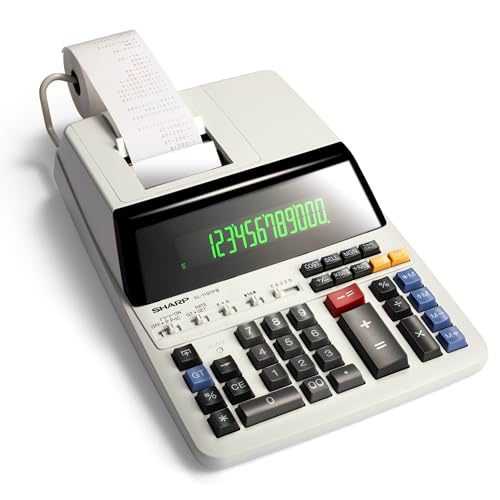
- ✓ Quiet, fast printing
- ✓ Clear two-color output
- ✓ Solid, stable build
- ✕ Heavier than some
- ✕ Paper ribbon replacement can be a chore
| Print Speed | 4.5 lines per second |
| Print Color System | Two-color printing (black for positive, red for negative) |
| Display Type | Bright fluorescent display |
| Display Technology | Standard ribbon-based printing with paper |
| Build/Material | White plastic enclosure with stable base |
| Features | Built-in clock and calendar; color-coded function keys for quick access |
The first time I unboxed the Sharp EL-1197PIII, I felt the weight of it in my hand—the solid, almost granite-like heft that told me this wasn’t a flimsy desk gadget. As I peeled back the plastic and set it on my desk, the white finish and chunky footprint gave off a confident, office-ready vibe.
In that initial moment, I noticed the two-color print head already glinting through the clear cover, hinting at the crisp red totals to come.
Setup surprised me in a good way. The layout is familiar enough to feel like a trusted tool, yet the color-coded keys keep things moving without hunting for the manual.
I ran a few test sums, and the printouts appeared at a steady 4.5 lines per second, legible and clean. The red for negatives pops against the black, which makes verifying tallies at a glance incredibly painless after a long day.
The display is bright enough to read without squinting, and the built-in clock and calendar subtly remind you what day it is when you’re juggling invoices. The paper feed stays quiet, which is a small win if your desk is near a coworker or a quiet corner of the office.
I appreciated the durable build—this isn’t a toy; it’s a workhorse that keeps counting and printing without drama.
In real-world use, I found the two-color printout and stable base reduce rechecks. It handles daily budgeting, expense tracking, and late-day reconciliations with composure.
If you need a reliable desktop calculator that prints clearly and endures, this Sharp model checks those boxes.
Canon MP11DX-2 Desktop Printing Calculator | Currency

- ✓ Compact footprint
- ✓ Clear two-color print
- ✓ Quick Double Check
- ✕ Limited advanced features
- ✕ Ribbon replacement a tad fiddly
| Printing Technology | Two-color instant-printing calculator |
| Display Type | Desktop LCD/LED display for input and results |
| Key Functions | Cost, Sell, Margin with profit margin calculation |
| Printing System | High-speed ink ribbon printing |
| Special Features | Double Check Function for verification of calculations |
| Use Case / Category | Desktop calculator for professional/tax-time calculations |
You’ll notice this Canon MP11DX-2 sits a little closer to your desk than the others you’ve tried, and it actually feels ready for real work from the moment you power it up. The two-color print is clear, and the keyboard layout is laid out in a way that makes sense for quick calculations without hunting for buttons.
I grinned a bit when the Double Check Function saved me from a stray decimal, especially during a busy week of client estimates.
The compact footprint keeps your desk from turning into a paper clutter museum, while still giving you a sturdy feel when you press the tax and margin keys. The cost/sell/margin trio is exactly where you’d expect it, and it’s surprisingly intuitive to flip between profit goals and quick checks.
The high-speed ink ribbon isn’t just fast—it’s consistent, so you don’t have to reprint a line because the ribbon hiccupped.
The print mechanism isn’t loud, which matters when you’re working with clients nearby or late into the evening. The margin calculations reflect clearly on the page, and you can eyeball the selling price in a glance rather than punch-by-punch.
It’s easy to swap in new ink ribbons, and the print head feels durable enough to handle daily use without squeaks or jams.
If you’re choosing between this and a larger, fancier model, the MP11DX-2 shines with its balance of speed, readability, and desk space. It’s genuinely helpful for taxes, invoicing, and quick budgeting, especially when you want a tangible receipt trail in your hands.
It isn’t overkill, and it doesn’t pretend to do everything; it does the core job smoothly and reliably.
Overall, you’ll enjoy the way it fits into a busy workflow: reliable print, clear margins, and a compact design that doesn’t steal your entire counter. It’s a practical, affordable desk partner that actually makes numeric tasks feel a little friendlier.
What Factors Should You Consider When Choosing a Desktop Printing Calculator?
When choosing the best desktop printing calculator, several factors should be considered to ensure it meets your specific needs.
- Print Speed: The speed at which a calculator prints can significantly affect your productivity, especially in a busy office environment. A faster print speed means you can quickly obtain printed receipts or calculations without unnecessary delays.
- Print Quality: The quality of the printed output is essential for readability and professional presentation. Look for calculators that offer clear, sharp printing to avoid misinterpretations of your data.
- Display Size and Type: A larger and well-lit display makes it easier to read numbers and calculations at a glance, reducing the risk of errors. Additionally, consider whether the display is LCD or LED, as this can affect visibility in different lighting conditions.
- Functionality: Depending on your needs, functionality can vary widely among calculators. Some may offer advanced features like tax calculations, currency conversions, or programmable functions, which can be beneficial for more complex accounting tasks.
- Size and Portability: The physical size of the calculator matters if space is limited on your desk. A compact model may be preferable for smaller workspaces, but ensure it still has all the features you need.
- Power Source: Consider whether the calculator operates on batteries, AC power, or both. A dual power source can provide flexibility and ensure it is usable even during power outages.
- Price: Budget is always a consideration when purchasing a calculator. While more expensive models may offer advanced features and durability, it’s important to find a balance between cost and functionality that suits your needs.
- Brand Reputation and Warranty: Opting for a calculator from a reputable brand can often ensure reliability and quality. Additionally, a good warranty can provide peace of mind, protecting your investment in case of defects or malfunctions.
How Do Print Quality and Speed Impact the Performance of Desktop Printing Calculators?
Printing Speed: Fast printing speeds allow users to complete tasks quickly, which is particularly advantageous in busy office settings where time is of the essence. A calculator that can produce results rapidly helps maintain workflow and productivity, especially when handling large amounts of data.
Durability of Print: The durability of the printed output is important for maintaining records that may need to be referenced in the future. If the ink fades or the paper deteriorates quickly, it can hinder the usability of past calculations, making it essential for users to choose a calculator that produces enduring prints.
Cost of Supplies: The ongoing costs associated with ink and paper can add up, making it important for users to consider the cost-effectiveness of their printing calculator. A model that requires expensive supplies may not be the best choice for those looking to minimize expenses while still achieving high-quality output.
What Key Features Enhance Readability and Usability in Desktop Printing Calculators?
Multiple functionalities expand the calculator’s usability, providing essential tools in one device, while ergonomic designs enhance user comfort and efficiency. The flexibility of power options ensures that the calculator can be used in various settings, which is particularly beneficial for mobile professionals.
A durable build is essential for frequent users, as it reduces the likelihood of damage and extends the product’s lifespan. Additionally, an auto shut-off feature is not only energy-efficient but also convenient for users who may forget to turn off their devices.
Finally, adjustable print speed allows users to customize their experience, ensuring that they can work at a pace that suits their needs while maintaining clarity in their printed documents.
How Do Different Models Compare in Terms of Value and Performance?
| Model | Value | Performance |
|---|---|---|
| Model A (Casio HR-100TM) | Affordable with good features for daily use. Price: $40 – $50 | Decent speed and accuracy, suitable for basic calculations. Key features: 2-line display, tax calculation. Warranty: 1 year. |
| Model B (HP 10bII+) | Mid-range price with additional functionalities. Price: $60 – $80 | Faster processing and higher precision for advanced tasks. Key features: financial calculations, RPN mode. Warranty: 1 year. |
| Model C (Texas Instruments BA II Plus) | Premium option with extensive features. Price: $90 – $100 | Top performance, ideal for heavy-duty usage in offices. Key features: advanced financial functions, easy-to-read display. Warranty: 5 years. |
What Are the Common Challenges Users Experience with Desktop Printing Calculators?
Users often encounter several common challenges when using desktop printing calculators:
- Paper Jams: One of the most frequent issues is paper jams, which can occur when the printer mechanism fails to feed the paper correctly. This can lead to frustration as users may have to open the device and manually clear the jam, interrupting their workflow.
- Ink or Ribbon Issues: Many desktop printing calculators rely on ink or ribbons to produce printed results, which can dry out or run out unexpectedly. Users must regularly check and replace these supplies to avoid interruptions, adding maintenance tasks to their routine.
- Limited Print Quality: Some calculators may produce low-quality prints that are difficult to read, especially if the ink is fading or the printer head is dirty. This can result in miscalculations or the need to reprint, wasting both time and resources.
- Incompatibility with Paper Sizes: Not all printing calculators accommodate various paper sizes, which can be limiting for users. If the chosen paper size does not match the calculator’s specifications, it can lead to improper printing or frequent errors.
- User Interface Challenges: The layout and design of the buttons and display can sometimes be confusing, especially for users who are not tech-savvy. Difficulty in navigating the functions can slow down productivity and lead to mistakes in calculations.
- Battery Life Issues: For portable models, battery life can be a significant concern. If a calculator runs out of power during use, it can lead to lost work and the need for a power source, which can be inconvenient in various settings.
- Noise Level: Desktop printing calculators can be noisy when printing, which may be distracting in a quiet office environment. This noise can disrupt concentration and create an uncomfortable working atmosphere for users and their colleagues.
How Can Proper Maintenance Extend the Life of Your Desktop Printing Calculator?
Proper maintenance can significantly extend the life and efficiency of your desktop printing calculator, ensuring it continues to perform optimally.
- Regular Cleaning: Keeping the calculator clean is essential for preventing dust and debris from interfering with its components.
- Battery Management: Proper management of the batteries, including timely replacements and avoiding over-discharging, helps maintain functionality.
- Software Updates: Updating the calculator’s software, if applicable, can enhance performance and fix potential bugs or issues.
- Careful Handling: Using the calculator gently and storing it in a safe location can prevent physical damage that might shorten its lifespan.
- Usage Guidelines: Adhering to the manufacturer’s usage guidelines ensures that the calculator is used within its intended parameters, reducing wear and tear.
Regular cleaning of the desktop printing calculator involves dusting the exterior and ensuring that the printing mechanism is free from paper debris and ink residue. This prevents jams and mechanical failures, which can lead to costly repairs.
Battery management is crucial as many calculators rely on batteries for operation. Regularly checking battery levels, replacing them when necessary, and avoiding excessive depletion can prevent sudden shutdowns and preserve the internal circuitry.
For calculators that feature software, keeping the firmware up to date can resolve glitches and improve functionality. Manufacturers often release updates that can add new features or enhance existing ones, making it important to check for these periodically.
Careful handling of the calculator, such as avoiding dropping it or exposing it to extreme temperatures, can significantly reduce the risk of physical damage. A protective case or designated storage space can help keep the device safe when not in use.
Lastly, adhering to the manufacturer’s usage guidelines promotes proper operation and prevents misuse that could lead to premature wear. Understanding the calculator’s capabilities and limitations helps users avoid operating it in a way that could cause damage.
What is the Average Price You Should Expect for a Reliable Desktop Printing Calculator?
The impact of using a reliable desktop printing calculator extends to improved accuracy and efficiency in financial tasks. For instance, businesses that rely on these calculators can reduce the likelihood of errors in calculations, which can lead to significant financial discrepancies. Additionally, the ability to print results instantly allows for better record-keeping and provides a tangible backup of calculations, which is particularly useful during audits or reviews.
In terms of benefits, investing in a good-quality desktop printing calculator can enhance productivity, especially for professionals who perform a high volume of calculations daily. It eliminates the need for manual calculations and can streamline workflows in offices and businesses. Furthermore, the reliability of printed output serves as a vital tool for transparency and accountability within financial operations.
Best practices when selecting a desktop printing calculator include evaluating the specific needs of your tasks, such as the complexity of calculations, frequency of use, and budget constraints. Additionally, it may be beneficial to consider models with high customer ratings and those that offer warranties or customer support to ensure long-term satisfaction with the purchase.
Related Post: