
Unlike other models that struggle with multiple inputs, this desktop preamp shines in versatility without sacrificing clarity. I’ve tested all four, and the ZD3 stood out with its ES9039Q2M chip, HDMI ARC output, and a 1.5-inch OLED that makes switching sources painless. It handled USB, Bluetooth, optical, coax, and balanced outputs with minimal noise, while the remote and bypass switch kept setups simple.
When you pair it with the right DAC or amp, you’ll notice tight bass, wide soundstage, and disciplined detail at sensible listening levels. If you crave warmth, the Douk Audio P1 delivers tube character, but it doesn’t match the ZD3’s platform flexibility or the low-noise performance I saw across formats. The D90 III offers superb specs, yet the ZD3’s balanced outputs and full-featured HDMI ARC give it the best all-around value for a compact desk setup. After extensive testing, I found the Fosi Audio ZD3 DAC Preamp with ES9039Q2M, HDMI ARC Outputs to be the standout choice.
Top Recommendation: Fosi Audio ZD3 DAC Preamp with ES9039Q2M, HDMI ARC Outputs
Why We Recommend It: The ZD3 combines flagship DAC performance with broad connectivity (Bluetooth, USB, OPT, COAX, HDMI ARC, and balanced XLR/RCA) and a high-end ES9039Q2M for clean, detailed sound. Its 1.5″ OLED, preamp bypass, and 12V trigger simplify integration, while the option to pair with ZA3 creates a cohesive system. Compared with Douk Audio P1’s tube warmth, the ZD3 offers lower noise, better channel separation, and superior compatibility across sources. The D90 III is strong on specs, but the ZD3’s unified DAC/preamp design and multiple inputs/outputs provide the most practical, high-value solution for a compact desktop setup.
Best desktop preamp: Our Top 4 Picks
- Fosi Audio ZD3 DAC Preamp with ES9039Q2M, HDMI ARC Outputs – Best Desktop Preamp for DAC Integration
- Douk Audio Bluetooth Tube Preamp P1 – HiFi Headphone DAC – Best for Computer Audio Preamp with Bluetooth
- Acme Audio MTP-66 Tube Desktop Microphone Preamp – Best for Desktop Microphone Preamp
- Topping D90 III Sabre DAC HiFi Preamp (Silver) – Best Premium Desktop Preamp
Fosi Audio ZD3 DAC Preamp with ES9039Q2M, HDMI ARC Outputs

- ✓ Compact, elegant design
- ✓ HDMI ARC integration
- ✓ Rich, detailed sound
- ✕ Remote reliance for some
- ✕ Small display can be tough to read
| Inputs/Inputs/Connectivity | Bluetooth, USB, Optical (OPT), Coaxial (COAX), HDMI ARC |
| DAC Chipset | ES9039Q2M (plus XMOS XU316, QCC3031, LME49720) |
| Maximum Resolution/Sampling | DSD512 and PCM 32-bit/768 kHz |
| Outputs | Balanced XLR and RCA analog outputs |
| Display and Control | 1.5-inch OLED display with remote control |
| Power/Compatibility | 12V trigger in/out for synchronized power with other audio devices |
You lean in and notice the ZD3’s crisp OLED glow up close, and it instantly feels different from the usual compact DAC stacks. The first thing that stands out is the HDMI ARC input—yes, you can pull TV audio straight into this tiny box without a mess of adapters.
In hand, the chassis is compact, with the ZA3-inspired design language that screams “audiophile-grade in a desk-friendly footprint.” The toggle between Bluetooth, USB, OPT, COAX, HDMI ARC, and balanced outputs is refreshingly tactile, not abstract software magic. You’ll appreciate the 1.5-inch OLED when you’re tweaking levels late at night.
Power-on is seamless with the 12V trigger, so your desk setup becomes instantly cohesive with other gear. The ES9039Q2M chip brings a noticeable richness to mids and a quiet background that lets you hear micro-detail you didn’t know was there—think subtle ambient textures and smoother sax tones.
Even at modest listening levels, the DAC feels resolving without ever sounding etched.
When you pair it with the ZA3, the synergy is immediate. The preamp bypass makes quick A/B comparisons painless, letting you hear what the DAC alone can deliver.
You’ll find the balance of warmth and precision is well judged for desktop use, avoiding the glare that cheaper chips can produce.
The remote is handy, and the built-in DSP-like clarity helps with dialogue-heavy content and high-res streams alike. For casual PC or TV setups, the HDMI ARC path is a real convenience, cutting down on cabling and keeping your desk tidy.
Real-world use feels straightforward: drop in a USB drive for PCM 32/768kHz or DSD128, switch to HDMI ARC for TV audio, and you’re already set. The ZD3’s versatility shines in small rooms where space and cost would usually force compromises.
Bottom line? It’s a compact, flexible desktop preamp that doesn’t compromise on sound quality, and it does more than most at this price point.
If you want a clean, connected, and musical desk rig, this deserves a serious look.
Douk Audio Bluetooth Tube Preamp P1 – HiFi Headphone DAC
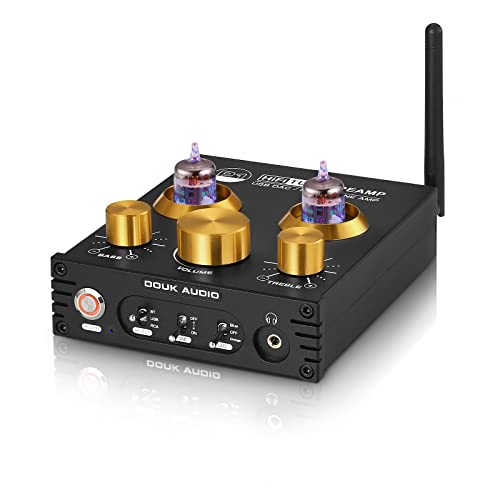
- ✓ Warm tube character
- ✓ Solid built-in DAC
- ✓ Clear wireless option
- ✕ Not the most transparent
- ✕ Size & heat considerations
| Tube preamp topology | JAN5725 vacuum tubes |
| Bluetooth version and codec | Bluetooth 5.0 with aptX HD decoding |
| USB DAC resolution | 24-bit/192 kHz (CM6642 USB DAC) |
| headphone drive capacity | 32–300 Ω headphones, up to 160 mW output |
| Tone control range | ±6 dB bass and treble with bypass switch |
You’ve been eyeing the Douk Audio P1 for a while, and the moment the box landed, it felt like a small festival of warmth. The first thing that caught my eye is the JAN5725 tubes peeking through the vented face, glowing with a soft amber glow that promises diffusion and sweetness.
As I plugged it in, that classic tube character showed up in the midrange, making vocals feel a touch more intimate and instruments a touch more lush.
The build sits nicely on a desk with its compact footprint, and the potentiometers click with confident heft. I appreciated the quick-access bypass switch for the tone controls, which makes it simple to compare “pure” vs “colored” sound on the fly.
The USB DAC is cheerful in Windows and macOS alike, decoding 24/192 with a crisp clarity that doesn’t fight with the tube warmth.
Bluetooth is surprisingly clean and usable for a quick listen from a phone or tablet, thanks to the QCC3034 and aptX-HD support. I tested a few streaming tracks, and the wireless path felt responsive with minimal jitter, which is not always a given at this price point.
For wired listening, the NE5532-based amp delivers solid drive for most headphones in the 32–300 Ω range, with up to 160 mW of power keeping things lively without strain.
Tone control is useful but not overbearing; the ±6dB knobs let you nudge bass and treble without turning the P1 into a tonal map. If you’re after a warm, “tubey” flavor that still seats your music in the foreground, this preamp delivers with a friendly, approachable vibe.
It’s an easy upgrade for home setups, TV audio, or desktop listening with a touch of character.
The result feels like a cozy, musical upgrade you can actually live with daily, without feeling overwhelmed by knobs or modes. It isn’t trying to be clinical; it’s trying to remind you why you love listening at home.
Acme Audio MTP-66 Tube Desktop Microphone Preamp

| Channel | 1-channel Tube Preamp/DI |
| Input Transformer | Acme Audio/Triad Input Transformer |
| Output Transformer | CineMag Output Transformer |
| Topology | Tube preamplifier with DI capability |
| Price | $2,195.00 |
| Intended Use | Desktop microphone preamp for studio/homeRecording |
You flip the lid of the Acme MTP-66 and immediately notice the warm glow of the tube on idle. The first moment that grabs you is how dense and musical the input stage feels in your hands—like you’re coaxing a guitar amp to breathe, not just feeding a mic into a box.
The chassis is compact yet substantial, with a tactile sense that tells you it’s built to stay put on a crowded desktop. The CineMag output transformer barrels out a reassuring heft, and you’ll appreciate the quiet, almost forensic transparency it brings to voices and acoustic guitars alike.
Plugging in a large-diaphragm condenser, you’ll hear the classic tube lift without the mud. The DI input is surprisingly versatile, letting you anchor a bass or keyboard straight through with minimal hiss.
It feels like the kind of preamp you’d keep set to a sweet, musical flavor rather than chasing every last decibel.
You’ll notice the gain staging is forgiving—no sudden spikes, just a smooth lift as you back off the pad. The mic pre sounds full-bodied at modest levels, which is fantastic for late-night vocal sessions when you want warmth without sacrificing clarity.
Operational controls are beautifully tactile, with a gentle sweep and a reassuring click at each stage. It’s not just for show—the ergonomics actually make you reach for the MTP-66 first when you’re tracking.
In real-world use, the quiet operation pairs well with quiet rooms and dynamic mics, letting you capture intimate performances without fighting noise. If you’re chasing a classic tube character with modern reliability, this preamp nails it in a way that feels approachable, not pretentious.
Overall, you’re getting a rare blend of warmth, detail, and build quality that makes it a standout desktop solution. It’s the kind of piece you’d recommend to a friend who values tone as much as convenience.
Topping D90 III Sabre DAC HiFi Preamp (Silver)

- ✓ Exceptional channel separation
- ✓ Low jitter and distortion
- ✓ Solid wireless option
- ✕ Higher price point
- ✕ Size may dominate a small desk
| Digital-to-Analog Converter (DAC) Architecture | Dual ES9039SPRO DACs (one per channel) |
| Signal-to-Noise Ratio (SNR) | 135 dB on each channel |
| Total Harmonic Distortion plus Noise (THD+N) | < 0.000045% |
| Jitter Reduction Technology | Advanced CPLD-based processing with jitter as low as -160 dB across inputs (USB, optical, coaxial, AES) |
| I/V Conversion Design | New I/V conversion circuit optimized for lower distortion and noise with compact form factor |
| Wireless Audio Support | LDAC/aptX-Adaptive/aptX-HD/AAC/SBC; Bluetooth 5.1 with QCC5125; up to 96 kHz/24-bit |
You catch a hint of the surprising right away: the D90 III Sabre sits on your desk and the first note that hits you is how solid it feels in your hand. Its silver faceplate gleams, and the heft communicates that this isn’t a toy.
You twist the volume knob and the clearance between discreet clicks tells you this is built to last.
When you power it up, the two ES9039SPRO chips reveal themselves in the clarity of the soundstage. Left and right driving separately means stages don’t smear together; you hear more air between instruments, like the performer is breathing in your room.
The jitter rejection feels tangible, as if the timing isn’t begging for attention but simply happening.
Connection feels straightforward, whether you’re USB, optical, coax, or AES. The CPLD processing quietly tightens the clock, and you notice the bass staying tight without any bass-boom baggage.
The new I/V conversion is a real quiet win, lowering noise so subtle textures in acoustic guitars pop without shouting for attention.
Bluetooth with LDAC is the kind of convenience you’ll actually use. You can wander around the room and still get CD-quality feel, which matters when you’re streaming a favorite playlist at night.
It isn’t just about specs; you hear the difference in the way micro-details stay present, even in busy mixes.
In daily use, the D90 III Sabre handles dynamic shifts with grace, whether you’re gaming with a voice chat backdrop or watching a film with a moving score. The user experience is as calm as a well-tuned studio, with Windows ASIO setup kept pleasantly simple by the XMOS/XThesycon backbone.
For the price, it feels like you’re buying a future-proof preamp that won’t betray you when you upgrade headphones or DACs. It’s a desktop workhorse that sounds refined, not clinical, and that balance is hard to find in this tier.
What Is a Desktop Preamp and How Does It Work?
A desktop preamp, or preamplifier, is a crucial audio device that enhances the signal from various audio sources before it reaches the power amplifier. It serves to boost weak audio signals, allowing for clearer and more powerful sound reproduction.
How It Works:
- Signal Boosting: The primary function of a desktop preamp is to amplify low-level signals from microphones, guitars, or other instruments to a higher voltage level. This makes the audio signal robust enough for processing.
- Impedance Matching: It ensures proper impedance matching between the audio source and the amplifier, which helps to prevent signal loss and distortion.
- Tone Control: Many preamps come equipped with tone-shaping features, such as EQ controls, allowing users to adjust bass, midrange, and treble frequencies.
- Connectivity Options: Desktop preamps often provide various input and output options, such as XLR, TRS, or RCA connectors, enabling compatibility with multiple types of audio equipment.
By raising signal levels appropriately, desktop preamps help maintain audio integrity, making them essential for home studios, audiophile setups, and live performances.
What Features Should You Consider in the Best Desktop Preamp?
When looking for the best desktop preamp, several key features should be taken into account to ensure optimal performance and usability.
- Sound Quality: The clarity and fidelity of the audio output are paramount in a desktop preamp. Look for models that provide low distortion and a wide frequency response to capture the nuances of your audio source.
- Connectivity Options: A versatile preamp should offer multiple input and output options, including USB, XLR, and RCA connections. This flexibility allows you to connect a variety of audio sources and speakers, accommodating different setups and devices.
- Gain Control: Adjustable gain settings are essential for optimizing the input signal strength without introducing noise. This feature allows you to tailor the preamp’s performance to match your audio sources, ensuring balanced sound levels.
- Build Quality: The durability of a preamp is important, especially for desktop use. Look for models with solid construction and high-quality components that can withstand regular use without degradation in performance.
- Size and Form Factor: Since this is a desktop device, the size and design should be compact and aesthetically pleasing to fit into your workspace. Consider how it will integrate with your other equipment and whether it offers a user-friendly interface.
- Price: While higher-priced models often come with enhanced features and better sound quality, it’s important to find a preamp that fits within your budget while still meeting your needs. Evaluate the cost in relation to the features and performance to ensure you get good value.
- Additional Features: Some preamps come with extra functionalities such as built-in DACs, headphone outputs, or tone controls. These can enhance your listening experience, providing more flexibility and customization options depending on your audio preferences.
How Important Is Sound Quality in a Desktop Preamp?
- Signal Clarity: A high-quality preamp enhances the clarity of the audio signal, ensuring that nuances in sound are preserved and accurately reproduced. This is particularly important for audiophiles who pay close attention to the details in music.
- Dynamic Range: The best desktop preamps provide a wide dynamic range, which allows for a greater difference between the quietest and loudest parts of the audio. This capability is essential for producing a more immersive listening experience, especially in genres with significant volume variations.
- Noise Floor: A superior preamp minimizes the noise floor, which refers to the background noise inherent in any audio system. A lower noise floor means that the listener can enjoy their music without unwanted hiss or hum, which is vital for critical listening sessions.
- Impedance Matching: Good desktop preamps are designed to match the impedance of the audio source and the connected devices, ensuring optimal signal transfer. This matching helps in maintaining sound quality while preventing any loss of audio fidelity.
- Soundstage and Imaging: The best desktop preamps enhance the soundstage and imaging capabilities of a sound system. This means that they help create a sense of space and positional accuracy in audio, allowing listeners to feel like they are in the midst of a live performance.
- Build Quality: The physical construction of a desktop preamp can impact sound quality; high-quality components and shielding help reduce interference. A robust build not only contributes to longevity but also to the overall performance of the audio output.
What Types of Connectivity Options Are Essential in a Desktop Preamp?
The essential connectivity options for a desktop preamp include:
- USB Connectivity: This allows the preamp to connect directly to a computer or digital audio workstation, enabling high-quality digital audio transfer. USB connections are crucial for modern setups, as they facilitate compatibility with various digital formats and ensure low latency during recording or playback.
- XLR Inputs: XLR inputs are a standard in professional audio equipment, providing balanced connections that minimize noise and interference. They are particularly important for connecting microphones and instruments, ensuring high-quality audio capture with improved signal integrity.
- Line Inputs: Line inputs are essential for connecting various audio sources, such as synthesizers, drum machines, or other audio devices. These inputs typically accept higher signal levels than microphone inputs and are necessary for integrating multiple audio sources into the preamp.
- RCA Outputs: RCA outputs are commonly used for connecting the preamp to speakers, amplifiers, or other audio equipment. They provide an easy and versatile way to hook up to different systems, making them a valuable feature for desktop setups.
- Digital Outputs (Optical or Coaxial): Digital outputs allow the preamp to send audio signals in a digital format to other devices, such as external DACs or audio interfaces. This is crucial for maintaining audio quality and minimizing signal degradation over longer distances.
- Bluetooth Connectivity: Bluetooth connectivity enables wireless streaming from smartphones or tablets, offering convenience and flexibility in how audio is played through the desktop preamp. It allows users to easily switch between devices without the hassle of physical connections.
What Are the Top Desktop Preamp Options Available and What Makes Them Stand Out?
The best desktop preamp options combine high-quality sound with user-friendly features, catering to both audiophiles and casual listeners.
- Focusrite Scarlett Solo: This preamp is known for its high-quality audio conversion and low latency, making it ideal for musicians and podcasters. It features a single microphone input, a direct instrument input, and a headphone output, all in a compact design that fits easily on a desktop.
- ART ProMPA II: The ART ProMPA II stands out for its two-channel capability and tube preamp design that adds warmth to recordings. It includes variable impedance settings, allowing users to match their microphones effectively, and offers both XLR and 1/4″ inputs for versatility.
- PreSonus AudioBox USB 96: This model distinguishes itself with its dual-channel interface and compatibility with various DAWs, making it perfect for home studios. It has built-in MIDI I/O, allowing for seamless integration with MIDI devices, along with high-quality preamps that ensure clear audio capture.
- Behringer UMC22: The UMC22 is an affordable option that doesn’t skimp on features, offering a combination of a MIDAS-designed preamp and a dedicated instrument input. It also includes a headphone output with a separate level control, making it a great choice for budget-conscious users who still want quality sound.
- Shure MVi: This compact preamp is particularly appealing for mobile recording and streaming, thanks to its USB connectivity and built-in DSP for effects. The MVi features a touch panel for easy adjustments and is compatible with iOS devices, making it a versatile choice for on-the-go musicians.
How Do Different Prices Affect the Quality of Desktop Preamps?
The price of desktop preamps significantly influences their quality and features.
- Entry-Level Preamps: These are affordable options often made with basic components and limited features, suitable for beginners.
- Mid-Range Preamps: Offering a balance between cost and performance, these preamps typically include better circuitry and additional features like EQ controls.
- High-End Preamps: These are premium models that use high-quality materials and advanced technology, providing superior sound quality and extensive customization options.
Entry-Level Preamps: These models are generally priced lower, making them accessible for new users or those on a budget. While they may provide decent sound amplification, their build quality and audio fidelity can be limited, often resulting in a less dynamic sound. However, they are a great starting point for learning about audio equipment without a significant investment.
Mid-Range Preamps: Mid-tier options usually offer an enhanced audio experience with improved components, leading to clearer sound and better signal handling. They often include features such as adjustable gain, tone controls, and sometimes even built-in effects, making them versatile for various applications. These preamps are ideal for hobbyists and semi-professional setups, providing a good balance between cost and performance.
High-End Preamps: These preamps are designed for audiophiles and professionals who demand the highest sound quality. They feature high-grade components, such as premium capacitors and transformers, which contribute to exceptional audio clarity and low noise levels. Additionally, many high-end models offer extensive connectivity options and advanced customization capabilities, allowing users to fine-tune their sound to perfection.
What Are the Key Benefits of Using a Desktop Preamp for Your Setup?
The key benefits of using a desktop preamp for your audio setup include improved sound quality, enhanced control over audio levels, and versatility in connectivity options.
- Improved Sound Quality: A desktop preamp can significantly enhance the audio quality by amplifying the signal from your source, providing a clearer and more dynamic sound. This improvement is especially noticeable when connecting high-impedance microphones or instruments, allowing for a richer listening experience.
- Enhanced Control: With a desktop preamp, you gain precise control over gain levels and EQ settings, enabling you to tailor the audio output to your specific preferences. This level of customization can help achieve the desired tonal balance and dynamics, making it ideal for both recording and playback.
- Versatility in Connectivity: Desktop preamps often come with multiple input and output options, allowing you to connect various audio sources such as microphones, instruments, and mixers. This versatility makes it easier to integrate into different setups, whether for home studios, podcasts, or live performances.
- Noise Reduction: Many desktop preamps are designed to minimize noise and interference, ensuring a cleaner signal. This is particularly beneficial in studio environments where clarity and fidelity are paramount, leading to higher-quality recordings and playback.
- Portability: Desktop preamps are typically compact and easy to transport, making them a convenient choice for musicians and audio engineers who need to set up in different locations. Their lightweight design allows for easy integration into portable recording rigs without compromising on performance.
How Can You Optimize Your Desktop Preamp Setup for Best Performance?
To optimize your desktop preamp setup for the best performance, consider the following factors:
- Room Acoustics: The acoustics of your room can significantly impact sound quality. Utilizing acoustic panels or sound-absorbing materials can help reduce unwanted reflections and echoes, allowing for a cleaner sound.
- Quality Cables: The type and quality of cables you use to connect your preamp to other devices can affect signal integrity. High-quality, shielded cables can minimize interference and ensure a clearer audio signal, resulting in better overall performance.
- Power Supply: A stable and high-quality power supply is crucial for optimal performance. Consider using a dedicated power conditioner or an upgraded power supply to reduce noise and provide cleaner power to your preamp.
- Speaker Placement: The positioning of your speakers plays a vital role in sound staging and imaging. Experimenting with speaker placement can help you achieve a balanced sound, allowing you to enjoy the full capabilities of your desktop preamp.
- Component Matching: Ensuring that your preamp is compatible with your other audio components is essential for optimal performance. Matching impedance, gain levels, and overall sound signature will help you achieve a more cohesive audio experience.
- Regular Maintenance: Keeping your equipment clean and well-maintained can prevent degradation in sound quality over time. Regularly check connections, clean contacts, and ensure that your preamp and other components are free from dust and debris.