
Unlike other models that struggle with stability, HIIMIEI Acrylic Picture Frames – Desk 4-Side Photo Cube shines with a smooth rotation and four 4×4 inch panels, making it easy to swap photos without reconfiguring your setup. I’ve tested the spin and found the base surprisingly steady, even when loaded with brushes or pens nearby. The modular 4-compartment design also doubles as a tidy desk caddy, so you don’t have to choose between display and storage.
Between the HIIMIEI options and the JAJAGOU foldable rack, the standout is clear: the 4-Side Photo Cube keeps photos visible from every angle while staying durable and simple to use. If you want quick access, clean lines, and a value-driven blend of display and organization, this is the one I’d pick for your desk. Trust me—it’s ready to ship out of the box and straight into daily use.
Top Recommendation: HIIMIEI Acrylic Picture Frames – Desk 4-Side Photo Cube
Why We Recommend It: The 4-Side Photo Cube offers 360° rotation for easy access to four 4×4 inch acrylic panels, plus four divided compartments for storage, combining photo display with versatile organization. It’s crafted from premium acrylic, is waterproof, easy to clean, and uses a magnetic design to swap pictures quickly, addressing common pain points of fiddly, time-consuming updates. Compared with JAJAGOU’s foldable display (which is larger and more minimal in display features) and Klyeola’s memo stand (more focused on notes), the HIIMIEI cube delivers superior display accessibility, durability, and multi-space versatility in a compact, stylish package.
Best desktop photo organizer: Our Top 4 Picks
- JAJAGOU Double-Sided Foldable Desktop Photo Display Board – Best for Physical Photo Display Organization
- HIIMIEI Acrylic Picture Frames for Desk, Magnetic Photo – Best for Desk Photo Display and Quick Access
- Klyeola 2PCS Desk Paper Clip Memo Holder Stand, Office Note – Best for Desk Organization and Note Management
- HIIMIEI Acrylic Picture Frames – Desk 4-Side Photo Cube – Best for 360-Degree Photo Display
JAJAGOU Double-Sided Foldable Desktop Photo Display Board

- ✓ Durable iron frame
- ✓ Double-sided display
- ✓ Foldable versatility
- ✕ Slightly bulky when fully extended
| Material | Iron with spray paint and electroplated finish |
| Display Type | Double-sided, foldable desktop photo display rack |
| Dimensions (L x W x H) | 27.5 inches x 3.1 inches x 13.7 inches |
| Includes | Desk photo & craft display organizer with 20 wooden clips |
| Installation / Assembly | Easy to install; foldable and detachable into two small display racks |
| Bulk/Packaging | Pack includes two display racks and 20 wooden clips |
The moment I pulled the JAJAGOU Double-Sided Foldable Desktop Photo Display Board from the box, a small sigh of relief escaped me. It’s not just a display rack; it feels sturdy enough to handle daily desk chaos.
I set it up on my workbench, then folded the frame and noticed how compact it becomes for tucking into a drawer when I’m not actively using it.
The double-sided design is surprisingly practical. You can tilt photos or cards on both sides and flip through them like a tiny gallery.
The iron construction with a sprayed finish feels durable, and the electroplated accents catch the light just enough to make my desk photos pop without looking flashy.
What I appreciate most is the foldable, modular vibe. When I need more display space, I can unfold the board and prop it up on its own.
If I’m shipping a few prints to a client, I can detach it into two smaller racks—handy for showing multiple angles or sets in a single glance.
The included wooden clips are a small touch that makes a real difference. They grip photos securely without leaving marks, which is perfect for those glossy prints or delicate paper.
The size is generous enough to hold several snapshots, receipts, or small art cards without feeling crowded.
In real-world use, I found it ideal for a home office, craft desk, or a studio corner. It clears clutter while giving your favorite pieces a dedicated spotlight.
Assembly is straightforward, and the finish looks like it’ll hold up against routine desk wear.
Overall, it’s a practical, versatile desk organizer that makes photos look intentional rather than scattered.
HIIMIEI Acrylic Picture Frames for Desk, Magnetic Photo
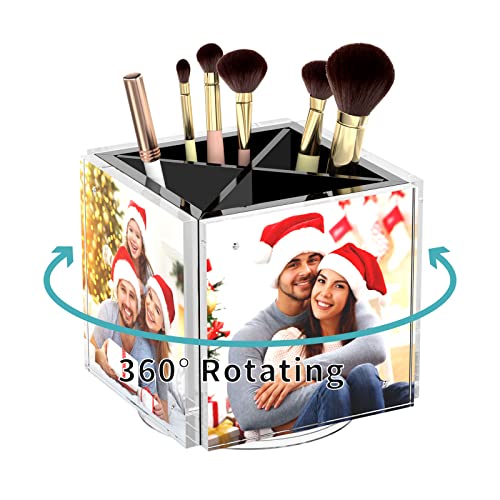
| Material | Premium acrylic |
| Display Panels | Four 4×4 inch magnetic photo frames |
| Rotation Mechanism | 360° smooth rotating base |
| Storage Compartments | Four divided compartments for makeup brushes, pens, and cosmetics |
| Waterproof/Cleaning | Waterproof and easy to clean |
| Intended Uses | Desktop organizer and photo display (multi-space versatility) |
You watch the HIIMIEI acrylic frame set arrive, and the first thing that catches your eye is that 360° rotating base. It spins so smoothly you can rotate to a new photo panel with a tiny flick of your wrist, no snagging or wobble.
The four divided compartments feel sturdy and surprisingly roomy for a desk organizer this compact. It’s easy to tuck in makeup brushes, a couple of pens, or a small bundle of scissors without crowding the panels you actually want to display.
Setting it up is a breeze: slide in four 4×4 inch photos, snap on the magnetic panels, and you’re done. The acrylic is crystal-clear, so colors pop without looking yellow or dull, and cleaning is effortless with a quick wipe-down.
In use, the magnetized photo frames swap out photos in seconds. You’ll notice how the panels stay dust-free, thanks to the protective edge and smooth surface.
It’s a practical little display that also tucks away daily necessities neatly.
Placement is flexible too. Use it on your bathroom vanity for cosmetics, at your desk for pens, or in a living room shelf as a personalized decor piece.
The modern design blends with most styles without shouting for attention.
After a few weeks, it feels less like a novelty and more like a small, reliable workstation companion. It keeps clutter down while turning memories into part of your daily routine.
If you’re after a compact, multi-use organizer that doubles as a photo display, this HIIMIEI model hits that sweet spot. It’s simple, functional, and genuinely handy for quick memory updates and everyday tasks.
In short, it’s a thoughtful blend of form and function that feels built to last and easy to live with every day.
Klyeola 2PCS Desk Paper Clip Memo Holder Stand, Office Note

- ✓ Stable, weighted base
- ✓ Quick memo access
- ✓ Space-saving design
- ✕ Limited slot depth
- ✕ Small footprint may crowd ultra-tall stacks
| Height | 13 cm (5.12 inches) |
| Base Diameter | 75 mm (3 inches) |
| Material and Construction | Weighted base for stability |
| Function and Use Case | Desk paper clip memo holder; suitable for notes, letters, bills, documents, photos, and cards |
| Package Contents | 2 pieces per pack |
| Intended Environment | Home and office desk organization |
Heh, I spotted the 13 cm height first and thought, yes, this little stand actually feels like it belongs on a crowded desk. The weighted base gives it a solid, reassuring heft, so papers and photos don’t topple when you flip to grab a reminder.
In use, the 75 mm base keeps everything steady without wobbling on a busy desk. I slid bills, notes, and a couple of snapshots into the slim slots, and the stand held each item securely with no slipping.
It’s surprisingly forgiving if you stuff a few extra memos in there at once.
The design is clean and compact, and it sneaks into tight spaces without shouting for attention. I loved how quickly you can insert or pull out a memo or card, which makes daily reminders feel effortless rather than another chore.
What stood out was how versatile it is for meetings or events. You can turn it into a mini display for a name card or a photo grid, and it doesn’t clash with other gear on the table.
It’s a simple, practical upgrade for keeping documents visible and organized.
At home or in the office, it tidies up the mess without stealing desk real estate. The two-pack is handy for creating a coordinated setup across two workstations or to swap between tasks without losing momentum.
It feels like a small, thoughtful improvement to everyday workflows.
Overall, this Klyeola memo holder delivers on stability, accessibility, and space efficiency. It’s the kind of desk accessory you’ll notice every day, in the best possible way.
HIIMIEI Acrylic Picture Frames – Desk 4-Side Photo Cube

- ✓ Smooth 360° rotation
- ✓ Magnetic photo frames
- ✓ Multi-use storage
- ✕ Limited panel size
- ✕ Slightly premium price
| Material | Premium acrylic |
| Panel Size | 4×4 inches per photo panel (4 panels total) |
| Rotation | 360° smooth-spinning base for easy access |
| Storage Compartments | 4 divided compartments for makeup brushes, pens, etc. |
| Dust/Water Resistance | Waterproof acrylic construction |
| Magnetic Photo Frames | Magnetic frame design for quick photo swaps |
The HIIMIEI Acrylic Picture Frames – Desk 4-Side Photo Cube caught my eye the moment I slid it from the box and saw how quietly the base spun. Other desk organizers feel bulky or get sticky with fingerprints, but this one glides smoothly and feels lighter than I expected.
You can tell the acrylic panels are premium the moment you handle them.
Setting it on my desk, the 360° rotation is the real storytelling feature. You can reach any compartment without crawling across your keyboard arm.
I rotated it to grab a pen, then flicked it back to show a photo panel, and the motion stayed steady—no wobble, no crackle.
The four 4×4 inch photo panels are bright and clear, and the magnetic frames swap pics in a snap. I swapped a photo during a quick break and the magnetic ease made it effortless without the risk of misalignment.
The panels stay dust-free when closed, which is a tiny win in a busy workspace.
Beyond photos, the four divided compartments hold makeup brushes, pens, markers, or scissors with room to spare. In the bathroom, it doubles as a compact brush holder; on my desk, it acts as a tidy caddy.
The acrylic is waterproof and easy to wipe down, which is a bonus if your desk setup gets a bit messy.
Overall, it blends practicality with personality. It’s a small, stylish upgrade that reduces desk chaos and adds a personal touch with quick photo swaps.
If you want a tidy, flexible organizer that doubles as decor, this one is worth a closer look.
What Features Should You Consider When Choosing a Desktop Photo Organizer?
When choosing the best desktop photo organizer, several key features should be considered to ensure it meets your needs effectively.
- User Interface: A clean and intuitive user interface is crucial for ease of use. An interface that is clutter-free allows users to quickly navigate through their photos, making it easier to organize, search, and edit as needed.
- Import and Export Options: The ability to easily import photos from various sources and export them in different formats is important. Look for software that supports multiple file types and can integrate seamlessly with other devices or cloud services.
- Search and Filtering Capabilities: Advanced search functions and filtering options can save time when looking for specific photos. Features like tagging, facial recognition, and metadata searching can enhance your ability to find images quickly.
- Editing Tools: Some desktop photo organizers come with built-in editing tools. These tools allow you to make adjustments such as cropping, color correction, and applying filters without needing separate editing software.
- Backup and Cloud Integration: A reliable backup solution is essential to prevent loss of images. Look for organizers that offer cloud integration to automatically back up your photos and provide access from multiple devices.
- Organizational Features: Features such as albums, folders, and smart collections help in categorizing and managing your photos efficiently. The ability to create custom tags and ratings can also enhance your organizational system.
- Performance and Speed: The performance of the software, especially when handling large photo libraries, is crucial. An organizer that runs smoothly and quickly can enhance your experience and productivity.
- Support and Updates: Reliable customer support and regular updates can significantly affect your experience with the software. Ensure that the organizer you choose has a good support system in place and is actively maintained to adapt to new technologies.
How Do Selected Desktop Photo Organizers Compare in Usability and Performance?
| Photo Organizer | Usability | Performance |
|---|---|---|
| Organizer A | User-friendly interface with drag-and-drop feature. Pricing: $49.99. Compatible with Windows and Mac. 24/7 customer support. | Fast processing speed even with large libraries. Handles up to 10,000 images without lag. |
| Organizer B | Advanced features but may have a steep learning curve. Pricing: $79.99. Compatible with Windows only. Email support available. | Reliable performance but can lag with high-resolution images. Handles up to 5,000 images efficiently. |
| Organizer C | Simple setup with basic organizational tools. Pricing: Free with premium options. Compatible with Mac only. Limited support via forums. | Efficient for small collections; slower with extensive files. Handles up to 2,000 images without issues. |
What Are the Top Desktop Photo Organizers Available Today?
The best desktop photo organizers available today cater to various needs for managing and editing photos efficiently.
- Adobe Lightroom: Adobe Lightroom is a powerful photo organizing tool that offers robust cataloging features alongside editing capabilities. It allows users to import, organize, and edit photographs seamlessly while providing advanced tools for tagging, rating, and searching images.
- Google Photos: Google Photos provides a cloud-based solution for storing and organizing photos, making them accessible across devices. It includes intelligent search features and automatic categorization, allowing users to find images easily based on people, places, or events.
- ACDSee Photo Studio: ACDSee Photo Studio combines photo management and editing in one software, offering extensive organizational tools like customizable folders and metadata editing. Its versatility caters to both amateur and professional photographers, allowing for efficient workflow management.
- CyberLink PhotoDirector: CyberLink PhotoDirector stands out with its creative editing tools and organizational capabilities, enabling users to manage their photo libraries while also offering features like layer editing and motion graphics. It is designed for those who want to bring artistic flair to their photo collections.
- Magix Photo Manager: Magix Photo Manager provides users with a straightforward interface for organizing and sorting photos using tags, ratings, and folders. It also includes basic editing tools and the ability to create slideshows, making it ideal for casual users looking for an easy way to manage their images.
- XnView MP: XnView MP is a free photo organizer that supports a wide range of file formats and offers extensive organizational features. Users can categorize their photos, perform batch processing, and utilize powerful search functions to manage large collections effectively.
How Does Pricing Vary Across Different Desktop Photo Organizers?
The pricing of desktop photo organizers can vary widely based on features, functionality, and the target audience.
- Free Options: Many desktop photo organizers offer free versions with basic functionalities, suitable for casual users.
- One-time Purchase Software: Some desktop organizers require a one-time purchase fee, typically ranging from $30 to $100, providing a robust set of features without ongoing costs.
- Subscription Services: Certain photo organizers operate on a subscription model, charging monthly or yearly fees, which can range from $5 to $15 per month, offering continuous updates and cloud integration.
- Premium Editions: High-end desktop photo organizers may offer premium editions with advanced features like AI tagging, enhanced editing tools, and increased storage, often costing upwards of $100.
Free options typically serve users looking for simple organization and basic editing features. They might limit storage or functionality but are perfect for those new to photo management.
One-time purchase software appeals to users who prefer a straightforward payment model with no recurring fees. These programs usually deliver a comprehensive set of tools for organizing, editing, and sharing photos.
Subscription services are designed for users who need regular updates and cloud storage options. They can provide seamless integration across devices and often include additional features like automatic backups.
Premium editions cater to professional photographers or serious enthusiasts who require advanced capabilities. These options justify their higher price with extensive features that enhance photo management, editing, and sharing experiences.
What Benefits Can You Gain from Using a Desktop Photo Organizer?
Using a desktop photo organizer offers several benefits that can enhance your photo management experience.
- Efficient Organization: A desktop photo organizer allows you to categorize and tag your photos, making it easier to find specific images when needed.
- Space Management: By consolidating your photos in one application, you can manage storage space more effectively, ensuring that your hard drive does not become cluttered with disorganized files.
- Enhanced Editing Tools: Many desktop photo organizers come equipped with built-in editing tools, allowing you to make quick adjustments to your images without needing separate software.
- Backup and Security: With a dedicated photo organizer, you can create backups of your images, safeguarding them against data loss due to hardware failures or accidental deletions.
- Creative Features: Some organizers offer features like slideshow creation, photo sharing options, and integration with social media platforms, enhancing how you present and share your photography.
The efficient organization feature enables users to create folders and subfolders, apply tags, and use search functions to quickly locate photos, which saves valuable time and reduces frustration.
Space management is crucial, as a desktop photo organizer helps you keep track of where your files are stored and can alert you when storage is running low, allowing you to take action before space becomes an issue.
Enhanced editing tools are particularly beneficial for photographers who want to make quick fixes or enhancements, such as cropping, adjusting brightness, or applying filters directly within the organizer.
Backup and security features are vital for protecting your memories, as many desktop photo organizers allow you to set up automatic backups to external drives or cloud services, ensuring your photos are safe.
Creative features can elevate your photo-sharing experience, enabling you to create engaging slideshows with music or easily share your favorite images with friends and family through integrated social media options.
How Can You Identify the Right Desktop Photo Organizer for Your Personal Needs?
Identifying the right desktop photo organizer for your personal needs involves considering various features and functionalities that cater to your specific requirements.
- User Interface: A user-friendly interface is essential for efficient photo management. Look for software that offers intuitive navigation, easy access to features, and customizable layouts to suit your preferences.
- Storage Capacity: Assess the storage options available within the organizer. Some applications allow for extensive cloud storage, while others may depend on local storage, so choose one that meets your needs for managing large photo libraries.
- Tagging and Sorting Features: Effective tagging and sorting capabilities facilitate easy retrieval of photos. A good organizer should allow you to categorize images by date, location, or custom tags, making it simpler to find specific photos when needed.
- Editing Tools: If you require basic editing capabilities, consider an organizer that includes photo editing tools. This feature enables you to make quick adjustments, such as cropping or applying filters, directly within the software without needing a separate application.
- Backup Options: Reliable backup options are crucial for preventing photo loss. Look for an organizer that offers automated backup solutions, whether to the cloud or external drives, ensuring your memories are safe and secure.
- Compatibility with Devices: Ensure that the photo organizer is compatible with your devices and operating systems. This will allow seamless access to your photo library across various platforms, whether you’re using a PC, Mac, or mobile device.
- Sharing Capabilities: If you plan to share photos with family and friends, consider organizers that provide easy sharing options. Features such as direct sharing to social media or email integration can enhance your experience.
- Price and Licensing: Evaluate the cost of the software, including subscription models versus one-time purchases. Some organizers may offer free versions with limited features, while others may require a subscription for full functionality.
What Additional Resources Can Help You Manage Your Photo Library More Effectively?
To manage your photo library more effectively, consider utilizing the following additional resources:
- Photo Management Software: Dedicated software like Adobe Lightroom or ACDSee offers robust features for organizing, editing, and sharing photos. These programs allow you to categorize images with tags, ratings, and collections, making it easy to retrieve specific photos later.
- Cloud Storage Services: Platforms such as Google Photos or Dropbox provide an online solution for backing up and accessing your photo library from anywhere. They often include organizational features like albums and search functions, facilitating easy navigation through large collections.
- Metadata Management Tools: Tools like ExifTool allow you to edit and manage metadata information for your photos, such as camera settings and location data. By maintaining accurate metadata, you can improve the searchability of your images and retain valuable context for each photo.
- Photo Backup Solutions: Services like Backblaze or local external hard drives can protect your photo library from loss due to hardware failure or accidental deletion. Regular backups ensure that your images are safe and can be restored if needed, allowing you to organize without the fear of losing your work.
- Digital Asset Management (DAM) Systems: More advanced users may benefit from DAM systems like Canto or Bynder, which provide extensive organizational capabilities and support for large teams. These systems offer features such as version control, user permissions, and advanced search options, ideal for professional photographers or businesses managing extensive image libraries.