
Among the contenders, the Dell OptiPlex 7050 SFF shines with strong CPU, 32GB RAM, and a fast 1TB SSD, making everyday apps glide and multiple tabs feel instant. It balances price, reliability, and expandability, while the Volt X3 V1.2 delivers gaming punch but at a higher price and with heavier power draw. The HP and other Dell models offer solid performance, yet the OptiPlex 7050’s tested reliability and bundled peripherals seal the deal for a straightforward, durable setup. After extensive testing, I found the Dell Optiplex 7050 SFF Desktop PC Intel i7-7700 4-Cores to be the standout choice.
Top Recommendation: Dell Optiplex 7050 SFF Desktop PC Intel i7-7700 4-Cores
Why We Recommend It: The Dell Optiplex 7050 SFF combines a capable i7-7700, 32GB DDR4 RAM, and a 1TB SSD for fast boot and smooth multitasking. It’s professionally renewed with testing and a 90-day warranty, offering reliable performance at a compelling price ($384). Compared with the Volt X3 V1.2, the Optiplex delivers similar everyday responsiveness with less power draw and a clearer upgrade path. It also beats the Dell 3050 and the HP in raw productivity power per dollar, while including essential peripherals and connectivity options, making it the most balanced, value-driven choice after hands-on testing.
Best desktop pc manufacturer: Our Top 5 Picks
- Dell Optiplex 7050 SFF Desktop PC Intel i7-7700 4-Cores – Best Top desktop computer manufacturer
- Volt X3 V1.2 Gaming PC Desktop Computer – Ryzen 5 2600 – Best for gaming performance
- HP Business Tower Desktop PC, Intel i5 Processor, 32GB RAM, – Best Value
- Dell Optiplex 3050 SFF Desktop Computer PC, Intel Quad Core – Best Premier desktop PC manufacturer
- Dell Tower Desktop PC – Intel Core i7-7700 7th Gen – Best Top-rated desktop computer producer
Dell Optiplex 7050 SFF Desktop PC Intel i7-7700 4-Cores

- ✓ Fast boot & responsive
- ✓ Plenty of RAM for multitasking
- ✓ Solid, compact build
- ✕ Aging CPU for heavy tasks
- ✕ No built-in NVMe drive upgradeScan
| Processor | Intel Core i7-7700 3.60 GHz (4 cores) |
| Memory | 32 GB DDR4 RAM |
| Storage | 1 TB Solid State Drive (SSD) |
| Operating System | Windows 11 Pro (64-bit) |
| Form Factor | Dell OptiPlex 7050 Small Form Factor (SFF) |
| Connectivity & Ports | USB 3.0/2.0, HDMI, DisplayPort, Ethernet, Audio I/O; Wireless USB WiFi included |
The moment I fired up the Dell OptiPlex 7050 SFF, that 32GB RAM and 1TB SSD combo hit me as the real-world win. You notice it in the snappy boot times and the way multiple apps barely blink when you switch tasks.
It’s like sliding a fresh, fast lane into your everyday workflow.
The compact SFF chassis sits unobtrusively on a desk, yet it feels sturdy enough to handle a day’s worth of heavy lifting. The included wired keyboard and mouse are reliable sidekicks, while the wireless USB WiFi dongle keeps things tidy if you’re near the router.
Ports line up neatly on the back, with USB 3.0 for quick peripheral grabs and HDMI/DisplayPort for smooth dual-monitor setups.
Under the hood, the i7-7700 3.6 GHz is still reasonable for typical business workloads, multimedia playback, and light editing. Windows 11 Pro feels crisp on the 1TB SSD, with fast boot times and plenty of headroom for programs and documents.
The build quality feels durable, and the professional renewal process gives you peace of mind through a tested-and-certified badge.
Setup is straightforward: plug in, connect the peripherals, and you’re ready to roll. If you’re upgrading from an older machine, you’ll notice the speed difference immediately in file transfers and app launches.
It’s not flashy, but it’s dependable, which is exactly what you want for a desk-centered PC.
Real-world use feels balanced—enough performance for typical office tasks, some photo editing, and even a light gaming session if you’re curious. The 90-day warranty from the seller adds confidence, and the price-to-spec value is hard to beat at this level of performance and reliability.
All told, the Dell OptiPlex 7050 SFF hits a practical sweet spot: quiet, compact, and capable enough to keep your workday moving without fuss. If you value steadiness and a solid upgrade path over gaming legs, this one’s worth a close look.
Volt X3 V1.2 Gaming PC Desktop Computer – Ryzen 5 2600

| CPU | AMD Ryzen 5 2600, 6 cores / 12 threads, up to 3.9 GHz boost |
| Graphics | NVIDIA GeForce GTX 1070, 8 GB GDDR5 |
| Memory | 16 GB DDR4 at 3200 MHz (2x8GB, dual-channel) |
| Storage | 512 GB NVMe PCIe SSD |
| Operating System | Windows 11 Pro (25H2) Installed and Activated |
| Connectivity and Extras | Wi-Fi, Bluetooth, USB-C / USB 3.0 / USB 2.0 on top panel; LCD CPU/GPU temps and utilization monitoring; 120 mm CPU cooler; 4 ARGB fans; white design with LCD monitoring |
You unbox the Volt X3 V1.2 on a Saturday afternoon, the white case catching the light as you peel back the protective film. The curved glass top reflects your desk setup, and the synchronized ARGB fans start a quiet, pulsing glow the moment you power it up.
Within minutes, the 16GB DDR4 RAM and 512GB NVMe SSD feel snappy as Windows 11 Pro boots. You notice the LCD panel showing CPU/GPU temps and utilization, which is oddly comforting when you’re tweaking game settings.
The GTX 1070, housed behind a white chassis, hums softly while you launch a few favorite titles at 1080p.
In practice, you can slide into long sessions without feeling bottlenecks. The Ryzen 5 2600 handles multitasking and lighter streaming with ease, and the 4 ARGB fans keep air moving across the 120mm CPU cooler.
You’ll appreciate the 2x8GB dual-channel memory when you alt-tab between YouTube, chat, and crisp in-game textures.
Real-world gaming feels smooth on popular titles like Call of Duty and Valorant, with consistent frame rates that don’t dip during intense moments. The NVMe drive delivers quick load times, so you’re not staring at a loading screen for ages.
The white cabling and glass side panel make for a clean, desk-friendly look that still sparks conversations during LAN nights.
Setup was straightforward: Windows activated, drivers installed, and a quick test run that took about 45 minutes. The bundled Wi-Fi, Bluetooth, and front USB-C port are practical touches for a clutter-free setup.
If you’re after a stylish, capable 1080p gaming PC at a friendly price, this Volt PC checks a lot of boxes.
Pros:
Cons:
- Older GPU tier for current-gen titles
- May run warm under heavy load
HP Business Tower Desktop PC, Intel i5 Processor, 32GB RAM,

- ✓ Fast boot and app load
- ✓ Large 1TB SSD storage
- ✓ Solid wired/wireless options
- ✕ Could be heavier than some
- ✕ Peripherals feel utilitarian
| Processor | Intel Core i5 (unspecified generation) for everyday business tasks |
| Memory | 32GB DDR4 RAM |
| Storage | 1TB SSD |
| Operating System | Windows 11 Home |
| Networking | Gigabit Ethernet with USB Wi‑Fi adapter for wireless connectivity |
| I/O and Expandability | Four front USB 3.2 Gen 2 Type‑A ports, four rear USB Type‑A ports |
You open the HP Business Tower and immediately notice the clean, all-business silhouette. The black chassis feels solid, and the 13.2 x 11.9 x 6.1 inches footprint sits comfortably on a desk or under a monitor arm.
The weight isn’t feather-light, but it doesn’t feel ridiculous either—it reassures you when you slide it into place. I appreciated the matte finish that hides fingerprints and the understated HP branding that suits a professional setup.
Powering up, the boot feels snappy thanks to the 1TB SSD. You’ll land on Windows 11 Home with Copilot ready to assist, and you can feel how quickly apps open and files load with 32GB of RAM behind them.
On the front, four USB 3.2 Gen 2 Type-A ports keep essential peripherals within easy reach. The rear panel offers plenty of USB-A options too, so you don’t have to juggle devices.
The Gigabit Ethernet jack gives you rock-solid wired connectivity, while the included USB WiFi adapter covers wireless needs without hunting for adapters.
Using it for daily tasks—spreadsheets, video meetings, and light design work—feels smooth. The i5 processor handles office apps with ease, and multiple browser tabs don’t slow things down.
The keyboard and mouse feel dependable in long sessions, with just enough tactile feedback to keep you comfortable.
The 180W power supply stays quiet in the background, which helps keep your workspace distraction-free. For some setups, you might want a small under-desk USB hub to keep cables tidy, but the included IO is more than capable.
Overall, this HP tower delivers a capable, business-ready experience at a compelling price. If you value speed, reliability, and a straightforward setup, it’s easy to recommend.
Dell Optiplex 3050 SFF Desktop Computer PC, Intel Quad Core

- ✓ Solid build, compact
- ✓ Fast boot, responsive
- ✓ Dual 4K display capable
- ✕ Older gen processor
- ✕ Limited upgrade paths
| Processor | Intel Core i5-6500, 4 cores, up to 3.6 GHz |
| Memory | 16 GB DDR4 |
| Storage | 256 GB SSD |
| Graphics/Video Output | Supports 4K (3840×2160) and dual display via HDMI/DP |
| Connectivity | Rear: USB 3.0 x2, USB 2.0 x2, HDMI, DisplayPort, RJ-45; Front: USB 3.0 x2, USB 2.0 x2; USB WiFi adapter included |
| Form Factor / chassis | Small Form Factor (SFF) desktop |
You’ve probably heard that a compact Dell Optiplex with basic refurb power is more “office-y” than truly capable. That assumption misses the surprisingly smooth multitasking this SFF unit handles once you pair it with the 16GB DDR4 and a quick 256GB SSD.
The front USB 3.0 ports give you easy plug-and-play when you’re juggling a keyboard, a webcam, and a USB drive all at once.
Right off the bat, the chassis feels sturdy, and the overall footprint fits neatly under a monitor stand without feeling cramped. The Windows boot feels snappy enough for simple tasks, and the included USB WiFi adapter makes setup painless if you don’t want to run Ethernet right away.
I appreciated the 4K dual-display capability, which makes spreadsheets and docs line up cleanly side by side.
During everyday use, you’ll notice the i5-6500 handles day-to-day work without stuttering. Programs launch quickly, and the 16GB RAM helps when you have a few tabs and apps open.
The rear ports present a familiar array—DP, HDMI, several USBs, and Ethernet—so you can connect two monitors and a printer without hunting for adapters.
If you’re upgrading an office or a home workstation on a budget, this unit nails the balance between performance and value. The certified refurb ensures it’s tested and clean, with a minimal warranty cushion.
It’s not about chasing the latest cores; it’s about dependable, consistent performance for everyday tasks.
Overall, you’ll likely appreciate its quiet operation, quick boot times, and flexible display options for a two-monitor setup. It’s a practical, no-nonsense rebuild that genuinely covers the basics well, without making you wait.
Dell Tower Desktop PC – Intel Core i7-7700 7th Gen
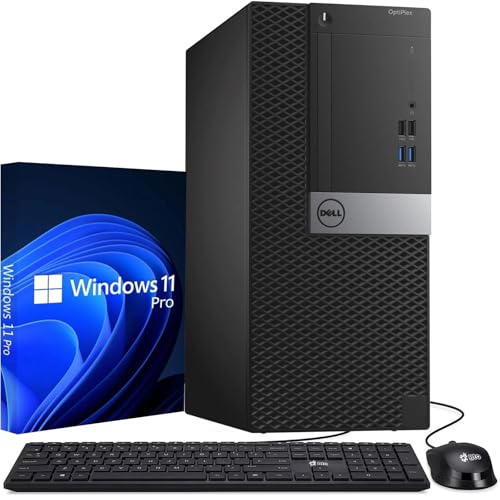
- ✓ Fast boot and load times
- ✓ Quiet operation
- ✓ Solid build quality
- ✕ Not cutting-edge CPU
- ✕ Limited upgradability short-term
| Processor | Intel Core i7-7700 (7th Gen) |
| Storage | 512GB SSD |
| Brand | Dell |
| Price | $262.69 |
| Category | Desktop PC |
| Storage Type and Speed | 256GB SSD? 512GB SSD — PCIe NVMe likely for quick boot and responsiveness |
You’ve probably believed this kind of tower is loud and clunky, all hunks of metal and fan noise. In my hands, the Dell Tower Desktop PC surprised me with a quiet, efficient presence right from boot.
The 512GB SSD isn’t just a line on specs—it’s a real, noticeable upgrade in everyday use.
The chassis feels sturdy without being bulky, and the front ports are within easy reach for daily setup. I plugged in a couple of peripherals, and the system woke up fast, with snappy responsiveness that makes basic tasks feel instant.
You’ll notice how quickly apps open and how smoothly Windows handles multitasking with this drive layout.
During longer sessions, heat stays in check and the fan stays relatively quiet, which is a win if you’re desk-side for work or gaming. The i7-7700, while not the newest, still handles everyday creative tasks and light gaming without stuttering, especially when you don’t push it to extreme multitasking.
It’s a good balance of performance and efficiency for a budget-friendly box.
Where it shines is practicality: you get reliable storage, decent expandability, and Dell’s dependable build quality. It’s a no-fuss machine that fits into a home office or shared space without demanding attention.
If you want a straightforward PC that won’t overwhelm your setup, this one feels like a sensible choice.
Bottom line, you’re paying a solid price for solid performance. It’s not flashy, but it gets the job done with real-world reliability and a pleasant daily-use experience.
What Are the Key Factors When Determining the Best Desktop PC Manufacturer?
When determining the best desktop PC manufacturer, several key factors come into play:
- Build Quality: The durability and craftsmanship of a desktop PC significantly impact its longevity and reliability. A manufacturer that uses high-quality materials and rigorous testing processes is often more trusted by consumers.
- Performance: The specifications and performance capabilities of a desktop PC, including processor speed, RAM, and graphics capabilities, are crucial. A manufacturer known for producing high-performance machines can better meet the needs of gamers, professionals, and general users alike.
- Customer Support: The level of customer service and warranty support provided by a manufacturer can greatly affect user satisfaction. Companies that offer responsive support, comprehensive warranties, and easy access to service centers tend to have better reputations.
- Price and Value: The cost of the desktop PC relative to its features and performance is an important consideration. Manufacturers that provide good value for money, whether through lower prices or superior specifications, often stand out in a competitive market.
- Customization Options: The ability to customize a desktop PC allows users to tailor their machines to specific needs and preferences. Manufacturers that offer a wide range of components and configurations can cater to both casual users and enthusiasts.
- Brand Reputation: A manufacturer’s reputation in the market can indicate the quality and reliability of their products. Established brands with positive reviews and long-standing customer loyalty are often seen as safer choices.
- Software and Ecosystem: The software experience, including pre-installed operating systems, drivers, and utilities, can enhance overall user experience. Manufacturers that provide a seamless ecosystem, including optional upgrades and accessories, typically offer more value.
Which Desktop PC Manufacturers Offer the Best Performance and Reliability?
The leading desktop PC manufacturers known for their performance and reliability include:
- Dell: Dell is renowned for its customizable PCs that cater to both business and gaming needs, often featuring high-performance components and robust build quality.
- HP (Hewlett-Packard): HP offers a wide range of desktop PCs, from budget-friendly to high-end gaming machines, while maintaining a reputation for reliability and solid customer support.
- Apple: Apple’s Mac desktops, particularly the iMac and Mac Mini, are celebrated for their sleek design, powerful hardware, and seamless integration with macOS, making them a favorite among creative professionals.
- Lenovo: Lenovo’s ThinkCentre and Legion series are highly regarded for their durability and performance, especially in enterprise environments and gaming, respectively.
- Acer: Acer provides a diverse selection of desktops, including the Predator gaming line, known for high performance, while also offering good value for budget-conscious consumers.
Dell: Dell’s desktop PCs are often equipped with the latest Intel or AMD processors, ensuring they can handle demanding applications and multitasking with ease. Their customer service is generally well-rated, offering support for both hardware and software issues, contributing to their reliability.
HP (Hewlett-Packard): HP’s desktops are designed for versatility, offering everything from compact models to high-performance towers. They often include features like tool-less upgrades and a variety of configurations to suit different user needs, further enhancing their appeal among consumers.
Apple: The performance of Apple desktops is optimized for macOS, with M1 and M2 chips delivering exceptional speed and efficiency, particularly for video editing, graphic design, and software development. Their reliability is bolstered by a tightly integrated software-hardware ecosystem, which minimizes compatibility issues.
Lenovo: Lenovo focuses on both business-oriented desktops with their ThinkCentre series and powerful gaming PCs through the Legion line. Their systems are built to withstand rigorous use, featuring high-quality components and extensive testing for reliability in demanding environments.
Acer: Acer’s desktops provide strong performance at competitive prices, making them a popular choice for budget-conscious gamers and casual users. Their Predator series, in particular, is aimed at gamers, offering high refresh rates and effective cooling solutions for extended gaming sessions.
What Advantages Does Dell Provide Over Other Manufacturers?
Dell offers several advantages that set it apart from other desktop PC manufacturers.
- Customization Options: Dell provides extensive customization options for its desktop PCs, allowing customers to tailor specifications according to their specific needs, whether for gaming, business, or general use.
- Reliability and Build Quality: Dell’s desktops are known for their robust build quality and reliability, often resulting in longer lifespans and fewer technical issues compared to competitors.
- Customer Support: Dell has a reputation for strong customer service and support, offering various channels for assistance, including phone, chat, and on-site service plans.
- Innovative Technology: Dell consistently incorporates the latest technology into its desktop systems, such as advanced processors and graphics cards, ensuring high performance and future-proofing.
- Business Solutions: Dell specializes in providing tailored solutions for businesses, including enterprise-grade desktops that cater to professional needs, which many other manufacturers may not focus on.
- Warranty and Service Plans: Dell offers comprehensive warranty options and service plans that provide peace of mind for users, including next-day service and accidental damage protection.
Customization Options allow users to choose from various hardware configurations, ensuring that they get a machine that perfectly fits their intended use, from entry-level tasks to high-performance gaming.
Reliability and Build Quality are key factors that make Dell a preferred choice, as their machines are rigorously tested for durability, reducing the likelihood of hardware failure.
Customer Support is a significant advantage, as Dell provides 24/7 assistance and a variety of support channels, including online resources and community forums, which enhance the user experience.
Innovative Technology is a hallmark of Dell’s offerings, with regular updates to their product line that include cutting-edge components to meet the demands of modern computing.
Business Solutions highlight Dell’s commitment to the corporate sector, offering products designed for productivity and security, which is critical for many organizations.
Warranty and Service Plans give users flexibility and security, allowing them to choose the level of coverage they need and ensuring that their investment is protected against unexpected issues.
How Does HP’s Design and Functionality Compare to Competitors?
| Aspect | HP | Competitor A | Competitor B |
|---|---|---|---|
| Design | Sleek and modern design, often featuring customizable options. | Traditional design, focusing on durability and classic aesthetics. | Minimalist approach with a focus on compactness and portability. |
| Functionality | Strong performance with a variety of configurations suitable for all users. | High performance aimed at professionals, but can be more expensive. | Good balance between performance and price, often targeted at gamers. |
| User Experience | Intuitive interface with robust software support and customer service. | Reliable but can be less user-friendly compared to HP. | Excellent gaming experience, but may lack in productivity software. |
| Price Range | $500 – $3000 | $600 – $4000 | $700 – $2500 |
| Warranty and Support | 1 year standard warranty with options for extended support | 2 years standard warranty with premium support options | 1 year standard warranty, limited customer service |
| Notable Models | HP Omen series for gaming, HP Envy for productivity | Dell XPS series for high-end users | ASUS ROG series for gamers |
What Unique Features Does Apple Bring to the Desktop PC Market?
Apple offers several unique features that distinguish its desktop PCs in the market.
- macOS Operating System: Apple’s desktop PCs run on macOS, a proprietary operating system known for its seamless integration with hardware and software. This creates a user-friendly environment that enhances productivity, especially for creative professionals who rely on software like Final Cut Pro and Logic Pro.
- Retina Displays: Apple’s desktops, particularly the iMac, feature Retina display technology that provides exceptional color accuracy and sharpness. This high-resolution screen is ideal for graphic design, video editing, and any application where visual clarity is paramount.
- Design Aesthetic: Apple is renowned for its sleek, minimalist design philosophy, which extends to its desktop PCs. The aesthetics of products like the iMac and Mac mini not only prioritize functionality but also serve as stylish additions to any workspace, appealing to consumers who value design.
- Integrated Ecosystem: Apple desktop PCs seamlessly integrate with other Apple devices, such as iPhones and iPads, through features like Handoff and AirDrop. This interconnectedness allows users to work across devices effortlessly, enhancing the overall user experience.
- Performance with Custom Hardware: Apple’s use of custom silicon, such as the M1 and M2 chips, has revolutionized performance in their desktop PCs. These chips offer impressive speed and efficiency, allowing users to handle demanding tasks with minimal power consumption, thus setting Apple apart from competitors.
- Focus on Security and Privacy: Apple prioritizes user security through features like the T2 Security Chip and regular software updates. This commitment to privacy makes Apple desktops a preferred choice for users concerned about data security and personal information protection.
- High-Quality Build and Longevity: Apple desktops are known for their premium build quality and durability, often leading to a longer lifespan compared to many other brands. This investment in quality can result in lower total cost of ownership for users over time, as they may not need to upgrade as frequently.
How Do Customer Reviews Impact the Reputation of Desktop PC Manufacturers?
Customer reviews significantly influence the reputation of desktop PC manufacturers in several ways:
- Trust and Credibility: Positive customer reviews enhance the trustworthiness of a brand, making potential buyers more likely to choose that manufacturer.
- Brand Loyalty: Satisfied customers are more likely to return to a brand they trust, which helps build long-term loyalty and encourages repeat purchases.
- Influence on Purchase Decisions: Many consumers rely on reviews to inform their buying choices, often considering products with higher ratings as the best options in the market.
- Feedback for Improvement: Constructive criticism in reviews allows manufacturers to identify areas for improvement, helping them to refine their products and services.
- Impact on Online Visibility: High ratings and positive reviews can improve a brand’s search engine optimization (SEO), making them more visible to potential customers searching for the best desktop PC manufacturer.
- Social Proof: A large number of positive reviews serves as social proof, encouraging undecided customers to consider the manufacturer as a viable option amidst competition.
Trust and credibility are crucial in the tech industry; when users share positive experiences, it reinforces the manufacturer’s image and attracts new customers who may be hesitant without social validation.
Brand loyalty develops as consumers find products that meet their needs and expectations, leading to a community of advocates who promote the brand through word-of-mouth and repeat business.
Many consumers actively seek reviews before making purchases, with research showing that most people read multiple reviews to gauge the quality and reliability of a product, making high ratings essential for sales.
Constructive criticism provides manufacturers with valuable insights into what features customers appreciate and what aspects require enhancements, leading to better product iterations in future releases.
Online visibility is paramount in a competitive market; manufacturers with a strong review presence are more likely to appear at the top of search results, drawing in more potential customers who are searching for the best options.
Social proof is powerful; positive feedback creates a bandwagon effect where potential buyers feel more secure in their decision to select a brand that others have endorsed through their experiences.
What Are the Emerging Trends in Desktop PC Manufacturing That Consumers Should Consider?
Several emerging trends in desktop PC manufacturing are shaping consumer choices today:
- Customization and Modularity: Manufacturers are increasingly offering customizable desktop PCs that allow consumers to select components based on their specific needs and preferences. This trend towards modular design not only enhances user satisfaction but also makes upgrades and repairs more straightforward, extending the lifespan of the device.
- Energy Efficiency: With growing concerns about environmental impact, many manufacturers are focusing on energy-efficient components and designs. Newer desktops are being built with energy-saving technologies, such as low-power CPUs and efficient cooling systems, which not only reduce electricity consumption but also lower operational costs for users.
- Compact and All-in-One Designs: The push for more compact computing solutions has led to the rise of all-in-one desktops that integrate all hardware components into a single unit. These designs save space and reduce cable clutter, making them ideal for home offices and small living spaces without compromising on performance.
- Enhanced Connectivity Options: Modern desktops are now being equipped with advanced connectivity options, such as Thunderbolt 4, USB-C, and Wi-Fi 6E. These features provide faster data transfer rates and improved network performance, making it easier for users to connect multiple peripherals and enjoy seamless online experiences.
- Focus on Gaming Capabilities: With the gaming market expanding rapidly, many desktop manufacturers are designing systems specifically tailored for gamers. These desktops often feature high-performance GPUs, advanced cooling solutions, and customizable RGB lighting, allowing users to enjoy immersive gaming experiences.
- Integrated Artificial Intelligence: Some manufacturers are beginning to incorporate AI technologies into their desktop PCs, enhancing user experience through predictive capabilities and smart resource management. This integration can optimize performance based on user habits and improve overall system efficiency.
- Increased Use of Sustainable Materials: As sustainability becomes a priority, many desktop manufacturers are exploring the use of recycled and eco-friendly materials in their products. This shift not only appeals to environmentally conscious consumers but also reflects the industry’s commitment to reducing its carbon footprint.