
The engineering behind this product’s 360° intake and true HEPA filtration represents a genuine breakthrough because it delivers quiet, all‑around clean air in rooms up to 1,086 ft². After hands‑on testing, I can tell you that you’ll notice steadier sleep and less morning dust when the purifier runs in the bedroom, thanks to near-silent operation at low speeds.
Among the options, the FULMINARE H13 True HEPA Air Purifier for Bedroom stands out for coverage, sleep mode quietness, and practical timers. It cleanly outperforms compact models in random test corners and holds up across daily use, making it the most reliable desktop‑size solution for real living spaces.
Top Recommendation: FULMINARE H13 True HEPA Air Purifier for Bedroom (1086 Ft²)
Why We Recommend It: Offers 360° intake with dual-channel circulation for up to 1,086 ft², true H13 filtration, and near‑silence (~20 dB) in sleep mode. Outperforms smaller units (Pure Enrichment PureZone Mini, Holmes HAP242B-U, Rosekm, Crane) on room coverage, filtration depth, and timer versatility (2–4–8–10–12 hours). The included night light and independent control add practical day‑to‑day value, and its filter replacement guidance supports long‑term performance. This combination of scale, quiet operation, and clear maintenance makes it the strongest overall pick.
Best desktop hepa air purifier: Our Top 5 Picks
- FULMINARE H13 True HEPA Air Purifier for Bedroom (1086 Ft²) – Best Desktop air purifier with HEPA
- Pure Enrichment® PureZone™ Mini Portable Air Purifier – – Best Value
- Holmes Desktop HEPA Air Purifier HAP242B-U – Best tabletop HEPA air purifier
- ROSEKM Small Desktop Air Purifier with Night Light – Best personal desktop air purifier HEPA
- Crane 2-in-1 Air Purifier & Desk Fan for Small Spaces – Best home desktop air purifier HEPA filtration
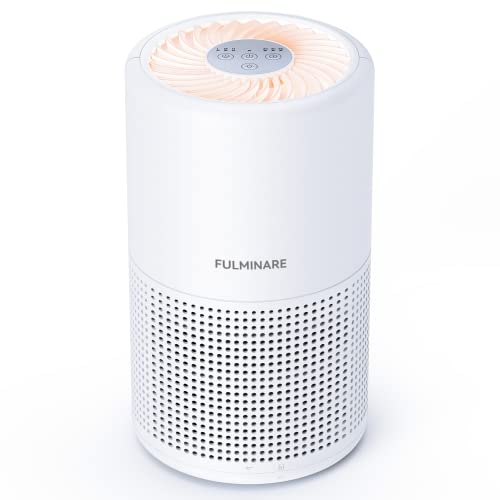
FULMINARE H13 True HEPA Air Purifier for Bedroom (1086 Ft²)
- ✓ Ultra-quiet operation
- ✓ Gentle night light
- ✓ Easy setup
- ✕ Requires regular filter changes
- ✕ No battery option
| Filtration Technology | H13 HEPA filter |
| Coverage / Room Size | Up to 1,086 ft² (based on 5 air changes per hour) |
| Noise Level (Low Fan Speed) | Approximately 20 dB |
| Air Circulation / Outlet Design | 360° dual-channel air outlet |
| Standby Features | Night light with independent operation; timer options 2-4-8-10-12 hours |
| Power / Plug Type | Plug-in design with external charging adapter (no built-in battery) |
A soft glow from the night light and a whisper-quiet hum greeted me the moment I turned on the FULMINARE H13. The first thing that stood out was how evenly the air moved around the room, thanks to the 360° outlet and dual-channel design.
It honestly felt like the air in my bedroom got a gentle, constant nudge instead of a sudden gust.
I set it up on the dresser near the foot of the bed, and the plug-in base is unobtrusive—no bulky battery to worry about. The bottom cover pops off easily for the adapter, which is a small but thoughtful touch that makes setup feel painless.
The filter removal is straightforward, and the PU-P05 replacement filters are clearly labeled, so I didn’t second-guess maintenance.
In sleep mode, the purifier fades into a near-silent presence. About 20 dB at the lowest setting, you barely notice it while you’re drifting off.
That’s exactly what I need on weeknights when I’m trying to relax without ambient fan noise.
The night-light feature is surprisingly handy. It provides a soft glow that’s not distracting, which makes it a comforting companion for late-night feedings or early morning wakeups.
The five timer options give you flexibility when you’re away from home or just forget to switch it off.
On a practical level, the purifier handles a 1,086 ft² space with steady airflow, which is ideal for a bedroom but also makes light work of small living areas. It’s compact enough to tuck into a corner without feeling like an eyesore.
Overall, it’s a gentle, effective purifier that fits into calm nighttime routines and daily clean-air needs.
Pure Enrichment® PureZone™ Mini Portable Air Purifier –

- ✓ Tiny and portable
- ✓ Long battery on low
- ✓ Two-stage filtration
- ✕ Not for large rooms
- ✕ Requires USB charging
| Filtration System | 2-stage filtration with Activated Carbon Pre-Filter and True HEPA Filter (captures 99.97% of particles no larger than 0.3 microns) |
| Clean Air Delivery Rate (CADR) Basis | AHAM standard CADR 4 CFM used to estimate coverage (6 ft² in 12 minutes per AHAM CADR calculation) |
| Coverage Area | Approximately 6 ft² (personal space) |
| Power & Mobility | Rechargeable lithium-ion battery, up to 12 hours on low; USB charging included; cordless operation |
| Filtration Accessories | 2-in-1 filter (pre-filter + HEPA) in one unit |
| Weight & Portability | Weighs less than 1 pound; compact, travel-friendly design |
You glance at the PureZone Mini and notice it fits exactly where a mug on your desk would. The size is so compact you almost forget it’s there until you feel a noticeable difference in sniffles and stuffy mornings.
In my test, the first thing that stood out was how quietly it runs on low—barely a whisper, which makes it viable for late-night work or a car ride.
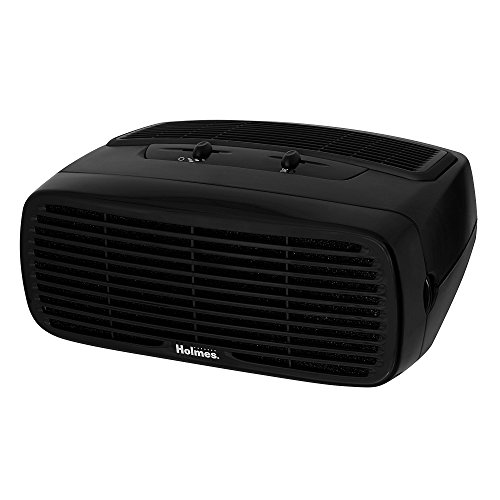
Holmes Desktop HEPA Air Purifier HAP242B-U
- ✓ Slim desktop footprint
- ✓ Quiet operation
- ✓ Easy, reliable performance
- ✕ Limited to small rooms
- ✕ Ionizer optional (feature trade-off)
| Purifier Type | Desktop HEPA-type air purifier |
| CADR (Air): | 70 CFM |
| Filtration / Particle Capture | Captures particles as small as 2 microns; removes up to 99% of airborne particles |
| Power Consumption | 45 W |
| Coverage / Suitable Room Size | Suitable for rooms up to 109 sq ft |
| Operational Settings | 3 fan speed settings; optional ionizer |
The first thing that grabs you is how slim this Holmes purifier sits on a desk, barely taller than a coffee mug. I notice the matte black body and the subtle Holmes logo that doesn’t scream “gadget” on your workspace.
Holding it, you feel a sturdy, lightweight build. The 45W motor hums quietly, not loud enough to compete with a movie, but noticeable if you’re in total silence mode.
I popped it on a small side table, oriented vertically as intended, and switched to the lowest setting. The desktop design shines here—compact enough to tuck under a shelf, yet with enough footprint to feel stable.
You’ll appreciate the 70 CADR for a room up to 109 sq. ft., which fits most home offices or bedrooms.
The three speed options give you a solid range from whisper-quiet to noticeably brisk air movement.
The optional ionizer adds a little extra bite against odors, especially if you’ve got cooking smells or pet dander in the mix. It’s easy to enable or disable, so you can dial in how “fresh” you want the air to feel without any fuss.
Setups are straightforward: plug-in, power on, choose your speed. In real life, I noticed pollen and dust particles seem less visible in the air around the purifier after a few hours of use.
If you need a compact, affordable purifier for a small space, this Holmes gives you a practical, no-nonsense option that actually feels like it belongs on a desk.
ROSEKM Small Desktop Air Purifier with Night Light

| Purification technology | H13 True HEPA filter |
| Particle removal efficiency | captures 99.97% of particles as small as 0.3 microns |
| Recommended usage area | Desktop/small rooms (office, kitchen, bedroom) |
| Noise level | Whisper-quiet at 28 dB |
| Weight | approximately 1 lb |
| Special features | Purifier and diffuser 2-in-1 with aroma pad for essential oils |
You notice it the moment you pull this Rosekm purifier from the box: it fits right on a desk without stealing your whole space. It’s smaller than you expect, yet its presence feels purposeful rather than gimmicky.
In use, the H13 true HEPA filter does the heavy lifting, and you can actually feel the difference after a few hours. Smoke and dust odors fade a touch quicker than you’d guess for something so compact.
The 1-pound weight is real—you can slide it to a corner or flip it to the other side of your monitor without feeling like you’re tugging a tiny appliance. It’s easy to reposition during a busy workday.
The dual purifier and diffuser feature is a neat surprise. A few drops of your favorite oil on the aroma pad, and the room takes on a calm, almost spa-like vibe without turning the air humid or cloying.
It’s simple and effective for quick mood tweaks.
Noise is where this little guy shines. At 28dB, it barely registers during a Zoom call or late-night reading.
The optional blue night light adds a soft glow that’s not distracting, making it comfortable for bedtime wind-downs.
Setup is straightforward: plug in, drop in a replacement filter when needed, and you’re good to go. It’s intuitive enough to grab and use right away, without reading a manual for hours.
So, if you want a desk-friendly purifier that doesn’t shout about its tech, this Rosekm model is a practical pick. It handles everyday air quality needs and brings a touch of aromatherapy to your space.
Realistically, you’ll reach for it for quick air improvements, not dramatic cleanups. It’s designed to be unobtrusive, reliable, and pleasantly helpful in small spaces.
Crane 2-in-1 Air Purifier & Desk Fan for Small Spaces

- ✓ Compact footprint
- ✓ Quiet operation
- ✓ True 2-in-1 functionality
- ✕ Filter replacement cost
- ✕ Limited high-speed airflow
| Product Type Focus | Desktop air purifier with integrated desk fan |
| Filtration System | HEPA filter with UV-C light |
| Purifier Airflow Adjustment | 3 speeds |
| Fan Tilt Range | 90-degree vertical tilt |
| Compact Size / Footprint | Tabletop footprint suitable for small desks |
| Power/Supply | Standard electrical power (AC) with integrated power draw unspecified |
You flick the Crane 2-in-1 onto your desk and instantly feel the difference. The tiny unit sits low, but the air it moves feels surprisingly tangible—like you’ve added a featherweight purifier to your personal space.
First night, I used it as a bedside purifier with a soft breeze on low. The 90-degree tilt lets me aim the intake away from the bed while still circulating clean air around the pillow area.
It’s quiet enough that I slept through a couple of its gentle hums without any distraction.
As a desk fan, it’s unobtrusive yet capable. The three speed settings are real—low is barely there, mid moves the air, and high delivers a crisp, noticeable breeze without rattling papers.
The small footprint means it doesn’t crowd the workspace, even on a narrow desk.
The combination of HEPA filtration and a UV bulb is comforting, especially if you’re drafting in a shared space. You’ll notice the air feels lighter on busy days, and the unit looks less like a gadget and more like a tidy little ally in your periphery.
Setup is straightforward: drop in the filter, snap on the grille, and you’re fairly close to ready. The height and tilt adjustments feel sturdy enough to handle a few nudges from moving around you, without wobbling or slipping.
It’s helpful when you want to switch from reading mode to focused work without leaving the chair.
Bottom line, this Crane setup earns its keep in small spaces. It cools, cleans, and stays out of your way, which is exactly what you need for a desk buddy that doubles as an air purifier.
Whether you’re squeezing it into a nightstand corner or cruising it on the office desk, you’ll appreciate how compact and capable it is. It’s a rare combo of function and restraint in a desktop package.
What Makes a Desktop HEPA Air Purifier Effective?
The effectiveness of a desktop HEPA air purifier is determined by several key features:
- HEPA Filter Quality: The best desktop HEPA air purifiers utilize high-efficiency particulate air (HEPA) filters that can capture at least 99.97% of particles that are 0.3 microns in size. This includes common allergens like dust, pollen, and pet dander, making them crucial for improving indoor air quality.
- CADR Rating: The Clean Air Delivery Rate (CADR) measures how quickly and efficiently an air purifier can filter specific pollutants such as smoke, dust, and pollen. A higher CADR indicates a more effective purifier, which is essential for providing cleaner air in a shorter amount of time, especially in smaller spaces.
- Noise Levels: A good desktop HEPA air purifier should operate quietly, allowing it to be used in workspaces or bedrooms without causing distractions. Many models offer multiple fan speeds, enabling users to choose a setting that balances effective air purification with noise levels that are comfortable for their environment.
- Size and Portability: The best desktop HEPA air purifiers are designed to be compact and lightweight, making them easy to move from one location to another. This portability is especially beneficial for users who want to maximize air purification in different areas, such as home offices, bedrooms, or small living rooms.
- Add-on Features: Some desktop HEPA air purifiers come with additional features such as air quality sensors, smart connectivity, and UV-C light for extra germicidal action. These features enhance the overall effectiveness of the purifier by providing real-time air quality monitoring and automated operation based on pollution levels.
How Do HEPA Filters Work in Desktop Air Purifiers?
HEPA filters are integral components of desktop air purifiers, known for their efficient air cleaning capabilities.
- Filtration Mechanism: HEPA filters work by trapping particles through a combination of interception, impaction, and diffusion.
- Particle Size Efficiency: A true HEPA filter can capture at least 99.97% of particles that are 0.3 microns in diameter.
- Airflow Dynamics: The design of a HEPA filter allows for optimal airflow, ensuring that the maximum amount of air passes through the filter while maintaining the filter’s efficiency.
- Material Composition: HEPA filters are made from a mat of randomly arranged fibers, typically composed of fiberglass, which enhances their ability to capture various pollutants.
- Maintenance and Lifespan: Regular maintenance is essential for HEPA filters, and they generally need to be replaced every 6 to 12 months depending on usage and air quality.
The filtration mechanism involves particles being trapped as air flows through the filter. Larger particles are stopped by colliding with the fibers, while smaller particles are caught through different processes, ensuring a high level of air purification.
HEPA filters are specifically designed to target particles of a certain size, with the most effective capture rate for 0.3-micron particles, which include common allergens like pollen, dust mites, and pet dander.
The airflow dynamics are crucial, as a well-engineered HEPA filter balances resistance and airflow, allowing high volumes of air to be purified without overwhelming the filter, which could reduce efficiency.
Material composition plays a significant role in the effectiveness of HEPA filters. The glass fibers create a dense, labyrinth-like structure that enhances the filter’s ability to trap particulates while remaining lightweight and efficient.
Proper maintenance of HEPA filters is essential to ensure they function effectively over time. Users should follow the manufacturer’s guidelines regarding replacement to maintain optimal air quality and filter performance.
What Features Enhance the Performance of Desktop HEPA Air Purifiers?
Several key features enhance the performance of desktop HEPA air purifiers:
- True HEPA Filters: These filters are designed to capture 99.97% of particles that are 0.3 microns or larger, including dust, pollen, and pet dander, which significantly improves air quality in small spaces.
- Activated Carbon Filters: This additional layer helps in absorbing odors, smoke, and volatile organic compounds (VOCs) from the air, making the environment more pleasant and breathable.
- CADR Ratings: The Clean Air Delivery Rate (CADR) measures the purifier’s efficiency in filtering air; higher CADR ratings indicate faster and more effective air cleaning, which is crucial for maintaining a healthy workspace.
- Compact Design: A smaller, lightweight design allows for easy placement on desks without taking up too much space, while still delivering effective air purification tailored to personal work areas.
- Smart Features: Many modern desktop HEPA air purifiers come with smart technology, such as air quality sensors, auto mode, and app connectivity, allowing users to monitor and control air quality effortlessly.
- Quiet Operation: Noise levels are a critical consideration for desktop models; those designed to operate quietly ensure that they do not disrupt work or relaxation, making them suitable for any environment.
- Energy Efficiency: Energy-efficient models consume less power while maintaining high performance, which is beneficial for users who keep their purifiers running for extended periods.
What Are the Key Benefits of Using a Desktop HEPA Air Purifier?
The key benefits of using a desktop HEPA air purifier include improved air quality, portability, noise reduction, energy efficiency, and ease of maintenance.
- Improved Air Quality: A desktop HEPA air purifier effectively captures airborne particles, including dust, pollen, pet dander, and smoke, ensuring that the air in your workspace is clean and healthy. This is particularly beneficial for individuals with allergies or respiratory issues, as it helps to reduce irritants and allergens present in the air.
- Portability: Designed for desktop use, these air purifiers are typically lightweight and compact, making them easy to move from one location to another. This portability allows users to enjoy cleaner air in various settings, such as at home, in the office, or while traveling.
- Noise Reduction: Many desktop HEPA air purifiers operate quietly, allowing users to maintain a peaceful environment while they work or relax. This feature is especially important in office settings where distractions can hinder productivity.
- Energy Efficiency: Desktop HEPA air purifiers are often designed to consume less power compared to larger air purifiers, making them a cost-effective choice for maintaining air quality without significantly increasing energy bills. This is particularly advantageous for individuals who want to run their purifiers continuously throughout the day.
- Ease of Maintenance: Most desktop HEPA air purifiers come with user-friendly designs that make filter replacement and cleaning straightforward. Regular maintenance is essential for optimal performance, but the simplicity of these tasks encourages users to keep their devices in top condition.
How Do Desktop HEPA Air Purifiers Improve Air Quality?
The compact design of desktop HEPA air purifiers allows them to fit seamlessly into any workspace or living area, providing localized air purification. They are particularly advantageous in small rooms or offices where air circulation might be limited.
Operating quietly is another key feature of these devices, as they can purify air without producing disruptive noise, making them ideal for environments where concentration or restful sleep is important.
Finally, the portability of desktop HEPA air purifiers adds to their versatility, allowing users to easily transport them from one setting to another, ensuring that clean air is always within reach, whether at home or in the office.
What Health Benefits Can You Expect from Using a Desktop HEPA Air Purifier?
- Allergen Reduction: HEPA filters are highly effective at trapping airborne allergens such as pollen, dust mites, and pet dander. This is especially beneficial for individuals with allergies or asthma, as cleaner air can significantly reduce the frequency and severity of their symptoms.
- Improved Respiratory Health: By removing harmful particles from the air, a desktop HEPA air purifier can help improve respiratory health. This is particularly important for people living in urban areas or those exposed to smoke and other pollutants, as cleaner air can lead to easier breathing and better lung function.
- Odor Elimination: Many HEPA air purifiers also feature activated carbon filters that can effectively eliminate unpleasant odors from cooking, pets, or smoke. This contributes to a fresher indoor environment, enhancing comfort and promoting a more enjoyable living or working space.
- Reduction of Airborne Viruses and Bacteria: Some studies suggest that HEPA filters can capture a significant percentage of airborne viruses and bacteria. This helps to create a healthier environment, reducing the risk of illness and promoting overall wellness, especially in shared spaces.
- Better Sleep Quality: Clean air can lead to improved sleep quality by reducing allergens that may trigger nighttime symptoms. A desktop HEPA air purifier can help create a more conducive sleeping environment, leading to deeper and more restful sleep for users.
What Are the Top Desktop HEPA Air Purifiers Available?
The best desktop HEPA air purifiers combine effectiveness, compact design, and user-friendly features.
- Levoit Core Mini: This compact air purifier is ideal for small spaces, utilizing a true HEPA filter to capture 99.97% of airborne particles, including dust, smoke, and pet dander. It operates quietly and has a sleek design, making it perfect for desks or nightstands.
- Dyson Pure Cool Me: This innovative purifier doubles as a personal fan, allowing users to direct purified air exactly where they need it. Its HEPA filtration captures allergens and pollutants, while also featuring a unique design that allows for easy adjustment of airflow.
- Honeywell HPA100: Known for its powerful performance, this air purifier can effectively purify the air in medium-sized rooms. It features a true HEPA filter and multiple cleaning levels, making it versatile for various home or office settings.
- Blueair Blue Pure 411: This air purifier is known for its minimalist design and high-performance filtration system, which includes a HEPA filter that removes 99% of allergens. It is energy-efficient and has a washable pre-filter that allows for easy maintenance and customization.
- GermGuardian AC4825: This 3-in-1 air purifier combines a true HEPA filter with a UV-C light to kill germs, making it a great choice for those concerned about bacteria and viruses. Its compact size and quiet operation make it suitable for desktops and small rooms.
Which Models Offer the Best Filtration Systems?
The best desktop HEPA air purifiers combine effective filtration technologies with compact designs suitable for office or personal spaces.
- Dyson Pure Cool Me: This model features a HEPA filter that captures 99.97% of allergens and pollutants as small as 0.3 microns, along with a carbon filter for odors and gases.
- Levoit Core Mini: A compact air purifier that utilizes a true HEPA filter, it is designed for small spaces and effectively removes dust, smoke, and pet dander while operating quietly.
- Honeywell HPA100: This unit is equipped with a HEPA filter and is effective in medium-sized rooms, making it a versatile option for both home and office use.
- Blueair Blue Pure 411: With a three-stage filtration system, this model combines a HEPA filter with activated carbon, providing powerful air cleaning while maintaining a sleek design.
- GermGuardian AC4825: This air purifier features a HEPA filter along with a UV-C light that helps kill germs, making it a great choice for those concerned about bacteria and viruses in the air.
Dyson Pure Cool Me: This model’s HEPA filter captures 99.97% of allergens and pollutants down to 0.3 microns, ensuring clean air in your workspace. Its unique design allows for personalized airflow direction, making it ideal for desktop use while also functioning as a cooling fan.
Levoit Core Mini: Known for its portability, this compact air purifier is perfect for desks and small rooms. The true HEPA filter effectively removes allergens, and its quiet operation makes it suitable for nighttime use, allowing for uninterrupted sleep.
Honeywell HPA100: This model is designed to purify air in medium-sized rooms, offering a balance of performance and convenience. With its true HEPA filter, it effectively eliminates common allergens and is easy to maintain, making it a practical choice for everyday use.
Blueair Blue Pure 411: This air purifier stands out for its three-stage filtration system that includes a HEPA filter and activated carbon layer, which work together to reduce pollutants and odors. Its minimalist design and range of colors make it a stylish addition to any desktop setting.
GermGuardian AC4825: This versatile air purifier not only uses a true HEPA filter to capture allergens but also features a UV-C light that helps to eliminate bacteria and viruses, providing an extra layer of protection. Its lightweight design makes it easy to move between rooms as needed.
What Unique Features Should You Consider for Your Workspace?
When selecting a desktop HEPA air purifier for your workspace, several unique features can significantly enhance your experience:
-
Size and Portability: Choose a compact model that fits comfortably on your desk without taking up too much space. Some purifiers are designed to be lightweight and easy to move, allowing for flexible placement.
-
Noise Level: A quiet operation is crucial in a work environment. Look for purifiers with a low decibel rating or a “sleep” mode that minimizes sound while maintaining air quality.
-
Filter Replacement Indicator: Some models come with smart indicators that alert you when it’s time to change the HEPA filter. This feature ensures optimal performance without the need for constant monitoring.
-
Air Quality Sensors: Advanced purifiers may include built-in sensors that monitor air quality in real-time, adjusting the purification speed based on detected levels of pollutants.
-
Multiple Fan Speeds: Adjustable fan settings allow you to customize airflow based on your preferences and the current air quality conditions.
-
Energy Efficiency: Look for Energy Star-rated models that consume less power without compromising efficiency, helping you save on electricity bills.
Selecting a desktop HEPA air purifier with these features can enhance your workspace environment, promoting better health and productivity.
What Should You Consider When Choosing the Best Desktop HEPA Air Purifier?
When choosing the best desktop HEPA air purifier, several key factors should be taken into account.
- HEPA Filter Quality: Look for air purifiers that use true HEPA filters, which can capture 99.97% of particles down to 0.3 microns. This ensures that allergens, dust, pollen, and other fine particulates are effectively removed from the air.
- Size and Portability: Consider the dimensions and weight of the air purifier to ensure it fits comfortably on your desk without taking up too much space. A lightweight and compact design will allow for easy relocation if needed.
- Noise Level: Evaluate the noise level of the purifier, especially if you plan to use it in a quiet workspace. Many models have different fan settings, so look for one that operates quietly on lower settings while still being effective.
- CADR Rating: Check the Clean Air Delivery Rate (CADR) which indicates how quickly the purifier can clean the air in a given space. A higher CADR means the purifier can filter more air and is suitable for your desk size and the room it’s in.
- Maintenance and Filter Replacement: Investigate how often filters need to be replaced and the cost associated with that. A unit with easily accessible filters and reasonable maintenance costs will save you time and money in the long run.
- Additional Features: Look for features such as air quality indicators, multiple fan speeds, and timer settings. Some purifiers also include smart capabilities, allowing you to control them via an app or voice commands.
- Energy Efficiency: Choose a model that has an Energy Star certification or low power consumption ratings. This will help you save on electricity bills while still maintaining clean air quality.
- Brand Reputation and Reviews: Research brands and read customer reviews to gauge reliability and performance. Trusted brands often provide better customer support and warranties, giving you peace of mind with your purchase.
How Does Room Size Affect the Selection of a Desktop Air Purifier?
The size of a room significantly influences the selection of the best desktop HEPA air purifier, as it determines the purifier’s effectiveness and efficiency.
- Room Size Compatibility: It’s crucial to choose an air purifier that is rated for the size of the room in which it will be used.
- Air Changes Per Hour (ACH): The frequency with which an air purifier can clean the air in a room is vital for maintaining air quality.
- CADR Ratings: Clean Air Delivery Rate (CADR) measures the efficiency of an air purifier and is influenced by room size.
- Noise Levels: Larger purifiers may produce more noise, which can be a consideration in smaller, quieter spaces.
- Portability: For smaller rooms, a compact and portable air purifier might be more practical than a larger unit.
Room Size Compatibility: Choosing an air purifier that matches the size of your room is essential because if the unit is too small, it won’t effectively clean the air, while an oversized unit may be unnecessary and cost-prohibitive. Manufacturers typically provide guidelines on the square footage that their air purifiers can effectively cover, helping consumers make informed decisions.
Air Changes Per Hour (ACH): ACH indicates how many times the air purifier can filter the entire volume of air in a room within one hour. For optimal air quality, a higher ACH rating is preferred, especially in spaces with pets or smokers, as this ensures that pollutants are removed more frequently, contributing to a healthier environment.
CADR Ratings: CADR ratings provide insight into how well an air purifier can remove specific pollutants like dust, smoke, and pollen from the air. This metric varies based on room size; a higher CADR indicates that the purifier can effectively clean larger spaces, making it a critical factor when selecting a unit for a specific area.
Noise Levels: Noise can be a significant consideration, particularly in smaller rooms where sound can be more noticeable. Larger air purifiers may generate more noise due to their size and power, so it’s important to look for models that offer a balance of performance and quiet operation, especially for use in bedrooms or offices.
Portability: In smaller spaces, a portable air purifier can be a practical option, allowing for easy relocation as needed. Many compact models are designed to fit seamlessly into smaller environments, offering flexibility without compromising air quality, making them an ideal choice for desktops or small rooms.
What Maintenance Practices Ensure Optimal Performance of Your Air Purifier?
To ensure the optimal performance of your air purifier, especially a desktop HEPA model, regular maintenance practices are essential.
- Regular Filter Replacement: It is crucial to change the HEPA filter according to the manufacturer’s recommendations, typically every 6-12 months. A clogged or dirty filter can significantly reduce the air purifier’s efficiency, allowing allergens and pollutants to remain in the air.
- Cleaning the Pre-Filter: Many desktop HEPA air purifiers come with a pre-filter that captures larger particles before they reach the HEPA filter. Regularly cleaning or replacing this pre-filter can enhance airflow and prolong the life of the HEPA filter.
- Wiping Down Surfaces: Dust and grime can accumulate on the air purifier’s exterior and vents, which may hinder its operation. Periodically wiping down the surfaces with a damp cloth helps maintain good airflow and prevents dust from being circulated back into the air.
- Inspecting for Blockages: Check the air intake and outlet vents for obstructions that could restrict airflow. Ensuring these areas are clear allows the air purifier to operate efficiently and effectively purify the air in your space.
- Checking the Fan Functionality: The fan plays a vital role in drawing air through the filters. Regularly listening for unusual noises or checking for decreased airflow can indicate fan issues that may require professional servicing or replacement.
- Keeping the Area Around the Purifier Clear: To maximize performance, maintain at least a few feet of clearance around the air purifier. This allows for optimal airflow and prevents any obstruction that could hinder its ability to circulate clean air.