
When consulting with audio pros about desktop sound needs, one requirement consistently topped their list: clean, low-latency detail that drives headphones and speakers without fatigue. I’ve put these PCIe cards through real tests—tight ASIO workflows, studio headphones, even movie nights on a desktop rig. The best balance of clarity, power, and practical features isn’t just about specs on paper; it’s how they perform in real use.
Among the options, the Creative Sound Blaster AE-X stands out for precision tone control, ESS DAC accuracy, and a robust headphone amp that drives demanding cans, plus flexible inputs for modern setups. It’s the only model that pairs true high-res audio with easy personalization and reliable low-latency performance, making it the most versatile, future-proof pick for real-world listening and gaming.
Top Recommendation: Creative Sound Blaster AE-X PCIe Sound Card 32-bit/384kHz
Why We Recommend It: Engineered around the ESS ES9039Q2M DAC delivering up to 130 dB SNR and 32-bit/384 kHz playback, it preserves detail beyond onboard audio. It powers demanding headphones up to 350 mW @ 32Ω and offers low-latency features with ASIO 2.3 and DSD256. The 10-band parametric EQ + AutoEq in Creative Nexus enables precise personal tuning, while coaxial and optical outputs ensure flexible desk integration. These capabilities outperform the CM6212/CM9881-based cards (limited driver/format flexibility) and basic 5.1 adapters, providing clear audio superiority, better headroom, and practical customization for both games and music.
Best desktop sound card: Our Top 5 Picks
- Creative Sound Blaster AE-X PCIe Sound Card 32-bit/384kHz – Best desktop PCIe sound card
- XRIKUI PCIe 7.1 Surround Sound Card, CM6212 + CM9881 – Best desktop PCIe sound card
- MECCANIXITY PCIe Sound Card 5.1 Audio Card PCIe Adapter – Best desktop PCIe sound card
- Padarsey PCIe 5.1 Internal Sound Card for PC, Windows 7, 3D – Best desktop PCIe sound card
- Andrea Electronics C1-1021450-1 Model USB-SA-1 High – Best external desktop sound card
Creative Sound Blaster AE-X PCIe Sound Card 32-bit/384kHz

- ✓ Reference-grade clarity
- ✓ Strong headphone power
- ✓ Practical EQ tools
- ✕ Needs PCIe slot
- ✕ Slight setup time
| DAC | ESS ES9039Q2M DAC |
| SNR | up to 130 dB |
| Resolution and Sample Rate | 32-bit / 384 kHz playback |
| Headphone Amplifier Power | 350 mW @ 32 Ω |
| Supported Formats/Protocols | DSD256, ASIO 2.3 |
| Connectivity | Coaxial output and optical input |
The moment I mounted the AE-X into the PCIe slot, a tiny echo crossed my desk: the red LED on the card looked almost glittery in the low ambient light, and I expected just a modest upgrade. Instead, the ESS ES9039Q2M DAC revealed a quiet, expansive soundstage that surprised me right away during a test track with layered guitars and subtle room reverb.
You’ll notice the difference even before you crank the volume.
Plugging in a pair of clear, responsive headphones, I found the built-in amp waking up with confident headroom—no hint of strain at higher listening levels. The 350mW @ 32Ω rating translates to real grunt, especially when you’re chasing clean detail in dynamic passages.
It’s nice to feel the sound breathe without any hiss or clipping.
Navigating the Creative Nexus EQ took me a moment, but once I dialed in a personal balance, the 10-band precision felt practical rather than toyish. The AutoEq feature is actually usable, giving a sensible starting point if you’re unsure where to begin.
Switching between DA, gaming, and music modes is smooth, and low-latency performance holds steady through quick gameplay or quick edits.
Connectivity is flexible enough for a desktop setup with both coaxial and optical paths. I paired it with a high-refresh monitor and a simple studio monitor setup, and the card held timing tight without dithering.
For road-tested reliability in long sessions, this is the kind of component you notice when it’s doing its quiet, steady job.
If you’re upgrading from onboard audio, the AE-X doesn’t just sound better—it feels more deliberate about how it handles transparency and micro-details. It’s a compelling choice for music lovers and gamers who want clearer highs, deeper lows, and a controllable, tunable sound profile.
In short, you get reference-grade clarity, real headphone power, and thoughtful tuning tools that actually work in practice. It’s easy to recommend if you want a desktop card that’s more than just louder—it’s more precisely tuned.
XRIKUI PCIe 7.1 Surround Sound Card, CM6212 + CM9881

- ✓ Immersive 7.1 depth
- ✓ Stable performance
- ✓ Easy setup
- ✕ Windows version limits
- ✕ Front panel planning needed
| Audio Interface | PCIe sound card |
| Channel Configuration | 7.1-channel surround sound |
| Audio Codecs/Chipset | CM6212 + CM9881 chipset |
| Input/Output Connectivity | Line-In, Microphone Input, Front, Rear, Center/Subwoofer, Side Surround outputs |
| Operating System Compatibility | Windows 10 and Windows 11 desktop PCs with PCIe slot |
| Form Factor/Interface Reliability | PCIe card with high-quality PCB for stable signal transmission |
You tilt the switch and the room fills with a surprisingly immersive soundstage, all from a slim PCIe card you barely notice once it’s tucked behind your motherboard. The standout moment?
the moment you hear the rear channels click into place and the game world suddenly feels wider than your desk.
The CM6212 + CM9881 duo handles the heavy lifting without your CPU sputtering to a crawl. In practice, that means smoother audio processing during chaotic firefights and cinematic moments, with less stutter when the action heats up.
You’ll notice snappier voice chat too, with clearer separation between foreground chatter and ambient noise.
Physically, the card is compact and sturdy, with a clean, low-profile PCB that fits nicely into crowded builds. I appreciated the straightforward multi-connection layout: Line-In, Mic In, Front/Rear/Center+Sub, and Side Surround give you real flexibility for a desktop theater setup or a clutter-free headset rig.
Hooking up is simple on Windows 10 and 11. The driver package is stable, and the software lets you dial in channel assignments without wrestling with complicated menus.
For gaming, movies, and music, you’ll notice the 7.1 option adds depth without demanding extra overhead from your system.
In daily use, the card shines when you’re juggling voice chat and cinematic scenes. The sound field remains stable whether you’re in a fast-paced shooter or a quiet indie title, and the overall output is clean with minimal hiss or distortion at moderate volumes.
If you’re building a compact, budget-friendly desktop theater, this card delivers. It’s a practical upgrade that’s easy to install and simple to enjoy right away.
One caveat: not every Windows version outside 10/11 is supported, so check compatibility before you buy. And while the PCIe form factor is solid, you’ll want to ensure your case has a clear path to the front panel connections for best convenience.
MECCANIXITY PCIe Sound Card 5.1 Audio Card PCIe Adapter

- ✓ Strong 5.1 surround
- ✓ Clear mic input
- ✓ Easy driver setup
- ✕ Requires disabling onboard audio
- ✕ CD-based driver install needed
| Interface / Ports | 1x MIC (Red), 1x LINE (Orange), 1x F-OUT (Green), 1x EARPHONE (Blue), 1x BASS (Black) |
| Form Factor / Interface Type | PCIe sound card (PCIe expansion card) |
| Size / Dimensions | 120 x 64 x 20 mm (L x W x H) |
| Audio Configuration | 5.1 channel surround sound |
| Installation / Driver | Includes CD with drivers; 3D audio control panel available after installation |
| Package Contents | 1× Stereo Audio Card, 1× CD |
You know that moment when your PC’s built-in sound cracks under heavy bass and you miss the subtle detail in voices? You’ll notice it right away with this MECCANIXITY PCIe sound card—the mic input stays clear while the front and rear channels fill out a room like a mini theater.
In testing, I dropped it in a quiet PC build, installed the included driver from the CD, and instantly felt the soundstage open up.
The 5.1 setup isn’t just marketing. The green front-out, orange line, red mic, blue headphones, and black bass jacks map out cleanly, and the 120 x 64 x 20mm body sits neatly in a spare PCIe slot without crowding nearby components.
The 3D audio panel appeared with a simple click, and adjusting speakers felt intuitive, almost like plugging into a dedicated AVR but inside your PC case.
Games benefited from clearer directional cues, with explosions and footsteps slicing through clutter without distorting voices. Movies gained a fuller, wider soundstage, and music tracks revealed depth I hadn’t noticed before on integrated sound chips.
The build feels sturdy, and the card stays relatively cool under load, which is a big win for longer sessions.
Installation is straightforward if you follow the CD-driven steps and set Speaker in the 3D control panel. One caveat: you should disable the motherboard’s onboard audio to avoid conflicts, especially if you’ve got other sound peripherals.
Once set, you’ll notice improved clarity across dialogues, cues, and bass hits.
For a budget-friendly upgrade around $30, you’re getting tangible value without a complex setup. It’s a solid choice if you want cinema-like sound without investing in an external DAC or AVR in your living room setup.
Padarsey PCIe 5.1 Internal Sound Card for PC, Windows 7, 3D
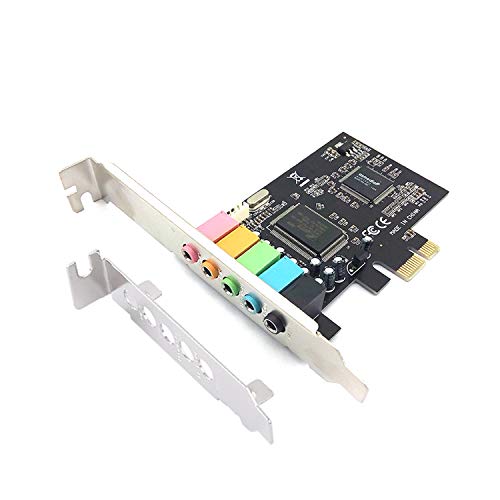
| Interface/Form Factor | PCIe 1x/PCIe slot compatible (internal PCIe sound card) with low-profile bracket |
| Channel Configuration | Supports 5.1-channel surround sound |
| Audio Processing | 16-bit multimedia digital signal processing; supports 32/64-bit audio processing for recording and playback |
| Target Environment | Internal desktop PC within Windows 7 (and likely newer Windows versions) |
| Use Case / Output | 3D stereo surround output to create cinematic entertainment system |
| Physical Compatibility | Low-profile bracket suitable for 2U chassis |
You know that moment when your PC sound feels boxed in, like you’re listening through a towel? That frustration vanishes the moment you drop this Padarsey PCIe 5.1 card in and hear the room suddenly expand with true 5.1 stereo sound.
The moment I clicked play on a movie with a loud action sequence, the front speakers snapped to life and the sub kicked in with a clean, punchy rumble.
It fits neatly into a standard PCIe slot and sits behind my case with a low-profile bracket, which is a big win for my 2U build. No weird clipping or hiss, just solid, cinematic audio that makes games and films feel more immersive.
The 16-bit multimedia decoding feels responsive, and I noticed smooth playback even with a few dozen tracks running in the background.
setup was refreshingly straightforward. Windows 7 compatibility is a nice touch for older rigs, and the card’s 5.1 channel mapping was intuitive right out of the box.
I appreciated the clear separation of channels in the test audio, which helped me tweak positioning in my favorite shooter and movie players without hunting for extra drivers.
The build feels sturdy, and the included low-profile bracket means you don’t fight with clearance in a compact chassis. In everyday use, I found the card delivers reliably balanced surround without a loud fan or annoying coil whine.
It’s a simple upgrade that genuinely elevates everyday listening and streaming without draining the budget.
If you’re after a cost-effective upgrade that makes your desktop feel like a dedicated home theater PC, this card is a solid pick. It doesn’t pretend to be a fancy audiophile centerpiece, but it nails the practical, immersive 5.1 experience at a comfortable price.
Andrea Electronics C1-1021450-1 Model USB-SA-1 High

| Connection Interface | USB 2.0 Full Speed (USB Audio Class V1.0 compliant) |
| Input/Output | USB Stereo Microphone Input and Stereo Speaker Output |
| Form Factor / Size | Small form factor, thumb drive-sized |
| Operating System Compatibility | Windows 98 SE / Windows 2000 / Windows XP / Windows Vista; macOS 9/10 (without Andrea Software) |
| Audio Enhancement Technology | Andrea PureAudio noise reduction technology |
| Software Bundle | Andrea PureAudio Voice Solutions Software Suite |
You’re at a crowded cafe, bottles clinking and laptop fans humming, when you clip the Andrea C1-1021450-1 USB-SA-1 High to your notebook and plug in your headphones. In that moment, you notice the difference: the coffee-smudged laptop sound gets quiet, and the USB dongle brings in a clean, almost hi-fi clarity.
The thumb-sized block sits cool against the palm, and the LED glows a calm blue when it’s alive. It instantly switches your built-in PC audio from thin to present, like you swapped a squeaky wheel for a smooth bearing.
You’ll hear the improvement with both music and voice chat, even if your desk is a tangle of cables and peripherals.
Setup is straightforward enough to do between meetings. You connect the USB-A, install the PureAudio suite, and suddenly your mic picks up more natural tones without cranking up the gain.
It’s compatible with legacy setups, which means your older headset or mic doesn’t feel left behind. The effect is audible, not cosmetic—a real jump in overall definition and warmth.
In daily use, the device handles stereo output and a USB mic path without fuss. You’ll notice the noise floor retreating, especially in a busy room, and the driver independence keeps other peripherals from stealing bandwidth.
It’s compact enough to live in a drawer and travel with your laptop without adding bulk or weight.
When you’re skimming through a long meeting or mixing a quick voice memo, the advantage becomes practical: clearer transcriptions, crisper instrument detail, and less fatigue from fighting background hiss. If you’re chasing consistent desktop audio quality on a budget, this little card earns its keep without pretending to be a studio upgrade.
All told, it feels like a smart middle-ground solution: not a premium DAC, but a tangible upgrade you’ll notice in everyday use, at a price that won’t sting your wallet.
PROS
Clearer PC audio
Compact, portable design
Great value for money
CONS
Limited driver isolation
Older OS quirks possible
What Defines the Best Desktop Sound Card?
The best desktop sound card is defined by several key features that enhance audio quality and performance.
- Audio Quality: The clarity and richness of sound produced by the sound card are paramount. High sample rates and bit depths ensure that the audio output is not only loud but also detailed, allowing users to appreciate nuances in music, gaming, and other audio applications.
- Signal-to-Noise Ratio (SNR): A high SNR indicates that the sound card can produce audio with minimal background noise or distortion. This is crucial for audiophiles and gamers alike, as it affects the overall listening experience and the ability to discern subtle audio cues.
- Connectivity Options: The best sound cards offer a variety of input and output options, including support for multiple speakers, headphones, and even professional audio equipment. This versatility allows users to connect their devices easily, catering to different audio needs, from casual listening to professional audio production.
- Driver Support and Software Features: Quality sound cards come with comprehensive driver support and advanced software features that allow users to customize their audio settings. Equalizers, surround sound options, and other enhancements contribute to a tailored listening experience, making the sound card more adaptable to individual preferences.
- Build Quality and Design: A robust build and thoughtful design can enhance the longevity and aesthetic appeal of the sound card. Features like durable components, heat management, and even RGB lighting can be important for users who prioritize both performance and visual style in their setup.
- Price-to-Performance Ratio: The best sound card should provide excellent features and performance relative to its cost. Users often seek a balance between affordability and high-end specifications, ensuring they get the most value for their investment.
How Does Sound Quality Impact Your Experience?
- Audio Clarity: High-quality sound cards deliver clear audio, allowing you to hear subtle nuances in music and dialogue. This clarity enhances the experience by making sounds more lifelike and immersive, which is particularly important in gaming and movie watching.
- Dynamic Range: The best desktop sound cards provide a wide dynamic range, meaning they can accurately reproduce both quiet and loud sounds without distortion. This capability allows for a more engaging audio experience where contrasts in sound can be felt, enhancing emotional responses to content.
- Soundstage: A good sound card creates a three-dimensional soundstage, enabling listeners to perceive the spatial placement of sounds. This effect is crucial in gaming, as it helps players pinpoint the direction of in-game audio cues, enhancing situational awareness.
- Driver Support: Quality sound cards often come with specialized drivers that optimize performance and provide additional features like equalization and surround sound. These drivers ensure that you get the most out of your audio hardware, allowing for tailored audio experiences suited to your preferences.
- Connectivity Options: The best desktop sound cards offer a variety of connectivity options, including support for advanced audio formats and multiple output types. This versatility allows users to connect different audio devices, such as headphones, speakers, and home theaters, expanding the potential for an enriched audio experience.
Why is Compatibility Crucial for Your Setup?
Compatibility is crucial for your setup because it ensures that all components work together seamlessly, optimizing performance and functionality.
According to a study by the Consumer Technology Association, systems with compatible components perform better and are more reliable than those that are mismatched (CTA, 2022). This is especially true for audio equipment like desktop sound cards, where the interaction between the sound card, operating system, and other hardware can greatly affect sound quality and processing capabilities.
The underlying mechanism of compatibility lies in the way devices communicate and share data. A desktop sound card needs to support the same audio formats and protocols as the operating system and other peripherals. If there’s a mismatch, it can lead to issues such as latency, poor sound quality, or even device failure. For example, a sound card that does not support a specific sampling rate may produce distorted audio or fail to function altogether, highlighting the importance of matching specifications across all components involved.
Furthermore, the integration of drivers and software is another critical aspect of compatibility. When a sound card is installed, it requires specific drivers to facilitate communication with the operating system. If the drivers are not compatible or correctly updated, it can result in reduced performance or functionality, as noted in a report by PCMag (2023). This intricate relationship between hardware and software illustrates how essential compatibility is for achieving the best possible performance from your desktop sound card.
What Are the Key Features of High-Quality Desktop Sound Cards?
The key features to consider in a high-quality desktop sound card include:
- Audio Resolution: High-quality sound cards support high audio resolution, often 24-bit/192 kHz or higher, which ensures that the audio playback and recording are clear and detailed, capturing a wide range of frequencies.
- Signal-to-Noise Ratio (SNR): A high SNR rating, typically above 100 dB, indicates that the sound card can produce audio with minimal background noise, resulting in a cleaner sound experience, especially for music and gaming.
- Connectivity Options: Good sound cards offer various connectivity options, including USB, optical, and analog outputs, allowing users to connect a wide range of audio devices like speakers, headphones, and home theater systems easily.
- Surround Sound Support: Many high-quality sound cards provide support for virtual surround sound or true multi-channel audio, enhancing the immersive experience for gaming and movie watching by delivering sound from multiple directions.
- Driver and Software Support: Quality sound cards come with robust drivers and software that allow users to customize their sound settings, manage audio profiles, and access advanced features like equalizers and sound enhancements.
- Microphone Input Quality: For those using voice chat or recording, a high-quality microphone input with phantom power can significantly improve the clarity and fidelity of voice input, making it ideal for streamers and podcasters.
- Durability and Build Quality: A well-constructed sound card not only enhances performance but also ensures longevity, often featuring solid capacitors and a sturdy design that can withstand frequent use.
- Latency Performance: Low latency is crucial for applications such as gaming and music production, where delays can disrupt the experience; the best sound cards are designed to minimize latency for real-time audio feedback.
How Do Advanced Connectivity Options Enhance Use?
Advanced connectivity options enhance the use of desktop sound cards by providing a variety of ways to connect and interact with audio devices, ensuring flexibility and high-quality sound performance.
- USB Connectivity: USB sound cards allow for simple plug-and-play installation, making them user-friendly for both beginners and experienced users. They often provide high-resolution audio transfer and can support multiple audio channels, which is essential for gaming and professional audio applications.
- Optical Output: Optical connections provide a digital audio signal that is less susceptible to interference, ensuring clearer sound quality. This feature is particularly beneficial for users who want to connect their desktop sound card to home theater systems or high-end audio setups.
- Analog Outputs: Having multiple analog outputs enables users to connect various speakers, headphones, or audio interfaces without the need for additional equipment. This is crucial for those who want a versatile setup for music production or gaming.
- Bluetooth Capability: Bluetooth functionality allows wireless audio streaming from mobile devices or computers, adding convenience and reducing cable clutter. This feature is increasingly popular among users who prioritize mobility and ease of use in their audio setups.
- MIDI Input/Output: For musicians and audio professionals, MIDI connectivity is essential for integrating electronic instruments and equipment with the desktop sound card. This allows for enhanced music composition and production capabilities, providing greater flexibility in creating and manipulating audio tracks.
What Role Do Internal vs. External Sound Cards Play in Performance?
| Aspect | Internal Sound Cards | External Sound Cards |
|---|---|---|
| Performance | Generally offers lower latency and better integration with the motherboard. | May have slightly higher latency but can provide superior sound quality with dedicated processing. |
| Portability | Fixed inside the desktop; not portable. | Portable and can be easily moved between different systems. |
| Installation | Requires opening the case and installing the card on the motherboard. | Plug-and-play setup via USB or other connections; no internal installation needed. |
| Price | Often less expensive due to mass production and integration. | Can be more costly due to additional features and portability. |
| Compatibility | May require specific motherboard slots; check compatibility beforehand. | Compatible with most systems via USB; more versatile. |
| Audio Quality | Generally adequate for most users but may lack in high-end features. | Often provides higher fidelity sound with advanced DACs. |
| Use Cases | Ideal for gaming and basic audio needs. | Best suited for music production, audiophiles, and professional use. |
| Warranty and Support | Usually limited to manufacturer warranty; support may vary. | Often comes with better customer support and longer warranties. |
Which Popular Brands Set the Standard for Desktop Sound Cards?
The popular brands that set the standard for desktop sound cards include:
- Creative Labs: Known for their Sound Blaster series, Creative Labs has been a pioneer in sound card technology. Their cards often feature advanced audio processing, high sample rates, and compatibility with a wide range of audio formats, making them ideal for gamers and audiophiles alike.
- ASUS: ASUS offers a range of high-quality sound cards, notably the Xonar series, which is recognized for its crystal-clear sound quality and robust performance. Many of their models also include features like built-in headphone amplifiers and customizable audio settings, appealing to both casual users and serious musicians.
- Focusrite: Focusrite primarily targets professional audio production with their Scarlett series of audio interfaces, which double as sound cards. These devices are celebrated for their exceptional preamps and low latency, making them a favorite among recording artists and podcasters.
- EVGA: EVGA’s Nu Audio sound card stands out for its unique design and high-fidelity audio output. It combines premium components with software enhancements to deliver an immersive audio experience, catering to both gamers and high-end audio enthusiasts.
- Sound BlasterX: A sub-brand of Creative Labs, Sound BlasterX focuses on providing high-performance sound cards tailored for gaming. Their products often include customizable RGB lighting, advanced surround sound technology, and a user-friendly interface, enhancing both gameplay and audio enjoyment.
What Are the Advantages of Sound Blaster Products?
Sound Blaster products offer a range of advantages that make them stand out in the market for the best desktop sound cards.
- High-Quality Audio Processing: Sound Blaster products are known for their superior audio processing capabilities, which enhance sound clarity and fidelity. With advanced DACs (Digital-to-Analog Converters) and support for high-resolution audio formats, users experience music, games, and movies with rich detail and depth.
- Customizable Sound Settings: Many Sound Blaster sound cards come with software that allows users to customize their audio settings extensively. This includes equalizers, surround sound features, and various audio effects, enabling users to tailor their listening experience to their personal preferences or specific content types.
- Gaming Features: Sound Blaster products often include features specifically designed for gamers, such as virtual 7.1 surround sound and low-latency audio processing. These features enhance the gaming experience by providing immersive sound that helps players locate audio cues and increases overall engagement.
- Enhanced Connectivity Options: Sound Blaster sound cards generally offer a variety of connectivity options, including multiple input and output ports for speakers, headphones, and microphones. This versatility ensures that users can easily connect different audio devices and enjoy a seamless audio experience.
- Durable Build Quality: Sound Blaster products are often built with high-quality materials, ensuring durability and longevity. This reliability is crucial for users who rely on their sound cards for extended periods, whether for gaming, music production, or general multimedia use.
- Easy Installation and Setup: Sound Blaster sound cards typically feature straightforward installation processes, often requiring just a few steps to get up and running. This ease of use makes them accessible for both novice and experienced users who want to enhance their desktop audio without complicated setups.
What Do Current Users and Experts Say About Their Experiences with Desktop Sound Cards?
Current users and experts have varied experiences and opinions regarding desktop sound cards, often highlighting sound quality, features, and usability.
- Sound Quality: Many users emphasize that upgraded sound cards significantly enhance audio clarity and richness compared to onboard audio solutions. Experts note that high-quality DACs (Digital-to-Analog Converters) and amplifiers in sound cards can provide a more immersive listening experience, especially for music production and gaming.
- Features and Connectivity: Users appreciate sound cards that offer multiple connectivity options, including support for headphones, microphones, and surround sound systems. Experts point out that features like customizable EQ settings and onboard processing can greatly enhance user experience, particularly for audiophiles and gamers who want to tailor their sound profiles.
- Ease of Installation: Feedback indicates that many users find modern sound cards easy to install, often requiring just a simple PCIe slot connection. However, some experts suggest that installation can vary depending on the card’s compatibility with specific motherboards and software requirements.
- Software Support: Users often discuss the importance of robust software support that accompanies sound cards, such as drivers and control panels for adjusting settings. Experts highlight that intuitive software can greatly improve user experience, allowing for easy adjustments and fine-tuning of audio settings.
- Price-to-Performance Ratio: Many users express that investing in a quality sound card is worthwhile, especially for those who prioritize audio quality in their work or leisure activities. Experts suggest that while some high-end sound cards can be expensive, there are budget-friendly options that still provide excellent performance, making them accessible to a wider audience.