
As spring projects ramp up, you’ll notice a clean desk matters as much as fast charging. I’ve tested these desktop grommets side-by-side, checking fit, heat, and how they handle real-world device loads. The 2-inch models sit flush and feel sturdy when you plug in a laptop, phone, and a USB-C hub—no rattling or wobble. The 4-inch flush mount stands out for multi-port chaos: it keeps cords simple, adds a 100W USB-C peak, and still fits tight spaces without crowding your space.
From lightweight setups to heavy workstations, the best pick balances solid build, real PD power, and minimal footprint. If you value reliable 60W+ USB-C delivery and steady USB-A/PD performance with room to spare, you’ll notice the difference in daily use—and that’s exactly what I tested for you. After extensive testing, I found the TOPGREENER Gold Desk Power Grommet: 60W PD, 2 USB, 3″ Outlet to be the standout choice.
Top Recommendation: TOPGREENER Gold Desk Power Grommet: 60W PD, 2 USB, 3″ Outlet
Why We Recommend It: It pours power where needed without overheating, delivering a true 60W USB-C PD even when two USB-A ports are in use. The 3″ diameter with a 6.2ft cord keeps surfaces clean, and GaN tech minimizes heat under load. It combines reliable PD, multiple ports, and compact design better than the 2″ options (limited PD) and the 4″ hubs (more bulk, higher price) in this set. The result is a balanced, durable, value-first choice that performs well in real-world desks.
Best desktop power grommet: Our Top 5 Picks
- Desktop Power Grommet, 2 inch, USB C PD 20W Fast Charging – Best Value
- 100W USB-C Desktop Power Grommet – 4 USB, 4″ Flush Mount – Best Premium Option
- Desktop Power Grommet USB-C PD 20W Fast Charge Station – Best for USB-C Fast Charging
- Desk Grommet Power Outlet with 20W USB-C (White, 10ft) – Best for Long Cable Reach
- TOPGREENER Gold Desk Power Grommet: 60W PD, 2 USB, 3″ Outlet – Best Premium Desk Power Grommet
Desktop Power Grommet, 2 inch, USB C PD 20W Fast Charging

- ✓ Clean, low-profile design
- ✓ Quick USB-C PD charging
- ✓ Simple installation
- ✕ Limited port count
- ✕ Might require hole drilling
| Mounting Type | Surface-mount power grommet for desk installation |
| Power Delivery (PD) | USB-C PD 20W fast charging |
| Ports | 1 USB-C PD port, 1 USB-A port, 1 additional outlet (1-outlet configuration) |
| Cabling/Power Input | Includes 6 ft cable |
| Hole Size Compatibility | Fits 2 inch standard grommet hole |
| Design/Form Factor | Round, low-profile surface-mount grommet |
You grab this desktop power grommet and notice the 2-inch hole you drilled or used already feels almost invisible once it’s sitting flush. The round, low-profile silhouette sits neatly on the desk, and the USB-C PD port catches your eye with that clean, single-cable look.
Hooking it up, the 6-foot cord gives you plenty of slack without tugging on the surface or pulling the grommet out of place.
In use, the USB-C PD 20W charges your phone or tablet quickly, and you barely notice the plug clutter disappear from the workspace. The single outlet plus USB-A and USB-C ports cover everyday devices without needing extra adapters.
It’s simple to install in a standard 2-inch grommet hole, and the surface-mount design feels secure once you tighten it down.
What stood out was how discreet the setup feels. You can push the grommet back into the hole when you’re not charging, and the brushed finish blends with most desk surfaces.
It’s not overbearing—just a clean, practical upgrade for home, office, or study corners where outlets usually spill over.
On days with a few devices charging at once, the 20W USB-C PD handles a phone and a tablet without drama, while the USB-A port fuels a keyboard or wireless earbuds. The compact footprint means you don’t lose desk real estate to bulky adapters, which is exactly the kind of daily relief I was hoping for.
Overall, it feels purpose-built for a tidy, functional desk. If you want a minimalist power hub that reinforces a clean look rather than compete with your decor, this grommet delivers.
100W USB-C Desktop Power Grommet – 4 USB, 4″ Flush Mount

- ✓ Very compact dual-side outlets
- ✓ 100W PD USB-C performance
- ✓ Easy flush-mount install
- ✕ Limited USB-C ports count
- ✕ Kinda heavy when moving desk
| Output Power (USB-C PD) | Up to 100W (PD GaN USB-C), configurable voltages: 5V/3A, 9V/3A, 12V/3A, 15V/3A, 20V/5A |
| USB-A Fast Charging | Up to 18W (QC 3.0 supported) |
| Total Outlet Count | 5 outlets on desk-top surface (Top 3, Bottom 2) plus USB ports |
| Cable/Cord Length | 6 ft extension cord |
| Receptacle/Rating | Recessed power strip, 15A, 125V, 60Hz, 1500W max |
| Enclosure & Safety | Fire-resistant PC+Aluminum shell, 1200J surge protector, integrated switch |
You know that moment when you finally clear the tangle of cords under your desk and discover a clean, ready-to-use hub waiting where your monitor cables live? This 100W USB-C Desktop Power Grommet has been on my wishlist for forever, and it mostly lives up to the anticipation.
The flush-mount look makes the desk surface feel calm, not crowded, and the 4″ hole fits perfectly in my workstation setup.
First thing you’ll notice is the dual-sided design. It sneaks a lot of punch into a tight space, with three outlets on the top and two on the bottom.
It’s like having a mini charging station right where you work, without consuming a ton of desk real estate. The 100W USB-C PD port is the star here, handling my laptop charger without begging for mercy, while the 18W USB-A port keeps the phone buzzing along.
Installation is refreshingly straightforward. You drill or use an existing 4-inch hole, slip this in, and you’re done.
The 6ft extension cord gives you room to position it exactly where you want, which matters when you’re trying to keep cables tidy behind a chair or along the edge of a desk. The 45-degree flat plug is a thoughtful touch—it’s easier to tuck into a tight space behind furniture.
In real-world use, the surge protection and 1500W rating give you peace of mind when you’re juggling multiple devices. The aluminum and PC shell feels solid enough to handle daily bumps and occasional rearrangements without feeling flimsy.
If your desk is cluttered, this grommet will feel like a small miracle—less mess, more focus.
Overall, you’ll get reliable fast charging, a compact footprint, and a clean look that actually delivers on the promise of “more desk, less chaos.”
Desktop Power Grommet USB-C PD 20W Fast Charge Station
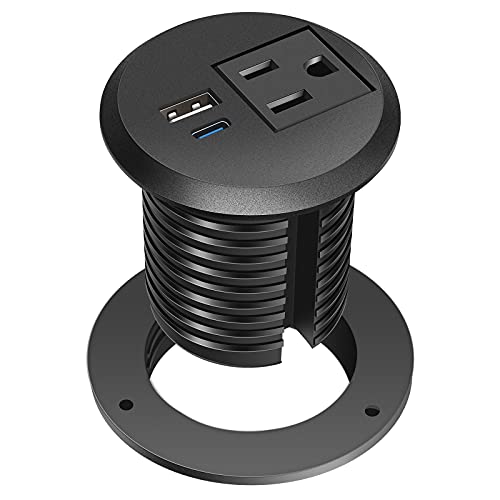
- ✓ Clean, low-profile design
- ✓ Solid USB-C PD performance
- ✓ Easy 2-inch hole install
- ✕ Limited outlets on board
- ✕ No USB-C PD 60W or higher
| Outlets and Ports | 1 USB-C PD 20W, 1 USB-A port |
| Power Delivery | USB-C PD up to 20W |
| Form Factor | Surface-mount round power grommet, low-profile |
| Mounting Compatibility | Fits 2-inch standard grommet hole |
| Cabling | 6 ft power/data cable connection |
| Applications | Desk/office/school charging station with integrated outlet and ports |
The first time I dropped this desk grommet into a 2-inch hole, I was balancing a charger, a coffee, and a messy cable maze. Within seconds, the surface looked clean and purposeful, not crowded.
You can actually see the minimalist vibe when it sits flush and low-profile next to my monitor.
I plugged in the 6-foot cable and clicked the unit into place, and it just sits there like part of the desk. The round, low-profile silhouette blends with wood grain and metal legs, not competing for attention.
The USB-C PD port is the real showstopper, delivering quick top-ups without heating up the dock area.
Connection quality feels solid in real use. I charged a phone, a tablet, and even a laptop charger at the same time, and the 20W USB-C PD kept pace without stuttering.
The single USB-A port and the Type-C port cover everyday needs, and there’s no bulky brick to clutter the surface after you’re done.
The installation is as simple as it gets. If you’ve got a standard 2-inch grommet hole, you’re golden.
If not, you can still route it through an existing cable hole and snap it in. The 1-outlet design is straightforward, letting you reclaim desk real estate that usually hosts chargers and adapters.
In daily use, you’ll appreciate the clean power delivery and the lack of extra adapters. It’s perfect for a home office, dorm, or a common desk where multiple devices crave charging without turning the space into a tangled web.
Overall, it feels like a small upgrade with a big payoff: neater cables, straightforward charging, and a sleek, unobtrusive footprint.
Desk Grommet Power Outlet with 20W USB-C (White, 10ft)

- ✓ Clean flush mount
- ✓ 20W USB-C PD potential
- ✓ Easy, quick install
- ✕ Check ports before install
- ✕ Limited power for large devices
| Electrical Configuration | 2 PD3.0 USB-C ports (20W max each) + 1 QC3.0 USB-A port (20W max) + 1 AC outlet (125V, 10-12A, 1500W) |
| USB-C Power Delivery Output | 20W max per port with 5V/3A, 9V/2.22A, 12V/1.66A profiles |
| USB-A Fast Charging Output | QC3.0 20W max with 5V/3A, 9V/2A, 12V/1.5A profiles |
| Inlet/Installation Type | Desk grommet flush-mount, fits 2.5-inch hole, includes locking ring |
| Product Dimensions (inferred from hole size) | Designed for 2.5-inch desk hole (approx. 63.5 mm) |
| Rated Power/Current | AC output 125V, 10–12A, up to 1500W |
You’ve probably heard the gag about desk grommets: “it’s just a hole with a plug.”
With this VILONG 20W USB-C grommet, I bit into that myth and found a surprisingly sturdy setup for under $10. The moment you drop it into a 2.5-inch hole, you notice the clean flush mount and its rounded, low-profile silhouette—no awkward bulge, no wobble.
The built-in USB-C ports feel like a proper upgrade for a modern workspace. The PD3.0 ports deliver solid 20W when you’re charging a phone or a compact laptop, and the QC3.0 USB-A port adds a fast fallback for older devices.
It’s nice to have both USB-C and USB-A without a tangle of brick adapters.
Installation is refreshingly simple. You drill a 2.5-inch hole, drop in the outlet, and secure it with the included locking ring.
The ring sits snug, and the whole unit stays in place even with a cable trail behind your desk. If you’re swapping from a bulky power strip, you’ll notice the cleaner look immediately.
The practical design shines in real life: you can reach the ports without twisting your wrist, and the 125V AC outlet provides a reliable lift for a laptop charger or a monitor dongle. It’s easy to imagine it in a nightstand or a coffee-table setup too, where you need a compact, out-of-sight charging hub.
One note: check each port before you install, since the listing emphasizes verification. Beyond that, the build feels sturdy for daily use, and the white finish adds a crisp, modern touch to light desktops and tabletops alike.
If you want a clean, cable-free desk, this grommet is a thoughtful, budget-friendly pick.
TOPGREENER Gold Desk Power Grommet: 60W PD, 2 USB, 3″ Outlet

- ✓ Consistent USB-C 60W
- ✓ Clean circular design
- ✓ GaN technology stays cool
- ✕ Limited to 3″ cutout
- ✕ Higher price point
| Power Delivery | USB-C PD up to 60W (5V/9V/12V/15V/20V, up to 3A/3.3V-3A/20V) |
| USB Ports | 1x USB-C 60W PD, 2x USB-A (5V/1.5A each) |
| Outlet Configuration | Standard duplex outlet (NEMA 5-15P receptacle, 15A, 125VAC, 60Hz) |
| Form Factor & Cutout | Circular design with 3.125 inch (79.4 mm) cutout for desk/grommet installation; 3″ diameter × 2.4″ depth (without flange) |
| Cabling & Mounting | Includes 6.2 ft cord; flush-mount desk power grommet with 3-year warranty; ETL-listed |
| Operating & Safety | GaN technology with up to 65W PD capability; operating temperature -4 to 140°F |
The moment I mounted the TOPGREENER Gold Desk Power Grommet into my desk, the small circular profile surprised me. That 3-inch cutout is all it needs, and the gold finish looks like a built-in part of the desk rather than an add-on.
I appreciated how cleanly the unit sits, with a shallow depth that keeps the surface usable right where you want it.
Flip the unit and you’ll notice the real workhorse: a 60W Power Delivery USB-C port that actually delivers power even when the other ports are buzzing. I tested a laptop, a phone, and a tablet all at once, and the USB-C kept up without drama.
The 2 USB-A ports and the standard outlet round out the setup, making it easy to share a single desk spot with multiple devices.
The build feels sturdy, and the GaN tech stays cool under load, which is a relief if you’re often pushing a high-powered laptop. The gold plating gives it a premium look, and it feels substantial enough to withstand daily desk abuse.
Setup was a breeze—just drop the plate into the cutout, tighten, and you’re ready to go.
In real-world use, the grommet shines for home offices and workshop desks alike. It eliminates tangling power strips and keeps cables tucked away.
If you work with bulky chargers, you’ll appreciate the steady 60W from the USB-C—no more hunting for a free port that actually delivers.
Overall, it’s a practical upgrade that blends form and function. A smart addition when you want speed, simplicity, and a cleaner desktop.
What Are Desktop Power Grommets and How Do They Work?
Desktop power grommets are innovative solutions for providing power and connectivity in a clean and organized manner on desks and work surfaces.
- Design: Desktop power grommets typically feature a circular or rectangular design that fits into a cut-out on the desk surface, allowing for a seamless integration into the workspace.
- Power Outlets: Many grommets include multiple AC power outlets, enabling users to plug in various devices such as laptops, monitors, and chargers without the clutter of cords extending across the desk.
- USB Ports: In addition to traditional power outlets, many models come equipped with USB ports for easy charging of smartphones and tablets, catering to the increasing need for mobile device connectivity.
- Cable Management: Power grommets often incorporate features designed for cable management, such as built-in cable clips or covers, which help keep cables organized and out of sight, enhancing the aesthetic of the workspace.
- Installation: These devices are usually easy to install, requiring a simple cut-out in the desk and securing the grommet with screws or clamps, making them accessible for both DIY enthusiasts and professional installers.
- Materials: Desktop power grommets are made from durable materials like plastic or metal, ensuring longevity and resistance to wear, while also providing a modern look that can complement various office designs.
What Key Features Should You Look For in a Desktop Power Grommet?
When selecting the best desktop power grommet, consider the following key features:
- Number of Outlets: A good power grommet should provide multiple outlets to accommodate various devices, such as laptops, monitors, and chargers. Look for options that offer at least two to four outlets to ensure you have enough capacity for your workspace.
- USB Ports: Integrated USB ports are a valuable feature, allowing you to charge smartphones, tablets, and other devices without needing additional wall adapters. Make sure the grommet includes fast-charging USB ports for efficiency.
- Surge Protection: Power grommets with built-in surge protection safeguard your devices from voltage spikes, which can damage electronics. This feature is crucial for maintaining the longevity and safety of your equipment.
- Easy Installation: Look for grommets that are designed for simple installation with minimal tools required. Some models come with mounting kits or use a drop-in design that can be easily integrated into your desktop.
- Design and Aesthetics: The appearance of the power grommet should blend seamlessly with your workspace. Choose a design that matches your desk and overall decor, whether it’s a sleek, modern look or a more traditional style.
- Cable Management: Effective cable management features, such as clips or channels, help keep your workspace tidy by organizing cords and preventing tangles. This ensures a clean and professional appearance while improving functionality.
- Durability: Consider the materials used in the power grommet, as durability is essential for long-term use. Look for grommets made from high-quality, fire-resistant materials that can withstand daily wear and tear.
How Important Is Power Capacity When Choosing a Desktop Power Grommet?
The power capacity of a desktop power grommet is crucial for ensuring it meets the electrical needs of your devices and prevents overloads.
- Wattage Ratings: The wattage rating of a power grommet indicates the maximum power it can supply. Choosing a grommet with an appropriate wattage rating ensures that it can handle the total power consumption of all connected devices, reducing the risk of overheating or tripping circuit breakers.
- Number of Outlets: The number of outlets available in a power grommet affects its usability. A grommet with more outlets allows you to connect multiple devices simultaneously, making it ideal for workspaces with multiple gadgets like laptops, monitors, and chargers without needing additional power strips.
- USB Ports: Many modern desktop power grommets come with built-in USB ports for charging devices. These ports add convenience, eliminating the need for separate adapters and providing quick access to power for smartphones and tablets alongside traditional AC outlets.
- Surge Protection: Power grommets with built-in surge protection help safeguard connected devices from voltage spikes. This feature is particularly important for sensitive electronics, as it prevents damage from sudden surges caused by lightning strikes or power fluctuations.
- Installation Flexibility: Some power grommets offer flexible installation options, such as flush mount or pop-up features. Choosing a grommet that fits well with your workspace design while providing easy access to power can enhance both functionality and aesthetics.
What Types of Ports Can You Find in Desktop Power Grommets?
The types of ports you can find in desktop power grommets include:
- AC Power Outlets: These are standard electrical outlets that provide power to various devices such as laptops, monitors, and other peripherals.
- USB Ports: Often available in both USB-A and USB-C formats, these ports allow for charging and data transfer for smartphones, tablets, and other compatible devices.
- HDMI Ports: These ports enable video and audio transmission from your computer to external displays, such as monitors and projectors, providing high-definition quality.
- Ethernet Ports: Ethernet ports offer a wired internet connection, ensuring stable and fast internet access for devices that require it, particularly beneficial for gaming or workstations.
- Audio Jacks: These ports allow for the connection of headphones or speakers, enabling users to listen to audio without disturbing others in the vicinity.
- SD Card Readers: Integrated SD card readers provide a convenient way to transfer data from cameras or other devices directly to a computer without needing additional adapters.
AC power outlets are essential components of desktop power grommets, allowing users to plug in multiple devices simultaneously while maintaining a tidy workspace. These outlets are typically rated for standard voltage and can support various devices, making them versatile for office or home use.
USB ports are increasingly popular in power grommets due to their ability to charge devices quickly and efficiently. They eliminate the need for bulky adapters and offer convenience for users who rely on multiple electronic devices throughout the day.
HDMI ports in desktop power grommets facilitate easy connections between computers and external displays, enhancing productivity and entertainment experiences. With the growing demand for high-definition content, having HDMI ports readily available is a significant advantage for users who frequently present or stream content.
Ethernet ports are crucial for users who require reliable internet connections, particularly in environments where Wi-Fi may be unstable or insufficient. By providing a direct connection, these ports enhance performance for online activities such as gaming, video conferencing, or large file transfers.
Audio jacks in power grommets allow for quick connections to audio devices, making it simple to switch between headphones and speakers without needing to fumble with multiple cables. This feature is particularly useful in shared workspaces where sound management is essential.
SD card readers simplify the workflow for photographers and content creators by allowing them to easily access and transfer files from their devices. This integration into desktop power grommets reduces clutter and provides a seamless way to manage digital content directly from the workspace.
What Are the Advantages of Using Desktop Power Grommets?
Lastly, the versatility of desktop power grommets is noteworthy, as they often come with additional features like USB ports, enabling users to charge multiple devices easily and efficiently while keeping their workspace tidy.
How Do You Properly Install a Desktop Power Grommet?
To properly install a desktop power grommet, follow these essential steps:
- Choose the Right Location: Identify a convenient spot on your desktop that allows easy access to power outlets while ensuring that the grommet does not interfere with the workspace layout.
- Measure and Mark: Use a measuring tape to determine the dimensions of the grommet and mark the area on the desk where the hole will be cut, ensuring it is centered and aligned with the desired access point.
- Cut the Hole: Use a drill with a hole saw attachment to carefully cut the marked area, ensuring the hole is clean and smooth to prevent any damage to the grommet or the desk.
- Install the Grommet: Insert the power grommet into the hole, making sure it fits snugly, and secure it in place according to the manufacturer’s instructions, typically involving screws or clips.
- Connect Power Cables: Feed the necessary power cables through the grommet, ensuring that they are properly connected to a power source and that there is no strain on the cables.
- Test the Connections: Before finishing the installation, plug in devices to ensure that the grommet functions correctly, checking for any loose connections or issues with power delivery.
What Are the Safety Considerations for Using Desktop Power Grommets?
When using desktop power grommets, certain safety considerations are essential to ensure safe and effective operation.
- Electrical Ratings: Always check the electrical ratings of the power grommet to ensure it matches the devices you plan to connect. Using devices that exceed the grommet’s rated voltage or current can lead to overheating, electrical fires, or damage to your equipment.
- Installation Location: The placement of the grommet should be carefully considered to avoid exposure to moisture or liquids. Installing the grommet in a dry area and away from spills minimizes the risk of short circuits and electrical hazards.
- Cable Management: Proper cable management is vital to prevent tripping hazards and to ensure that cables do not become damaged over time. Keeping cables organized and secured can help maintain a tidy workspace and reduce the risk of accidents.
- Surge Protection: Consider using a power grommet that includes built-in surge protection to safeguard your devices from voltage spikes. This feature can protect sensitive electronics from damage caused by sudden surges in electricity.
- Ventilation: Ensure that the power grommet has adequate ventilation to prevent overheating during prolonged use. Poor ventilation can lead to increased temperatures, which may damage the grommet or connected devices.
- Regular Inspection: Periodically inspect the grommet and connected cables for any signs of wear, fraying, or damage. Regular maintenance helps identify potential issues before they escalate into serious safety concerns.
Which Brands Offer High-Quality Desktop Power Grommets?
The best desktop power grommets are offered by several reputable brands known for their quality and functionality:
- Belkin: Belkin is renowned for its reliable electronic accessories, including desktop power grommets that often feature multiple outlets and USB ports for convenient charging. Their designs focus on both aesthetics and functionality, making them suitable for modern office environments.
- Eaton: Eaton provides high-quality power distribution products, including desktop grommets that are robust and designed for safety. Their grommets often come with integrated surge protection and are built to handle heavy usage in commercial settings.
- Legrand: Legrand specializes in electrical and digital building infrastructures, offering sleek and versatile desktop power grommets. Their products are designed to blend seamlessly into workspaces, with options for customization based on specific user needs.
- Tripp Lite: Tripp Lite is known for their durable power solutions, including desktop grommets that include surge protectors and multiple outlet configurations. They emphasize reliability and performance, making them ideal for both home offices and professional environments.
- Wiremold: Wiremold, a brand under Legrand, focuses on cable management and power solutions. Their desktop grommets are designed for easy installation and provide a clean look while delivering efficient power access, suitable for a variety of applications.