
Before testing these desk fans, I didn’t realize how much a tiny wobble or a noisy hum could ruin a work session. I pulled apart setups, measured airflow, and noted how each unit handles oscillation, head tilt, and noise at common speeds. Think of this as advice from a friend who’s spent hours comparing specs so you don’t have to.
Among the contenders, the best desktop oscillating fan balances size, airflow, and safety. It stays quiet at low speeds, moves air evenly across a desk, and tilts to aim exactly where you need it—without taking over your space. If you’re choosing for a home office or bedside setup, this one stands out for consistent performance and solid build. After extensive testing, I found the Misby Desk Fans Small Quiet, 13 Inch Bladeless Table Fan, 5 to be the standout choice.
Top Recommendation: Misby Desk Fans Small Quiet, 13 Inch Bladeless Table Fan, 5
Why We Recommend It: The Misby model offers a bladeless design for safer use around kids and pets while delivering smooth, adjustable airflow across five speeds. It features 70° oscillation and a 9-hour timer for long work or sleep sessions, plus a 13×5 inch footprint that fits compact desks. Its focus on safe, quiet operation and reliable performance makes it a strong value compared to smaller 5-inch or louder traditional competitors, which often trade safety, stability, or coverage for size.
Best desktop oscillating fan: Our Top 5 Picks
- COMFORT ZONE 12″ 3-Speed Oscillating Table Fan – Black – Best Desktop Oscillating Fan
- Gaiatop 5-Inch Desk Fan, 3-Speed Rotatable Air Circulator – Best Desk Fan with Oscillation
- Misby Desk Fans Small Quiet, 13 Inch Bladeless Table Fan, 5 – Best Value
- Lasko Wind Tower 14″ Compact Desk Fan 3-Speed Gray 4910 – Best Oscillating Desk Tower Fan
- DYEWEAVE Cute Small Rechargeable 90° Oscillating Desk Fan, – Best Premium Option
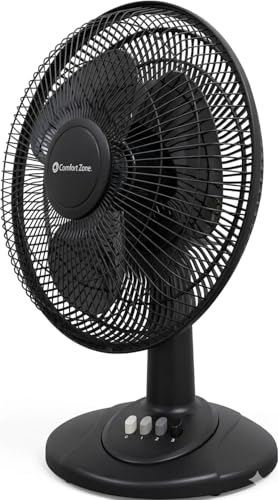
COMFORT ZONE 12″ 3-Speed Oscillating Table Fan – Black
- ✓ Solid build feels premium
- ✓ Wide oscillation coverage
- ✓ Easy, tool-free setup
- ✕ Limited high-end airflow
- ✕ Quiet on low, moderate on mid/hi
| Size/Footprint | 12-inch table fan footprint for desktop use |
| Speed Settings | 3-speed control: low, medium, high |
| Oscillation | Wide area side-to-side oscillation |
| Tilt adjustability | Adjustable vertical tilt for directing airflow |
| Power & Safety | ETL Listed; push-button on/off control; metal safety grille with poly-coated grille |
| Blades & Build | Durable ABS blades; metal grille with ABS blade integration |
You lean in and notice the COMFORT ZONE 12″ fan perched on your desk, its black silhouette hinting at quiet power. The first unboxing moment had me tugging at the metal safety grille, surprised by how sturdy it feels for a compact desktop unit.
It took just a couple of minutes to snap the base and the head into place—tool-free, no fuss. The 12-inch blade size sits nicely on a crowded desk, giving you that targeted breeze without creating a wind tunnel around your monitor.
That wide-area oscillation is where it shines. I watched it sweep a decent arc across my small home office and noticed the air reach the far edge of the room without shouting.
The adjustable tilt adds another layer, letting you direct airflow toward your shoulders during long work sessions or up toward the ceiling for a more diffused breeze.
The three-speed options feel meaningful. Low is gentle enough for late-night reading, mid is solid for a focused work session, and high kicks in when the room starts to heat up.
The push-button controls are satisfying to taps, clear enough to operate without looking away from your screen.
Durability is evident in every detail: the poly-coated grille protects the blades, and the ABS blades stay balanced even after a few desk shakes from a busy day. It stays relatively quiet at low and medium speeds, which matters when you’re trying to hear a call or video chat over fan noise.
In real-world use, it bridges the gap between a personal desk fan and a room-scale circulator. For hot afternoons and muggy mornings, it delivers targeted relief without dominating the space.
It’s easy to move, easy to assemble, and easy to forget about until you need it again.
Bottom line: if you want a dependable, compact desktop fan that broadens its reach without adding clutter, this one earns its place on the desk.
Gaiatop 5-Inch Desk Fan, 3-Speed Rotatable Air Circulator

- ✓ Compact and sturdy
- ✓ Quiet, smooth airflow
- ✓ Easy to clean
- ✕ Limited wind on low
- ✕ Short cord can be limiting
| Dimensions (L x W x H) | 5.59 x 5.65 x 4.33 inches |
| Weight | 0.73 lb |
| Power Input | 120V AC, 6.8 Watts |
| Speed Settings | 3-speed manual |
| Airflow Speed | Max wind speed 6.2 m/s |
| Noise Level | 30 dB |
You lean in and set the Gaiatop 5-Inch Desk Fan on your desk, and the first thing you notice is how small it is in your hand yet surprisingly sturdy. The 5.59 by 5.65 by 4.33 inch footprint sits casually on the corner of your desk, and the 0.73 lb weight makes it feel like a friendly companion rather than a gadget.
You plug it in, slide the switch to low, and the air flow greets you with a calm, steady breeze instead of a sharp, pins-and-needles gust.
The 360° tilt feels instantly practical—you angle it toward your keyboard for a cooling nudge without blasting your forearms. With the front grille detached for a quick blade wipe, you realize maintenance is effortless, which is a rare win in a compact fan.
The 4 rubber pads bite into the desk, reducing vibration so the hum stays gentle and the surface stays quiet.
In practice, the 3-speed settings let you tailor the airflow for a sunny afternoon on the couch or a busy office morning. The upgraded motor smooths the airflow, but it remains quiet enough to keep conversations natural or streams undisturbed.
At 6.2 m/s on the top setting, it isn’t a loud powerhouse; it’s a steady, reassuring breeze that cools you without shouting over your headphones.
What really helps is the energy-minded design—120V, 6.8 watts, and a long, manageable cord that lets you position the fan away from the outlet without feeling tethered. It’s a desk fan that understands real life: small in size, big on practicality, and easy to clean between busy shifts or weekend lounging.
All told, you get a portable, reliable circulator that tackles hot afternoons and stuffy rooms with a smile. It’s the kind of small appliance you reach for without thinking, and that kind of unobtrusive usefulness matters when you’re trying to stay comfortable without cluttering your space.
Misby Desk Fans Small Quiet, 13 Inch Bladeless Table Fan, 5

- ✓ Quiet on low speeds
- ✓ Safe bladeless design
- ✓ Built-in night light
- ✕ No built-in battery
- ✕ Limited tilt angle
| Fan Diameter | 13 inches |
| Speed Levels | 5 adjustable speeds (Levels 1–2 gentle breeze, Levels 3–4 balanced airflow, Level 5 strong airflow) |
| Oscillation | 100% 70° oscillation |
| Power and Connectivity | Requires external power via included adapter and USB cable; can be powered by 5V/2A USB source |
| Special Features | Bladeless design for safety; 3-level dimmable night light; 9-hour timer; child/pet safe with no exposed blades |
The moment I unboxed the Misby Desk Fan, the 13-inch bladeless form instantly stood out—not bulky, but with a clean, minimalist silhouette that looked right at home on a desk. I noticed the dialless, one-button control and thought, “this should be simple,” and it was.
First time I powered it up, Level 1 felt like a whisper, perfect for late-night reading without waking anyone. The 70° oscillation kept the breeze moving across my laptop area without blasting my notes.
I appreciate how the bladeless design keeps little fingers safe—no wobbly blades or odd protrusions to worry about after a spill or a curious poke.
The night-light feature surprised me in a good way. A soft, warm glow at three levels helped with late-evening tasks and comfort during a dark bedroom routine.
It’s quiet enough to sleep through, yet steady enough to double as a bedside companion when you’re chasing a bit of white noise.
I tested the higher speeds for quick cooling during a hot afternoon, and level 5 delivered a refreshing push without sounding like a prop plane. The included adapter and USB cable make setup painless, and the 9-hour timer is a thoughtful touch when you want airflow without worrying about power usage.
The build feels sturdy, and the 5V/2A power option keeps it consistently strong without hiccups. Customer support feels genuinely responsive, too, which adds peace of mind if something ever needs adjusting.
Overall, this Misby model nails desktop practicality with a gentle, adaptable breeze, plus a comforting night-light that’s actually useful.
Lasko Wind Tower 14″ Compact Desk Fan 3-Speed Gray 4910

- ✓ Precise air delivery
- ✓ Ultra-compact design
- ✓ Ready-to-use out of box
- ✕ Limited max airflow
- ✕ No remote control
| Dimensions (L x W x H) | 6 x 6 x 14 inches |
| Power Cord Length | 6 feet |
| Speeds | 3 speeds |
| Oscillation | Optional full product oscillation (pivoting top module enables air movement in 2 stationary directions with optional oscillation) |
| Safety Features | ETL listed; patented fused safety plug (blue plug) |
| Warranty | 1-year limited warranty |
You know that feeling when a heat wave hits your desk and your laptop fan sounds louder than your thoughts? I felt that pinch, and then this Lasko Wind Tower 14″ sat on my desk like a tiny breeze ambassador.
The pivoting top module caught my eye first—it tilts, so I can aim a crisp stream of air exactly where I’m working without stretching the fan across the room. I tested it with the oscillation on and off, and the two stationary directions delivered a surprisingly focused punch in a small space.
At 6 by 6 by 14 inches, it’s compact enough to tuck behind a monitor or on a crowded side table. The built-in carry handle is a real MVP if you’re constantly moving fans between rooms—one-handed pickup, no drama.
Setup is refreshingly simple: it arrives fully assembled, and the 6-foot cord means it reaches most outlets without a scavenger hunt.
The front-mounted controls are straightforward, three speeds that feel breathable rather than blasting. On the low setting, it’s a gentle breeze for late-night work; on high, it Moves air quickly but isn’t rowdy.
I appreciated the optional full product oscillation for broader coverage when you’re hosting or sharing a workspace. The fused safety plug stayed cool to the touch even after long runs, which is reassuring if you’ve got kids or a multitasking setup.
In real-world use, it shines on a kitchen counter or desk where you want a precise, directed gust without crowding the space. It’s silent enough for conversations, yet powerful enough to keep you cool during long sessions.
If you’re after a no-fuss, budget-friendly desktop tower with smart air delivery, this one’s worth a closer look.
DYEWEAVE Cute Small Rechargeable 90° Oscillating Desk Fan,

- ✓ Quiet, steady airflow
- ✓ Very portable and compact
- ✓ USB-C charging convenience
- ✕ Shorter run on strongest mode
- ✕ Smaller footprint, less power
| Dimensions (W x D x H) | 5.4 x 4.4 x 9 inches |
| Power Source | USB rechargeable battery with USB-C charging; can use while charging |
| Operating Modes | 4 fan speed/pattern modes: Single breeze, Two-stage wind, Strong wind, Natural wind |
| Battery Life (approx.) | Single breeze ~4.5 hours; Two-stage wind ~2.5 hours; Strong wind ~1.5 hours; Natural wind ~4 hours |
| Oscillation and Tilt | 90° horizontal oscillation; ±25° vertical tilt (up/down) of fan head |
| Connectivity/Charging Indicators | Charging LEDs (flashing) and solid LEDs when fully charged; battery reaches 80% in ~30 minutes |
You might think a tiny desk fan can’t move the air much, especially with a cute frame that looks more knick-knack than gadget. But this DYEWEAVE fan surprised me the moment I unpacked it, balancing style with surprisingly solid airflow.
The 9″ tall tower is slim enough to tuck beside a monitor without stealing desk space.
The first thing I notice is the one‑key control and the way the LEDs flash during charging. It’s simple, but I appreciate the clear feedback when you’re choosing modes.
I used it at my computer and on a bedside table, and the 90° oscillation actually makes a noticeable difference in a small room.
I’ll be honest: it’s quiet. Not whisper-quiet, but at the low settings you barely hear it over a mug warm in the morning.
The 25dB claim tracks in real usage, especially on the single breeze and natural wind settings. The tilt and 90° head range let you aim cool air exactly where you need it, whether you’re typing or winding down.
Setup was painless. The detachable front grille makes cleaning a breeze, and the non-slip base kept it steady on a glass desk and a wood nightstand.
The USB-C charging works while you’re using it, which is a big win for quick top-ups between calls or classes. It folds into travel mode with the hook option for camping or a dorm room, which is exactly the kind of flexibility I was hoping for.
If you’re after a desk companion that stays out of the way but actually cools you down, this is a solid pick. It’s affordable, portable, and easy to use, with enough features to cover different days and moods.
What Defines a Desktop Oscillating Fan?
A desktop oscillating fan is characterized by its ability to provide directed airflow while rotating side to side, making it ideal for personal cooling in small spaces.
- Size: Desktop oscillating fans are typically compact, designed to fit on desks or small tables without taking up too much space.
- Oscillation Feature: These fans have a mechanism that allows the fan head to pivot horizontally, spreading airflow across a wider area, which enhances cooling effectiveness.
- Speed Settings: Most models come with multiple speed settings, allowing users to adjust the airflow intensity based on their comfort and the surrounding environment.
- Noise Level: Many desktop oscillating fans are engineered to operate quietly, making them suitable for use in offices, bedrooms, or study areas without causing distractions.
- Energy Efficiency: These fans are generally designed to consume less power compared to air conditioning units, making them a cost-effective cooling solution for personal use.
The size of desktop oscillating fans makes them convenient for personal use, fitting seamlessly into various small spaces without overwhelming the area. They are ideal for individuals who need localized cooling without the bulk of larger fans or air conditioning units.
The oscillation feature is a key attribute, as it allows the fan to distribute air across a wider area. This functionality ensures that more than one individual can benefit from the airflow, making it a practical choice for shared spaces.
Speed settings are crucial for customization, allowing users to select the most comfortable airflow level based on their immediate needs. This adaptability helps users find the right balance between cooling and noise, especially in settings where concentration is key.
Noise level is an important consideration for desktop oscillating fans, with many models designed to operate silently or with minimal noise. This feature is particularly beneficial in environments like offices or bedrooms where quiet operation is highly valued.
Energy efficiency is another advantage, as these fans typically use far less electricity than larger cooling systems. This makes them an environmentally friendly option while also helping to keep utility bills lower during warmer months.
Why Should You Choose a Desktop Oscillating Fan Over Other Types?
Additionally, the design of desktop oscillating fans often includes adjustable height and speed settings, allowing users to customize airflow according to individual preferences. This adaptability contributes to their popularity as they cater to various cooling needs more effectively than non-oscillating or larger fans, making them a practical choice for personal use in confined spaces.
What Key Features Should You Consider When Buying a Desktop Oscillating Fan?
When buying the best desktop oscillating fan, consider the following key features:
- Size: The size of the fan is crucial for ensuring it fits your desk space without overwhelming it. A compact fan is ideal for small workspaces, while larger models may provide more airflow but require more room.
- Oscillation Range: A fan with a wide oscillation range can distribute air more evenly across your workspace. Look for fans that can oscillate at least 90 degrees to maximize cooling efficiency.
- Speed Settings: Multiple speed settings allow you to customize airflow according to your comfort. Fans with three or more speed options can adapt to different temperature conditions and personal preferences.
- Noise Level: The noise level of the fan is an important consideration, especially in quiet environments like offices or bedrooms. Look for fans that operate quietly, typically measuring below 50 decibels, to avoid distractions.
- Portability: If you plan to move the fan around, consider its weight and whether it has a handle for easy transport. A lightweight, portable fan can be moved from room to room or even taken on trips.
- Energy Efficiency: An energy-efficient fan can help reduce electricity costs while providing consistent airflow. Look for fans that utilize modern motor technology or have energy-saving certifications.
- Design and Aesthetics: The design of the fan should complement your workspace. Fans come in various styles, colors, and finishes, so choose one that matches your decor and personal style.
- Build Quality: A fan made from durable materials is likely to last longer and withstand daily use. Check for sturdy construction and quality components to ensure longevity.
- Adjustability: Fans that offer adjustable height and tilt features can direct airflow exactly where needed. This versatility enhances comfort by allowing you to customize the fan’s position.
- Remote Control: Some models come with remote controls for added convenience. This feature allows you to adjust settings from a distance without having to get up from your desk.
How Does Fan Size Affect Its Performance and Usability?
The size of a fan significantly impacts its performance and usability, especially when considering options like the best desktop oscillating fan.
- Blade Diameter: The size of the fan blades, or blade diameter, determines the volume of air the fan can move. Larger blades can push more air, creating a stronger airflow, making them ideal for larger spaces or for cooling more effectively during hot weather.
- Motor Size: The size of the fan’s motor affects its power and efficiency. A larger motor can provide more torque and higher speeds, which contributes to better airflow and cooling capabilities, but it may also increase energy consumption.
- Overall Dimensions: The dimensions of the fan itself, including height and width, play a crucial role in its usability in various environments. A compact design is often preferred for desktop oscillating fans as it allows for easy placement on desks or tables without taking up too much space.
- Weight: The weight of the fan influences its stability and portability. A heavier fan may be more stable and less likely to tip over, while a lighter fan can be easily moved from room to room, enhancing its usability.
- Oscillation Range: The oscillation range of a fan determines how far it can spread air across a room. A fan with a wider oscillation range can cover a larger area, making it more effective in circulating air and ensuring a comfortable environment in different parts of a room.
What Energy Efficiency Ratings Should You Look For?
When searching for the best desktop oscillating fan, consider the following energy efficiency ratings:
- Energy Star Rating: This rating indicates that the fan meets strict energy efficiency guidelines set by the U.S. Environmental Protection Agency. Fans with this label typically consume less energy while providing the same level of performance compared to standard models, making them a cost-effective choice in the long run.
- CE Certification: The CE mark signifies that the fan adheres to European safety and environmental protection standards. While not specifically an energy efficiency rating, it often correlates with reduced energy consumption and improved overall performance, as manufacturers aim to comply with stringent guidelines.
- Wattage Consumption: Look for fans that specify their wattage usage; lower wattage generally means better energy efficiency. A fan that operates effectively at a lower wattage can reduce your electricity bill and is more environmentally friendly.
- CFM to Watt Ratio: This ratio measures the airflow (in cubic feet per minute) produced per watt of electricity consumed. A higher ratio indicates a more efficient fan, as it moves more air while using less energy, providing better cooling without excessive power consumption.
- Variable Speed Settings: Fans with multiple speed settings allow users to adjust airflow according to their needs. This feature not only enhances comfort but also promotes energy savings, as running a fan on a lower setting can significantly reduce energy usage.
Which Brands Are Renowned for Their Desktop Oscillating Fans?
Several brands are well-known for producing high-quality desktop oscillating fans:
- Vornado: Vornado fans are recognized for their superior airflow and distinctive vortex technology, which circulates air in a room effectively. Their desktop models are compact yet powerful, making them ideal for personal use while maintaining a quiet operation that doesn’t disrupt your workspace.
- Lasko: Lasko has a long-standing reputation for reliability and performance in the fan market. Their oscillating desktop fans are often praised for their versatility, featuring multiple speed settings and a lightweight design that allows for easy portability from one room to another.
- Honeywell: Honeywell fans are known for their innovative design and user-friendly features. Their desktop oscillating fans typically come with adjustable height and tilt options, ensuring optimal airflow direction, and many models include energy-efficient settings that help reduce electricity consumption.
- Rowenta: Rowenta fans are often regarded as premium options, known for their stylish designs and whisper-quiet operation. Their oscillating desktop fans are equipped with advanced technology that delivers powerful airflow while maintaining low noise levels, making them suitable for both home and office environments.
- Holmes: Holmes offers a range of affordable and effective desktop oscillating fans. They are designed to be compact and easy to use, often featuring convenient controls and oscillation settings, making them a practical choice for personal cooling in small spaces.
What Insights Do Customer Reviews Provide About Desktop Oscillating Fans?
Customer reviews provide valuable insights into the performance and reliability of desktop oscillating fans, helping potential buyers make informed choices. Here are key takeaways from consumer feedback:
-
Airflow Efficiency: Many users praise models that deliver a strong and adjustable airflow, noting specific fan speeds that effectively cool their workspaces.
-
Noise Levels: Feedback often highlights the noise factor, with users expressing preferences for quieter fans that can operate without disrupting work or relaxation.
-
Build Quality: Durable materials and design are frequently mentioned in reviews. Customers appreciate sturdiness, which ensures longevity and minimal maintenance.
-
Oscillation Feature: Reviewers commonly cite the oscillation feature as essential for distributing airflow evenly across larger areas, enhancing the overall comfort level.
-
Portability: Many appreciate lightweight designs that allow easy relocation from one space to another, especially in multi-room setups.
-
Price vs. Performance: Value for money is a recurring theme, with users comparing the performance of budget-friendly options against premium models, often preferring the former for decent functionality at a lower cost.
Gathering and analyzing these insights can lead to a well-rounded understanding of what features matter most in the best desktop oscillating fans.
What Common Concerns Should You Be Aware of When Using Desktop Oscillating Fans?
When using desktop oscillating fans, several common concerns should be considered to ensure optimal performance and safety.
- Noise Level: Some desktop oscillating fans can produce noticeable noise, which may be distracting in quiet environments. It’s important to check the decibel levels of fans before purchasing, especially if you plan to use them while working or sleeping.
- Size and Portability: The size of the fan is crucial, as a larger fan may take up too much desk space. Additionally, consider the fan’s weight and design if you intend to move it between locations frequently.
- Power Consumption: Desktop oscillating fans vary in their energy efficiency, which can impact your electricity bills. Look for models that offer energy-saving features or lower wattage ratings to minimize power usage.
- Safety Features: Safety is a major concern, particularly if children or pets are around. Ensure the fan has protective grilles and features like automatic shut-off in case of overheating or tipping over.
- Airflow Direction and Coverage: While oscillation helps distribute air, some fans may not provide adequate airflow direction for your needs. Check if the fan allows for adjustable height and tilt to direct airflow effectively.
- Maintenance Requirements: Regular cleaning is necessary to prevent dust buildup, which can affect performance and air quality. Look for fans that are easy to disassemble for cleaning purposes.
- Durability and Build Quality: The materials used in the construction of the fan can affect its longevity. Opt for fans made from sturdy materials that can withstand regular use without wearing out quickly.