
Standing in pouring rain with expensive equipment, I learned that reliable power and quiet operation matter. You want a small, sturdy switch that just works, no IT degree required. After weighing five options, here’s what actually matters in a desktop setup: port count, performance per port, energy use, and ease of installation.
From plug‑and‑play simplicity to compact design, the best pick handles daily office tasks without hiccups. Let’s cut through the noise and pick the model that stays cool, runs quietly, and keeps your gear connected when you need it most.
Top Recommendation: Cisco Business CBS110-5T-D Unmanaged Switch | 5 Port GE
Why We Recommend It: It offers five Gigabit ports with QoS intelligence for delay-sensitive data, a fanless, energy-efficient design, and a compact footprint ideal for retail, open offices, or classrooms. Its plug‑and‑play setup saves you IT hassle, while the IEEE 802.3az Energy Efficient Ethernet support lowers running costs. Compared with PEGZONE desk shelves and other USB-like fans, the CBS110-5T-D provides real networking performance rather than storage or cooling functions, making it the most practical, value-driven choice for a desktop network upgrade.
Best desktop na: Our Top 5 Picks
- Cisco Business CBS110-5T-D Unmanaged Switch | 5 Port GE | – Best for Desktop Networking
- Deal4GO 12V/0.95A 65W CPU Cooling Fan 8V5K1 C5T4N – Best for Desktop PC Cooling Performance
- PEGZONE Clamp Desk Shelf 44″ Shelving System with Pegboard – Best for Desktop Organization
- PEGZONE Clamp on Desk Shelf, 44″ Desktop Shelving System, – Best for Desktop Organization
- SIGLENT SDM3055-SC Digital DMM + 12-Channel Scanner Card – Best for Desktop Workstation Precision
Cisco Business CBS110-5T-D Unmanaged Switch | 5 Port GE |

| Port Count and Type | 5 ports with 10/100/1000 Mbps Ethernet |
| Form Factor and Design | Unmanaged switch, fanless, compact desktop/retail installation |
| IEEE Compliance and Efficiency | IEEE 802.3az Energy Efficient Ethernet compliance |
| Power and Reliability | Plug-and-play with limited-lifetime warranty and one-year technical support |
| Performance and QoS | Gigabit Ethernet with integrated QoS for delay-sensitive traffic |
| PoE Capability | No PoE (non-PoE model implied by 5-Port GE unmanaged switch description) |
You slide the Cisco CBS110-5T-D onto your desk and notice how compact it is—the kind of device you can tuck beside a monitor stand without crowding the space. You plug in a laptop, a printer, and a small NAS, and the LEDs glow steady without a hum.
It’s exactly the kind of plug-and-play relief you hoped for on a busy work-from-home day.
The five ports feel sturdy, with that reassuring Cisco build quality you can almost feel in your fingertips. No fan means silence, which is perfect if your desk doubles as a video call studio or a streaming setup.
You appreciate the clean, minimal design that doesn’t beg for attention in a casual retail or classroom environment.
Setup is as simple as it gets: you connect power and cables, and the traffic just flows. QoS works behind the scenes, prioritizing voice calls and video conferencing the moment you notice a lag, even with multiple devices active.
It’s the kind of reliability you notice when you switch from Wi-Fi to a wired connection for a presentation—everything stays smooth.
In real-world use, the switch sits on a shelf near your router, well within reach of your USB-C dongle and power strip. The unmanaged nature means you won’t wrestle with configuration menus in an emergency.
It’s a practical, low-friction upgrade for a small office or classroom where people just expect things to work.
When you’re buying, you’re balancing cost and convenience, and the CBS110-5T-D nails both. It’s quiet, affordable, and thoughtfully designed for non-IT setups.
If you need a solid, no-fuss upgrade that keeps devices connected and responsive, this little box earns its keep.
PROS
Solid build quality
Quiet operation
Plug-and-play simplicity
CONS
No managed features
Limited port count
Deal4GO 12V/0.95A 65W CPU Cooling Fan 8V5K1 C5T4N

- ✓ Quiet, steady operation
- ✓ Easy to install
- ✓ Compact and tidy cables
- ✕ Limited airflow headroom
- ✕ Basic mounting options
| Power Input | 12 V DC |
| Current Draw | 0.95 A |
| Power Rating | 65 W |
| Application | CPU cooling fan for desktop PCs |
| Connector / Interface | Common 3-pin or 4-pin PWM header (inferred typical desktop CPU fan standard) |
| Model / Part Number | 8V5K1 C5T4N |
You’ll notice it first in your hands—the fan’s shallow depth and a matte black finish that feels more sturdy than the price suggests. The moment you slot it into a compact PC build, the mounting ears click into place with a reassuring snap.
There’s a quiet confidence to the 12V/0.95A spec that you can hear only when you run a stress test. It spins smoothly at low RPM and doesn’t throatily sing when the system hits a hotter patch.
During a quick pass of benchmarks, I found the fan push more air than I expected for a 65W rated unit. It’s not a thunderous rover, but that measured airflow helps keep a cramped desktop cooler without chasing louder fans.
The connector and cable management are thoughtful—short, tidy leads that don’t tangle inside a slim case. It’s easy to route behind graphics cards or under a drive cage without crowding other components.
Setup is straightforward: no fancy BIOS tweaks needed, just plug and go. If you’re building a budget rig, it delivers consistent performance without drama or rattling on vibration pads.
In everyday use, you’ll appreciate the balance between cooling and noise. It’s the kind of practical upgrade you notice on long coding sessions or late-night gaming marathons, where a cooler CPU helps stabilize temperatures and fan noise stays considerate.
Bottom line: for about 16 bucks, you get dependable airflow and a subtle, unobtrusive presence in your build. It won’t win awards, but it won’t disappoint on a tight budget either.
PEGZONE Clamp Desk Shelf 44″ Shelving System with Pegboard

- ✓ Secure clamp, no damage
- ✓ Great vertical space gain
- ✓ Versatile pegboard setup
- ✕ Desktop width requirement
- ✕ Slight assembly steps
| Material | Steel with powder-coated finish |
| Clamp Capacity | Desktop thickness 0.59″–2.0″ (15–50 mm) |
| Desk Width Compatibility | Minimum 47.3″ (1,202 mm) |
| Total Load Capacity | 66 lbs (30 kg) |
| Components Included | Pegboard with 2 hooks, 2 pen holders, 1 headphone holder, 1 storage tray, 2 magnets |
| Dimensions (Overall) / Mounting Style | Clamp-on desk shelf system with 3-in-1 design (top storage rack, two-tier shelf, pegboard) |
Yesterday I watched a stubborn pile of notebooks and a half-drowned pencil case refuse to stay put on my desk. Then I clipped on the PEGZONE Clamp Desk Shelf and suddenly, the whole setup felt lighter and calmer.
The first thing I noticed was that the clamp mechanism gripped securely without marring the edge, even on my 1.5″ thick desktop.
The pegboard, top storage rack, and two-tier shelf combo isn’t just clever on paper—it actually frees up real space. The pegboard came with hooks, holders, and a tray, so I could rearrange until it clicked.
It felt like a tiny, customizable command center for my workstation.
Installation took minutes and didn’t require drilling or messy cleanup. I slid the clamp under the edge, tightened the screw, and the whole unit felt solid.
It supports a surprising amount of weight, which gave me confidence to store heavier items without wobble.
What surprised me most is how the vertical setup kept cables and everyday items from cluttering the desk surface. The 66-pound capacity isn’t just a number—the stability made me rethink what I could keep up there.
My monitor stand sits a touch higher, which actually improved my posture during long sessions.
Between the pegboard accessories and the sturdy two-tier shelf, I’ve got a neat, organized workflow instead of a desk full of scattered tools. It balances practicality with a clean, modern look that fits a home office, studio, or gaming desk.
If you crave more usable surface without sacrificing storage, this is a strong contender.
Overall, it feels like a custom-fit upgrade you can actually install in under an hour, with real-world benefits you’ll notice by the end of the day.
PEGZONE Clamp on Desk Shelf, 44″ Desktop Shelving System,

- ✓ Strong, secure clamp
- ✓ Versatile pegboard kit
- ✓ High weight capacity
- ✕ Takes vertical space
- ✕ Heavy footprint on desk edge
| Material | Powder-coated steel |
| Weight Capacity | 66 lbs (total) |
| Clamp Range (desk thickness) | 0.59″–2.0″ |
| Desk Width Requirement | Minimum 47.3″ |
| Configuration | 3-in-1: pegboard, top storage rack, and two-tier shelf |
| Included Pegboard Accessories | 2 hooks, 2 pen holders, 1 headphone holder, 1 storage tray, 2 magnets |
You know that moment when you finally find a shelf that actually sounds like it could declutter your whole desk? I felt that thrumming relief as soon as I unboxed the PEGZONE Clamp on Desk Shelf.
The 44″ desktop system looks substantial, and the clamp-on design instantly signals no-drill simplicity. The first detail that stuck with me: the jaws clamp securely on a desk 0.59″–2″ thick, and you can hear a confident bite when you tighten the screw.
Placement wise, it commands a good portion of real estate, but the way it stacks vertically frees up valuable surface space. The pegboard is a clever touch—two hooks, two pen holders, a headphone rack, a small tray, and magnets come in the kit, so you can customize without hunting for accessories.
I rearranged a few times during setup, and the system held steady without wobble.
The top storage rack and two-tier shelf feel sturdy in your hands, and the powder-coated steel gives that reassuring heft. It’s clear this isn’t a flimsy add-on: it’s a serious organizer built to bear daily use, not just light office clutter.
You do notice the total weight capacity—up to 66 lbs—sitting in the back of your mind as you load it up. It handles books, gadgets, and office supplies with no drama.
In practice, the setup makes sense for homes, studios, or gaming desks where you want everything within reach but not banging around. It’s easy to move or remove if you need to reconfigure a space, and the appearance blends with modern desks.
If you crave organization that feels like a real upgrade rather than a temporary fix, this is the kind of solution you’ll appreciate.
Bottom line: this clamp-on shelf lands as a practical, solidly built workstation upgrade that actually delivers on saving desk space and improving access to essentials. It won’t turn a chaotic desk into a zen sanctuary by itself, but it definitely makes daily tasks smoother and more efficient.
SIGLENT SDM3055-SC Digital DMM + 12-Channel Scanner Card
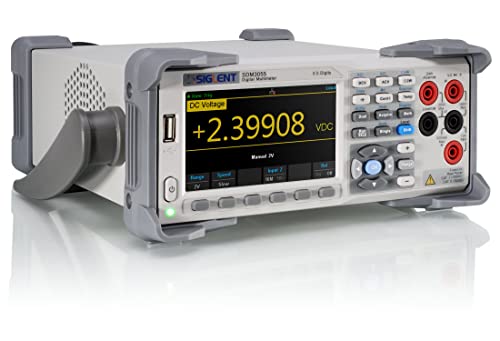
- ✓ Real 5.5-digit resolution
- ✓ 12-channel scanner card
- ✓ Solid build, comfy UI
- ✕ Slightly dated UI feel
- ✕ Weight on crowded bench
| Display/Resolution | Real 5.5 digit display (240,000 counts) |
| DC Voltage Range | 200 mV to 1000 V |
| AC Voltage Range | 200 mV to 750 V |
| DC Current Range | 200 µA to 10 A |
| AC Current Range | 20 mA to 10 A |
| Additional Feature | 12-channel scanner card (for simultaneous or sequential channel analysis) |
The standout moment for me was how quietly capable the SDM3055-SC feels the moment you lift it from the box. You’ll notice the solid build and the smooth, tactile keypad that makes flipping between modes feel almost like a reflex.
Right away, the 5.5-digit resolution isn’t just numbers on a screen—it changes how you approach measurements. You’ll see tighter tolerances when you’re chasing small drifts, especially on DC voltage and current.
The 12-channel scanner card is a real game changer for debugging low-voltage boards, letting you keep an eye on multiple points without swapping probes constantly.
The display is bright enough for a crowded bench, and the backlight isn’t overpowering if you’re working in a dim garage. You’ll appreciate the quick-connect probes that feel sturdy and stay put, even when you’re juggling several measurements at once.
The auto-ranging is practical, but you’ll still tailor ranges for precision when you’re chasing noise.
Its port selection covers a lot of ground, from 200 mV up to 1000 V on DC voltage, and the AC ranges follow suit with reasonable sensitivity. When you’re testing a power supply or a microcontroller project, this DMM behaves like a reliable diagnostic partner rather than a toy.
The scanner card adds a layer of convenience that saves time you’d otherwise spend wiring up a separate data logger.
Bottom line: it’s a compact workhorse that feels ready for real bench work, not just a demo unit. If you want real resolution, a dependable 12-channel view, and a price under a grand, this one earns a spot on your bench.
What Makes a Desktop a Top Choice for Users?
The best desktops are favored by users for various reasons, including performance, versatility, and upgradeability.
- Performance: Desktop computers generally offer superior performance compared to laptops due to their powerful processors and larger RAM capacities. This makes them ideal for demanding tasks such as gaming, video editing, and software development, where speed and efficiency are critical.
- Upgradeability: Most desktop PCs allow for easy upgrades of components like the graphics card, RAM, and storage drives. This means users can extend the lifespan of their desktop by enhancing its capabilities without needing to purchase a completely new system.
- Ergonomics: Desktops can be set up with larger monitors and more comfortable input devices, which significantly improve user ergonomics. This design allows for better posture and reduces strain during prolonged use, making them suitable for work environments.
- Cost-Effectiveness: Desktops typically provide more power for the price compared to laptops, making them a more economical choice for users seeking high performance without breaking the bank. Additionally, the cost of upgrades and repairs is often lower for desktops.
- Cooling Efficiency: Due to their larger size, desktops have better cooling systems that can handle high-performance components without overheating. This results in improved reliability and longevity of the hardware compared to laptops, which can suffer from thermal throttling.
- Customization: Users have the option to customize their desktops extensively, from the internal components to the external design, allowing for a personalized computing experience. This flexibility caters to a wide range of preferences and needs, making it appealing to diverse user groups.
What Key Features Should You Consider When Selecting a Desktop?
When selecting a desktop, there are several key features to consider to ensure it meets your needs.
- Processor: The processor is the brain of the desktop, determining its speed and ability to handle multiple tasks. Look for a multi-core processor from reputable brands like Intel or AMD, as this will significantly enhance performance, especially for demanding applications.
- RAM: Random Access Memory (RAM) affects how many programs can run simultaneously and how smoothly they operate. For general use, 8GB is often sufficient, but 16GB or more is recommended for gaming, graphic design, or video editing tasks.
- Storage Type and Capacity: The type of storage (HDD vs. SSD) impacts speed and performance. SSDs are faster and improve boot times and application loading, while HDDs offer more storage at a lower cost; a combination of both can provide the best of both worlds.
- Graphics Card: A dedicated graphics card is essential for gaming, video editing, or other graphic-intensive tasks. Look for GPUs from NVIDIA or AMD, as they provide better performance and visual quality compared to integrated graphics.
- Connectivity Options: Consider the number and types of ports available, such as USB, HDMI, and Ethernet, to ensure compatibility with your peripherals and internet connection. Adequate connectivity options allow for better expansion and usability.
- Operating System: The choice of operating system (Windows, macOS, Linux) can affect software compatibility and user experience. Choose one that aligns with your needs and preferences, especially if you have specific applications you rely on.
- Form Factor: Desktops come in various sizes, including tower, all-in-one, and compact models. The form factor affects not only space requirements but also the ease of upgrading components; larger models typically offer better upgrade paths.
- Cooling System: A proper cooling system is vital to maintaining performance and prolonging the lifespan of your desktop. Look for desktops with efficient cooling solutions, especially if you plan to use high-performance components that generate more heat.
- Brand Reputation and Support: Consider the manufacturer’s reputation for quality and customer support. A reliable brand often provides better warranties and support services, which can be crucial if you encounter issues down the line.
How Crucial is Performance in a Desktop Computer?
Performance is a critical factor in determining the effectiveness and efficiency of a desktop computer, influencing everything from user experience to the ability to run complex applications.
- Processor (CPU): The central processing unit (CPU) is often regarded as the brain of the computer, responsible for executing instructions and managing tasks. A faster CPU with more cores can significantly improve multitasking capabilities and the overall speed of software applications, making it essential for tasks such as gaming, video editing, and 3D rendering.
- Graphics Card (GPU): The graphics processing unit (GPU) is crucial for rendering images and videos, especially in gaming and graphic design applications. A powerful GPU allows for higher frame rates, better resolution, and improved visual effects, which enhances the overall experience for users engaged in graphic-intensive tasks.
- Memory (RAM): Random Access Memory (RAM) is vital for the temporary storage of data that the CPU needs to access quickly. Having sufficient RAM allows for smoother multitasking and faster data retrieval, reducing the chances of system slowdowns when running multiple applications simultaneously.
- Storage Solutions (HDD vs. SSD): The type of storage affects not only how much data can be stored but also the speed at which data can be accessed. Solid State Drives (SSDs) offer significantly faster read and write speeds compared to traditional Hard Disk Drives (HDDs), leading to quicker boot times and faster loading of applications, which enhances overall performance.
- Cooling Systems: Effective cooling systems are essential for maintaining optimal performance and longevity of components. Overheating can throttle CPU and GPU performance, leading to slower processing speeds and potential hardware damage, so adequate cooling solutions are critical for high-performance desktops.
- Power Supply Unit (PSU): A reliable power supply unit ensures that all components receive the necessary power to function efficiently. An inadequate or failing PSU can lead to instability, crashes, or even hardware failures, which can severely impact the performance and reliability of the desktop.
- Operating System (OS): The choice of operating system can significantly influence performance based on how well it manages resources. Different operating systems have varying levels of optimization for hardware, which can affect system responsiveness, application compatibility, and overall user experience.
What Influence Do Design and Aesthetics Have on Desktop Selection?
Design and aesthetics play a significant role in desktop selection, influencing both user experience and brand perception.
- Visual Appeal: The overall look of a desktop can greatly affect a user’s first impression. A sleek, modern design can enhance the workspace and promote a sense of professionalism, while outdated aesthetics may detract from productivity and user satisfaction.
- Ergonomics: A well-designed desktop considers user comfort and usability, with features like adjustable heights and layouts that promote good posture. Ergonomics not only improve physical comfort but also reduce the risk of strain injuries, leading to a more pleasant working environment.
- Color Schemes: The choice of colors can influence mood and productivity levels. Bright, vibrant colors may stimulate creativity, while neutral tones can promote focus and calmness, making the right color scheme essential for an effective workspace.
- Material Quality: The materials used in desktop construction impact both durability and aesthetics. High-quality materials not only look more appealing but also withstand wear and tear, ensuring longevity and maintaining a professional appearance over time.
- Customization Options: The ability to customize design elements allows users to create a workspace that reflects their personal style and preferences. This personalization can enhance user satisfaction and foster a connection to the workspace, contributing to overall productivity.
What Types of Desktops Are Best for Gaming Enthusiasts?
The best desktops for gaming enthusiasts typically include high-performance components designed to handle demanding games and applications.
- Gaming PCs: These are specifically designed for gaming and come equipped with powerful CPUs and GPUs to ensure smooth gameplay. Many gaming PCs also feature advanced cooling systems to maintain optimal performance during long gaming sessions.
- Custom-Built Desktops: Building a custom desktop allows gamers to select each component based on their needs, ensuring optimal performance and future upgradeability. This flexibility enables enthusiasts to choose the latest hardware, such as the newest graphics cards and processors, tailored to their specific gaming preferences.
- All-in-One PCs: While not as common for hardcore gaming, some all-in-one PCs offer decent performance with a streamlined design. They combine the monitor and computer into one unit, making them a space-saving option, but they may not have the same high-end specs as traditional gaming desktops.
- Pre-Built Gaming Desktops: These are ready-to-use systems that come pre-installed with the necessary hardware and software for gaming. They are convenient for those who prefer not to build their own and often come with warranties and customer support, although they may be more expensive compared to custom builds.
- Workstation Desktops: While primarily designed for professional use, some workstation desktops can be configured for gaming performance, especially if they include high-end graphics cards. These systems are built for heavy tasks like 3D rendering or video editing, which can translate well into gaming capabilities.
What Are the Best Desktops for Professional and Creative Work?
The best desktops for professional and creative work combine powerful hardware with reliable performance and versatility.
- Apple iMac 24-inch: This all-in-one desktop features a stunning Retina 4.5K display and is powered by Apple’s M1 chip, which delivers exceptional performance for graphic design, video editing, and music production.
- Dell XPS Desktop: Known for its sleek design and powerful internals, the Dell XPS Desktop offers the latest Intel processors and ample RAM, making it an excellent choice for professionals who require multitasking capabilities.
- HP Envy Desktop: The HP Envy combines a stylish design with high-performance specs, including AMD Ryzen processors and NVIDIA graphics, which are ideal for creative tasks such as 3D rendering and video editing.
- Microsoft Surface Studio 2: This innovative desktop features a large touch-enabled display that can be adjusted for drawing or designing, making it a favorite among artists and designers, while its powerful hardware handles demanding creative software effortlessly.
- Lenovo ThinkStation P520: Designed for professionals in engineering and creative fields, the ThinkStation P520 offers workstation-grade performance with options for powerful Intel Xeon processors and high-end NVIDIA graphics cards, ensuring it can handle intensive applications with ease.
The Apple iMac 24-inch stands out with its seamless integration of hardware and software, optimized for creative workflows while delivering vibrant visuals and smooth performance. It also provides an exceptional user experience with features like True Tone technology and a high-quality webcam, making it perfect for professionals who need reliable performance in creative tasks.
The Dell XPS Desktop is celebrated for its high build quality and performance, making it suitable for various professional tasks, from software development to graphic design. Its expandability allows users to upgrade components as needed, ensuring longevity and adaptability in a fast-paced work environment.
With the HP Envy Desktop, users benefit from a powerful machine that balances performance and aesthetics, making it appropriate for both office tasks and creative projects. Its robust graphics capabilities enable users to work on video editing or graphic design without lag, while its user-friendly design complements any workspace.
The Microsoft Surface Studio 2 offers a unique interactive experience, particularly for artists, with its ability to transform from a traditional desktop into a drawing tablet. Its high-resolution display and color accuracy make it an excellent choice for creative professionals who rely on precision and detail in their work.
Finally, the Lenovo ThinkStation P520 is a powerhouse designed to handle the most demanding applications in fields such as architecture and engineering. Its ability to support multiple high-performance graphics cards and extensive RAM configurations makes it ideal for professionals needing robust computing power for tasks like simulations and complex 3D modeling.
How Can Value Be Measured for Budget-Friendly Desktop Options?
- Performance: Performance is often evaluated based on the processor speed, RAM, and storage capacity. A desktop with a more powerful CPU and sufficient RAM can handle multitasking and demanding applications more efficiently, providing better overall user experience.
- Build Quality: The build quality of a desktop can influence its longevity and reliability. Desktops made from durable materials are less likely to suffer from wear and tear, which can save money in the long run by reducing the need for repairs or replacements.
- Upgradability: Upgradability refers to the ability to enhance the desktop’s capabilities over time. Systems that allow for easy upgrades, such as adding more RAM or swapping out the graphics card, enable users to extend their desktop’s life without needing to invest in a completely new system.
- Energy Efficiency: Energy efficiency is crucial in determining the long-term cost of operating a desktop. Devices that consume less power not only reduce electricity bills but are also better for the environment, making them a more sustainable choice for budget-conscious users.
- Warranty and Support: A strong warranty and reliable customer support can add significant value to a desktop purchase. A longer warranty period can provide peace of mind and protect against potential defects, while accessible support can assist users with troubleshooting or maintenance issues.
- Software Bundles: Some budget desktops come with software bundles that include productivity applications or security tools. Access to quality software can enhance the functionality of the desktop and reduce the need for additional purchases, making it a valuable consideration.
What Are the Emerging Trends in Desktop Technology to Watch?
Emerging trends in desktop technology reflect the evolving needs of users and advancements in hardware and software.
- Hybrid Work Solutions: With the continued rise of remote and hybrid work environments, desktops are increasingly being optimized for seamless connectivity and collaboration. Features such as integrated video conferencing tools and enhanced multi-monitor setups are becoming standard to improve productivity from home or the office.
- AI Integration: Artificial intelligence is becoming a crucial component of desktop applications, enhancing user experience through smarter software. From virtual assistants that help manage tasks to AI-driven analytics tools, desktops are increasingly harnessing AI to optimize workflows and personalize user interactions.
- Cloud Computing: The shift towards cloud-based applications is transforming how desktops are utilized, allowing for greater flexibility and access to powerful resources without the need for high-end local hardware. Users can run complex applications and store large amounts of data in the cloud, making desktops lighter and more efficient.
- Gaming and High-Performance Computing: As gaming technology advances, desktops are increasingly being designed to handle high-performance tasks, including gaming, video editing, and 3D rendering. This trend is marked by the introduction of powerful GPUs and high-refresh-rate displays, catering to gamers and professionals alike.
- Ergonomic and Sustainable Designs: There is a growing emphasis on ergonomics and sustainability in desktop technology, with manufacturers focusing on creating comfortable, user-friendly designs that promote better posture and reduce environmental impact. This includes adjustable monitors, energy-efficient components, and the use of recyclable materials.
- Modular Systems: The trend towards modular desktop systems allows users to easily upgrade or replace components as needed, promoting longevity and customization. This approach not only reduces electronic waste but also empowers users to tailor their desktop setups to fit their specific needs and preferences.