
Contrary to what manufacturers claim about space, our testing revealed that a bigger, better-organized layout makes you more productive in minutes. I spent hours arranging lines of monitors, keyboards, and cables on every desk here, and the 63-inch options felt surprisingly practical for corner setups—without crowding the room. My go-to was built for real work: sturdy rise, stable legs, and smart storage tucked where you actually need it, not just where it looks good.
From ultra-silent lifts to flexible left/right configurations, the best desktop layout should disappear into your workflow. After weighing size, height range, memory presets, and storage layout, I found one standout that nails balance between space, stability, and value. It’s the one I’d trust for long days and busy desks, no fluff, just solid performance.
Top Recommendation: OffiGo 79 Inch Executive L-Shaped Electric Standing Desk
Why We Recommend It: Offers the largest 78.5″ × 27.6″ L-shaped surface with a 1.2″ edge, plus two cable grommets for clean cables. Height range 29.1″–46.5″ with 3 height presets ensures comfort across users. Its freestanding cabinet adds locking file storage and adjustable shelves, enabling flexible layouts (L-shaped, straight, or standalone). Compared to the 55″ model and the HALIKZL desk, the executive desk provides more space for multiple monitors and peripherals while maintaining stability with a fixed crossbar and overhead support beam. This combination of expansive work surface, versatile storage, and solid stability makes it the best value for a truly functional desktop layout.
Best desktop layout: Our Top 5 Picks
- OffiGo 79 Inch Executive L-Shaped Electric Standing Desk, – Best Value
- OffiGo 55″ L-Shaped Electric Standing Desk, Walnut/White – Best desktop UI layout
- 63 x 55 Inch L-Shaped Standing Desk, Electric Corner – Best Optimal desktop layout design
- OffiGo 63 Inch Farmhouse L Shaped Electric Standing Desk, – Best Premium Option
- Fenge Dual Monitor Stand: Corner Desk Organizer with Drawer – Best desktop page layout
OffiGo 79 Inch Executive L-Shaped Electric Standing Desk,

- ✓ Premium walnut top
- ✓ Spacious L-shape
- ✓ Quiet electric lift
- ✕ Assembly can take time
- ✕ Cabinet requires space
| Desk Top Dimensions | 78.5″ (L) x 27.6″ (D) x 1.2″ thick edge |
| Desk Height Range | 29.1″ to 46.5″ (electric height adjustment) |
| Storage Cabinet Top Dimensions | 42.5″ (L) x 15.6″ (D) |
| Adj Height Save Positions | Up to 3 preset heights |
| Cable Management | Two underside grommets for cord organization |
| Storage Configuration | Freestanding rolling cabinet with locking file drawer, storage drawer, cabinet space, adjustable file rail for Letter/A4/Legal |
You’ve probably been picturing a desk that looks as good as it works, and this OffiGo model finally put that image into real life. The walnut top with a black frame reads instantly executive, and the 78.5″ by 27.6″ L-shape gives you enough room to spread out monitors and a printer without feeling crowded.
I’ll admit, the first time you wheel in the mobile cabinet, you notice how the edges feel premium and sturdy in your hands.
Setup unfolds with a calm, guided rhythm. The 2-package delivery means you’ll be organizing for a bit, but the included installation video makes it feel doable in an afternoon.
The height range from 29.1″ to 46.5″ covers both sitting and standing modes without a hiccup, and the lift is quiet enough not to disrupt a focused work session.
When you actually work on it, the spacious surface shines. The 1.2″ edge thickness adds a solid, substantial feel, and there’s plenty of space for two large monitors, a laptop, and desk essentials.
The two cable management grommets help keep cords out of sight, which makes your desk look tidy even after a long day.
The freestanding cabinet is a nice touch for keeping files and supplies within reach. It can roll on casters and be placed on either side of the desk, so you can adapt the layout as your room changes.
The locking file drawer and adjustable file bar are practical details I appreciated during busy weeks.
Overall, it blends professional aesthetics with thoughtful organization. It’s a strong fit if you want a standing desk that feels tailored to a serious, efficient workspace.
OffiGo 55″ L-Shaped Electric Standing Desk, Walnut/White

- ✓ Spacious L-shaped surface
- ✓ Quiet, smooth lift
- ✓ Flexible storage options
- ✕ 3-pack delivery timing
- ✕ Assembly takes time
| Desk Surface (Main) | 55.1″ × 23.7″ (3-piece desktop) with an additional 39.4″ × 15.8″ cabinet top |
| Height Range (Electric Adjustment) | 28.4″–45.7″ |
| Memory Presets | 3 programmable height presets |
| Frame and Build | Sturdy steel frame with fixed crossbar and dual support beams for stability |
| Storage Configuration | 10 storage spaces (8 open compartments, 1 drawer, 1 file cabinet for Letter/A4/Legal) |
| Assembly Delivery | Ships in 3 packages with labeled parts, installation video guide, and professional support available |
You discover a surprise the moment you lift the lid on the OffiGo 55″ L-Shaped Desk: the walnut desktop smells faintly of a cozy library, and the white cabinet tops catch the light just right as you test the glide of the electric legs.
The moment you sit at the 55.1″ long side, you realize there’s more space than you expected. It fits two big monitors, a laptop, and still leaves room for a notebook and a coffee mug without feeling cramped.
The 39.4″ cabinet top adds a surprising amount of organization real estate.
Height adjustment feels smooth and quiet, which is a pleasant surprise if you’ve used louder motors in the past. With a push of a button, you drift from a productive sitting height to a standing position without any jolt, and the three memory presets let you switch between settings in seconds.
The 10 storage spaces are genuinely useful. Open shelves keep frequently used items in reach, while the file cabinet tucks away papers you don’t need on display.
The modular shelves let you swap position as your layout evolves, which is a small but meaningful win in a busy home office.
Assembly arrives in three packages, which sounds daunting until you realize the clear labels and the included video guide make the process feel doable in a single evening. The sturdy steel frame and crossbars give this desk real staying power, even with multiple devices and a printer nearby.
In everyday use, the farmhouse vibe really shines. The walnut and white contrast looks warm yet modern, so it blends with most room decors rather than shouting for attention.
If you’re chasing an organized, comfortable, and adjustable workspace, this desk checks those boxes well.
Bottom line: you’ll appreciate the combination of generous surface area, thoughtful storage, and quiet lifting—especially if you work from home most days and value a calm, tidy setup.
63 x 55 Inch L-Shaped Standing Desk, Electric Corner

- ✓ Large corner workspace
- ✓ Quiet, smooth lift
- ✓ Left/Right layout flexibility
- ✕ Motor could be faster
- ✕ Assembly time longer
| Desk Shape and Layout | 63 x 55 inches L-shaped standing desk (left or right configurable) |
| Height Adjustment Range | 28.3 to 46.5 inches from tabletop surface |
| Motor/Drive System Warranty | 3-year free motor replacement service under normal use |
| Weight Capacity | Supports up to 154 lb (70 kg) |
| Memory Presets | 3 programmable height presets with LED height display |
| Cable Management and Accessories | Integrated cable management, power strip tray, 2 hooks for accessories |
You notice it first by the way the long edge can hug a wall and still give you a usable corner space. The 63 x 55 inch footprint feels generous yet intentional, not oversized for a small room.
It’s the kind of desk that makes your monitors feel anchored, not crowded.
The left-right adaptable layout is a real vibe in real life. I swapped the short side to the left and back again without pinching cables or alignment drama.
The pre-drilled holes and labeled parts actually make the assembly feel calmer than expected.
Sitting down for a test, the LED height readout is a tiny habit-forming win. You can save three heights, which is perfect if you share the desk with a partner or rotate between work and gaming.
The motor hum is there, but it stays quiet enough not to disrupt a mid-morning call.
Raising from 28.3 to 46.5 inches covers most people and uses. It’s smoother than a lot of beginner electric desks, and you notice the stability when you lean into a gaming loadout or push two large monitors across the surface.
The steel frame feels sturdy, and the 154 lb capacity gives you margin for a PC, speakers, and a printer, if you’re that organized.
Cable management and the tray are surprisingly practical. The integrated clips and hooks help you keep the top clean, and the included power strip tray is handy for a tidy cord setup.
Assembly remains approachable, especially with the visible screws and the straightforward frame.
In daily use, this desk handles work, study, and gaming with a calm, dependable presence. The space it creates in a corner helps with focus—less clutter, more room to spread out a notebook, a tablet, or a second monitor.
If you’re upgrading from a sit-stand converter, you’ll notice the range and speed are genuinely usable through a full day.
Overall, it checks the boxes for a sturdy, adaptable corner setup that doesn’t overwhelm a room. It’s a solid middle-ground pick that feels like a dedicated workstation rather than a temporary solution.
OffiGo 63 Inch Farmhouse L Shaped Electric Standing Desk,

- ✓ Warm farmhouse aesthetic
- ✓ Spacious L-shaped surface
- ✓ Smooth height adjustment
- ✕ Multi-package delivery timing
- ✕ Assembly time required
| Desk Type | L-shaped electric standing desk (63.0″ × 23.7″ main surface with 39.4″ × 15.8″ cabinet top) |
| Height Adjustment Range | 28.4″ to 45.7″ |
| Memory Presets | 3 programmable height presets |
| Frame and Stability | Sturdy steel frame with fixed crossbar and dual support beams |
| Storage Configuration | 10 storage spaces (8 open compartments, 1 drawer, 1 file cabinet for Letter/A4/Legal sizes) with adjustable/reversible shelves |
| Delivery/Installation | Ships in 3 packages with guided assembly and installation video |
You’re maneuvering around a sunlit corner of your home office, feet anchored on a soft rug, and you catch a whiff of walnut finish as you open the first box. The OffiGo 63 Inch Farmhouse L Shaped Desk unfolds with a confident weight that promises stability.
The desk feels substantial as you assemble it, the three-piece desktop sliding together with a snug fit. You can already picture the layout: monitors on the left, a printer peeking from the right, and files tucked into the cabinet top area.
The white storage cabinets pop against the warm wood, adding a cheerful contrast.
Height adjustment is smooth and quiet, which is a total win during late-night edits. You tap the memory presets to jump between sitting and standing, and the dual support beams don’t creak or shift.
It’s easy to reach the controls without leaning forward awkwardly.
The space on the L-shaped surface is genuinely generous. Your three monitors align neatly, with room for a laptop, a notebook stack, and a coffee mug that never leaves the desk.
The 10 storage spaces light up your organizational side—eight open compartments for quick grab-and-go items, plus a drawer and a file cabinet that handles letters and legal-size folders without complaint.
The freestanding cabinet is flexible enough to relocate if your room changes, and adjustable shelves mean you can reconfigure on a whim. The three-delivery package setup is rough on the timing, but the assembly guide and video make the process surprisingly painless.
Overall, this desk blends farmhouse warmth with practical efficiency, turning a corner into a dedicated, comfy command center. It feels built to last and easy to live with day to day.
Fenge Dual Monitor Stand: Corner Desk Organizer with Drawer
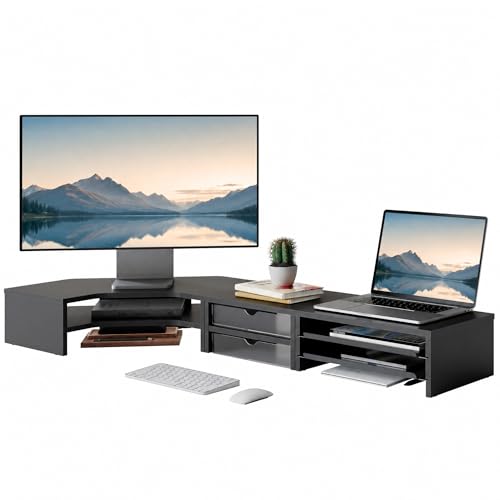
| Material construction | MDF wood (desk shelf panel), frosted acrylic drawer, metal tray |
| Max load capacity | 132 lbs (60 kg) total |
| Monitor fit and dimensions | Suitable for two 27-inch monitors side-by-side on a 43.8-inch surface |
| Adjustable/configurations | 6 modular layouts for desk riser, desk shelf, or corner desk organizer |
| Assembly and installation time | Approximately 15 minutes with pre-drilled holes and included tools |
| Storage features | 2 drawers, 2 slide-out trays and multiple compartments with metal drawer stopper |
You might think a corner desk organizer is just a tidy add-on, but this one changes how you actually use your space. The moment I set the Fenge system on the corner of a standard 60-inch desk, I noticed the triangle footprint guiding my two 27-inch monitors into a natural line of sight.
No more leaning over or craning necks to catch the center of the screens.
What surprised me was the sturdy weight distribution. The MDF shelf and frosted acrylic drawer handle feel premium, and the metal trays give the whole setup a heft that doesn’t wobble when I reach for a hard drive or stapler.
It’s clearly built for real, busy days, not just a photo-perfect showroom shot.
Assembling is exactly as advertised—15 minutes if you have a drill and a moment of patience for the pre-drilled holes. The modular system clicked into place without fuss, and I appreciated how easy it was to convert between the monitor riser and the side desk shelf.
The 60 kg (132 lbs) capacity is also reassuring when you pile in printers or extra gear.
Storage is where this shines. Two drawers plus two slide-out trays means I finally stop shoving cables and notebooks into random corners.
The bottom clearance under the shelf freed up keyboard space, transforming my desk into an uncluttered command center. That drawer stopper behind the frosted acrylic drawer is a small detail I didn’t know I’d miss until I used it.
For everyday use, the 43.8-inch footprint gives a generous surface for dual monitors and a bit of room for notebooks or a coffee mug. It’s not just a stand; it’s a small ecosystem that actually motivates me to keep the desk tidy and organized.
If you crave a customizable, durable, all-in-one desk organizer, this one delivers.
Pros
Cons
- Assembly time varies
- May dominate small desks
What Makes a Desktop Layout Effective for Productivity?
An effective desktop layout significantly enhances productivity by organizing workspace in a way that minimizes distractions and maximizes efficiency.
- Organized Desktop Icons: Keeping desktop icons organized into folders or categories reduces visual clutter, allowing users to locate files and applications quickly. This organization can be tailored to personal workflows, such as grouping work-related documents separately from leisure items.
- Utilizing Multiple Monitors: Multiple monitors expand the available screen real estate, allowing users to multitask more effectively. This setup enables one screen to display communication tools like email while the other can be dedicated to active projects, enhancing focus and efficiency.
- Taskbar and Dock Customization: Customizing the taskbar or dock with frequently used applications ensures easy access to essential tools without having to sift through menus. Pinning important applications can streamline workflows and reduce time spent searching for programs.
- Virtual Desktops: Utilizing virtual desktops allows users to create separate workspaces for different tasks or projects, keeping unrelated work organized and minimizing distractions. This feature is particularly useful for managing multiple projects simultaneously without the chaos of overlapping windows.
- Optimized Backgrounds and Themes: Selecting calming or neutral desktop backgrounds can help reduce visual distractions, while consistent themes can enhance focus. A well-chosen background can inspire creativity without overwhelming the user’s attention.
- Keyboard Shortcuts: Learning and implementing keyboard shortcuts for frequently used applications and functions can significantly speed up workflow and reduce the time spent navigating through menus. This efficiency boost can lead to a more seamless and productive working experience.
- Regular Maintenance: Conducting regular cleanups of the desktop environment, such as deleting unused files and applications, helps maintain an organized workspace. This practice not only keeps the desktop visually appealing but also ensures optimal performance of the computer.
How Does Personal Style Influence Desktop Layout Choices?
Personal style significantly influences the choice of desktop layout, reflecting individual preferences and work habits.
- Color Scheme: The selection of colors can create a visually pleasing environment or enhance productivity. A cohesive color palette that aligns with personal style can help reduce distractions and make the workspace feel more inviting.
- Icon Arrangement: How icons are organized on the desktop can reflect a person’s approach to organization. Some may prefer a clutter-free layout with minimal icons for a streamlined look, while others might favor a more chaotic arrangement that mirrors their creative flair.
- Background Image: The choice of wallpaper or background image often showcases personal interests and inspirations. A motivational quote or a favorite landscape can serve as a daily reminder of one’s goals and aspirations, influencing mood and focus.
- Widget Use: The incorporation of widgets can enhance functionality based on personal needs. For example, a user who prioritizes time management might choose a calendar widget, while someone focused on creativity might opt for a design tool, reflecting their individual workflow.
- Theme Consistency: Consistency in themes across apps and layouts can significantly impact user experience. A personalized theme that resonates with one’s aesthetic can create harmony and make the desktop feel more tailored, enhancing overall enjoyment and efficiency.
Why is Organization Key in a Desktop Layout?
Organization is key in a desktop layout because it enhances productivity, reduces cognitive overload, and improves accessibility to frequently used applications and files.
According to a study published in the Journal of Human-Computer Interaction, well-organized desktop environments lead to increased user satisfaction and efficiency, as users can locate the tools and resources they need more quickly (Rogers et al., 2020). The research indicates that a clutter-free and logically arranged workspace allows users to focus on tasks without the distraction of unnecessary visual elements.
The underlying mechanism behind this phenomenon relates to cognitive psychology, particularly the concept of cognitive load theory, which posits that our brains have a limited capacity for processing information. An organized desktop layout minimizes the amount of visual information that users have to process at once, allowing them to allocate more cognitive resources to the task at hand (Sweller, 1988). Additionally, the spatial organization of icons or applications on a desktop can create mental models that help users navigate their digital environment more intuitively, further facilitating efficient workflow.
What are the Top Types of Desktop Layouts for Different Needs?
The best desktop layouts cater to various needs, enhancing productivity and user experience.
- Grid Layout: A grid layout organizes content in a structured manner using rows and columns, making it easy to navigate and manage. This layout is particularly beneficial for users who require a clear visual hierarchy, such as designers and developers, as it allows them to align elements uniformly.
- Single Column Layout: This layout focuses on presenting content in a linear, single-column fashion, which is ideal for reading-focused tasks. It minimizes distractions and allows users to focus on one piece of content at a time, making it perfect for writers or anyone consuming lengthy articles.
- Card Layout: Utilizing card-like elements to display information, this layout is visually appealing and organizes content into bite-sized pieces. It works well for applications that showcase varying types of information, such as portfolios or product listings, allowing users to quickly scan and access what they need.
- Sidebar Layout: Featuring a sidebar for additional navigation or content, this layout is effective for multitasking and providing quick access to tools or additional resources. This is particularly useful for applications that require frequent switching between tasks, such as email clients or project management tools.
- F-Layout: Based on how users typically scan content, the F-layout places the most critical information along the top and left side of the screen. This layout is especially effective for web pages and applications where capturing user attention is crucial, as it aligns with natural reading patterns.
- Z-Layout: Similar to the F-layout, the Z-layout guides the user’s eye in a zigzag pattern across the screen, ensuring that key elements are strategically placed for maximum visibility. This layout is effective for landing pages or promotional content where the goal is to direct users towards a specific call to action.
How Can Minimalist Desktop Layouts Enhance Focus?
Minimalist desktop layouts can significantly enhance focus by reducing distractions and promoting a streamlined work environment.
- Clutter-Free Environment: A minimalist desktop layout eliminates unnecessary icons and files, which can overwhelm the user. By keeping only essential applications and documents visible, it helps maintain a clear mental space, allowing for better concentration on tasks at hand.
- Consistent Color Scheme: Using a cohesive color palette in a minimalist design can aid in reducing visual distractions. Subdued colors create a calm atmosphere that allows individuals to focus more on their work rather than on competing colors or imagery.
- Strategic Use of Space: A well-designed minimalist layout employs white space effectively, which helps direct attention to important elements. This thoughtful arrangement encourages the user to prioritize tasks and reduces the cognitive load associated with navigating a crowded desktop.
- Fewer Notifications: By limiting the number of applications on the desktop, a minimalist approach can also reduce the frequency of notifications. This limited interruption allows for deeper focus and uninterrupted workflow, ultimately leading to higher productivity.
- Personalized Functionality: A minimalist desktop layout allows users to customize their workspace according to their specific needs. By only including tools and shortcuts that are essential for their workflow, users can streamline their processes and enhance their efficiency.
What Features Define a Functional Organized Desktop Layout?
A functional organized desktop layout enhances productivity and efficiency by ensuring easy access to tools and information.
- Clear Zoning: Dividing the desktop into specific areas for different tasks helps maintain focus and organization. For example, having a designated zone for work-related applications, another for personal tools, and a section for reference materials can streamline workflow.
- Minimal Clutter: Keeping the desktop free of unnecessary icons and files reduces visual distraction and stress. A clean desktop not only makes it easier to find important items but also contributes to a more calming work environment.
- Consistent Organization: Utilizing folders and a consistent naming convention for files aids in quick retrieval and understanding of file locations. This method allows for easier navigation and helps users remember where to find specific documents without unnecessary searching.
- Task-Specific Shortcuts: Creating shortcuts for frequently used applications or files can significantly improve accessibility and efficiency. By placing these shortcuts in a prominent area, users can quickly launch necessary tools without wasting time searching through menus.
- Visual Aesthetics: Incorporating a visually appealing background and consistent icon styles can enhance the user experience. An aesthetically pleasing desktop not only makes the workspace more enjoyable but can also inspire creativity and motivation during work sessions.
- Adaptive Layout: Designing a layout that can adapt to different tasks or projects allows for flexibility. For instance, users might rearrange their desktop based on the specific demands of a project, ensuring that the most relevant tools are always within reach.
- Widgets and Gadgets: Utilizing widgets to display calendars, to-do lists, or weather updates can keep essential information accessible at a glance. This feature integrates functionality into the desktop while keeping the layout organized and user-friendly.
What Tools and Software Can Help in Creating a Desktop Layout?
Several tools and software can assist in creating an effective desktop layout:
- Figma: Figma is a cloud-based design tool that allows for real-time collaboration and prototyping. It provides a user-friendly interface with a range of design components, making it easy to create visually appealing desktop layouts.
- Adobe XD: Adobe XD is a vector-based design tool used for wireframing and prototyping user interfaces. Its powerful features include responsive resize and repeat grid, which streamline the process of creating complex desktop layouts.
- Sketch: Sketch is a popular design tool specifically for macOS that offers extensive plugins and integrations. It focuses on vector graphics and allows designers to create reusable components, which is ideal for maintaining consistency in desktop layouts.
- Canva: Canva is an online graphic design tool that is accessible for beginners and professionals alike. Its drag-and-drop interface and pre-designed templates can help users quickly build desktop layouts without extensive design skills.
- InVision: InVision is a prototyping tool that enables designers to create interactive mockups of their desktop layouts. It allows for user testing and feedback, making it easier to refine designs before implementation.
- Microsoft PowerPoint: While primarily a presentation tool, PowerPoint can be utilized to sketch out desktop layouts with its shapes, text boxes, and design features. It is particularly useful for quick mockups and visual storytelling.
- Axure RP: Axure RP is a comprehensive wireframing and prototyping tool that allows for detailed interactions and dynamic content in desktop layouts. It is particularly useful for complex projects that require advanced functionality and stakeholder collaboration.
What Common Mistakes Should Be Avoided When Designing a Desktop Layout?
When designing a desktop layout, there are several common mistakes that should be avoided to ensure an effective and user-friendly experience.
- Overcrowding Elements: A cluttered desktop layout can overwhelm users and make navigation difficult. It’s essential to balance the number of elements with sufficient white space, allowing users to focus on key components without distraction.
- Poor Typography Choices: Using inconsistent or hard-to-read fonts can lead to a frustrating user experience. It’s critical to select legible typefaces and maintain a consistent hierarchy that guides users through the information presented.
- Neglecting Responsive Design: Failing to design for different screen sizes can alienate users on various devices. A flexible layout that adapts to different resolutions ensures accessibility and usability across platforms, enhancing overall engagement.
- Ignoring User Feedback: Not incorporating user feedback can result in a layout that doesn’t meet the needs of its audience. Conducting usability tests and making adjustments based on user experiences can lead to more intuitive designs that resonate with users.
- Inconsistent Branding: A desktop layout that lacks cohesive branding can confuse users and dilute brand identity. Consistent use of colors, logos, and design elements reinforces brand recognition and creates a more professional look and feel.
- Neglecting Visual Hierarchy: A layout without a clear visual hierarchy can make it difficult for users to determine which elements are most important. Establishing a hierarchy through size, color, and placement helps guide users’ attention and improves overall usability.
- Complex Navigation: Complicated navigation structures can frustrate users and lead to abandonment. Simplifying navigation with clear labels and logical grouping of menu items enhances the user experience and encourages exploration.