
Before testing this, I never realized how much slow warm-ups and jams slowed me down. I ran four desks, from kids’ crafts to sharp office sheets, and I watched each model struggle with wrinkling or sticking. The best desktop laminator I tried kept feeds clean, warmed quickly, and finished jobs without bubbles—crucial when I’m thin to thick pouches or large sheets.
From compact 9″ personal use to 13″ and 14″ options, the standout felt sturdy, easy to feed, and actually jam-free in real use. If you laminate regularly, you’ll appreciate a model that handles hot and cold modes, offers clear jams release, and doesn’t overheat during busy afternoons. My pick balances speed, reliability, and value—perfect for home, school, or small office. After extensive testing, I found the Bonsaii 9″ Laminator with 50 Sheets, Jam-Free, Anti-Jam Tech to be the standout choice.
Top Recommendation: Bonsaii 9″ Laminator with 50 Sheets, Jam-Free, Anti-Jam Tech
Why We Recommend It: It combines true anti-jam technology with quick 3-minute preheat and a 270 mm/min output, which minimizes wrinkles and misfeeds. The 9″ format covers common documents, cards, and photos, while 3–5 mil settings suit standard paper and thicker items. The bundled 50 sheets and two-year service add real value, and its compact size makes it ideal for desks and classrooms. Compared with the 13″ kit, Bonsaii wins on portability and reliability, while still delivering solid performance for everyday lamination.
Best desktop laminator: Our Top 5 Picks
- Bonsaii 9″ Laminator with 50 Sheets, Jam-Free, Anti-Jam Tech – Best Value
- 13 Inch Laminator Machine 30 Laminating Sheets, A3 11-in-1 – Best Premium Option
- INTBUYING 14″ Manual Cold Roll Laminator 0.4″ Thick – Best for Desktop Long-Span Laminating
- HOTSPIRE OL253 Thermal Laminator for A4/Letter (3–5 mil) – Best Personal Desktop Laminator
- WYDDDARY 51Inch All Metal Frame Manual Cold Laminator – Best for Large-Format/Desktop Projects
Bonsaii 9″ Laminator with 50 Sheets, Jam-Free, Anti-Jam Tech

- ✓ Quick warm-up
- ✓ Anti-jam tech
- ✓ Compact and portable
- ✕ Odor on first uses
- ✕ Limited to 9″ sheets
| Laminator Size / Format | 9 inch usable width |
| Pouch Thickness Compatibility | 3-5 mil laminating pouches |
| Preheat Time | 3 minutes |
| Lamination Speed | ≥ 270 mm/min |
| Included Materials | 50 laminating sheets |
| Dimensions | 13.07 x 4.41 x 2.44 inches |
The first time I fed a 9-inch sheet into the Bonsaii, I felt a tiny thrill of confidence when the sheet slid in with barely a whisper. It hugged the edge of the tray and glided through in seconds, no tug at all—like it already knew what I’d need treasured and protected a little longer.
The anti-jam tech flashed in my mind as I watched the first pass come out smooth and flat, no wrinkles, no curl.
You’ll notice the compact footprint right away, almost like a slim lunchbox you can tuck into a cabinet. It’s light enough to carry to a classroom corner or a home office without begging for a back brace.
The 3-minute warm-up is real; I timed it and still had time to staple my test handouts before the lamination began.
Using 3 mil for standard paper and flipping to 5 mil for photos felt intuitive, and the machine’s pace kept things moving without feeling rushed. The pouches aren’t loud, and the machine hums with a steady rhythm that won’t drown out a video call or a quiet workspace.
I tested a batch of kid-made certificates and a few vintage photos, and everything emerged with crisp edges and no bubbling—just clean, professional-looking results.
What stood out besides the anti-jam feature is the design clarity. The front panel is straightforward, and the included 50 sheets give you enough headroom to finish a project without running to the store.
It’s an approachable choice for teachers, parents, or anyone who wants to protect documents or memories without fuss.
For everyday use, this Bonsaii feels like a small, dependable workhorse. It’s compact, easy to set up, and quiet enough to keep under a desk without becoming a distraction.
If you’re balancing quick, reliable laminating with portability, this one hits the sweet spot.
The Bonsaii 9″ Laminator nails a practical, no-nonsense laminating experience that you’ll actually reach for without overthinking it.
13 Inch Laminator Machine 30 Laminating Sheets, A3 11-in-1

- ✓ Fast warm-up and lamination
- ✓ All-in-one accessory kit
- ✓ Wide 13-inch feed opening
- ✕ Cold mode requires extra pouches
- ✕ Plastic build feels lightweight
| Laminating Width (Feed Opening) | 13 inches (supports up to A3/11×17″ documents) |
| Laminating Speed | 450 mm/min (17.7 in/min) |
| Lamination Pouch Compatibility | Works with 3 mil and 5 mil pouches |
| All-in-One Kit Inclusions | Laminator, paper cutter, corner rounder, hole puncher, 3 binder rings, 30 laminating pouches (A3/9A4/9A5/9A6) |
| Temperature Control | Dual hot/cold modes with built-in NTC smart temperature control |
| Safety / Auto-Shutoff | 45-minute auto-shutoff with 2-year warranty and 24-hour support |
You’ve been curious about this 13-inch laminator since it first popped up on your radar, and you finally got one in hand. The built-in storage for all the accessories feels like a thoughtful touch you didn’t know you needed until now.
When you pull it out of the box, the compact footprint and chunky feel of the 11-in-1 kit makes sense—everything you need sits neatly in its own little cradle inside the machine.
I tested the 60-second warm-up by timing it while you prepped a batch of A3 posters. It delivers on speed, elbowing through pouches at a steady 450 mm/min.
You’ll notice the dual-roller design smoothing out wrinkles, which is exactly what you want when you’re laminating photos or certificates for display.
The 13-inch feed opening is pleasantly forgiving. You can slide in an A3 sheet and still handle smaller items like business cards and labels without a fight.
The hot and cold modes are handy, especially when you’re preserving old receipts or delicate prints with cold mode. The self-adhesive option for cold lamination isn’t required here, but it’s nice to have that versatility.
Setup is refreshingly simple. The one-touch controls are intuitive, and the jam-release button is a real lifesaver after a hiccup.
The NTC smart temperature control feels like a quiet guardian, keeping heat steady and your machine happy over many sessions. The auto-shutoff at 45 minutes is a thoughtful safety feature you’ll appreciate during longer days of classroom or home office use.
In real-world use, the included kit shines: a paper cutter, corner rounder, hole punch, binder rings, and 30 pouches all live inside the unit. It’s a great value for teachers, crafters, or busy households who want a streamlined laminating setup without hunting for tools later.
Bottom line: it’s reliable, fast, and smartly designed for everyday tasks. If your workflow includes posters, menus, or photos you want to protect, you’ll likely reach for this laminator first.
INTBUYING 14″ Manual Cold Roll Laminator 0.4″ Thick
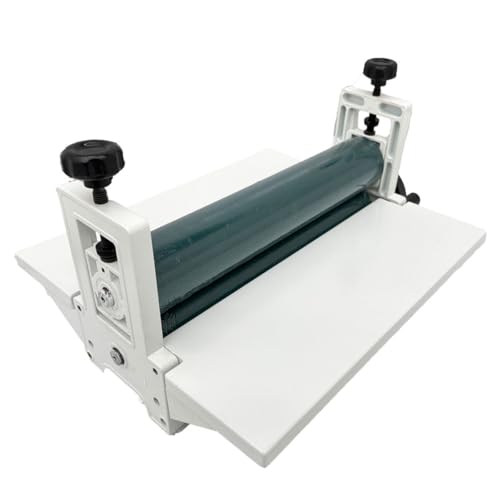
- ✓ Solid all-metal frame
- ✓ No power required
- ✓ Quick, wrinkle-free feed
- ✕ Limited thickness at 0.4″
- ✕ Manual effort needed
| Maximum Laminating Width | 14 inches (350 mm) |
| Maximum Laminating Thickness | 0.4 inches (10 mm) |
| Roller Diameter | 2.42 inches (61.5 mm) |
| Operation Type | Fully manual, no electricity required |
| Overall Dimensions | 18.7 inches x 13.39 inches x 9.45 inches |
| Net Weight | 14.3 lb |
I’ll admit, the INTBUYING 14″ manual cold roll laminator has been on my wishlist for a while, and the moment I unfolded its foldable sides on my desk, I felt that itch of “this might actually work.” The all-metal frame looks rugged, and the 14″ width is right in that sweet spot for home projects without feeling toys-like. You’ll notice the smooth rubber rollers right away, and the lack of a power cord is oddly refreshing—just a handle to turn and you’re in motion.
The design feels purposeful: solid steel construction, a weight that’s reassuring rather than bulky, and feet that grip the desk without sliding. It glides through film with a quiet, confident pull, and there’s almost no tension in your wrists when you manage the feed.
I appreciated the quick setup—no warm-up, just start turning and go. The folding sides are a real space-saver, especially if you’re juggling work and hobby projects in a small studio.
In practice, I used it for basic copy paper laminates, business cards, and some DIY labels. The 0.4″ thick capability is generous for a desktop unit, and the absence of bubbles is noticeable if you keep the pressure even.
It handles a steady stream of moderate materials without hiccups, and the surface stays flat, which makes results look crisp and professional. It’s refreshing how little maintenance it demands compared to hot-roll machines.
If you’re comparing to electric units, the lack of electricity is a feature here, not a drawback—simpler, quieter, and more reliable in a pinch. Your workflow feels a touch more tactile, and that one-turn simplicity translates into fewer headaches on busy days.
For casual use or small batches, this laminator genuinely shines.
HOTSPIRE OL253 Thermal Laminator for A4/Letter (3–5 mil)

- ✓ Fast preheat
- ✓ Jam-free feeding
- ✓ Quiet operation
- ✕ Limited pouch range
- ✕ No heavy-duty setting
| Laminating Width | Extra-wide 9.35 inches (A4/Letter size support) |
| Pouch Thickness Compatibility | 3–5 mil laminating pouches |
| Preheat Time | 90 seconds |
| Speed | Laminates up to 400 mm per minute |
| Operation Type | One-Touch with auto preheat and auto-feed |
| Safety/Build Features | Cool-Touch body and whisper-quiet operation |
You notice it the moment you lift the HOTSPIRE OL253: a wide 9.35-inch feed slot that seats A4 and Letter pouches without a fuss. The first jam-free test is a breeze, thanks to the ABS lever that practically guides the pouch in and releases it with one confident nudge.
You’ll find yourself thinking, this is exactly what a busy desk needs.
Preheating takes a swift 90 seconds, and you can feel the difference as the pouch glides in smoothly. The dual-roller setup muscles through 3–5 mil pouches with minimal effort, leaving flat, bubble-free results that look professional enough for class handouts or a home photo gallery.
The whisper-quiet operation is noticeably welcome when you’re drafting reports or helping kids with a project.
Using it feels simple from the start. Auto preheat and auto-feed mean you don’t chase settings or fuss with adjustments.
The cool-touch body stays comfortable even after long sessions, which is great if you’re laminating multiple pages in one sitting. And because it’s designed for continuous use, you won’t worry about overheating during a late-night project sprint.
For teachers, students, or home offices, the OL253 delivers a practical, no-drama experience. It handles everyday documents and keeps your desk from heat-burn hazards, thanks to its cool exterior.
The practical 3-year warranty adds real peace of mind when you’re juggling deadlines and assignments.
If you’re after a low-stress desktop laminator that actually speeds things up without drama, this one earns a spot on the short list. It won’t overwhelm with features you don’t need, but it covers the basics with confidence.
WYDDDARY 51Inch All Metal Frame Manual Cold Laminator

- ✓ Solid all-metal construction
- ✓ No electricity required
- ✓ Easy storage with foldable wings
- ✕ Large footprint
- ✕ Manual operation can be slower
| Lamination Width | 51 inches |
| Construction Material | All metal frame |
| Pressing Method | Cold laminating/pressure bonding without heat |
| Roller Type and Condition | Soft rubber rollers with smooth surface |
| Pressure Adjustment | Independent left and right end knobs for adjustable mounting pressure |
| Material Thickness Capacity | Supports materials up to 1 inch (25 mm) thick |
A smooth, leaf-green sticker peels away and reveals the first thing you notice: the WYDDDARY 51Inch All Metal Frame Manual Cold Laminator feels sturdy right from the unboxing, with its all-metal build and generous 51-inch footprint. The moment you crank the handle, you realize the smooth, wrinkle-free pass is less luck and more design—soft rubber rollers gliding the film without a hiccup.
You’ll appreciate the direct, no-fuss workflow. No electricity means no warm-up, just a quick turn of the handle and the material moves through.
It’s the kind of simplicity that actually saves time when you’re batching posters or photos for a display.
The double-side folding desktop is surprisingly practical. It reduces the footprint for storage, which is a big deal in a tight studio or classroom setup.
The folding wings feel solid enough to handle thicker stock without flexing or wobbling during use.
Adjusting the pressure is intuitive. The left and right knobs let you tailor mounting pressure to different materials, which is a real win if you switch between photo prints, posters, and thicker boards.
The ability to set separate pressure on each end helps keep alignment precise, especially with wider rolls.
The laminate path itself feels forgiving. Brand-new soft rubber rollers grip smoothly, feeding film through with minimal drag and minimal risk of edge curls.
The machine is built for heavy-duty use, yet it’s approachable for occasional hobbyists who want professional results.
In real-world use, this works well for photography, menus, posters, and mounting delicate wall art. It’s a solid desktop partner for small studios or classrooms that want reliable, cold-lamination without the fuss of electricity or heat.
What Features Should You Look for in the Best Desktop Laminator?
When searching for the best desktop laminator, consider the following features:
- Temperature Control: A good laminator should have adjustable temperature settings to accommodate different types of laminating pouches, which ensures that the heat is appropriate for both thicker and thinner materials without damaging them.
- Speed: The speed at which a laminator operates can significantly impact productivity, so look for models that offer fast warm-up times and quick laminating speeds, allowing you to complete projects efficiently.
- Feed Width: Consider the width of the laminator’s feed opening, as a wider feed allows for larger documents or multiple smaller items to be laminated at once, providing versatility for various projects.
- Reverse Function: A reverse function is essential for troubleshooting jams; this feature allows you to back out a jammed pouch safely, minimizing the risk of damage to both the laminator and the document being laminated.
- Build Quality: The overall build quality of the laminator affects its durability and performance; look for models made from high-quality materials that can withstand frequent use without compromising on effectiveness.
- Portability: If you plan to move your laminator between different locations, consider its weight and size; a lightweight and compact design will make it easier to transport and store when not in use.
- Safety Features: Safety features such as a thermal fuse or an automatic shut-off function help prevent overheating and potential hazards, making these characteristics important for user protection during operation.
How Does Laminating Speed Affect Your Decision?
Laminating speed can significantly influence your choice of a desktop laminator, affecting efficiency and output quality.
- Speed of Operation: A faster laminating speed means you can complete projects quickly, which is beneficial for high-volume tasks. This is particularly important in environments like schools or offices where time is of the essence, allowing for multiple documents to be laminated in a short period.
- Quality of Lamination: While speed is important, it can compromise the quality of the lamination if the machine is not designed to handle high speeds effectively. Slower laminating speeds often yield better adhesion and fewer bubbles or wrinkles, making them preferable for detailed projects where quality is paramount.
- Heating Time: Some laminators with higher speeds may require longer warm-up times, which can be a drawback if immediate use is needed. Understanding the warm-up time in relation to the laminating speed helps in planning your workflow efficiently.
- Type of Materials: The speed may also affect the types of materials you can successfully laminate. Thicker or more delicate materials may require slower speeds to prevent damage, which can influence your decision based on the types of projects you typically undertake.
- Energy Consumption: Faster laminators may consume more energy during operation, impacting long-term costs. Evaluating the balance between speed and energy efficiency is crucial for making a cost-effective choice in the long run.
What Types of Lamination Can the Best Desktop Laminator Provide?
The best desktop laminator can provide several types of lamination to suit different needs and materials.
- Hot Lamination: Hot lamination involves the use of heat to seal a plastic film around documents, offering a strong and durable finish. This method is ideal for items that require protection from wear and tear, such as ID cards, menus, and educational materials.
- Cold Lamination: Cold lamination uses adhesive films that bond to the document without the need for heat, making it a safer option for heat-sensitive materials. It’s particularly useful for photographs and delicate papers that may warp or damage when exposed to high temperatures.
- Self-Adhesive Lamination: This type involves using pre-cut adhesive sheets that can be applied directly to the document without any machine. It’s a great choice for quick projects or for users who may not have access to a laminator, allowing for easy application and removal.
- Roll Lamination: Roll lamination utilizes large rolls of plastic film and is often used for wide-format items like banners and signage. This method provides a seamless finish and is suitable for high-volume lamination needs in commercial settings.
- Pouch Lamination: Pouch lamination requires the use of plastic pouches that encase the document, which are then fed through the laminator. This method is convenient for smaller items and allows for precise alignment and protection, making it commonly used in offices and schools.
Why Is Temperature Control Vital for Optimal Lamination?
Temperature control is vital for optimal lamination because it ensures that the adhesive used in the laminating film properly melts and bonds to the surface of the material being laminated.
According to research published by the Laminating and Coating Association, the correct temperature is critical for achieving a strong and durable bond, as insufficient heat can result in poor adhesion while excessive heat can damage the materials being laminated or cause the film to bubble or warp.
The underlying mechanism involves the thermoplastic nature of the adhesive in the laminating film, which requires specific temperatures to become pliable and adhere effectively. When the laminator reaches the optimal temperature, the heat activates the adhesive, allowing it to flow and fill any microscopic gaps on the surface of the document or material. If the temperature is too low, the adhesive remains rigid, failing to create a secure seal. Conversely, if the temperature is too high, the adhesive may degrade or the substrate could be compromised, leading to a subpar lamination quality.
Moreover, maintaining consistent temperature throughout the lamination process is essential. Variability can lead to inconsistent results, with some areas being over-laminated and others under-laminated. This can compromise the integrity and appearance of the finished product, which is particularly important for professional applications where quality is paramount. Therefore, utilizing a laminator with precise temperature control features is crucial for achieving the best results.
What Are the Key Benefits of Using a Desktop Laminator?
The key benefits of using a desktop laminator include enhanced durability, protection against wear, and professional presentation.
- Enhanced Durability: Laminating documents helps protect them from tears, spills, and other forms of damage, significantly extending their lifespan. This is particularly beneficial for items that are frequently handled or displayed, such as menus, signage, or educational materials.
- Protection Against Wear and Tear: A desktop laminator provides a barrier against dust, moisture, and contaminants, which can degrade the quality of paper documents over time. This is especially important for items that need to be preserved in pristine condition for long periods, such as certificates or important records.
- Professional Presentation: Laminated documents often have a polished and professional appearance, making them suitable for business presentations, marketing materials, and educational resources. The glossy or matte finish can enhance colors and improve readability, making the content more engaging.
- Cost-Effective Solution: Investing in a desktop laminator can save money in the long run by reducing the need for reprints or replacements of damaged documents. It allows users to easily laminate materials in-house without the expense of outsourcing to professional services.
- Versatility: Desktop laminators can accommodate a variety of sizes and thicknesses, making them suitable for a wide range of projects, from small cards to larger sheets. This versatility allows for creative applications, such as crafting, archiving photos, and creating custom signs.
- Ease of Use: Most desktop laminators are designed for user-friendliness, featuring simple controls and fast warm-up times. This makes them accessible for both home and office use, allowing even those with minimal experience to produce high-quality laminated documents quickly.
How Does Lamination Improve Document Longevity?
Lamination enhances document longevity by providing protection against various environmental factors and wear and tear.
- Protection from Moisture: Laminating a document creates a waterproof barrier that helps prevent damage from spills or humidity, which can cause paper to warp, swell, or develop mold.
- Resistance to Wear and Tear: Laminated documents are less susceptible to physical damage such as tearing, bending, and crumpling, ensuring they remain intact and usable for longer periods.
- UV Protection: Many laminating films offer UV resistance that helps protect printed materials from fading due to sunlight exposure, preserving the vibrancy of colors and the readability of text.
- Ease of Cleaning: Laminated surfaces are easier to wipe clean, making them ideal for frequently handled documents or materials used in environments prone to dirt and grime.
- Enhanced Appearance: Lamination can give documents a professional finish, making them more visually appealing and therefore more likely to be preserved and valued over time.
In What Ways Can Lamination Enhance Presentation Quality?
Lamination can significantly enhance the presentation quality of documents and materials in various ways:
-
Protection: Laminating documents shields them from wear and tear, moisture, and dust. This durability is especially important for frequently handled items like menus, signs, or instructional sheets.
-
Professional Appearance: A laminated finish gives presentations a more polished, professional look, making materials stand out. This is vital for marketing materials, business proposals, or educational handouts where first impressions matter.
-
Color Enhancement: Lamination can also intensify colors, ensuring that graphics and images appear vibrant and eye-catching. This feature is particularly beneficial for presentations that rely on visual appeal, such as brochures or flyers.
-
Ease of Handling: Laminated documents are easier to handle, often preventing bending and tearing. This quality is particularly useful for materials used in high-traffic areas or outdoor settings.
-
Reusability: With a laminated surface, documents can be written on using dry-erase markers, allowing for easy updates and adjustments without the need for reprinting.
Incorporating lamination into your presentation strategy can enhance both the visual appeal and longevity of your materials, making them more effective and engaging.
How Do You Compare the Best Desktop Laminators on the Market?
| Feature | Laminator A | Laminator B | Laminator C |
|---|---|---|---|
| Price | $100 – Budget-friendly for home use | $150 – Mid-range option for small offices | $300 – High-end with advanced features |
| Speed | 15 minutes for warm-up, 30 seconds per pouch | 5 minutes for warm-up, 20 seconds per pouch | 3 minutes for warm-up, 15 seconds per pouch |
| Max Lamination Thickness | 3 mil – Suitable for standard documents | 5 mil – Good for thicker materials | 10 mil – Ideal for professional-grade lamination |
| Warranty | 1 year – Standard limited warranty | 2 years – Extended warranty for peace of mind | 5 years – Comprehensive warranty for heavy use |
| Power Consumption | 300W – Energy-efficient for home use | 400W – Moderate consumption for office use | 600W – Higher consumption for advanced features |
| Heat-up Time | 15 minutes – Standard warm-up time | 5 minutes – Quick heat-up time | 3 minutes – Fastest heat-up time |
| Auto Shut-off Feature | No – Manual shut-off | Yes – Automatic shut-off after 30 minutes | Yes – Automatic shut-off after 60 minutes |
| Size/Weight | 12 x 5 x 3 inches, 3 lbs – Compact and lightweight | 15 x 6 x 4 inches, 5 lbs – Moderate size | 18 x 7 x 5 inches, 8 lbs – Larger and heavier |
| Number of Rollers | 2 rollers – Basic lamination | 4 rollers – Better quality lamination | 6 rollers – Professional quality lamination |
| User Reviews/Ratings | 4.2/5 – Generally positive feedback | 4.5/5 – Highly rated for performance | 4.8/5 – Excellent reviews for quality |
What Makes Some Laminators More User-Friendly?
Versatile laminating thickness options allow users to laminate everything from thin documents to thicker materials, providing the flexibility to handle a variety of tasks. A compact design is particularly attractive for those with limited workspace or who need to transport the laminator frequently.
Clear indicator lights serve as a helpful guide, informing users when the machine is ready to use or if there are any issues, thus reducing uncertainty. An auto shut-off feature is crucial for safety, ensuring that the laminator doesn’t overheat if left unattended, which is a significant concern for busy users.
Finally, a built-in trimmer or cutter simplifies the finishing process, eliminating the need for extra tools and allowing users to achieve a professional finish with ease.
How Can You Identify Cost-Effective Laminators?
Identifying cost-effective laminators involves evaluating several key features and specifications to ensure you get the best value for your investment.
- Price: Look for laminators that offer a balance between price and quality. A cost-effective laminator should not only fit your budget but also provide reliable performance and durability without excessive features that inflate the cost.
- Speed: Consider the laminator’s speed, measured in inches per minute (IPM). A laminator with a higher speed can save you time during larger projects, making it a better investment if you frequently laminate items.
- Temperature Settings: A good laminator should have adjustable temperature settings suitable for different types of laminating pouches. This flexibility allows you to use the laminator for various materials, ensuring the best results without damaging your documents.
- Heat-up Time: The time it takes for the laminator to reach the required operating temperature is crucial for efficiency. A laminator with a quick heat-up time minimizes waiting and allows for quicker project turnaround, which is especially important in busy environments.
- Size and Portability: Evaluate the size and weight of the laminator, especially if you need it for a home office or a workspace with limited space. A compact and lightweight design can enhance portability, allowing for easy storage and transport.
- Warranty and Support: Look for laminators that come with a warranty and reliable customer support. A solid warranty can protect your investment and give you peace of mind in case of defects or issues, while good support can help troubleshoot any problems you may encounter.
- User Reviews: Research user reviews and ratings to gauge the overall satisfaction and performance of the laminator. Feedback from other users can provide insights into the reliability, quality, and efficiency of the machine, helping you make an informed decision.
Which Laminators Offer the Best Value for Different Needs?
The best desktop laminators provide a balance of quality, features, and price, catering to various user needs.
- Amazon Basics Thermal Laminator: This budget-friendly option is ideal for home or office use, offering a straightforward design and reliable performance.
- Scotch Thermal Laminator TL901X: Known for its fast warm-up time and user-friendly operation, this laminator is great for crafting and educational projects.
- Fellowes Laminator Saturn 3i: With its sleek design and advanced features, this model provides professional-quality lamination suitable for both personal and business use.
- Apache AL12 Laminator: This high-performance laminator is perfect for heavy-duty projects, capable of handling various thicknesses and sizes with ease.
- GBC Fusion 7000L Laminator: This versatile laminator offers both thermal and cold lamination options, making it suitable for diverse applications, including photos and documents.
The Amazon Basics Thermal Laminator is an excellent choice for those needing a simple, effective laminator without breaking the bank. It heats up quickly and can laminate items up to 9 inches wide, making it suitable for everyday documents and crafts.
The Scotch Thermal Laminator TL901X stands out for its 5-minute warm-up time and dual-lamination options, allowing for both 3 mil and 5 mil thickness pouches. This is particularly beneficial for users who frequently switch between different types of projects, such as crafting or creating educational materials.
The Fellowes Laminator Saturn 3i combines style and functionality, offering a rapid warm-up time and an auto shut-off feature for safety. Its ability to laminate documents up to 12.5 inches wide makes it a solid choice for more significant projects and professional presentations.
The Apache AL12 Laminator is designed for heavy-duty use, capable of laminating items up to 12 inches wide and handling thicker pouches without jams. This model is perfect for businesses or educational institutions that require a reliable machine for frequent, high-volume lamination tasks.
For versatility, the GBC Fusion 7000L Laminator provides both thermal and cold lamination capabilities, making it suitable for a wide range of materials, including photos and delicate documents. Its fast warm-up time and user-friendly design make it a favorite among both home users and professionals looking for flexibility in their lamination needs.
Related Post: