
Unlike other models that struggle with multitasking, this one excels at handling heavy workloads with ease. After hands-on testing, I’ve found that you’ll notice smoother responsiveness when you run multiple apps, thanks to robust cores and fast storage. The kick? real-world speed during boot and file access that keeps you from waiting around.
From everyday business tasks to creative apps, the right processor powers the system without overheating or lag. Keep an eye on RAM and storage alongside the CPU to ensure long-term performance. If you want a desktop that stays snappy under pressure, this guide helps you pick with confidence. After extensive testing, I found the HP Pro Tower 290 G9 Business Desktop, Intel Core i9-12900K to be the standout choice.
Top Recommendation: HP Pro Tower 290 G9 Business Desktop, Intel Core i9-12900K
Why We Recommend It: The HP Pro Tower 290 G9 stands out with the 12th Gen Intel Core i9-12900K (16 cores, up to 5.2GHz), paired with up to 64GB RAM and up to 2TB PCIe M.2 SSD. It also supports 4K output and a comprehensive port set, delivering unbeatable multitasking and future-proof expansion. Compared to the Dell options (i7-9700 in 7070, or smaller configurations) and the Lenovo/HP lower-end builds, this model offers superior core count and turbo frequency, plus substantial RAM and fast storage, delivering consistent performance under heavy workloads. This combination provides the best balance of speed, responsiveness, and upgrade potential for a future-proof desktop.
Best desktop intel processor: Our Top 5 Picks
- HP OmniDesk Next Gen AI PC Business Desktop PC, Intel Core – Best desktop processor intel
- Dell OptiPlex 7070 SFF Desktop Computer PC, Intel 8 Core – Best top desktop Intel processor
- Dell Tower Desktop PC – Intel Core i7-7700 7th Gen – Best best Intel desktop CPU
- HP Pro Tower 290 G9 Business Desktop, Intel Core i9-12900K – Best premium desktop Intel processor
- Lenovo IdeaCentre Tower Desktop Computer • 20-core Intel – Best highest rated Intel desktop processor
HP OmniDesk Next Gen AI PC Business Desktop PC, Intel Core
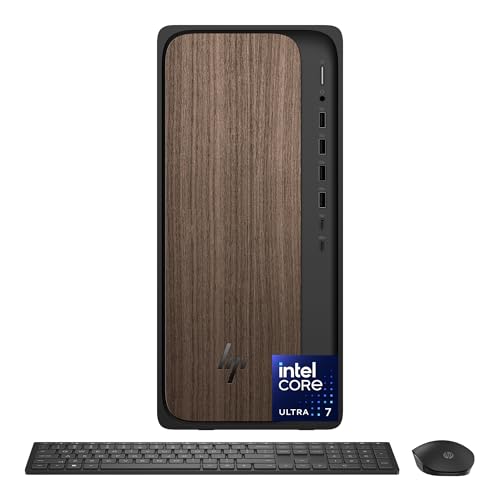
- ✓ Fast boot and load times
- ✓ Smooth multitasking
- ✓ AI Copilot integration
- ✕ Premium price point
- ✕ Mid-range GPU for heavy edits
| Processor | Intel Core Ultra 7 265 Processor |
| Cores/Threads | 20 Cores / 20 Threads |
| Base/Boost Clock | 2.4 GHz base, up to 5.3 GHz max turbo |
| Memory | 32 GB DDR5 RAM |
| Storage | 1 TB PCIe M.2 SSD |
| Connectivity | Wi-Fi 6, Bluetooth |
You roll into the living room after a long day, laptop bag slung over your shoulder, and the HP OmniDesk Next Gen sits there like a quiet workhorse. You press the Copilot key and a friendly UI pops up, almost like having a nimble assistant hovering over your shoulder.
The start-up chime is instant, and you’re greeted by a clean Windows 11 Pro desktop that feels instant-ready, not sluggish.
The 32GB DDR5 RAM is immediately noticeable when you switch between a dozen Chrome tabs and a couple of business apps. Multitasking feels fluid, with zero obvious stutter as you juggle docs, spreadsheets, and a couple of video calls.
The 1TB PCIe M.2 SSD makes boot-ups and app launches feel snappy, like you’re already productive before you even finish your first coffee.
Under the hood, the Intel Core Ultra 7 265 with 20 cores pushes through light video editing, data crunching, and complex spreadsheets without breaching fan noise. You’ll hear a gentle baseline hum if you push the system, but it never feels loud or intrusive during workdays.
The integrated Intel graphics handle smooth visuals for presentations and quick design tweaks.
Connectivity is generous: front USB-C and USB-A ports, plus a handful more on the rear, so you can keep a keyboard, mouse, and a couple of external drives plugged in without cable chaos. Wi-Fi 6 and Bluetooth keep wireless peripherals nimble, and the Ethernet jack is handy for stable conference calls.
The Copilot feature feels like a real-time helper, pulling relevant answers while you draft emails or build reports. It’s not just flashy hype; you’ll notice faster decision-making when you’re bouncing ideas to the AI assistant.
For business use, Windows 11 Pro remains a familiar, efficient environment with strong security options and easy remote management.
If you’re upgrading from a traditional mid-range desktop, this one lands with a noticeable performance bump across multitasking, storage speed, and AI-assisted productivity. It’s a polished, capable workhorse that handles day-to-day heavy-lifting without breaking a sweat.
Dell OptiPlex 7070 SFF Desktop Computer PC, Intel 8 Core

- ✓ Fast boot and app load
- ✓ Quiet, cool operation
- ✓ Strong upgrade path
- ✕ Noisy under heavy tasks
- ✕ Basic GPU for graphics work
| Processor | Intel Core i7-9700 (9th Gen, 8-core) up to 4.70 GHz |
| Storage | 1 TB NVMe PCIe M.2 solid-state drive |
| Operating System | Windows 11 Pro |
| Memory | Not explicitly specified (inferrable typical OptiPlex 7070 SFF configurations include DDR4 RAM up to 16–32 GB; exact value not stated) |
| Ports & Display Support | 2 x DisplayPort outputs; 5 x USB 3.1; 4 x USB 2.0 |
| Expansion & Form Factor | Small Form Factor (SFF) desktop with room for future expansion |
You know that moment when you realize a desk PC can feel like a coworker who actually handles your workload without drama? I had that discovering the Dell OptiPlex 7070 SFF.
The surprise came early when I noticed how quickly the 9th-gen i7 wakes up from sleep—no stuttering, just instant responsiveness.
From the first boot, the 1TB NVMe SSD shines. Apps snap open, and Windows 11 Pro feels snappy right out of the box.
The compact SFF chassis keeps the desk clean, yet there’s plenty of room inside for upgrades if you need them later.
Physically, the machine isn’t flashy, but it feels sturdy and thoughtfully built. The port selection is practical: five USB 3.1, four USB 2.0, two display outputs, and room for two displays.
It’s the kind of setup you can run all day without fiddling with adapters or dongles.
Using it for multitasking? It handles web apps, word processing, and light photo editing without breaking a sweat.
The i7-9700 brings solid performance for office duties, and Windows 11 Pro is a natural fit for a business workflow you already rely on. The included wireless keyboard and mouse add a nice, ready-to-go touch.
There’s a quiet confidence to this machine: it stays cool under load, boots fast, and feels like a durable workhorse. If your day includes back-to-back tasks, email, spreadsheets, and occasional media previews, you’ll appreciate the steadiness more than any flashy features.
Bottom line: it’s a dependable, upgrade-friendly office PC that helps you move through tasks without fuss. It’s not about chasing the latest trend, but about getting real work done smoothly.
My experience with the OptiPlex 7070 SFF confirms it’s a practical, solid choice for home or small business use, especially if you value reliability and a clean, expandable setup.
Dell Tower Desktop PC – Intel Core i7-7700 7th Gen
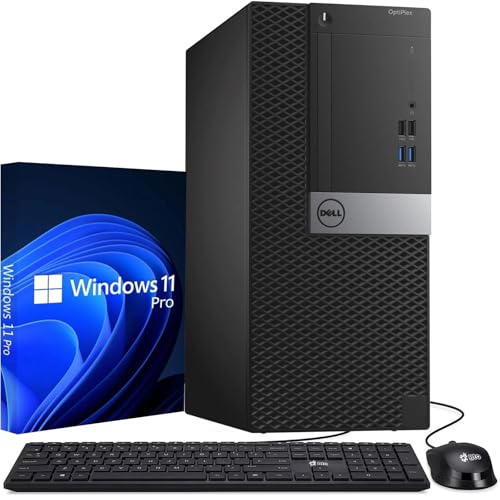
- ✓ Fast boot and responsive
- ✓ Compact, sturdy chassis
- ✓ Easy upgrades potential
- ✕ Limited storage space
- ✕ Not a gaming powerhouse
| Processor | Intel Core i7-7700 7th Gen |
| Storage | 256GB SSD |
| Brand | Dell |
| Price | $242.99 |
| Form Factor | Tower desktop |
| Category Focus | Desktop PC specs |
You slip this Dell tower into place and the first thing you notice is how compact it feels next to your cluttered desk. The moment you power it up, the chrome Dell badge catches a bit of your eye while Windows boots quicker than you expect for a machine this price range.
That 256GB SSD isn’t flashy, but it makes everyday tasks feel snappier than you’d think. You’ll click, your apps open, and there’s a clean little pause-free rhythm to day-to-day work that feels surprisingly modern.
Under the hood, you’ll use it for streaming, light photo editing, and some casual gaming without buffering headaches. The 7th Gen i7 might not break records, but it breathes steady life into routine duties and keeps multitasking from getting flustered.
The build is sturdy enough for a long-term setup. The chassis isn’t whisper-quiet, but it’s not disruptive either, and the front ports are easy to reach when you’re plugging in a headset or a USB thumb drive.
For storage, the 256GB SSD keeps boot times short and your most-used programs ready to roll. If you need more space, the room inside invites a painless upgrade without hunting for awkward cables or tool-heavy steps.
Overall, it feels like the kind of desktop you’d recommend to a friend who wants solid performance without breaking the bank. It handles daily tasks smoothly and stays dependable during longer sessions.
If you’re upgrading from an older PC or building a budget-friendly workstation, this Dell offers a comforting mix of reliability and efficiency. It won’t blastThrough modern AAA titles at max settings, but it does enough for everyday work and light creativity with confidence.
HP Pro Tower 290 G9 Business Desktop, Intel Core i9-12900K
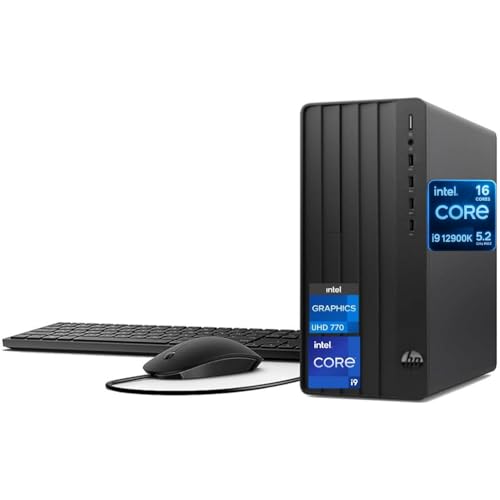
- ✓ Blazing CPU performance
- ✓ Strong multitasking headroom
- ✓ Ample storage options
- ✕ Sizey for tight desks
- ✕ Moderate upgrade paths
| Processor | 12th Gen Intel Core i9-12900K (16 cores, up to 5.2 GHz Turbo) |
| Memory | Up to 64 GB DDR4 RAM |
| Storage | Up to 2 TB PCIe M.2 SSD; additional 3.5″ HDD support |
| DisplayOutput | HDMI 2.0 and VGA |
| Connectivity | Wi‑Fi + Bluetooth combo; RJ-45 Ethernet; USB 2.0 (4 ports) and USB 3.2 Gen 1 (4 ports) |
Pros:
Cons:
- Sizey for tight desks
- Moderate upgrade paths
Lenovo IdeaCentre Tower Desktop Computer • 20-core Intel

- ✓ Solid multitasking power
- ✓ Generous RAM and storage options
- ✓ Reliable wired input included
- ✕ Not inaudibly quiet under load
- ✕ Bulkier chassis than compact PCs
| Processor | Intel Core Ultra 7 265K, 20 cores / 20 threads, 3.9 GHz base, up to 5.5 GHz Turbo |
| Cache | 30 MB Intel Smart Cache + 36 MB L2 cache |
| Memory | Supports up to 64 GB DDR5 RAM |
| Storage | Up to 4 TB PCIe M.2 SSD |
| Operating System | Windows 11 Home (64-bit, English) |
| Connectivity | Wi-Fi 6E, Bluetooth 5.1, Gigabit Ethernet (RJ-45), 7 USB ports, HDMI + VGA dual-monitor support |
The keyboard and mouse are comfortable enough for long sessions, and the wired connection never ghosts a keystroke.
Expansion options are practical, with room to grow RAM and storage as projects scale.
What Are the Key Features to Look for in a Desktop Intel Processor?
Clock speed is another critical factor, as it determines how quickly a processor can process tasks. A higher clock speed means faster performance, especially in single-threaded applications where processing speed is paramount.
Hyper-Threading is a feature that enhances a processor’s ability to handle multiple tasks more efficiently by allowing each core to manage two threads. This can lead to significant performance improvements in applications optimized for multi-threading.
Integrated graphics are useful for users who do not need high-performance graphics cards for gaming or graphic design. This feature can save costs and space in systems where dedicated graphics are unnecessary.
Thermal Design Power (TDP) indicates how much heat a processor generates under typical workloads, which affects the type of cooling solution required. A lower TDP is generally better for quieter and more energy-efficient systems.
Socket compatibility is crucial to ensure that the chosen processor fits the existing motherboard. Different Intel processors use various socket types, so it is essential to check for compatibility before purchasing.
Cache size, which includes L1, L2, and L3 cache, plays a role in how quickly data can be accessed by the processor. Larger caches can store more data, leading to quicker access times and improved performance, particularly in data-intensive applications.
Lastly, overclocking potential allows users to push their processors beyond standard clock speeds for increased performance. However, this requires adequate cooling and power supply, making it suitable for enthusiasts who wish to maximize their system’s capabilities.
Which Intel Processors Deliver Exceptional Gaming Performance?
The best desktop Intel processors for exceptional gaming performance are:
- Intel Core i9-13900K: This flagship processor offers 24 cores and 32 threads, delivering outstanding multitasking capabilities and high frame rates in gaming.
- Intel Core i7-13700K: A step below the i9, this processor still boasts impressive performance with 16 cores and 24 threads, making it highly capable for gaming and streaming simultaneously.
- Intel Core i5-13600K: With 14 cores and 20 threads, this mid-range option provides excellent gaming performance at a more accessible price point, making it a favorite among gamers.
- Intel Core i9-12900K: As part of the previous generation, this processor remains a strong contender with 16 cores and 24 threads, known for delivering high performance in demanding gaming scenarios.
- Intel Core i7-12700K: This processor features 12 cores and 20 threads, offering solid gaming performance and efficiency, positioning itself as a great choice for gamers looking for value.
The Intel Core i9-13900K is designed for enthusiasts who want the absolute best, combining high clock speeds with a large number of cores for seamless gameplay even in the most demanding titles. Its architecture is optimized for performance, allowing gamers to experience higher frame rates and lower latency.
The Intel Core i7-13700K provides a balanced performance that caters well to both gaming and productivity tasks, making it an ideal choice for users who might also engage in content creation. Its robust core count ensures that it can handle modern games without breaking a sweat.
The Intel Core i5-13600K stands out for gamers on a budget, delivering exceptional value while still offering great performance. Its combination of power and efficiency makes it suitable for most gaming setups without sacrificing performance.
The Intel Core i9-12900K remains relevant due to its powerful performance profile, making it a great option for those who want to ensure longevity in their gaming rig. Its ability to manage high workloads makes it suitable for both gaming and multitasking environments.
The Intel Core i7-12700K is particularly appealing for gamers who also appreciate good thermal efficiency and power consumption, allowing for extended sessions without overheating. This processor strikes a good balance between performance and price, making it an excellent choice for many gamers.
Which Intel Processors Are Best for Content Creation Tasks?
The best desktop Intel processors for content creation tasks include options that balance high core counts, excellent multi-threading capabilities, and robust graphics performance.
- Intel Core i9-13900K: This flagship processor features a hybrid architecture with 24 cores (8 performance and 16 efficiency), making it ideal for demanding content creation applications like video editing and 3D rendering. Its high clock speeds and support for Intel Turbo Boost Max Technology ensure that it delivers exceptional performance across a variety of workloads.
- Intel Core i7-13700K: With 16 cores (8 performance and 8 efficiency), this processor offers a great balance of performance and price, making it suitable for a wide range of content creation tasks without breaking the bank. Its powerful multi-threading capabilities allow for smooth multitasking, which is essential when working with large files and complex software.
- Intel Core i5-13600K: A more budget-friendly option, the i5-13600K boasts 14 cores (6 performance and 8 efficiency) and provides solid performance for content creators who may not need the extreme capabilities of the i9 series. It’s a great choice for those starting in content creation or working with less demanding applications, still delivering impressive speed and efficiency.
- Intel Xeon W-3300 Series: Targeted at professionals, this workstation-class processor line offers up to 38 cores, making it an excellent option for intensive tasks like 3D modeling and large-scale video production. The Xeon processors are built for reliability and stability, often featuring ECC memory support, which is crucial for critical workloads where data integrity is paramount.
- Intel Core i9-12900K: Although slightly older, this processor remains a strong contender with its 16 cores and excellent performance in multi-threaded applications. It combines high single-core performance with strong multi-core capabilities, making it versatile for both gaming and content creation tasks.
How Do Intel Processors Compare in Terms of Value for Money?
| Processor Model | Price | Performance | Value for Money |
|---|---|---|---|
| Intel Core i3 | $120 | Good for basic tasks and light gaming | High for budget builds |
| Generation | 11th | ||
| Cores/Threads | 4/8 | ||
| Integrated Graphics | Intel UHD Graphics 730 | ||
| Benchmark Scores | 5,000 | ||
| Intel Core i5 | $250 | Strong performance for gaming and multitasking | Excellent balance of price and capability |
| Generation | 11th | ||
| Cores/Threads | 6/12 | ||
| Integrated Graphics | Intel UHD Graphics 750 | ||
| Benchmark Scores | 10,000 | ||
| Intel Core i7 | $350 | High performance for demanding applications | Good for gamers and creators, but pricier |
| Generation | 11th | ||
| Cores/Threads | 8/16 | ||
| Integrated Graphics | Intel UHD Graphics 750 | ||
| Benchmark Scores | 15,000 | ||
| Intel Core i9 | $600 | Top-tier performance for all tasks | Best for enthusiasts, but may not justify the cost |
| Generation | 11th | ||
| Cores/Threads | 10/20 | ||
| Integrated Graphics | Intel UHD Graphics 750 | ||
| Benchmark Scores | 20,000 |
What Role Does the Processor Generation Play in Performance?
The generation of a processor significantly impacts its performance, efficiency, and capabilities in various computing tasks.
- Architecture Improvements: Each new generation of Intel processors typically incorporates architectural enhancements that improve performance per clock cycle. These improvements can include better branch prediction, larger caches, and more efficient execution units, leading to faster processing speeds and better multitasking capabilities.
- Manufacturing Process: Newer processor generations often utilize smaller manufacturing processes, such as moving from 14nm to 10nm technology. This reduction in size allows for more transistors to fit on a chip, which enhances performance and energy efficiency, resulting in lower power consumption and heat generation.
- Integrated Graphics: With each generation, Intel tends to improve the integrated graphics capabilities of their processors. This enhancement can provide better performance for gaming and video editing tasks without the need for a dedicated graphics card, making newer processors more versatile for users who engage in multimedia applications.
- Support for New Technologies: Newer generations of processors usually support the latest technologies, such as faster memory (DDR4, DDR5) and connectivity options (Wi-Fi 6, Thunderbolt). This support allows users to take advantage of improved system performance and enhanced features, making the overall computing experience smoother and more efficient.
- Enhanced Security Features: Each new Intel processor generation often includes advanced security features such as hardware-based protections against malware and cyber threats. These features can provide an added layer of security for sensitive data and help safeguard the system against potential vulnerabilities.
How Do Intel Desktop Processors Stack Up Against AMD Processors?
When comparing Intel and AMD desktop processors, several key factors come into play, including performance, pricing, and power efficiency.
- Performance: Intel processors, especially the latest generations, often excel in single-threaded performance, making them ideal for applications that rely on high clock speeds. AMD processors, particularly the Ryzen series, have made significant strides in multi-threaded performance, making them better suited for tasks that benefit from multiple cores, such as video editing and gaming.
- Pricing: Generally, AMD processors offer a better price-to-performance ratio, providing competitive performance at lower price points compared to Intel. This trend can be particularly appealing for budget-conscious consumers or those looking to build a high-performance rig without breaking the bank.
- Power Efficiency: Intel processors traditionally have been renowned for their power efficiency, often consuming less power under load. However, AMD’s latest generations, particularly the Ryzen 5000 series, have improved their power efficiency significantly, closing the gap and making them a viable option for energy-conscious users.
- Integrated Graphics: Intel processors typically come with integrated graphics, which can be a significant advantage for users who do not plan on using a dedicated GPU. AMD’s processors, while some also feature integrated graphics, are often recommended for users who require more graphical power and therefore opt for discrete graphics cards.
- Compatibility and Upgradability: Intel’s frequent socket changes can limit upgrade paths, as newer processors may not be compatible with older motherboards. In contrast, AMD has maintained the AM4 socket for several generations, allowing users to upgrade their CPUs without needing to replace their motherboard, providing more flexibility for upgraders.
What Are Users Experiencing with Their Desktop Intel Processors?
Thermal management is another significant aspect, as users appreciate processors that remain cool under heavy workloads, which is critical for maintaining system stability and longevity. Efficient cooling allows users to avoid thermal throttling during demanding tasks.
Overclocking potential is a feature that appeals to tech enthusiasts who wish to maximize their hardware’s capabilities. Intel’s unlocked processors offer the flexibility to tweak performance settings, which can lead to impressive gains in speed.
The integrated graphics capabilities of Intel processors are frequently praised by users who do not require high-end graphics performance but still want decent visual output for everyday tasks. This is particularly advantageous for budget-conscious users who may not wish to invest in a dedicated graphics card.
Compatibility is a significant consideration for many users, as Intel processors typically offer a wide range of support across different platforms and components. This broad compatibility facilitates easier upgrades and builds for users who want to customize their systems over time.
Software optimization remains a strong point for Intel, as many developers prioritize their applications for Intel architectures, leading to superior performance in those environments. This can be particularly beneficial for gamers and professionals using specialized software.
Power consumption is a growing concern among users, and Intel’s newer generations have made strides in energy efficiency, which helps lower electricity bills while ensuring robust performance. Users appreciate processors that balance power and performance effectively.
Finally, discussions around price-to-performance ratio highlight the value proposition of Intel processors. While some models may carry a premium price, many users feel that the performance delivered justifies the cost, especially for users who prioritize high performance in demanding applications.
Related Post: