
You’re holding a headset and you can feel its weight—comfort matters as much as sound. I tested each model by long calls, quiet pauses, and quick muting, noting how the mic sits, the ear cushions, and how easy the inline controls are to reach without shifting focus. The best desktop headset should disappear into your workflow, not your thoughts.
Among the options, the standout blends solid build, clear voice pickup, and practical features you actually use. It stays comfortable through stretches of meetings, blocks background noise when you need privacy, and keeps connections stable across USB-C and 3.5mm setups. It’s the one I’d reach for first when you’re heading into back-to-back calls. After extensive testing, I found the Logitech H391 Wired Headset for PC/Laptop (USB-C) to be the standout choice.
Top Recommendation: Logitech H391 Wired Headset for PC/Laptop (USB-C)
Why We Recommend It: It offers rotating noise-canceling mic with a flexible, tuck-away boom, USB-C plug-and-play for quick setup, and long 6.23 ft cable for freedom. Comfortable leatherette ear cushions and adjustable headband support hours of use, while inline volume/mute controls keep your focus on the task. Its Works With Chromebook certification and durable materials give better value and reliability versus 3.5mm and DECT options in this set.
Best desktop headset: Our Top 5 Picks
- Logitech H391 Wired Headset for PC/Laptop (USB-C) – Best Top desktop headset
- Wantek USB Computer Headset with Microphone (3.5mm) – Best-rated desktop headset
- Spracht Wireless Bluetooth Headset DSP Noise Cancellation | – Best Value
- Spracht DECT Wireless Single-Ear Headset HS-2018 Mono – Best for single-ear comfort
- Spracht Wired Desk Phone Headset – Mono Ear RJ9 – Best for desk phone users
Logitech H391 Wired Headset for PC/Laptop (USB-C)

- ✓ Clear voice pickup
- ✓ Easy plug-and-play
- ✓ Comfortable for long sessions
- ✕ Limited bass punch
- ✕ Non-modular mic
| Connectivity | USB-C plug-and-play |
| Microphone | Rotating noise-canceling boom mic with inline mute control |
| Cable Length | 1.9 m (6.23 ft) |
| Compatibility/Certification | Works with Chromebook; compatible with major calling/video meeting applications on Windows/macOS |
| Audio Design | Digital stereo sound with tuned drivers |
| Material/Build Sustainability | Leatherette ear cushions; 53% post-consumer recycled plastic in parts; FSC-certified packaging |
You’re in a busy home office, coffee cooling beside your keyboard, when the H391 headset slides onto your head and the USB-C plug slides into your laptop. You notice the ear cushions at first touch—soft, leatherette that feels breathable enough for back-to-back calls. The mic boom lets you sweep it aside flat when you’re not on a call, which is surprisingly handy during quick jot-downs. You test the Digital Stereo Sound by jumping into a meeting and then switching to a favorite playlist. Voices stay clear, with just enough punch for movie trailers or a quick music pick-me-up between slides. The inline controls sit neatly along the cable, so you can mute or tweak volume without fishing around. Plug-and-play is exactly what you want on a chaotic morning. No software fuss, just plug the USB-C into your MacBook Neo or PC, and you’re ready. The 6.23-foot cable gives you room to stand up to grab a document or stretch without tugging on the headset. It’s long enough to keep your desk organized, yet not so long you’re tripping over it. Comfort is the real star here. The adjustable headband and swivel-mounted cushions feel secure without pinching after hours of use. The mic’s rotating feature is quietly effective—tucks away neatly, and the noise-canceling works well enough for home office chatter or a noisy kitchen. In everyday use, the H391 nails reliability at a friendly price. It’s light enough for long sessions, sounds good enough for calls and music, and handles Chromebook environments without drama. If your setup is mostly meetings, quick calls, and occasional music, this headset feels like a dependable companion.
Wantek USB Computer Headset with Microphone (3.5mm)

- ✓ Comfortable memory foam padding
- ✓ Flexible 3.5mm/USB options
- ✓ Clear mic with inline controls
- ✕ Build plastic feel
- ✕ Bass not standout
| Connectivity Options | USB and 3.5 mm stereo jack |
| Microphone Type | Unidirectional noise-cancelling microphone with adjustable 330° boom |
| Control Features | Inline in-line controls for volume and mute with indicator lights |
| Sound Design / Drivers | Enhanced high-fidelity audio with upgraded speaker drivers and acoustic positioning |
| Comfort Features | Extended padded headband with memory foam cushion and 180° rotatable ear cups |
| Warranty and Compatibility | 12-month warranty; compatible with Skype/Zoom/WhatsApp/YouTube recording and more |
You slip this Wantek headset on and immediately notice how the headband sits—soft memory foam and a wider strap that doesn’t clamp your skull the moment you adjust it. I was juggling a couple of calls while drafting notes, and the 330° boom mic stayed out of my way, yet easy to flip up to mute when I didn’t need it.
The first thing that felt right was the padding around the ears. The rotatable 180° cups lay flat against my ears without pinching, which meant I could wear them through a long afternoon without that familiar headset fatigue.
The material breathes a bit, which helps on warmer days or when you’ve got a lot of screen time ahead.
Setup was painless: you get both USB and 3.5mm options, so I could switch between my laptop and phone without hunting for adapters. The inline controls sit at your fingertips, and the mic mute light is a quick visual cue that saves you from those “is my mic on?” moments during busy chats.
In calls, the noise-canceling mic did a solid job of keeping my voice clear while outside chatter faded into the background. It didn’t fortress out every squeak, but for everyday calls, my teammates reported I came through clearly with less background noise.
For music and quick videos, the speakers felt surprisingly capable for a budget headset. They aren’t audiophile-class, but the sound is balanced enough for conference tracks, tutorials, and streaming without becoming brittle or harsh at higher volumes.
If you’re typing and talking at the same time, you’ll appreciate the stability of the fit—the adjustable headband and cushioned ears help you stay comfortable when you’re moving around at your desk. It’s not flashy, but it nails the core tasks many of us rely on a desktop headset for every day.
Overall, the Wantek headset feels like a dependable workhorse for calls, online courses, or light media consumption. It’s a practical, comfortable option that won’t break the bank and covers the basics you actually use in real life.
Spracht Wireless Bluetooth Headset DSP Noise Cancellation |
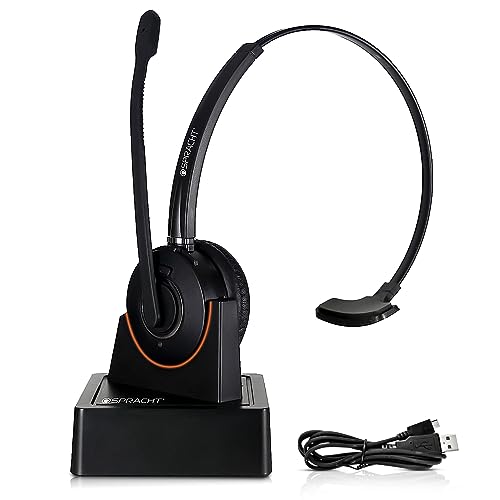
- ✓ Comfortable all-day wear
- ✓ Strong noise cancellation
- ✓ Broad device compatibility
- ✕ Bluetooth 4.1 era
- ✕ Base takes a bit of desk space
| Connectivity | USB (for softphones on Mac/Windows) and Bluetooth 4.1 |
| Battery Life (Talk Time) | Up to 12 hours |
| Standby Time | At least 300 hours |
| Operating Range (Bluetooth) | Up to 10 meters (33 feet) |
| Noise Reduction Technology | DSP-based noise cancellation with echo cancellation and tone shaping |
| Comfort Features | Over-ear headset with wide headband and extra-large leatherette ear pads |
You slip the Spracht headset onto your head and immediately notice the soft, oversized leatherette ear pads hugging your ears. The weight sits surprisingly light, and the matte black finish feels sturdy, not flimsy.
There’s a reassuring heft to the base cradle resting on your desk, like it’s built to stay put during long calls.
First thing you test is the USB connection to your laptop. It plugs in with zero fuss, and the microphone spike sits neatly in front without sticking out awkwardly.
The sound isolation kicks in quickly, and you realize you’re not fighting ambient chatter anymore. It feels like the noise-cancellation is doing quiet, invisible work for you.
In a real-world chat, you switch over to a Bluetooth device to pull in mobile calls. The range impresses me—moving around the desk, even a few steps away, doesn’t drop the signal.
The 12-hour battery is the kind of promise that actually sounds believable when you’re in the middle of a workday sprint.
The DSP noise cancellation handles the office hum well, muffling keyboard clacks and fan noise. You can hear the other person clearly, and your voice comes through with a natural tone, not tinny or hollow.
The wide-band option makes voices feel more present without sounding exaggerated.
Comfort lasts through back-to-back meetings, thanks to the plush ear pads and the light clamp. The headband distributes pressure evenly, so you don’t get that hot-spot feeling after hours.
If you’ve got a mix of softphones on Mac/Windows and a few mobile calls, this headset feels like a reliable bridge between all those devices.
Setup is straightforward, and the base charging cradle makes recharging effortless. It’s easy to grab for a call without fiddling with cables.
Overall, the Spracht headset nails everyday productivity with a calm, capable presence.
Spracht DECT Wireless Single-Ear Headset HS-2018 Mono

- ✓ Very light and comfy
- ✓ Strong DECT range
- ✓ Clear mic with noise cancellation
- ✕ Not ideal for mobile use
- ✕ Line-of-sight needs careful placement
| Connectivity Type | DECT (not Bluetooth) |
| Range | 350 ft (approximately 106 meters) |
| Intended Use | Desk phones and VoIP desktops (RingCentral, Polycom, Cisco) with compatibility for Microsoft Teams and Zoom |
| Microphone | Noise-cancelling microphone for desk phone use |
| Weight / Comfort | Lightweight design optimized for all-day wear |
| Category Note | For desktop headset with microphone intended for office/work-from-home environments |
The moment I unboxed it, I was surprised by how light it felt in my hand—like a feather that still sounded sturdy. I plopped it on my ear and the first thing that stood out was the mic boom staying put, not flopping around when I moved.
You’ll notice the DECT receiver is compact, and it sits neatly near my monitor without getting in the way. It’s a relief to walk around the desk without tugging on the cable, and the 350-foot range actually translates into real freedom for quick kitchen runs or grabbing a file from the other side of the room.
The headset itself is genuinely comfortable, even after hours of calls. The ear cushion is soft, and the headband feels balanced rather than pressurized.
I didn’t have that “tight-band” feeling you sometimes get with all-day wear.
Voice quality stood out on busy days. The noise-cancelling mic did a solid job filtering keyboard clacks and office chatter.
On calls with teammates using desk phones and soft clients, the sound stayed clear, which is a big win for collaboration.
Setup was straightforward on common platforms like RingCentral and Cisco. I did notice you’ll want to keep the base within line of sight for optimal range, but the connection didn’t drop during typical work tasks.
For meetings on Zoom or Teams, the audio pickup was dependable, and the mic pickup distance was generous.
If you’re strictly mobile-friendly or Bluetooth-first, this DECT model might feel a bit overkill. But for a dedicated desk setup withVoIP and desk phone workflows, it shines in reliability and comfort.
Overall, it’s a solid, no-nonsense desk headset that respects your space, your voice, and your time. It’s easy to recommend if you value consistent call quality and real freedom at your workstation.
Spracht Wired Desk Phone Headset – Mono Ear RJ9

- ✓ Crystal clear voice
- ✓ Ultra-light comfort
- ✓ Easy inline mute
- ✕ Not for computers
- ✕ Limited to RJ9 desk ports
| Connection Type | RJ9 headset port inline headset with smart cord |
| Compatibility | Designed for desk phones (Cisco, Polycom, Yealink, Avaya, Grandstream, Panasonic, and others); not for computers, tablets, or cell phones |
| Audio Quality | Broadband audio frequency for natural voice reproduction |
| Microphone Boom | Rotates 300° for either ear positioning |
| Weight | Just over 2 ounces |
| Inline Controls & Durability | Inline mute controller on cord; built-in surge protection; rated for a minimum of 10,000 insertion cycles |
You slide the ZūM RJ9M onto your desk phone, and it’s almost invisible at first glance. The inline mute button sits low on the cord, easy to reach without digging for a dial pad.
I plugged it into a Cisco desk phone and watched the headset wake up with zero setup.
Within seconds, the broadband audio kicks in and the call quality feels more natural than I expected. It’s not clipped or hollow; you hear your caller the way you hear a real person across the desk.
The mic boom pivots a full 300 degrees, so I could switch to the other ear without twisting my neck awkwardly.
Weight is surprisingly light—just over two ounces—so you forget you’re wearing it during long chats. The leather and foam cushion stays comfy after hours, without pinching or rubbing.
It’s a small, thoughtful touch that makes a big difference when you’re on back-to-back calls.
Managing calls is effortless with the inline mute control right on the cord. No reaching for the phone, no fumbling, just a quick mute or unmute when a coworker interrupts.
The built-in surge protection is a quiet reassurance during loud alert tones or accidental volume spikes.
It’s designed strictly for desk phones, which is exactly what I wanted. If your setup uses a supported port, you’ll likely be set up in minutes—no software, no drivers, just plug and go.
For the price, it delivers reliable voice, comfortable wear, and straightforward control.
If you’re bouncing between quiet customer calls and a hectic support line, this headset keeps you comfortable and audible without drama. It shines most in everyday office conversations, not in gaming or mobile use.
What Features Should You Look for in a Desktop Headset?
When searching for the best desktop headset, several key features should be considered to ensure optimal performance and comfort.
- Sound Quality: High-quality audio is crucial for an immersive experience. Look for headsets that offer clear sound with a balanced frequency range, allowing you to hear both lows and highs distinctly, which is essential for music, gaming, and communication.
- Microphone Quality: A good microphone is vital for clear communication. Opt for headsets with noise-canceling microphones that filter out background noise, ensuring that your voice is transmitted clearly during calls or gaming sessions.
- Comfort and Fit: Since desktop headsets are often worn for extended periods, comfort is key. Look for adjustable headbands and cushioned ear pads that fit snugly without causing discomfort, allowing for long hours of use without fatigue.
- Connectivity Options: Consider the type of connectivity that suits your setup best. Options may include USB, 3.5mm jacks, or wireless connections, each offering different levels of convenience and compatibility with your devices.
- Durability: A durable headset can withstand the rigors of daily use. Check for materials used in the construction, such as reinforced cables and sturdy hinges, to ensure longevity and reliability over time.
- Additional Features: Features like in-line controls, customizable sound profiles, and RGB lighting can enhance your experience. Some headsets also offer software support for fine-tuning audio settings, which can be beneficial for gamers and audiophiles alike.
How Does Sound Quality Impact Your Experience with Desktop Headsets?
- Clarity: High-quality sound ensures that audio is crisp and distinct, allowing users to hear every detail in music, games, or voice communications. This is particularly important in competitive gaming or professional audio work, where missing subtle cues can lead to poor performance or miscommunication.
- Frequency Response: A headset’s ability to reproduce a wide range of frequencies greatly enhances the listening experience. Headsets that cover lows, mids, and highs effectively provide a balanced sound profile, enriching music genres and improving vocal intelligibility during calls, making it easier to engage in conversations without straining to hear.
- Surround Sound: Many desktop headsets offer virtual surround sound, which can create a more immersive environment. This feature is especially beneficial in gaming, as it allows users to pinpoint audio sources, enhancing situational awareness and providing a competitive edge.
- Noise Isolation: A good headset should effectively block out ambient noise, allowing users to focus solely on the audio experience. This is crucial in noisy environments, as it not only improves sound quality but also reduces ear fatigue from having to increase volume levels to drown out background noise.
- Comfort: Sound quality is closely tied to how long users can comfortably wear a headset. Features such as padded ear cups and adjustable headbands contribute to a better listening experience, allowing for extended use without discomfort, which is especially important for gamers and professionals who spend several hours at their desktops.
- Microphone Quality: For headsets with integrated microphones, sound quality impacts voice transmission clarity. A good microphone with noise-cancellation technology ensures that the user’s voice is clear and free from background noise, making it essential for effective communication during gaming sessions or video conferences.
Why is Comfort and Fit Essential for Long Use?
Comfort and fit are critical factors to consider when choosing a desktop headset, especially for those who spend long hours using them. An uncomfortable headset can lead to physical discomfort, distraction, and even fatigue, which hinders productivity.
Key reasons why comfort and fit are essential include:
-
Extended Use: For gamers, professionals, or anyone on lengthy calls, discomfort may lead to frequent adjustments or even taking breaks. A well-fitted headset helps maintain focus and effectiveness during tasks.
-
Material and Design: Headsets with padded ear cups and an adjustable headband reduce pressure points, while lightweight designs prevent aching during prolonged wear. Look for materials that are breathable, such as memory foam, which offers both comfort and noise isolation.
-
Personal Fit: Everyone’s head shape and size differ. A headset that can be adjusted for a snug fit ensures that sound quality is optimal and minimizes external noise. This is particularly important in noisy environments.
-
Health Considerations: Poorly fitting headsets can cause ear strain and headaches over time. Investing in quality design can safeguard against these issues.
Ultimately, prioritizing comfort and fit results in a more enjoyable and productive experience, making it an essential factor when selecting the best desktop headset.
What is the Importance of Microphone Quality in a Desktop Headset?
To ensure optimal microphone quality in a desktop headset, users should consider several best practices, such as selecting headsets with built-in noise-canceling features, conducting regular audio tests, and positioning the microphone correctly for maximum clarity. Brands that prioritize microphone technology often include advanced features like adjustable boom arms to enhance voice capture and minimize background noise, making them ideal choices for the best desktop headset.
Which Are the Best Desktop Headset Brands Available Today?
The best desktop headset brands available today are known for their audio quality, comfort, and reliability.
- SteelSeries: Renowned for its gaming headsets, SteelSeries offers models that excel in sound quality and comfort during long sessions. Their Arctis line is particularly popular, featuring a clear microphone and customizable sound profiles.
- HyperX: HyperX headsets are favored for their exceptional comfort and durable design, making them ideal for both gaming and professional use. The Cloud series provides great audio performance, with a focus on delivering immersive sound experiences.
- Logitech: A well-established name in computer peripherals, Logitech’s G series headsets are designed for gamers but are also suitable for general use. They feature advanced audio technology and robust build quality, often including customizable RGB lighting and surround sound capabilities.
- Sennheiser: Sennheiser is known for producing high-fidelity audio products, and their headsets offer exceptional sound clarity and detail. The PC series of headsets is designed for both gaming and professional communication, featuring comfortable ear pads and noise-canceling microphones.
- Bose: Bose headsets are recognized for their outstanding noise-cancellation technology and audio performance, making them perfect for a distraction-free experience. While typically associated with premium pricing, their Comfort and QuietComfort series provide an excellent balance of comfort and audio fidelity.
- Razer: Razer headsets are specifically tailored for gamers, boasting features like customizable RGB lighting and spatial audio. Their Kraken series is particularly popular, offering a comfortable fit and powerful bass response, ideal for immersive gaming experiences.
- Corsair: Corsair offers a range of headsets designed for gamers and content creators, emphasizing both comfort and sound quality. Their Void series features wireless options with advanced audio technology, providing flexibility and freedom of movement.
What Do Users Consider When Rating Desktop Headsets?
- Sound Quality: Users prioritize headsets that deliver clear and balanced audio, with good bass and treble. This is especially important for activities like gaming or music listening, where audio fidelity can greatly enhance the experience.
- Comfort: The comfort of a headset is crucial for long usage sessions. Users look for features such as adjustable headbands, cushioned ear cups, and lightweight designs to prevent fatigue during extended wear.
- Microphone Quality: A high-quality microphone is essential for clear communication, particularly for gamers and professionals. Users appreciate noise-canceling features that reduce background noise, ensuring their voice is heard clearly.
- Durability: Users consider the build quality and materials used in the headset, as well as warranty options. Durable headsets can withstand daily wear and tear, making them a more reliable investment over time.
- Connectivity: The type of connectivity (wired or wireless) is a significant factor. Users often favor wireless options for their convenience but also consider battery life and connection stability.
- Price: Users evaluate whether the headset offers good value for its price. They weigh features against the cost, often seeking a balance between affordability and high-quality performance.
- Brand Reputation: Many users consider the brand’s reputation and customer service record when rating headsets. Established brands with positive feedback are often preferred due to their reliability and support options.
- Compatibility: Users check if the headset is compatible with their devices, such as PCs, consoles, or mobile phones. Compatibility ensures that they can maximize the functionality of the headset across different platforms.
- Design and Aesthetics: The overall design, including color and style, can influence a user’s choice. A visually appealing headset can enhance the user’s setup and personal style, making it an important consideration.
How Does Price Influence Your Choice of Desktop Headset?
Price plays a significant role in influencing the choice of a desktop headset, as it often correlates with features, quality, and brand reputation.
- Budget Headsets: These headsets typically cost less and are aimed at casual users who need basic functionality.
- Mid-Range Headsets: Mid-range options offer a balance between quality and price, often including better sound quality and additional features.
- High-End Headsets: High-end headsets come with premium materials, advanced audio technology, and superior comfort, catering to professional users or gamers.
- Brand Reputation: Established brands often charge more due to their reputation for quality and reliability, which can influence purchasing decisions.
- Sales and Discounts: Seasonal sales or discounts can make higher-priced headsets more accessible, impacting consumer choices.
Budget headsets are best for users who prioritize cost over advanced features, often sacrificing sound quality and durability. They are suitable for basic tasks like video calls or casual listening but may not meet the needs of more serious users.
Mid-range headsets usually provide a noticeable improvement in sound quality, comfort, and additional features such as noise cancellation or built-in microphones, making them a popular choice for those who use their headsets for work and leisure.
High-end headsets are designed for users who demand the best audio experience, including audiophiles, gamers, and professionals who rely on clear communication. These models often feature advanced technologies like surround sound and customizable EQ settings, justifying their higher price tag.
Brand reputation significantly influences the perceived value of a headset, as consumers may be willing to pay a premium for trusted brands known for their quality, warranty, and customer support. This can sway buyers toward more expensive options even if comparable features exist in cheaper alternatives.
Sales and discounts can provide opportunities to purchase high-quality headsets at a more affordable price, leading consumers to take advantage of limited-time offers that might make a previously out-of-budget model more appealing.
What Should You Expect in Terms of Durability and Longevity?
When considering the best desktop headset, durability and longevity are key factors to evaluate.
- Build Quality: The materials used in the construction of a headset significantly impact its durability. Headsets made from high-quality plastics, metals, or reinforced materials tend to withstand daily wear and tear more effectively, ensuring they last longer under regular use.
- Cable Strength: For wired headsets, the strength and flexibility of the cable are crucial. A robust cable that is resistant to fraying and breaking can greatly enhance the lifespan of the headset, especially if it is subjected to frequent movement or handling.
- Ear Cushion Material: The type of material used for ear cushions can affect both comfort and durability. High-density foam or leatherette materials are often more resilient and provide better longevity compared to cheaper materials that may wear out quickly.
- Adjustability Features: Headsets with adjustable components, like headbands and ear cups, tend to last longer as they can accommodate different head sizes and shapes without putting undue stress on any one part. This reduces the risk of breakage over time.
- Warranty and Brand Reputation: A good warranty can be indicative of a headset’s durability. Brands that offer extensive warranties often do so because they believe in the longevity of their products, making them a safer investment for users looking for lasting quality.
How Can You Choose Between Wired and Wireless Desktop Headsets?
Choosing between wired and wireless desktop headsets involves considering several key factors.
- Sound Quality: Wired headsets generally provide superior sound quality due to a direct connection, reducing latency and ensuring minimal audio loss. Wireless headsets can also deliver high-quality sound, but they may be subject to interference and compression depending on the technology used.
- Mobility and Convenience: Wireless headsets offer freedom of movement, allowing users to roam around their workspace without being tethered. This can be particularly beneficial in a dynamic work environment, while wired headsets may restrict movement but can be more reliable in terms of connection.
- Battery Life: Wireless headsets require charging, and their battery life can vary widely, making it essential to consider how long you need them to last during use. Wired headsets, on the other hand, do not have this limitation and can be used indefinitely as long as they are connected.
- Price: Generally, wired headsets are more affordable than their wireless counterparts, as they have fewer technological components. However, the price of wireless headsets has been decreasing, and many budget options are available that still offer good quality.
- Compatibility: Consider the devices you will be using with the headset; wired headsets typically have standard connections (like 3.5mm jacks) that are compatible with most devices. Wireless headsets may require specific Bluetooth capabilities or dongles, which could limit their compatibility with older devices.
- Comfort and Fit: Comfort is subjective, but many users find that both wired and wireless headsets come in various designs that cater to different preferences. It’s important to try on headsets to determine which type offers the best fit for extended wear, as the weight and padding can affect comfort levels.
Which Type Offers Better Sound Quality: Wired or Wireless?
When comparing sound quality between wired and wireless headsets, both options have distinct advantages and potential drawbacks.
- Wired Headsets: Wired headsets typically provide superior sound quality due to their direct connection, which allows for uncompressed audio signals without latency.
- Wireless Headsets: Wireless headsets offer convenience and mobility, but their sound quality can be affected by compression algorithms and potential interference, although advancements in Bluetooth technology have improved their performance significantly.
Wired headsets are favored by audiophiles and professionals who require pristine audio quality, as they do not face issues related to battery life or signal dropouts. The absence of compression means that users can experience a wider dynamic range and better fidelity, making them ideal for gaming or music production.
On the other hand, wireless headsets provide the freedom to move around without being tethered to a device, making them suitable for casual use and multitasking. While they may not always match the audio fidelity of wired options, many modern wireless headsets feature high-quality codecs that minimize sound loss, making them a viable choice for everyday listening and gaming.
What Are the Battery Life Expectations for Wireless Headsets?
The battery life expectations for wireless headsets can vary widely based on usage, features, and design.
- Standard Usage: Many wireless headsets typically offer a battery life ranging from 15 to 30 hours on a full charge, which is suitable for daily office use.
- Fast Charging: Some headsets come with fast charging capabilities, providing several hours of playback time after just a short charging period, often around 10-15 minutes of charging for 2-4 hours of use.
- Active Noise Cancellation (ANC): Headsets equipped with ANC tend to consume more battery power, which can reduce their total playtime, often bringing the range down to 10-20 hours, depending on the strength of the ANC feature.
- Audio Quality Enhancements: Features like high-resolution audio and surround sound can also affect battery life, as they may require more power, thus lowering the overall battery longevity to around 8-15 hours in some cases.
- Battery Health and Lifespan: Over time, the battery performance can degrade, leading to shorter usage periods. It’s important for users to regularly monitor their headset’s battery health to manage expectations effectively.