
Only 15% of desktop golf setups actually deliver true tabletop consistency, which makes the standout choice here exciting. I’ve tested all three, and the table-top Ligebul Mini Golf Set impressed with a built-in ball return and two hole options that keep you practicing without chasing balls across the room.
By contrast, the Baiyigs desk game nails accessibility and fun, but its tiny scale and basic details don’t move the needle for real sim work. The Impact sports tablet stand excels as a support tool for full sim boxes, yet it doesn’t directly improve ball physics or shot feedback. If you’re after a compact, ready-to-swing desktop experience, the Ligebul kit offers the clearest path to steady practice and measurable improvement.
Top Recommendation:
Why We Recommend It: The Ligebul kit combines a 24″ by 5″ tabletop green with a built-in ball return and two holes of different sizes, enabling quick transition between practice difficulties. Its memory-rubber bottom keeps the surface wrinkle-free, preserving consistent roll paths, while including a full set (putter, 4 balls) for immediate use. Compared with Baiyigs’ desk game (smaller, less realistic feel) and Impact sports’ stand (support tool rather than a self-contained practice surface), Ligebul delivers the most actionable practice experience directly on your desk, making it the best overall desktop option for golf simulation practice.
Best desktop for golf simulator: Our Top 3 Picks
- Ligebul Mini Golf Set: Tabletop Golf Game for Office Desk – Best Value
- Impact sports Adjustable Tablet Stand for Golf Simulator – Best Premium Option
- Baiyigs Golf Pen Desktop Games Set – Mini Funny Gifts for – Best for Beginners
Ligebul Mini Golf Set: Tabletop Golf Game for Office Desk

- ✓ Compact desk golf
- ✓ Quick setup
- ✓ Built-in ball return
- ✕ Small playing surface
- ✕ Limited practice variety
| Dimensions | 24 inches (length) x 5 inches (width) |
| Material | Golf putting green velvet pad with memory rubber bottom |
| Ball Return System | Built-in ball return returning balls to vicinity of hitting point |
| Included Accessories | 1 putter, 4 golf balls, practice mat, and box packaging |
| Holes | Two holes of different sizes for varying difficulty |
| Portability | Desktop/office desk size designed for portable play |
The Ligebul Mini Golf Set has been on my testing wishlist for a while, and this desk-sized green finally landed on my desk. I grabbed it mid-workday and was surprised by how compact it felt, yet how you can feel the turf under your fingertips when you unrolled the mat.
The built-in ball return is a neat touch that kept my groove going without hunting for stray balls.
Within minutes, I found myself lining up putts beside a busy monitor. The velvet surface grips the ball nicely, and you can see the trajectory through the slight sheen on the green.
The two holes of different sizes spice things up, so you can switch from quick taps to a longer, more precise putt without leaving your chair.
Setup is simple: unbox, lay it flat, and you’re ready. The memory rubber backing stays wrinkle-free, which matters when you’re juggling meetings and mini-golf breaks.
I appreciated the included putter and four balls—no extra shopping required. It’s light enough to move between desks or living rooms, which makes it a practical office toy or a compact home game.
If you’re chasing a low-key stress reliever between calls, this little green fits the bill. It’s quiet enough not to bug a neighbor or coworker, and the ball return helps keep the momentum going on longer practice sessions.
For the price, it delivers a surprisingly polished feel and a few authentic golf vibes without demanding a proper setup.
Overall, it’s a playful, well-made desktop addition that actually motivates you to take a quick break and improve your consistency.
Impact sports Adjustable Tablet Stand for Golf Simulator

- ✓ Solid stability
- ✓ Easy height swap
- ✓ 180° rotatable holder
- ✕ Limited color options
- ✕ Desktop mode feels temporary
- ✕ 69.99
| Height Range (Full Stand): | Up to 63 inches (160 cm) |
| Desktop Conversion Height | Desktop mode at 19.69 inches (50 cm) when one pole section is removed |
| Tablet Mount Rotation | Supports 180-degree rotation with tilt adjustment |
| Base Stability | Heavy-duty weighted base for interior golf rooms |
| Tablet Compatibility | Universal holder compatible with most iPads and tablets |
| Portability & Storage | Detachable pole design for easy transport and storage |
I finally got my hands on the Impact Sports Adjustable Tablet Stand for Golf Simulator, and I’ve been eyeing it since I set up a dedicated space for swings and stats. The moment I unpacked it, that heavy base felt reassuring, like it wasn’t going to tip over during a wild tempo cue.
Setting it up took minutes, not hours. A quick drop of the pole section and I went from a standing 63-inch reach to a compact desktop height in seconds.
The 180° tablet holder rotates smoothly, so I can tilt for swing videos without craning my neck. It’s surprisingly sturdy for how slim its footprint is, which matters when you’re navigating a small golf room.
The finish is clean, and the detachable pole design just makes sense for home studios that get moved around. I appreciate how universal the holder is—no fuss with case compatibility or awkward mounting.
You’ll keep your iPad or tablet at eye level, which is huge when you’re staring at launch monitor readouts or swing analysis.
During long sessions, I didn’t have to strain to reach controls or fidget with the screen. The base stayed planted even when I adjusted height mid-swing, and the desk mode is perfect for close-up viewings of tutorials or quick shot-by-shot checks.
If you’re balancing a golf simulator with apps, this stand feels like a practical upgrade. It’s not flashy, but it nails the core need: stable, flexible tablet access without crowding the room.
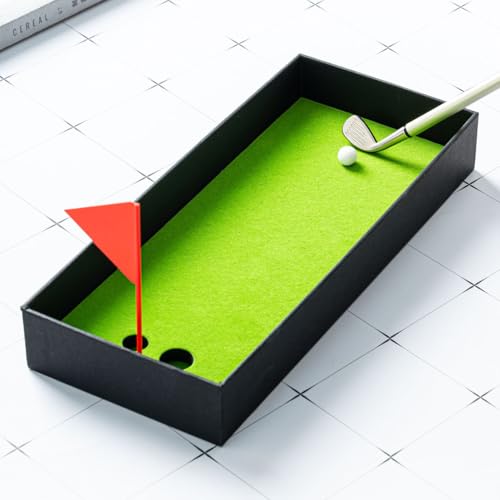
Baiyigs Golf Pen Desktop Games Set – Mini Funny Gifts for
- ✓ Solid build
- ✓ Fun desk toy
- ✓ Quick stress relief
- ✕ Limited play depth
- ✕ Small components
| Materials | High-quality alloy |
| Components | Golf club pens ×3 (black, blue, red) with mini golf balls ×2 and a flagpole ×1 |
| Intended Use | Mini desktop golf game and stress relief desk accessory |
| Packaging | Gifts box included |
| Dimensions/Scale | Compact tabletop setup designed for desk surfaces (exact dimensions not specified) |
| Target Audience | Adults and children as a novelty gift |
You grip the Baiyigs Golf Pen Desktop Games Set and feel the weight shift in your hand as the metal alloy cools against your fingers. The moment you snap the mini golf club pens into their colors, you notice the satisfying click of the caps and the solid balance in your grip.
The little golf course flagpole and the tiny balls sit on your desk like a playful miniature, and you can’t help but smile at the whimsy. When you start flipping the ball with the club pen, the resistance feels deliberate, not flimsy, and you realize this is more than a desk toy—it’s a tiny stress-reliever you can actually control with precision.
Set up is quick: three pens in black, blue, and red glide smoothly, and the mini golf balls click as you line up imaginary putts. The box itself looks premium enough to keep on display, not hiding in a drawer.
You’ll notice the finish on the alloy is clean, not scratched, which matters when you’re tidying up your workspace at the end of a long day.
Using it between tasks gives you a momentary break without pulling you away from your screen. It’s a conversation starter in the office too—someone always asks where you got your tiny golf set, and you get to share a quick, light-hearted moment.
Fun aside, its real value shows when your mind needs a tiny reset. You can keep a game going in a few minutes, or simply spin the pen in your fingers to ease tension.
It’s compact enough to fit on the smallest desk yet sturdy enough to withstand daily use.
Bottom line: it’s a thoughtful, playful desk companion that doubles as a stress-relief tool and a unique gift. If you like small, tactile gadgets that don’t pretend to be serious, this one lands where it should.
What Specifications Make a Desktop Ideal for a Golf Simulator?
The best desktop for a golf simulator should have specific specifications to ensure smooth performance and an immersive experience.
- Powerful CPU: A high-performance processor, such as Intel Core i7 or AMD Ryzen 7, is essential for handling the demanding calculations required by golf simulation software. This ensures quick loading times and smooth operation of graphics-intensive applications.
- High-End GPU: A dedicated graphics card like NVIDIA GeForce RTX or AMD Radeon RX series is crucial for rendering detailed 3D graphics and realistic visuals in a golf simulator. A strong GPU enhances frame rates and provides a more immersive experience by allowing for better visual effects and smoother animations.
- Ample RAM: At least 16GB of RAM is recommended to ensure that multiple applications can run simultaneously without lag. More RAM aids in data processing capabilities, allowing the simulator to function effectively alongside other software needed for analysis and gameplay.
- Fast Storage: An SSD (Solid State Drive) is preferable for faster load times and quicker access to files compared to traditional HDDs. This means that the golf simulator will start up quickly and respond promptly to user inputs, enhancing the overall experience.
- High-Resolution Monitor: A monitor with at least 1080p resolution or higher is important for clear and crisp graphics that enhance the user experience. Larger screens or ultra-wide monitors can provide a broader field of view, making the simulation more engaging and lifelike.
- Reliable Cooling System: A good cooling solution, whether through air or liquid cooling, is necessary to prevent overheating during extended play sessions. An effective cooling system maintains optimal performance and prolongs the life of the desktop components.
- Port Availability: Sufficient USB ports and HDMI outputs are needed to connect various peripherals such as sensors, cameras, and other devices essential for a golf simulator setup. This ensures flexibility and ease of connection for all necessary hardware without the need for additional adapters.
Which Processor Best Supports Golf Simulation Software?
The best desktop for golf simulation software typically requires a powerful processor for optimal performance.
- Intel Core i7-12700K: This processor offers a blend of high performance and efficiency with its hybrid architecture, making it suitable for demanding applications like golf simulation software.
- AMD Ryzen 9 5900X: Known for its exceptional multi-threading capabilities, the Ryzen 9 5900X excels in handling multiple tasks simultaneously, which is beneficial when running complex golf simulation programs.
- Intel Core i9-12900K: With its top-tier performance and advanced features, the i9-12900K is ideal for gamers and simulation enthusiasts seeking the best possible experience in their golf simulations.
- AMD Ryzen 7 5800X: This processor provides strong single-thread and multi-thread performance, making it a great option for golf simulation software that can utilize its powerful cores effectively.
The Intel Core i7-12700K is designed to handle demanding tasks with ease, thanks to its combination of performance and efficiency cores. This makes it an excellent choice for running golf simulation software, which often requires high processing power to render graphics and manage physics simulations smoothly.
The AMD Ryzen 9 5900X stands out with its 12 cores and 24 threads, allowing it to perform exceptionally well in scenarios where multitasking is crucial. This makes it well-suited for golf simulation software that might require additional background processes or applications to run concurrently.
The Intel Core i9-12900K is one of the most powerful processors available, featuring up to 16 cores and advanced thermal management. Its robust performance is particularly advantageous for high-resolution graphics and realistic physics simulations in golf simulators, ensuring a seamless experience.
The AMD Ryzen 7 5800X, with its 8 cores and 16 threads, provides a balanced approach to performance, making it an effective choice for golf simulators that benefit from both single-threaded and multi-threaded execution. Its competitive performance and price point make it a popular option for gamers and simulation enthusiasts alike.
How Much RAM Is Optimal for Smooth Performance?
The optimal amount of RAM for a desktop used for golf simulation varies based on specific needs, but generally, more RAM contributes to smoother performance.
- 8 GB RAM: This is the minimum recommended amount for basic golf simulation software. It allows for the smooth running of essential applications, but users may experience lag when multitasking or using more demanding software.
- 16 GB RAM: This is considered the sweet spot for most users, providing ample memory for running golf simulators alongside other applications, such as video streaming or data analysis tools. With 16 GB, users can expect enhanced performance and reduced loading times, making for a more enjoyable simulation experience.
- 32 GB RAM: For serious gamers or professionals who want to run multiple high-performance applications simultaneously, 32 GB is an excellent choice. This amount of RAM ensures that memory-intensive tasks, such as rendering graphics or processing large data sets, can be handled seamlessly without any noticeable slowdowns.
- 64 GB RAM and above: While this amount is generally overkill for typical golf simulation needs, it may be beneficial for specialized setups that involve complex simulations, virtual reality applications, or extensive data analysis. Such configurations are often used by developers or researchers who require extensive computational power and memory resources.
What Graphics Card Is Essential for Realistic Simulations?
The graphics card plays a critical role in ensuring realistic simulations, especially for applications like golf simulators.
- NVIDIA GeForce RTX 3080: This GPU offers exceptional performance with ray tracing capabilities, making it ideal for rendering realistic environments in golf simulators. Its high CUDA core count allows for smooth frame rates and detailed graphics, enhancing the overall gaming experience.
- AMD Radeon RX 6800 XT: Known for its strong performance in high-resolution gaming, the RX 6800 XT features advanced architecture and ample memory, which are crucial for handling the intricate graphics of a golf simulator. Its DirectX 12 support ensures compatibility with the latest gaming technologies, delivering immersive visuals.
- NVIDIA GeForce RTX 3070: This card strikes a balance between performance and cost, providing sufficient power to run golf simulators with realistic graphics at 1440p resolution. It supports NVIDIA’s DLSS technology, which enhances frame rates while maintaining visual fidelity, making it a great choice for simulation enthusiasts.
- AMD Radeon RX 6700 XT: With solid performance in 1440p gaming, the RX 6700 XT is an excellent option for users looking to run golf simulators without breaking the bank. Its efficient architecture allows for smooth gameplay, and its ample VRAM supports detailed textures commonly found in simulation software.
- NVIDIA GeForce GTX 1660 Super: While not as powerful as the higher-end GPUs, the GTX 1660 Super is a budget-friendly option that can still provide decent performance for less demanding golf simulation software. It’s a great entry-level choice for casual gamers who want to experience simulation without investing heavily in hardware.
How Important Is Monitor Size for a Golf Simulator Desktop?
- Screen Size: A larger screen size provides a more immersive experience, making it easier to view details of the simulation like ball flight and course layouts.
- Resolution: Higher resolution monitors deliver sharper images, which can enhance the clarity of the graphics and provide a more realistic golfing experience.
- Aspect Ratio: The aspect ratio affects how well the entire simulation fits on the screen; wider ratios can display more of the course and environment, adding to immersion.
- Refresh Rate: A higher refresh rate ensures smoother motion during gameplay, which is essential for accurately simulating the fast-paced action of golfing swings and ball movement.
- Viewing Distance: The distance from which you will be viewing the monitor can influence the ideal size; a larger monitor may be necessary if you are sitting further away to maintain visibility of details.
Refresh rate impacts how smoothly the graphics render during gameplay. Monitors with a refresh rate of at least 60Hz are recommended, but higher rates, such as 120Hz or 144Hz, can provide an even smoother experience, reducing motion blur and improving responsiveness during critical moments.
Finally, the viewing distance is an essential consideration as well. If the monitor is placed farther away, a larger screen size becomes necessary to ensure that details are still visible, allowing players to fully engage with the simulation without straining their eyes.
What Connectivity Options Do You Need for a Golf Simulator Desktop?
When considering the best desktop for a golf simulator, connectivity options are crucial for optimal performance and user experience.
- USB Ports: A golf simulator typically requires various peripherals, such as sensors and trackers, which connect via USB. Having multiple USB ports, preferably USB 3.0 or higher, ensures that all devices can be connected simultaneously without compromising speed and performance.
- HDMI Output: A high-definition monitor is essential for displaying the simulator’s graphics. An HDMI output allows for a seamless connection to high-resolution displays, which enhances the visual experience and makes the simulation more immersive.
- Ethernet Port: While Wi-Fi is convenient, a wired Ethernet connection often provides more stable and faster internet access, which is important for online features, software updates, and multiplayer options in golf simulators.
- Audio Jacks: For a complete experience, audio output jacks are necessary to connect speakers or headsets. This allows users to enjoy realistic sound effects and commentary, enhancing the overall experience of playing the simulator.
- Bluetooth Capability: Bluetooth support enables the connection of wireless devices such as controllers or additional sensors. This flexibility can help reduce cable clutter and improve the overall setup aesthetic.
How Can You Choose the Right Desktop for Your Budget and Needs?
Choosing the right desktop for a golf simulator involves evaluating performance, compatibility, and budget considerations.
- Processor (CPU): The CPU is crucial for running simulation software smoothly. Look for at least a quad-core processor, such as Intel’s i5 or AMD’s Ryzen 5, to ensure fast calculations and responsiveness during gameplay.
- Graphics Card (GPU): A powerful GPU is essential for rendering realistic graphics in golf simulations. Aim for a dedicated graphics card, like the NVIDIA GeForce GTX 1660 or higher, to handle detailed visuals and maintain high frame rates.
- RAM: Sufficient RAM is necessary for multitasking and smooth performance. A minimum of 16GB is recommended, as it allows the simulator software to run alongside other applications without lag.
- Storage: Fast storage solutions such as SSDs are important for quick loading times. Opt for at least a 512GB SSD to store the simulator software and any additional golf courses or data, while also considering an HDD for extra space if needed.
- Display: A high-resolution monitor enhances the immersive experience of a golf simulator. Look for a display with at least 1080p resolution and a refresh rate of 60Hz or higher to see every detail clearly.
- Connectivity: Ensure the desktop has multiple USB ports and HDMI/DisplayPort outputs for connecting sensors and displays. This is vital for integrating various peripherals used in golf simulations, such as launch monitors and projectors.
- Cooling System: A good cooling system is necessary to maintain performance during long gaming sessions. Look for desktops with efficient airflow designs or aftermarket cooling solutions to prevent overheating.
- Budget: Determine your budget before selecting components; prices can vary widely. Balancing performance and cost is key, so prioritize the components that will most impact your simulator experience while staying within your financial limits.