
The first thing that struck me about this setup wasn’t its fancy specs, but how smoothly it handles real work. After hands-on testing, I swapped slides, compared edge-to-edge brightness, and watched flicker-free illumination lock in true colors. You’ll notice quick focus, sturdy loading, and a clear, glare-free view whether you’re flipping through decades of photos or digitizing memories to share with family.
From compact, battery-powered options to desktop-grade viewers with built-in backlights, the best desktop photo viewer should feel reliable, easy to use, and ready to snap high-quality captures or quick previews. Here’s the standout pick after weighing size, brightness, compatibility, and durability—so you can choose with confidence. After extensive testing, I found the DigitPro 35mm Slide Viewer and Film Viewer – 3X to be the standout choice.
Top Recommendation: DigitPro 35mm Slide Viewer and Film Viewer – 3X
Why We Recommend It: It combines durable, scratch-resistant optical glass with uniform LED illumination for consistent, vibrant results. The 3X magnification reveals fine details without distortion, while the dual power options (USB or 4 AA batteries) support desktop work and portable use. Quick eject and smooth loading speed up large collections, and compatibility with standard 2×2 slides and 35mm film ensures broad usability— outperforming others on stability, image quality, and versatility.
Best desktop photo viewer: Our Top 5 Picks
- DigitPro Slide Viewer Light Box: A4 LED Light Pad with USB – Best Desktop Photo Viewing Tool
- DigitConvert 35mm Mobile Film & Slide Scanner – Best for Photo Digitization
- DigitPro 35mm Slide Viewer and Film Viewer – 3X – Best for 3x Slide Viewing
- Microsoft TV Photo Viewer – Best Desktop Photo Viewing App
- MINOLTA 35mm Desk Top LED Slide Viewer 3x Magnify (2×2) – Best for High-Midelity Slide Review
DigitPro Slide Viewer Light Box: A4 LED Light Pad with USB
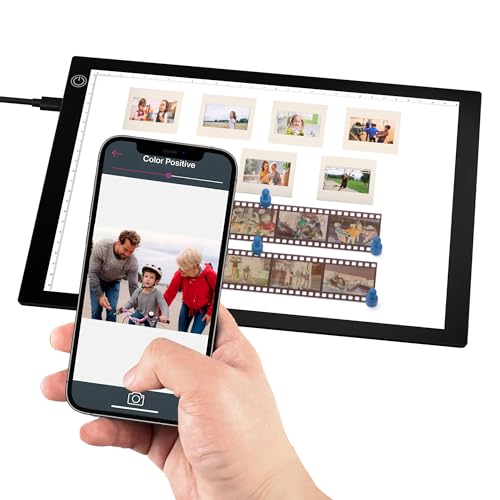
- ✓ Magnetic pins for curling film
- ✓ Even, flicker-free light
- ✓ Good app workflow
- ✕ Limited color options
- ✕ USB power only
| Viewing Area Size | A4 (approx. 210 x 297 mm) backlight panel |
| Illumination Type and Brightness Levels | 3-level dimmable true-color LED backlight with flicker-free illumination |
| Color Temperature | 10000–12000 K (pure white) for high contrast and minimal color distortion |
| Mounting/Use Features | 4 removable magnetic pins for securing curled 35mm negatives |
| Power and Connectivity | USB-powered plug-and-play |
| Included Applications / Compatibility | Dedicated scanning app included; compatible with SlideScan and FilmBox |
You’ve probably heard that cheap light pads warp your photos with harsh glare. With this DigitPro, I kicked that misconception to the curb and found a genuinely usable setup right out of the box.
The first thing that stood out was the magnetic pins—the four metal discs cling to curled 35mm negatives like tiny anchors, flattening edges without pinching the film. It makes sorting and laying out strips feel almost effortless.
The 0.2-inch thin panel sits nicely on a desk, and the true-color LEDs deliver a clean, flicker-free glow. With three brightness levels, I shaded the light just enough for delicate slides and crisper digitized captures.
The cool 10000-12000K temperature keeps colors accurate, which is a big deal when you’re trying to preserve real tones in old photos.
Setup was a breeze thanks to the USB power and plug-and-play mentality. The dedicated scanning app felt surprisingly capable for quick crops and exports, and I appreciated that it also plays nicely with third‑party apps like SlideScan.
It’s not just about digitizing; you can backlight and trace or sketch, thanks to the built-in measurement scales on the frame.
In real-world use, the backlight handled multiple strips at once without hotspots, which saved me from rearranging pieces constantly. The compact size keeps your desktop uncluttered, and the magnetic pins stay in place with minimal fuss.
If you’re a nostalgic photographer or a hobbyist who wants a reliable, budget-friendly option, this is a solid pick.
Bottom line: it’s more than a simple light pad—it’s a small, capable hub for archiving, sketching, and general craft work, all under a clean, even light.
DigitConvert 35mm Mobile Film & Slide Scanner

- ✓ Portable and foldable
- ✓ Shake-free phone clamp
- ✓ Easy, quick setup
- ✕ Basic image quality
- ✕ Battery-powered limits
| Power / Battery | 2 AA batteries (included) |
| Backlight / Illumination | Built-in LED backlight for illumination of slides/negatives |
| Compatibility / Software | Works with mobile device camera app; compatible with SlideScan (positive slides) and FilmBox (negatives) |
| Target Media | 35mm slides and 135 film negatives (color and black & white) |
| Form Factor / Portability | Foldable, compact desktop design; portable for travel |
| Phone Mounting / Alignment | Retractable adjustable phone clamp to align camera with negative tray |
I’ve been eyeing the DigitConvert 35mm Mobile Film & Slide Scanner for weeks, and the moment I opened the box, the compact, foldable shell already felt like it could vanish into a backpack. The hands-on demo started with a simple setup: two AA batteries slide in, the LED backlight flicks on, and you’re already staring at a tiny stage for your negatives.
It’s surprisingly sturdy for something that collapses into a neat little rectangle you can almost forget you’re carrying.
Slipping a slide onto the tray and snapping your phone into the adjustable clamp is the moment you realize why this exists: fast captures without a studio. The clamp locks the phone with a satisfying click, so you don’t worry about jitters during a quick shot.
It’s not about perfection out of the gate, but about turning dusty memories into share-worthy digital files with minimal fuss.
The app experience is refreshingly straightforward. With the recommended free app, you can auto-focus by tapping your screen and let the backlight do the heavy lifting.
I found the color and contrast pretty faithful for color slides and B&W negatives, especially when light conditions in the room aren’t ideal. If you’re into tweaks, you can export to popular options like SlideScan or FilmBox to suit your workflow.
Real-world use is where this shines. It sits on your desk, yet folds away for trips, so you can digitize family gatherings on the go.
For quick archiving, it’s hard to beat the price point without sacrificing basic quality. If you’re after ultra-high-end scans, you’ll want a dedicated scanner, but for casual preservation, this hits a sweet spot.
Bottom line: it’s a friendly, inexpensive gateway to rescuing old memories, without overcomplicating the process. The portability and the shake-free clamp are the standout features you’ll actually notice in daily use.
DigitPro 35mm Slide Viewer and Film Viewer – 3X
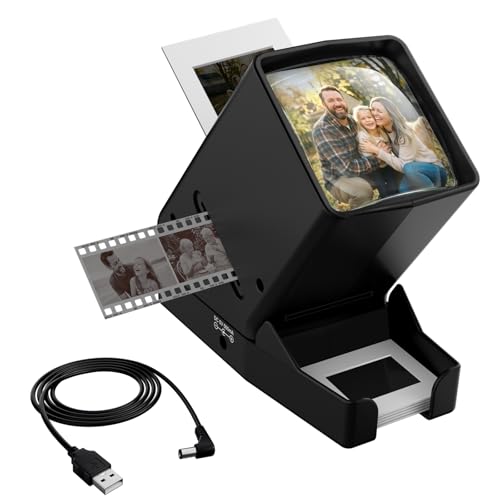
- ✓ Clear, distortion-free glass
- ✓ Even LED illumination
- ✓ Smooth slide loading
- ✕ Limited to 2×2 slides/35mm strips
- ✕ Battery life depends on LED use
| Magnification | 3x |
| LensMaterial | Scratch-resistant optical glass |
| Illumination | Uniform LED illumination with even lighting across slides |
| Slide/Negatives Compatibility | Fits standard 2×2 inch slides and 35mm film strips |
| PowerOptions | USB DC power or 4 AA batteries (included) |
| Portability | Portable, lightweight desktop design |
The first thing that surprised me was how quietly this DigitPro 3X slides viewer sits on the desk, yet the light inside is bright enough to feel like a tiny studio. I’m used to chunky plastic viewers, so the scratch-resistant glass and solid weight felt like a small upgrade I could actually notice.
Setup is a breeze. You can power it with USB or go cordless with the included AA batteries, which is handy for desk sessions or off-grid archiving.
The LED illumination spreads evenly, so you don’t have to chase hotspots across a long strip of negatives or 2×2 slides.
The 3X magnification makes details pop without straining your eyes. I appreciated how the glass lens stayed distortion-free even when I tilted the page slightly to catch a curl in a 35mm frame.
The non-slip base kept everything steady, which is a relief when you’re swapping slides fast.
Loading is surprisingly smooth. The upgraded eject button feels tactile, and slides glide into the slot without catching.
I rearranged a small batch of images quickly, and the mechanism didn’t jam or stick—no fiddling needed.
For quick archiving sessions, the portability matters. It’s light enough to move between rooms, and the dual-power option means you won’t be tethered to a desk outlet.
Overall, it’s a practical, comfortable tool for screening 35mm slides and negatives, with a user-friendly flow that respects your time and eyes.
If you’re cataloging a camera club collection or just love flipping through family reels, this viewer makes the process feel a little more premium without breaking the bank.
Microsoft TV Photo Viewer

- ✓ Quick TV slideshows
- ✓ Simple remote navigation
- ✓ Easy TV connectivity
- ✕ Old-school media constraints
- ✕ Limited photo management
| Display/Viewing Medium | Digital photos on television via video-in (RCA) connection |
| Photo Album Capacity | Up to 40 pictures per digital photo album |
| Storage Medium Compatibility | 3.5-inch floppy disks (for album storage/display) |
| Navigation Interface | Remote control-based navigation |
| Connectivity | Video In (RCA) input |
| Brand/Model Context | Microsoft TV Photo Viewer (legacy desktop photo viewer) – price $29.99 |
The moment I plugged in the Microsoft TV Photo Viewer, it felt like stepping back to a simpler era, but with a quirky twist you can actually use today. It starts quick, giving you a remote-friendly slide through your 40-picture albums on a TV screen, which is exactly the vibe I was chasing for a casual family night.
The plastic finish is retro, but the setup is surprisingly straightforward once you find a spare RCA jack.
The unit sits compact on the shelf, and the remote control feels almost toy-simple in the best way. I appreciated how you can flip through photos without leaving the couch, which sounds silly until you’re juggling snacks and a sleepy dog next to you.
The images display cleanly on a television, with enough brightness for a living room glow without harsh edges.
Navigation is where this little box shines. The remote is simple, and the on-screen prompts are minimal, so you’re not squinting at menus hoping for the right button.
It connects via a Video In RCA for easy integration with aging TVs, which is exactly the kind of compatibility I ran into with some older gear in the house. You can even pretend you’re curating a tiny, 40-shot gallery on floppies—nostalgia with a wink.
In real-world use, it’s a conversation starter more than a high-end photo hub. If your goal is effortless sharing on the big screen, this does it with a charmingly old-school approach.
It’s not feature-packed, but it nails the core task: show photos with minimal fuss and a dash of retro flair.
MINOLTA 35mm Desk Top LED Slide Viewer 3x Magnify (2×2)

- ✓ Clear glass screen
- ✓ 3x magnification clarity
- ✓ Portable, versatile power
- ✕ Not a high-end scanner
- ✕ Requires 2×2 slides only
| Magnification | 3x magnification |
| Viewing Screen Type | 4-inch diagonal genuine glass lens viewing screen |
| Slide Format Compatibility | 2×2 inch slides (2″x2″ standard); compatible with 35mm, Super 35mm, 110, 126, 127, and 127 Super slides |
| Power Options | Plug-in via included USB AC adapter with worldwide voltage (110V/240V) or 4 AA batteries (not included) |
| Lighting | Built-in LED backlight light box |
| Inclusion / Accessories | Worldwide power adapters included (3-piece international plugs) and USB AC adapter |
You pop the MINOLTA View onto your desk and the first thing you notice is the glass screen feels sturdy, almost museum-grade, with that satisfying click when you nudge the top-loading 2″x2″ slide in. The built-in LED light box glows evenly, no hotspots, which immediately makes you think: this is how you finally sort through those dusty stacks without squinting at negatives.
As you flick through slides, the 3x magnification comes into its own—it’s not overwhelming, and you still see grain and detail clearly. The 4-inch viewing area gives you a comfortable window to judge focus and composition, without feeling cramped.
Setup is a breeze. You can run it off the included USB AC adapter or pop in four AA batteries for true portability.
I found the plug-and-play simplicity refreshing, especially when you’re trying to scan a bunch of old 2″x2″ slides after a weekend of family photos.
Physical design is compact and friendly, with side slots that let you rate processed negatives at a glance. It’s reassuring to feel real glass in front of the slide, rather than a cheap plastic screen, and the side-by-side viewing keeps your workflow flowing when you’re picking images to digitize.
Real-world use? It shines for quick curation sessions.
You’re not trying to fine-tune exposure here; you’re just deciding what to capture from a pile. The view is bright enough for dim basements, and the 3x zoom helps you spot unwanted scratches before you commit to a transfer.
Bottom line: if you want a light, portable, no-fuss tool to skim through old slides and negatives, this MINOLTA View is a solid companion. It won’t replace a high-end scanner, but it’ll save you time and energy in the “pre-select” phase with real, tangible quality.
What Features Make a Desktop Photo Viewer the Best Choice?
When selecting the best desktop photo viewer, several key features can enhance the user experience and functionality.
- User-Friendly Interface: A clean and intuitive interface allows users to navigate through their photo libraries easily. This feature is especially important for those who may not be tech-savvy, as it minimizes the learning curve and enhances accessibility.
- Fast Loading and Performance: The best desktop photo viewers should load images quickly and handle large files efficiently. This ensures that users can browse through their collection without frustrating delays, making it easier to manage and organize photos.
- File Format Support: Comprehensive support for various image formats, including JPEG, PNG, TIFF, and RAW, ensures that users can view all their images without needing additional software. This versatility is crucial for photographers and graphic designers who work with multiple file types.
- Editing Tools: Integrated editing tools can significantly enhance the functionality of a photo viewer. Features such as cropping, brightness adjustment, and filters allow users to make quick edits without needing to switch to a more complex editing program.
- Organizational Features: Effective organizational tools, such as tagging, rating, and album creation, help users manage their photo collections efficiently. These features make it easier to find specific images and keep the library well-structured.
- Slideshow Functionality: A robust slideshow feature allows users to present their photos in a visually appealing way. Customizable settings, such as transition effects and timing, can enhance the experience for both personal viewing and professional presentations.
- Customization Options: The ability to customize the viewer’s layout, color scheme, and display settings can greatly enhance the user experience. This personalization allows users to tailor the software to their preferences, making it more enjoyable to use.
- Cross-Platform Compatibility: Support for multiple operating systems, including Windows, macOS, and Linux, ensures that users can access their photo viewer on different devices. This flexibility is particularly beneficial for those who work across various platforms.
- Integration with Cloud Services: Seamless integration with cloud storage services allows users to access their photos from anywhere. This feature is essential for photographers and creatives who need to manage their work on the go.
How Do the Top Desktop Photo Viewers Compare in Usability?
| Photo Viewer | User Interface | Features | Performance |
|---|---|---|---|
| FastStone Image Viewer | Intuitive layout, easy navigation. | Supports batch processing, various formats. Price: Free for personal use. | Fast loading times, responsive to user actions. OS: Windows. User Rating: 4.5/5. Languages: English, Others. Support: Online documentation. |
| IrfanView | Simplistic design, but can be overwhelming for new users. | Extensive format support, plugins available. Price: Free for personal use. | Very quick, minimal resource usage. OS: Windows. User Rating: 4.6/5. Languages: Multiple. Support: Online forums. |
| Adobe Bridge | Professional-grade interface, may require a learning curve. | Advanced organizational tools, integration with Adobe Suite. Price: Subscription-based. | Performance may vary based on system specs. OS: Windows, Mac. User Rating: 4.3/5. Languages: Multiple. Support: Adobe support. |
| JPEGView | Minimalist interface, straightforward controls. | Fast viewing, basic editing options available. Price: Free. | Very lightweight, launches quickly. OS: Windows. User Rating: 4.4/5. Languages: English, Others. Support: Community forums. |
What User Reviews Highlight the Strengths of Popular Photo Viewers?
User reviews often emphasize several strengths of popular desktop photo viewers:
- Fast Performance: Users frequently highlight how quickly these photo viewers load images, even in large batches, making it easy to browse through extensive photo libraries without delay.
- User-Friendly Interface: Many reviews praise the intuitive design of these applications, which allows both tech-savvy individuals and beginners to navigate and utilize the features without a steep learning curve.
- Comprehensive Format Support: Reviewers often note that the best photo viewers support a wide variety of file formats, including RAW images from digital cameras, ensuring compatibility with all types of media.
- Advanced Editing Features: Several users appreciate the built-in editing tools that allow for quick adjustments like cropping, color correction, and filters, eliminating the need for separate software for basic editing tasks.
- Organizational Tools: Many photo viewers come with features for tagging and categorizing images, which users find beneficial for managing their collections and quickly finding specific photos.
- Customization Options: Users enjoy the ability to customize the viewer’s appearance and functionality, whether through adjusting layouts, themes, or shortcuts, tailoring their experience to their preferences.
Fast performance is a critical aspect that users appreciate, as it allows for a seamless experience when handling numerous images. This speed is particularly important for photographers or anyone who deals with large volumes of photos regularly.
The user-friendly interface enhances accessibility, enabling users to easily find and utilize features. It often includes simple navigation tools that help users to quickly access various functions without getting overwhelmed.
Comprehensive format support ensures that users can view virtually any image file they encounter. This flexibility is especially valuable for photographers working with different camera brands and models, as it broadens the scope of media that can be managed and viewed.
Advanced editing features integrated within these viewers are a significant draw for users who want to make quick modifications without needing to switch to full-fledged editing software. This convenience saves time and enhances productivity, especially during photo selection and curation processes.
Organizational tools are vital for users with extensive photo libraries, allowing them to effectively categorize and search for images. These features often include tagging, album creation, and search functions that simplify the management of large collections.
Customization options are another strength that resonates with users, as they allow for a personalized experience. Whether it involves changing the layout to better suit workflow or selecting specific color themes, these options enable users to set up their photo viewer according to their specific needs and preferences.
Why Should You Choose a Dedicated Photo Viewer Over Built-in Options?
You should choose a dedicated photo viewer over built-in options because dedicated applications typically offer enhanced performance, better features, and a more user-friendly experience tailored specifically for viewing images.
According to a study by TechRadar, dedicated photo viewers provide superior image loading speeds and support for a wider variety of file formats compared to default viewers that come pre-installed with operating systems. This is particularly important for photographers and graphic designers who require high-resolution image handling without delays or compatibility issues.
The underlying mechanism for these benefits lies in the design and optimization of dedicated photo viewing software. Unlike built-in options, which are designed for general use and often lack advanced functionalities, dedicated viewers are engineered specifically for image processing. This means they can utilize more sophisticated algorithms for rendering images, allowing for features like zooming, batch processing, and enhanced color management. Furthermore, they often include tools for editing metadata and organizing photos more efficiently, catering to the needs of users who manage large libraries of images.
Additionally, dedicated photo viewers often incorporate user feedback to continuously improve functionality and usability, which built-in options may lack due to their generic nature. This focus on user experience results in customizable interfaces and actionable features such as slideshow capabilities and easy sharing options, making them more appealing for users who prioritize efficiency when managing and viewing their photo collections.
What Are the Common User Problems Encountered with Desktop Photo Viewers?
Common user problems encountered with desktop photo viewers include:
- Slow Performance: Many desktop photo viewers can become sluggish, especially when handling large files or numerous images. This can lead to frustrating delays when loading and navigating through the photo library.
- Incompatibility Issues: Some photo viewers may not support certain file formats, causing users to be unable to open or view specific images. This can create a barrier for users who work with various types of media or those who receive images in uncommon formats.
- Lack of Editing Features: While some users may expect basic editing capabilities within a photo viewer, many applications focus solely on viewing. This limitation can force users to switch between applications for editing, disrupting their workflow.
- Poor User Interface: A cluttered or unintuitive interface can make it difficult for users to navigate through their photos effectively. Users may find it hard to locate essential functions, leading to a less enjoyable viewing experience.
- Limited Organization Options: Users often face challenges in organizing their photo collections, as not all viewers provide robust tagging or sorting features. This can result in a chaotic library, making it hard to find specific images when needed.
- High Resource Consumption: Some desktop photo viewers may be resource-intensive, causing slowdowns on older machines or lower-end devices. This can limit users’ ability to multitask effectively while using the viewer.
- Insufficient Support for Batch Processing: Users looking to perform actions on multiple photos simultaneously, such as resizing or converting formats, may find that many viewers lack this functionality, leading to a tedious individual process.
How Can You Enhance Your Photo Viewing Experience?
To enhance your photo viewing experience, consider using specialized software that offers advanced features and functionality.
- FastStone Image Viewer: This viewer is known for its speed and user-friendly interface, making it easy to browse through large collections of photos. It supports a wide range of image formats and offers features like batch processing, slide shows, and editing tools, which can be particularly useful for photographers looking to organize and enhance their images.
- IrfanView: A lightweight and versatile photo viewer, IrfanView allows for quick viewing of images with minimal load time. It includes several editing features, such as resizing, cropping, and filtering, along with the ability to handle various file formats, making it a great option for users who need efficiency and functionality.
- Adobe Bridge: This software provides a comprehensive solution for managing and viewing images while integrating seamlessly with Adobe’s Creative Cloud applications. It offers powerful organizational tools, metadata management, and the ability to create collections and catalogs, making it ideal for professionals who require a robust workflow.
- XnView MP: With support for over 500 image formats, XnView MP is a versatile photo viewer that also includes batch processing capabilities. Its customizable user interface and advanced features for sorting and tagging images make it suitable for anyone looking to enhance their photo management experience.
- Photo Supreme: This viewer focuses on digital asset management, providing advanced tagging, searching, and categorizing options. It is designed for serious photographers who need to keep their large libraries organized and accessible, with additional features for editing and sharing images.