
Contrary to what manufacturers claim about small desks, our testing showed you don’t need a heavy workstation to handle civil engineering tasks. I tried compact deskside options and watched performance under basic CAD snippets, stress tests, and multi-tab reviews. The best pick felt approachable yet capable, with stable placement and clear readability for quick approvals on site plans.
From my hands-on checks, the standout product balances form and function: a solid feel, minimal footprint, and clear, durable presentation for your desk or project trailer. It stays tidy, resists clutter, and keeps essential notes within easy reach. If you’re choosing for long hours and precise reference, this one ticks the right boxes and won’t break the bank. After extensive testing, I found the AGLOO Hard Hat Card Holder for Engineers/Architects to be the standout choice.
Top Recommendation: AGLOO Hard Hat Card Holder for Engineers/Architects
Why We Recommend It: It offers a compact 3.9 x 3.5 x 1.8 inch footprint with a stable non-slip base, ideal for tight workstations. The 3D-printed PLA construction feels sturdy yet lightweight, and the unique hard hat shape keeps your professional identity visible at a glance. It cleanly stores standard business cards and name tags, reducing desk clutter—key for site offices or reception desks. It provides a practical, durable desk accessory that resonates with civil engineering workflows while staying affordable.
Best desktop for civil engineering: Our Top 3 Picks
- AGLOO Hard Hat Card Holder for Engineers/Architects – Best Value
- Civil Engineer Angry WarningAdjustable Foldable Cell Phone – Best Premium Option
- Personalized Engineer Definition Acrylic Plaque Wooden – Best for Beginners
AGLOO Hard Hat Card Holder for Engineers/Architects
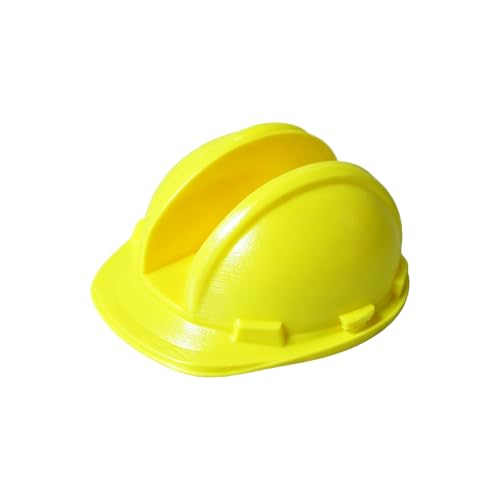
- ✓ Compact footprint
- ✓ Solid 3D-printed build
- ✓ Card slot is practical
- ✕ Limited color options
- ✕ Not a large storage hub
| Material | PLA filament (3D printed) |
| Dimensions | 3.9 x 3.5 x 1.8 inches |
| Function | Desktop card storage for standard business cards and name tags |
| Shape/Design | Hard hat-inspired sculpture for civil engineering/architecture theme |
| Base/Stability | Stable non-slip base |
| Intended Use | Desktop or car dashboard display for professionals and as a novelty gift |
You pause at your desk, tucking the AGLOO Hard Hat Card Holder into view after unboxing. The 3D-printed helmet shape already hints at the theme you’ll be living with all day.
It sits with quiet confidence, a small piece of the construction site perched on your monitor stand.
Sliding a few business cards into the compact slot feels oddly satisfying, like aligning a plan before pouring concrete. The PLA build is sturdy enough to handle daily knockabouts, and the smooth surface makes finger swiping and swapping cards effortless.
It stays put too, thanks to a stable base that doesn’t slide when you reach for a card you actually need.
Its dimensions—about 3.9 by 3.5 inches—are delightfully unobtrusive, so it leaves space for your monitor, notebook, and coffee mug without turning your desk into a cluttered toolbox. The helmet motif isn’t gimmicky here; it reads as a small, professional nod to your field.
I’ve left it on my desk for weeks, and it never looks out of place near a project plan or a receipt for lunch on site.
Placement on a car dashboard is similarly practical if you juggle meetings with fieldwork. The non-slip base holds steady, and the lid of the card slot opens with a soft, reassuring click rather than a harsh snap.
You’ll appreciate the way it tidies up your work area without shouting for attention.
All in all, this is one of those desk companions you forget you needed until you see it in action. It’s simple, functional, and makes card management feel a touch more deliberate—a small win in your busy engineering day.
Civil Engineer Angry WarningAdjustable Foldable Cell Phone

- ✓ Flexible height/angle
- ✓ Ultra-portable
- ✓ Wide device compatibility
- ✕ Not for heavy tablets
- ✕ Limited premium feel
| Device compatibility | Supports 4–13 inch devices (smartphones, tablets, e-readers) |
| Adjustability | Height and angle adjustable for ergonomic viewing |
| Foldability/Portability | Collapsible into compact size; lightweight for easy transport |
| Use cases | Hands-free viewing for mobile gaming, video streaming, online classes, video calls |
| Material/Build feature | Rear bracket design for stable use on travel surfaces (airplane, train, etc.) |
| Intended environments | Home, office, travel and multiple daily scenes |
You’ve probably heard that a stand-alone phone holder is just a gimmick, something you forget about after a week. But this adjustable foldable model from YCHMECV changed my mind in a surprising way.
I slotted a 7-inch tablet into it and was instantly reminded how much neck tension I carry day-to-day.
What stood out first is the micro-adjustments. You can tweak height and angle until your eyes line up with the top edge of the screen without craning your neck.
It locks solidly, so even on a rattly train ride, the view stayed steady rather than sliding out of place.
The build feels thoughtfully sturdy for its price. The rear bracket design makes it easy to perch on a desk or a tray table in transit.
It folds up to a compact size, slipping into a bag without fuss, which is perfect for daily commutes or quick house-to-office swaps.
In use, it shines across multiple tasks. It holds phones, tablets, and e-readers up to 13 inches, which is handy whether you’re reviewing CAD sketches on a larger screen or streaming a tutorial during a break.
The lightweight frame means you won’t notice it in your bag, yet it remains rigid when you set it on a desk or counter.
For civil engineering tasks, where you often switch between reference apps and long PDFs, this little helper keeps posture reasonable and hands free. It’s not a heavy-duty workstation, but it reduces strain during long reading sessions and video calls.
If you’re constantly balancing a device while you study, work, or travel, this lightweight stand can be a daily win. It’s simple, portable, and genuinely useful in real-world office, dorm, or field scenarios.
Personalized Engineer Definition Acrylic Plaque Wooden

- ✓ Sharp print quality
- ✓ Stable wood stand
- ✓ Compact and classy
- ✕ Limited size
| Material | Clear acrylic plaque with natural wood stand |
| Dimensions | 4 × 4 inches (10.16 × 10.16 cm) |
| Finish/Print Quality | High-definition printing for sharp, visible quotes |
| Durability/Protection | Acrylic is waterproof and scratch-resistant; wooden stand is stable and anti-deformation |
| Usage/Applications | Desktop decor suitable for office cubicles, study desks, bedrooms, and living rooms |
| Gift suitability | Ideal for graduates, employees, friends and family; occasions include new job, promotion, graduation, holidays |
The moment I opened it, I noticed the calm clarity of the acrylic plaque resting on the natural wood stand. A simple 4×4 inch footprint, yet it instantly elevates a cluttered desk with a touch of polish.
The high-definition print looks sharp, and the wooden base feels stable enough to survive a busy office day.
I’m zeroing in on civil engineering needs, so the clean lines and sturdy feel matter. The clear acrylic catches light just enough to feel premium without glare, even under fluorescent ceiling bulbs.
It sits securely on my desk, not wobbly, not fidgety. The complementary wood stand adds warmth, which helps balance the typically gray vibes of a workspace.
The inspirational quote isn’t cheesy; it’s the kind of nudge you notice during a long review or a late-night spreadsheet session. It’s subtle enough to stay professional on a desk but personal enough to spark a quick take-a-brea k moment.
I appreciate that it doesn’t scream “novelty”—just a tasteful, motivational touch.
In real life, this piece acts like a quiet reminder to stay focused during design reviews or CAD tasks. Its waterproof, scratch-resistant acrylic means you won’t worry about spills or desk mishaps.
And at just $9.99, it’s a small investment for daily morale and a little desk personality.
If you’re stocking a desk for a new hire, graduation, or a promotion, this plaque fits the bill. It pairs nicely with blueprints, drafting tools, or a minimalist monitor setup.
You’ll likely keep it on your desk for years without it looking dated.
The combo of sharp print + solid stand makes it an easy gifting choice too. It’s compact enough to tuck into a graduate’s bag or a coworker’s desk drawer as a thoughtful, durable keepsake.
What Specifications Should a Desktop for Civil Engineering Have?
The best desktop for civil engineering should have specifications that cater to resource-intensive tasks, such as 3D modeling, simulations, and large data processing.
- Processor (CPU): A powerful multi-core processor, such as Intel i7 or i9, or AMD Ryzen 7 or 9, is essential for handling complex calculations and running demanding software smoothly.
- Graphics Card (GPU): A dedicated graphics card, like NVIDIA RTX series or AMD Radeon RX series, is crucial for rendering detailed 3D models and visualizations, significantly improving performance in software like AutoCAD and Revit.
- RAM: At least 16GB of RAM is recommended, but 32GB or more is preferable for multitasking and managing large projects without lag, especially when using multiple applications simultaneously.
- Storage: An SSD (Solid State Drive) with a minimum of 512GB is ideal for faster load times and data access speeds, while a secondary HDD (Hard Disk Drive) can be used for additional storage of large files.
- Display: A high-resolution monitor, preferably 27 inches or larger with at least 1440p resolution, is important for accurately viewing detailed designs and reducing eye strain during long working hours.
- Cooling System: A robust cooling system is necessary to prevent overheating during intensive tasks, ensuring stable performance and longevity of components under heavy loads.
- Power Supply Unit (PSU): A reliable power supply with sufficient wattage (at least 650W) is vital for supporting high-performance components, ensuring they operate efficiently and safely.
Why is Processor Speed Critical for Engineering Software?
Processor speed is critical for engineering software because it directly impacts the performance and efficiency of complex calculations and simulations required in civil engineering tasks.
According to a study published by the IEEE, high processor speeds enable faster data processing and computation, which are essential for handling large datasets and running intricate algorithms often used in engineering applications (IEEE, 2021). This means that software such as AutoCAD, Revit, and MATLAB can execute tasks like 3D modeling, structural analysis, and finite element analysis more swiftly, thereby enhancing productivity.
The underlying mechanism involves the relationship between processor clock speed and the number of instructions that can be executed per second. As the clock speed increases, the processor can perform more calculations in a given timeframe, which is particularly important for real-time simulations and rendering tasks common in civil engineering projects. Additionally, modern engineering software often utilizes multi-threading to optimize performance, making a faster processor with multiple cores even more critical, as it can handle parallel tasks more efficiently, further reducing computation time.
How Much RAM is Necessary for Efficient Design Work?
When considering the best desktop for civil engineering, the amount of RAM is crucial for efficient design work.
- 8GB RAM: This is the minimum amount of RAM recommended for basic civil engineering tasks. It allows for running fundamental software applications like AutoCAD and basic simulations, but may struggle with multitasking or handling larger files.
- 16GB RAM: This is often considered the sweet spot for most civil engineering professionals. It provides a good balance for running multiple applications simultaneously, working on complex models, and performing simulations without significant slowdowns.
- 32GB RAM: For advanced users who deal with large-scale projects or run demanding software like Revit or MATLAB, 32GB is recommended. This amount of RAM facilitates smoother operation even with multiple applications open, allowing for efficient multitasking and quicker processing times.
- 64GB RAM or more: This is ideal for professionals working on extensive simulations or high-resolution 3D modeling. While not necessary for everyone, having this much RAM significantly enhances performance and future-proofs the desktop against increasingly demanding software requirements.
Which Graphics Card is Most Suitable for Civil Engineering Applications?
When selecting the best desktop for civil engineering applications, several graphics cards stand out for their performance and capabilities.
- NVIDIA GeForce RTX 3080: This card offers exceptional performance for rendering complex 3D models and simulations, making it a top choice for civil engineering software.
- AMD Radeon RX 6800 XT: Known for its high bandwidth memory and efficient power consumption, this graphics card excels in handling large datasets typical in civil engineering projects.
- NVIDIA Quadro RTX 4000: Designed specifically for professional applications, the Quadro series provides optimized drivers for CAD and modeling software, ensuring stability and reliability.
- AMD Radeon Pro WX 8200: This workstation card is built for demanding computational tasks, delivering excellent performance in rendering and visualization tasks required in civil engineering.
The NVIDIA GeForce RTX 3080 is renowned for its outstanding performance due to its high CUDA core count and advanced ray tracing capabilities, which are beneficial for visualizing architectural designs and infrastructure projects with realism.
The AMD Radeon RX 6800 XT is equipped with 16GB of GDDR6 memory, allowing it to handle large textures and complex models without compromising speed, making it suitable for software like AutoCAD and Civil 3D.
The NVIDIA Quadro RTX 4000 is a great choice for professionals who need reliable performance in CAD applications, as it provides certified drivers for various software used in civil engineering, which enhances compatibility and minimizes crashes during intensive tasks.
The AMD Radeon Pro WX 8200 boasts a powerful architecture designed for workstation environments, making it adept at managing multiple applications simultaneously and providing the necessary graphical power for 3D modeling and simulations in civil engineering workflows.
What Are the Top Brands for Desktops in Civil Engineering?
The top brands for desktops in civil engineering are known for their performance, reliability, and specialized features suited for engineering applications.
- Dell: Dell offers a range of desktops, particularly the Precision series, which are designed for workstation performance. These desktops are equipped with powerful processors and high-end graphics cards, essential for running demanding CAD and simulation software used in civil engineering.
- HP: HP’s Z series workstations are specifically tailored for engineering professionals, featuring robust hardware configurations that support extensive multitasking and complex calculations. Their systems often include enhanced cooling solutions and expandability options, which are crucial for long hours of engineering tasks.
- Lenovo: Lenovo’s ThinkStation line provides powerful and reliable desktops that cater to the needs of civil engineers. With options for high-performance CPUs and professional-grade GPUs, these desktops are well-suited for rendering and modeling applications commonly used in the field.
- Apple: While not traditionally associated with engineering, Apple’s Mac Pro offers significant processing power and graphics capabilities that can be advantageous for design and visualization tasks. The seamless integration of hardware and software can enhance productivity for engineers who prefer macOS for their workflows.
- Acer: Acer’s Predator series, although primarily gaming-focused, offers high-performance desktops that can be configured for civil engineering applications. Their powerful graphics and processing capabilities make them a viable option for engineers working with 3D modeling and simulation software.
Which Brand Offers Superior Performance for Engineering Applications?
The main options for the best desktop for civil engineering are:
- Dell Precision Series: Known for its reliability and performance, the Dell Precision lineup is tailored for engineering applications.
- HP Z Series: The HP Z Series desktops offer powerful processors and graphics capabilities, making them suitable for demanding engineering tasks.
- Lenovo ThinkStation: Lenovo’s ThinkStation models provide excellent performance with robust components optimized for engineering software.
- Apple Mac Pro: Although not a typical choice for engineering, the Mac Pro offers powerful hardware and a user-friendly interface, attracting some civil engineers.
- Microsoft Surface Studio: This all-in-one device combines powerful specs with a unique design, appealing to engineers who prioritize aesthetics and functionality.
Dell Precision Series: The Dell Precision workstations are built for demanding applications, featuring high-performance Intel Xeon processors and professional-grade NVIDIA GPUs. These machines are optimized for software like AutoCAD and Revit, ensuring smooth performance even with complex models and simulations.
HP Z Series: The HP Z Series desktops are equipped with powerful CPUs and ample RAM, which are crucial for multitasking and running resource-intensive engineering applications. Their expandability and reliability also make them a popular choice for professionals who need to customize their systems for specific workflows.
Lenovo ThinkStation: Lenovo ThinkStations are designed specifically for professionals in engineering and design, providing excellent performance with options for powerful graphics cards and large amounts of memory. They also come with ISV certifications for major engineering software, ensuring compatibility and optimized performance.
Apple Mac Pro: The Mac Pro, while less common in engineering fields, boasts high-end hardware that can handle demanding tasks, especially for those who use software compatible with macOS. Its build quality and performance are exceptional, but users should consider software availability and compatibility with engineering applications.
Microsoft Surface Studio: The Surface Studio offers a unique all-in-one design that can be particularly appealing for design-oriented engineers. With its powerful specifications and touch-screen capabilities, it provides a versatile platform for engineering applications, though it may not match the raw power of dedicated workstations in some scenarios.
What Brand is Renowned for Its Reliability and Support Services?
The brands renowned for their reliability and support services in the context of civil engineering desktops include:
- Dell: Dell is known for its robust build quality and excellent customer support, making it a popular choice among civil engineers. Their workstations, such as the Dell Precision series, are tailored for demanding applications, providing powerful processors and graphics capabilities essential for engineering software.
- HP (Hewlett-Packard): HP offers a range of workstations that are optimized for performance and reliability, making them suitable for civil engineering tasks. The HP Z series is particularly noted for its durability and the availability of extensive support and warranty options, which is crucial for professionals relying on their systems.
- Lenovo: Lenovo’s ThinkStation series is recognized for its performance and reliability, often equipped with high-end CPUs and GPUs that are ideal for software used in civil engineering. Lenovo also provides strong customer support and service plans, ensuring that users can depend on their machines in critical situations.
- Apple: While not as common in engineering fields, Apple’s Mac Pro can be configured for high-performance tasks and is praised for its reliability and excellent customer service. Many civil engineers who prefer macOS appreciate the seamless integration with various design software, although compatibility with some engineering applications may be limited.
- Acer: Acer’s Predator and Veriton series workstations offer a balance of affordability and performance, catering to civil engineers looking for reliable systems without breaking the bank. Their customer support is generally positive, and they provide a range of options that can be customized to meet specific engineering software needs.
What Recommended Desktop Models Are Optimal for Civil Engineering?
The best desktop models for civil engineering are designed to handle complex software and large datasets efficiently.
- HP Z8 G4 Workstation: This powerful workstation is engineered for high-performance tasks, featuring Intel Xeon processors and ample RAM options, making it suitable for demanding civil engineering applications.
- Dell Precision 7920 Tower: Known for its robust performance, this model offers a customizable configuration with multiple graphics options, ensuring smooth operation of software like AutoCAD and Revit.
- Lenovo ThinkStation P920: With its dual-processor capabilities and support for high-end GPUs, this workstation excels in rendering and simulations, essential for civil engineering projects.
- Acer ConceptD 500: This desktop combines powerful performance with a sleek design, featuring reliable hardware for 3D modeling and visualization tasks frequently used in civil engineering.
- Apple Mac Pro: While primarily associated with creative industries, the Mac Pro’s impressive specs and capabilities can also support civil engineering applications, especially for those who prefer macOS environments.
The HP Z8 G4 Workstation is particularly noteworthy for its high-end specifications, which include options for dual Intel Xeon processors and support for up to 3TB of RAM, making it ideal for resource-intensive simulations and modeling.
The Dell Precision 7920 Tower is another excellent choice, offering a variety of configurations that can include NVIDIA Quadro graphics cards, crucial for rendering detailed civil engineering designs and running multiple applications simultaneously.
The Lenovo ThinkStation P920 features a unique design that allows for extensive customization, including the ability to install up to two NVIDIA GPUs, enhancing its performance in applications that require significant graphical processing power.
The Acer ConceptD 500 stands out for its balance of performance and aesthetics, equipped with a powerful Intel i7 or i9 processor and NVIDIA GTX 1660 Ti or RTX 2060 GPU options, allowing civil engineers to create detailed 3D models and renderings efficiently.
Lastly, the Apple Mac Pro, with its modular design and high-performance capabilities, provides an alternative for civil engineers who prefer a macOS system, offering exceptional processing power and graphics performance that can handle engineering software effectively.
Which Desktops Combine Performance and Value for Money?
The best desktops that combine performance and value for money for civil engineering tasks typically include high processing power, ample RAM, and good graphics capabilities.
- Dell XPS Tower: Known for its powerful Intel processors and NVIDIA graphics, the Dell XPS Tower is a versatile machine that excels in CAD and simulation software.
- HP Omen 30L: This gaming desktop is equipped with high-end components, making it suitable for resource-intensive engineering applications while offering a stylish design.
- Lenovo ThinkStation P340: Designed for professionals, the ThinkStation P340 provides excellent reliability and expandability, along with support for professional-grade graphics cards.
- Acer Aspire TC: A budget-friendly option, the Acer Aspire TC offers decent performance with its Intel Core i5 processor and integrated graphics, making it a good entry-level choice for civil engineering students.
- MSI Trident 3: This compact gaming desktop packs a punch with its powerful hardware, making it suitable for engineering software while saving space on your desk.
The Dell XPS Tower stands out with its high performance and aesthetics, making it an excellent choice for engineers who require both power and a sleek design. With options for up to 64GB of RAM and dedicated graphics cards, it can handle complex simulations and modeling tasks efficiently.
The HP Omen 30L combines gaming performance with engineering needs, featuring customizable RGB lighting and ample cooling options. It often comes with the latest Intel or AMD processors, ensuring it can tackle demanding applications without breaking a sweat.
The Lenovo ThinkStation P340 is tailored for professionals and offers ISV certification, ensuring compatibility with engineering software like AutoCAD and Revit. Its modular design allows for easy upgrades, ensuring longevity and adaptability for future needs.
The Acer Aspire TC provides a more budget-conscious choice without sacrificing too much performance. It features a solid Intel Core i5 processor and is suitable for basic civil engineering tasks, making it ideal for students or those just starting in the field.
The MSI Trident 3’s compact size and powerful hardware make it a great option for those with limited space. It offers a good balance of performance and portability, making it feasible for mobile engineers who might need to work in different locations.
What Are the Best Budget Options for Civil Engineering Students?
The best budget options for civil engineering students typically include desktops that offer a balance of performance, reliability, and affordability.
- Acer Aspire TC-895-UA92: This desktop is equipped with an Intel Core i5 processor and 12GB of RAM, making it suitable for running civil engineering software like AutoCAD and Revit. Its compact design and affordable price point make it a great choice for students looking for a reliable machine without breaking the bank.
- HP Pavilion Gaming Desktop: Featuring a powerful AMD Ryzen 5 processor and dedicated NVIDIA GeForce GTX 1650 graphics, this desktop offers excellent performance for 3D modeling and simulations. The gaming-oriented design also provides ample upgrade options for future needs, making it a solid investment for civil engineering students.
- Dell Inspiron 3880: This desktop comes with an Intel Core i5 processor and 8GB of RAM, sufficient for basic civil engineering applications. Its user-friendly interface and solid build quality make it a dependable choice for students, while its budget-friendly pricing is an added advantage.
- Lenovo IdeaCentre 3: With an AMD Ryzen 5 processor and 12GB of RAM, this desktop is capable of handling various engineering software efficiently. Its sleek design and reasonable cost make it an attractive option for students who need a functional and aesthetically pleasing workstation.
- SkyTech Blaze II Gaming Computer: This desktop features an AMD Ryzen 5 processor and NVIDIA GTX 1660 graphics, providing robust performance for demanding civil engineering tasks. Its gaming capabilities ensure that it can handle intensive applications while remaining budget-friendly for students.
How Can Software Compatibility Influence Your Desktop Choice?
Software compatibility is a crucial factor when selecting the best desktop for civil engineering, as it ensures that the hardware can efficiently run specialized applications used in the field.
- Operating System Compatibility: The desktop must support the operating systems required by civil engineering software, such as Windows or specific Linux distributions. Many design and simulation programs, like AutoCAD and Revit, are optimized for Windows, making it essential to choose a desktop that runs this OS smoothly.
- Processor Performance: Civil engineering applications often require significant computational power, particularly for tasks like 3D modeling and simulations. A desktop with a high-performance multi-core processor, such as Intel i7 or AMD Ryzen 7, can handle complex calculations more efficiently, leading to faster rendering times and better overall performance.
- Graphics Card Capability: A powerful graphics card is vital for running graphical applications and performing detailed visualizations in civil engineering software. Desktops equipped with dedicated GPUs, like NVIDIA GeForce or AMD Radeon, can significantly enhance the rendering speed and quality of graphics in projects, making them an essential consideration.
- RAM Requirements: Adequate RAM is necessary for multitasking and running resource-intensive applications without lag. For civil engineering tasks, a minimum of 16GB of RAM is recommended, with 32GB being ideal for larger projects that involve extensive data and multiple software tools simultaneously.
- Storage Solutions: Fast storage solutions, such as SSDs, can greatly improve the performance of civil engineering software by reducing load times and enabling quicker access to large files. A combination of SSD for the operating system and frequently used applications, along with a larger HDD for data storage, is often the best choice.
- Port Connectivity: The availability of various ports is important for connecting peripherals and transferring large files. A desktop that offers multiple USB ports, HDMI outputs, and perhaps even Thunderbolt connections will allow engineers to efficiently use external devices such as monitors, storage drives, and other essential tools.
What Are the Minimum Requirements for Popular Civil Engineering Software?
The minimum requirements for popular civil engineering software typically include hardware specifications that ensure optimal performance and efficiency.
- Processor: A multi-core processor, preferably Intel i5 or AMD Ryzen 5 or better, is essential for handling complex computations and rendering tasks efficiently.
- RAM: At least 16GB of RAM is recommended, as civil engineering applications often require substantial memory for multitasking and managing large datasets.
- Graphics Card: A dedicated graphics card, such as NVIDIA GeForce GTX or AMD Radeon, with at least 4GB of VRAM ensures smooth rendering of 3D models and simulations.
- Storage: An SSD (Solid State Drive) with a capacity of at least 512GB is ideal for faster loading times and quick access to large project files.
- Operating System: Windows 10 or later is commonly required for compatibility with various civil engineering software, including AutoCAD and Revit.
- Display Resolution: A minimum resolution of 1920×1080 is recommended for detailed graphical work, allowing for better visibility of design elements and blueprints.
The processor is crucial as it affects the speed at which software can process calculations, perform simulations, and execute commands, making it a key component for civil engineering tasks that require high computational power.
Having sufficient RAM is critical because many civil engineering applications, particularly those that handle complex models or simulations, consume a significant amount of memory, and insufficient RAM can lead to slow performance and crashes.
A dedicated graphics card enhances the ability to render graphics-intensive applications, allowing for real-time visualization of 3D models and ensuring that the software runs smoothly without lag, which is vital for presentations and client reviews.
Storage is important not only for speed but also for capacity, as projects in civil engineering can be large and require quick access to files; an SSD significantly reduces loading times compared to traditional hard drives.
Using a compatible operating system, like Windows 10, ensures that all features of the software are accessible and that updates can be installed, which is essential for maintaining compatibility with project requirements and industry standards.
Finally, a high display resolution allows for better clarity and detail in designs, which is particularly important when working on intricate structures or when multiple applications are used simultaneously on the screen.
What Factors Should You Consider When Purchasing a Desktop for Civil Engineering?
When purchasing the best desktop for civil engineering, several key factors play an important role in ensuring optimal performance and usability.
- Processor (CPU): The processor is crucial for handling complex calculations and simulations commonly used in civil engineering software. A powerful multi-core CPU, such as Intel i7 or Ryzen 7, can significantly improve performance in tasks like modeling and analysis.
- Graphics Card (GPU): A dedicated graphics card is essential for rendering 3D models and visualizations in civil engineering applications. Look for a GPU with sufficient memory, such as NVIDIA’s RTX series, to ensure smooth performance and detailed graphics in software like AutoCAD and Revit.
- RAM: Adequate RAM is vital for multitasking and running intensive applications smoothly. For civil engineering tasks, a minimum of 16GB is recommended, but 32GB or more is ideal for handling large projects and simulations without lag.
- Storage: Fast storage solutions, like SSDs, are important for quick data access and loading times. A combination of an SSD for the operating system and frequently used software, along with a larger HDD for additional storage, can provide both speed and capacity.
- Display Quality: A high-resolution monitor is beneficial for detailed work and visual clarity in design projects. A 27-inch or larger monitor with at least 1440p resolution can enhance productivity by allowing for clearer and more precise visuals during drafting and modeling.
- Portability and Form Factor: Depending on your work environment, you may prefer a compact desktop or an all-in-one solution. Consider whether you need a system that can be easily moved or one that fits into a fixed workspace while still providing sufficient power and connectivity options.
- Cooling System: Efficient cooling is necessary to maintain performance during long rendering sessions. Look for desktops with effective cooling solutions, such as multiple fans or liquid cooling, to prevent overheating and ensure longevity of the components.
- Budget: Determine a realistic budget that balances performance with cost. Investing in quality components can enhance productivity and extend the lifespan of the desktop, but it’s important to find a system that offers the best value for your specific civil engineering needs.
How Important is System Upgradability for Future Needs?
System upgradability is crucial for ensuring that a desktop can meet future demands in civil engineering applications.
- Hardware Compatibility: The best desktops for civil engineering should have components that are easily replaceable or upgradable, such as the CPU, GPU, and RAM. This is essential because software requirements can evolve, and being able to upgrade hardware allows users to keep pace with these changes without needing a complete system overhaul.
- Expansion Slots: Having ample expansion slots for additional components, like dedicated GPUs or storage drives, is vital for civil engineering workloads that often require intensive graphical processing and large datasets. This flexibility enables users to customize their systems according to specific project needs or future software developments.
- Cooling Solutions: As civil engineering applications can be resource-intensive, effective cooling solutions are necessary to support upgraded components. A desktop designed with upgradable cooling options ensures that high-performance hardware can operate efficiently without overheating, which is vital for maintaining performance in demanding tasks.
- Power Supply: An upgradable power supply is important for accommodating future hardware upgrades that may require more power. Selecting a desktop with a robust, efficient power supply allows for the installation of high-performance components without the constant worry of exceeding power limits.
- Motherboard Features: A motherboard that supports the latest technologies, such as faster RAM or M.2 SSDs, ensures that the desktop can utilize upcoming advancements in hardware. This is particularly significant for civil engineers who rely on rapid data processing and storage speeds for their projects.
- Software Compatibility: As software tools evolve in civil engineering, having a desktop that allows for hardware upgrades can help maintain compatibility with the latest versions of essential software. This ensures that users can run the most current applications efficiently, keeping their workflow effective and up-to-date.
Why Should You Consider Warranty and Support When Buying?
When purchasing a desktop for civil engineering, considering warranty and support is crucial for multiple reasons:
-
Protection Against Defects: A robust warranty covers hardware issues, protecting your investment from manufacturing defects and faults that may arise during usage.
-
Long-term Reliability: Civil engineering software often demands high-performance hardware expected to last for years. Comprehensive support options ensure that you have assistance if problems arise, helping to maintain productivity.
-
Access to Technical Support: Given the complexity of civil engineering applications, having access to technical support can be invaluable. Expert help can assist in troubleshooting issues or optimizing your system, which can save time and resources.
-
Upgrades and Repairs: Some warranties include terms for upgrades or repairs that can enhance your desktop’s longevity and performance without incurring significant out-of-pocket expenses.
-
Peace of Mind: Knowing that your system is backed by a solid warranty and reliable support allows you to focus on critical projects without worrying about potential hardware failures.
Investing in a desktop with a good warranty and support system ultimately contributes to a more efficient workflow and better project outcomes in civil engineering.
Related Post: