
Top Recommendation: Huion Kamvas 22 (Gen 3) 2.5K 90Hz Drawing Tablet with Screen
Why We Recommend It: Offers a 21.5-inch 2.5K display with 2560×1440 resolution and 90Hz refresh for smoother strokes; PenTech 4.0 with 16,384 pressure levels and ±60° tilt; factory calibration ΔE<1.2 and 5 color spaces (sRGB, Rec.709, Adobe RGB, Display P3, monochrome); laminated screen with Canvas Glass 2.0 for accuracy and a natural pencil feel; integrated ambient lighting and robust connectivity (USB-C or HDMI) for flexible animation workflows. These combined features provide sharper detail, truer colors, and a more responsive drawing experience than the other options.
Best animation desktop: Our Top 3 Picks
- Huion Kamvas 22 (Gen 3) 2.5K 90Hz Drawing Tablet with Screen – Best Value
- LED Holographic Crystal Cube Display with Weather Clock – Best Animated Desktop Backgrounds
- Pthjswj T13 Action Figure: 6 Hands, 2 Weapons, Green – Best/Desktop App for Fun Visuals
Huion Kamvas 22 (Gen 3) 2.5K 90Hz Drawing Tablet with Screen
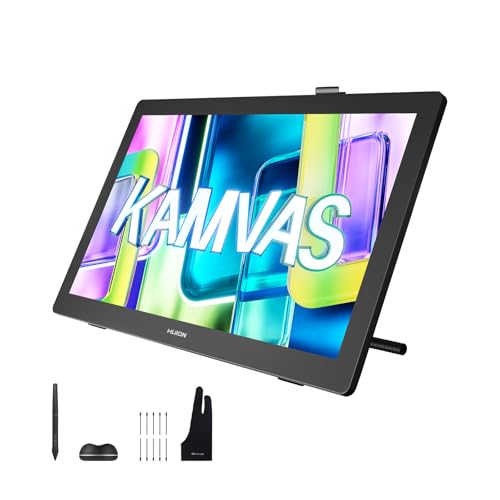
- ✓ Big, crisp 2.5K panel
- ✓ Precise PenTech 4.0
- ✓ Excellent color accuracy
- ✕ Not standalone (needs computer)
- ✕ Amb light not on all Macs always
| Display Size and Type | 21.5-inch pen display with laminated 2.5K (2560×1440) resolution |
| Refresh Rate | 90 Hz |
| Pen Input and Feel | PenTech 4.0 with 16,384 pressure levels and ±60° tilt support; 2 g initial force |
| Color Gamut and Calibration | Factory-calibrated to ΔE < 1.2; supports 99% sRGB/Rec.709, 90% Adobe RGB, 94% Display P3; Black & White monochrome mode |
| Glass Surface and Parallax | Canvas Glass 2.0 with nano-etched AG glass; fully laminated screen to minimize parallax |
| Connectivity and System Compatibility | HDMI or USB-C connection; compatible with Windows 10+, macOS 10.12+, Android (USB 3.1 and DP 1.2+); USB-C cable included |
You’ll notice the large display immediately, with a crisp 2.5K image that makes line work look clean and confident.
The glass surface isn’t glossy, but the texture helps control. Parallax is minimal once you calibrate, which is a relief for fine details.
Pen response is fast and consistent, with tilt support that actually matters for shading and brush effects.
The stand is solid and adjustable, and the built-in pen holder keeps your tools in reach.
Color accuracy is impressive out of the box, and the 5 color modes cover most creative workflows.
Ambient lighting is a nice bonus that adds mood without distracting from the work.
LED Holographic Crystal Cube Display with Weather Clock

- ✓ Crisp 3D visuals
- ✓ Easy to personalize
- ✓ Quiet operation
- ✕ Limited screen size
- ✕ Requires online features
| Display Type | 3D holographic crystal cube display |
| Content Support | Photos, GIFs, and dynamic content; full-screen GIF animation |
| Smart Functions | Weather, time, and electronic photo album in one device |
| Material | ABS plastic and acrylic with transparent display structure; black base |
| Form Factor | Compact desktop cube suitable for desk, bedside, shelf, or car interior |
| Connectivity | Internet-enabled features (weather and time via Internet) |
The moment I peeled the plastic and pressed the power button, the cube lit up with a gentle glow and floated a simple photo into the air. It felt almost magical sitting on my desk, like a tiny window into another world.
I drop a GIF of a hummingbird and watched the animation loop smoothly, the edges crisp against the black base.
The 3D holographic effect is surprisingly present for a desktop display. From across the room, you can tell there’s depth, not just a flat image.
I swapped in a cityscape and the weather widget synced up, so the skyline looked like a real scene, not a sticker on glass. It’s compact enough to fit by a monitor, but sturdy enough to resist nudge from a keyboard.
Setup is straightforward: upload a photo or GIF, wave a finger at the touchscreen-like controls, and bam, content plays. The weather and time functions feel handy for daily use, especially when you want a quick glance without opening apps.
The ABS acrylic build keeps things lightweight yet solid, and the transparent display section looks clean against a dark desk setup.
What surprised me is how quietly it runs. No fan noise, just a soft hum when the device engages, which is great if you’re in a quiet room or a late-night workspace.
It also doubles as a conversation starter; people lean in to ask what it is, and you get to show off a rotating album of your favorite moments.
If you’re chasing a desk accessory that blends art with utility, this little cube covers both bases. It’s easy to place, simple to personalize, and genuinely comforting to look at during busy workdays.
Pthjswj T13 Action Figure: 6 Hands, 2 Weapons, Green

| Material | 3D-printed with ABS and PLA |
| Finish | Vibrant colored finish with customizable appearance |
| Joints | Movable joints with 6 gesture options |
| Accessories | 2 weapons and multiple hand gesture accessories |
| Assembly | Already assembled and ready for dynamic poses |
| Applications | Desktop decoration and display for home or office |
You lift the box and catch a whiff of fresh plastic—green, glossy, and somehow more sturdy than the price suggests. The T13 sits in your hand with a surprisingly solid heft for a 12-dollar figure, its bulkier ABS feel meeting the smooth PLA accents just right.
The 3D-printed finish shows crisp edges and clean joints, not a rough layer in sight. It’s simple to spot: this isn’t a flimsy desk toy; it’s a compact sculpture with real presence.
As you snap the 6 hands and 2 weapons into place, you notice the joints click satisfyingly. The pose options feel generous for a desktop figure, especially given it’s already assembled out of the box.
The color pops in a vibrant green that reads well under desk lamps and natural light alike. It’s not flashy, but it has a confident, characterful vibe that suits a creative workspace or a gamer’s desk.
You’ll appreciate the movable joints for photography or quick doodles in your notebook. The included weapons and gestures let you stage a little action scene without extra purchases.
Placement is easy: you can prop it on a monitor stand or lean it against a notebook, and it won’t topple unless you really overdo the tilt. It doubles as a small decoration that sparks ideas rather than just occupying space.
For casual gifting or impulse decoration, it hits a sweet spot—color, poseability, and price align in a way that feels thoughtful rather than shop-worn. It’s not a premium statue, but it doesn’t pretend to be.
In short, the T13 action figure is a playful, affordable add-on that nudges your creative space toward a bit more personality without demanding a lot of maintenance or setup time.
PROS
Solid build quality
Good poseability
Affordable price
CONS
Limited scale variety
Not a premium finish
What Key Features Should You Consider in an Animation Desktop?
When choosing the best animation desktop, several key features should be considered to ensure optimal performance and functionality.
- Graphics Card: A powerful graphics card is essential for rendering complex animations smoothly and efficiently. Look for GPUs with high VRAM and support for the latest rendering technologies to handle demanding tasks.
- Processor Speed: The CPU’s speed and core count significantly impact animation software performance, especially when multitasking or using CPU-intensive features. A multi-core processor can facilitate faster rendering times and improve overall workflow.
- RAM Capacity: Sufficient RAM is crucial for handling large files and multiple applications simultaneously. A minimum of 16GB is recommended for most animation tasks, but 32GB or more is ideal for professional-level work.
- Storage Type: An SSD (Solid State Drive) provides faster load times and better overall responsiveness compared to traditional HDDs. Opting for an SSD with ample capacity will enhance your workflow by reducing the time it takes to open and save projects.
- Display Quality: A high-resolution monitor with accurate color reproduction is important for animation work. Look for displays that support a wide color gamut and have features like IPS technology for better viewing angles and color consistency.
- Software Compatibility: Ensure that the desktop supports the animation software you plan to use, as certain programs may have specific hardware requirements. Check for compatibility with popular software like Adobe Animate, Blender, or Maya to avoid any issues during your workflow.
- Cooling System: Animation tasks can place a heavy load on hardware, generating heat that can affect performance. A reliable cooling system, whether air or liquid cooling, is essential to maintain optimal temperatures and prevent thermal throttling during long rendering sessions.
- Upgrade Potential: Consider the ability to upgrade components in the future, as technology evolves rapidly. A desktop with easily accessible hardware can be a wise investment, allowing you to keep pace with advancements in animation software and techniques.
What Specifications Are Essential for Optimal Animation Performance?
To achieve optimal animation performance on a desktop, several specifications are essential:
- Powerful CPU: A high-performance CPU is critical for rendering animations efficiently. Processors with multiple cores and high clock speeds can handle complex calculations and multitasking, ensuring smoother playback and quicker rendering times.
- Dedicated GPU: A dedicated graphics processing unit is vital for rendering high-quality graphics. Modern GPUs are optimized for animation and can execute parallel processing, which significantly enhances rendering speeds and allows for real-time previews of animations.
- Ample RAM: Sufficient RAM is necessary to support the software and the assets used in animation. Having at least 16GB of RAM helps in running multiple applications simultaneously and handling large files without lag, which is crucial during the animation process.
- Fast Storage (SSD): Using a solid-state drive (SSD) instead of a traditional hard drive can dramatically improve loading times and overall system responsiveness. SSDs allow for quicker access to files and faster application launches, which is beneficial when working with large animation projects.
- High-Resolution Display: A high-resolution monitor is important for detailed visual work. Displays with good color accuracy and wide viewing angles help animators see their work clearly and make precise adjustments, leading to better end results.
- Robust Cooling System: Animation software can be resource-intensive, leading to increased heat generation. A reliable cooling system ensures that the CPU and GPU operate at optimal temperatures, preventing throttling and maintaining performance during long rendering sessions.
How Does RAM Impact Animation Software Efficiency?
Sufficient RAM allows multiple applications to run simultaneously, which is essential for animators who often use various tools and resources during the creative process. For instance, an animator may need to have their animation software open alongside graphics editing tools, sound editors, or asset libraries without experiencing lag. This multi-tasking capability is vital for maintaining productivity and creative flow.
Higher RAM capacity enables the handling of more complex projects with numerous layers and high-resolution assets, ensuring that animations are smooth and detailed. Complex scenes with multiple characters or intricate backgrounds require more memory to manage all the elements effectively, and having enough RAM prevents slowdowns or stuttering during animation playback.
Adequate RAM minimizes buffering and improves caching performance, which is particularly important for previewing animations and maintaining a fluid workflow. When animators can quickly preview their work without interruptions, it enhances their ability to make timely adjustments and fosters a more efficient creative process.
Insufficient RAM can lead to software crashes and instability, disrupting the animation process and potentially causing loss of work, making it critical to have enough memory for reliable operation. A stable environment is crucial for animators who rely on their software to function seamlessly, as crashes can not only waste time but also hinder the development of the animation project.
What Graphics Card Specification Should You Prioritize for Animation?
When selecting a graphics card for animation, several key specifications should be prioritized to ensure optimal performance and rendering quality.
- GPU Architecture: The architecture of the GPU plays a crucial role in determining its performance. Modern architectures, such as NVIDIA’s Ampere or AMD’s RDNA2, provide enhanced processing power and efficiency, allowing for smoother rendering of complex animations.
- VRAM Size: Video RAM (VRAM) is essential for handling large textures and complex scenes in animation software. A minimum of 8GB of VRAM is recommended for 3D animation work, as it allows for greater detail and reduces the likelihood of performance bottlenecks.
- CUDA Cores/Stream Processors: CUDA cores for NVIDIA or Stream Processors for AMD determine the parallel processing capability of the graphics card. A higher number of these cores allows for faster computations, which is particularly beneficial for rendering and real-time playback of animations.
- Ray Tracing Capability: Ray tracing technology enhances visual realism through advanced lighting and shadow effects. A graphics card that supports real-time ray tracing can significantly improve the quality of animations, making them more lifelike and visually appealing.
- Driver Support and Software Compatibility: Ensuring that the graphics card has robust driver support and is compatible with major animation software (like Adobe After Effects, Blender, or Maya) is vital. Reliable drivers can enhance stability and performance, making the animation workflow smoother.
- Cooling System: A well-designed cooling system is important for maintaining optimal performance during intensive rendering tasks. Graphics cards with efficient cooling solutions help prevent thermal throttling, ensuring that the GPU operates at peak performance for longer periods.
- Price-to-Performance Ratio: While high-end graphics cards offer superior performance, it’s important to consider the price-to-performance ratio. Selecting a card that provides the best performance for your budget can maximize your investment, especially for those just starting in animation.
What Advantages Do Animation Desktops Offer Over Laptops?
Animation desktops offer several advantages over laptops that make them particularly suited for animation work.
- Performance: Desktops typically have more powerful processors and graphics cards compared to laptops. This enhanced performance allows for smoother rendering of animations and faster processing times for complex tasks, which is crucial for animators who often work with high-resolution graphics.
- Upgradability: Many desktops allow users to easily upgrade components such as RAM, storage, and graphics cards. This flexibility means that as software requirements increase or projects become more demanding, users can enhance their systems without needing to purchase a completely new machine.
- Cooling Systems: Desktops generally have superior cooling systems due to their larger size, which allows for better airflow and heat dissipation. This is important for animation work that often requires heavy processing, as overheating can lead to throttling and reduced performance.
- Screen Real Estate: Desktops can accommodate larger monitors, which provides animators with more screen space to work with multiple applications simultaneously. This is beneficial for multitasking and viewing detailed work without straining the eyes.
- Price-to-Performance Ratio: Desktops often provide a better price-to-performance ratio compared to laptops. Users can get more power and capabilities for a lower price when opting for a desktop, making it a cost-effective solution for professional animators.
- Ergonomics: Desktops can be set up in an ergonomic manner with adjustable monitors, keyboards, and chairs, leading to a more comfortable working environment. This is particularly important for animators who spend long hours working on their projects.
What Common Animation Software Can You Use on These Desktops?
There are several common animation software options available for desktops that cater to different needs and skill levels:
- Adobe Animate: Adobe Animate is a versatile tool used for creating interactive animations and vector graphics. It supports a wide range of formats, allowing users to design animations for web, mobile, and television. Its integration with other Adobe Creative Cloud applications makes it a popular choice among professionals.
- Blender: Blender is a powerful open-source 3D animation software that offers a comprehensive suite of tools for modeling, rendering, and animating. It is widely used for both professional and indie projects due to its extensive features, including sculpting, texturing, and rigging capabilities. The active community and vast array of tutorials also make it accessible for beginners.
- Toon Boom Harmony: Toon Boom Harmony is a leading software for 2D animation that is favored by studios and independent animators alike. It offers advanced features for traditional hand-drawn animations as well as digital puppetry, enabling users to create high-quality animations with ease. Its robust tools for compositing and effects allow for a polished final product.
- After Effects: Adobe After Effects is primarily used for motion graphics and visual effects but is also a popular choice for creating animations. It allows for intricate animations, manipulation of video footage, and the addition of effects, making it ideal for both animated shorts and integrated animation in live-action films. Users benefit from a vast library of plugins that can enhance their projects.
- OpenToonz: OpenToonz is a free, open-source animation software used by both amateur and professional animators. It provides features for traditional animation, digital cut-out animation, and special effects, making it versatile for various animation styles. Its customizable interface and scripting capabilities allow users to tailor their workflow to their specific needs.
- Moho (Anime Studio): Moho, previously known as Anime Studio, is designed for both beginners and experienced animators focusing on 2D animation. It features a user-friendly interface along with powerful tools for rigging and bone animation, which simplifies the animation process. Moho’s features also include smart bones and lip-syncing, making character animation more intuitive.
- Cinema 4D: Cinema 4D is a high-end 3D modeling, animation, and rendering software that is highly regarded in the motion graphics industry. Its user-friendly interface and powerful capabilities allow artists to create complex animations with ease. The software’s integration with Adobe products and extensive library of presets enhance its usability for animators working on various projects.
What Is the Expected Price Range for High-Quality Animation Desktops?
High-quality animation desktops are specialized computer systems designed to handle the intensive demands of animation software and graphics rendering. These desktops typically feature powerful processors, high-performance graphics cards, ample RAM, and large storage capacities to facilitate smooth rendering of complex animations and 3D models.
According to a report by TechRadar, the expected price range for a high-quality animation desktop generally falls between $1,500 to $4,000, depending on the specifications and brand. High-end models designed for professional use can even exceed this range, especially if they include advanced GPUs from NVIDIA or AMD, which are crucial for rendering high-resolution graphics with speed and efficiency.
Key aspects of high-quality animation desktops include their CPU capabilities, which are vital for multitasking and running demanding software such as Adobe After Effects, Blender, or Autodesk Maya. A multi-core processor, such as the AMD Ryzen 9 or Intel Core i9, enhances performance during rendering tasks. Additionally, a robust graphics card, often equipped with dedicated VRAM, is essential for handling the intricate visual details that animation requires. Furthermore, having a minimum of 16GB of RAM is recommended to ensure that multiple applications can run simultaneously without slowing down the system.
This investment in high-quality animation desktops significantly impacts the workflow of animators and designers. With faster rendering times and more efficient processing, creators can focus on their artistic vision without being hindered by technical limitations. This is particularly important in a competitive industry where meeting deadlines is crucial. Moreover, the ability to work with high-resolution textures and complex 3D models allows for more detailed and visually appealing animations, which can lead to higher quality outputs and increased client satisfaction.
Benefits of investing in a high-quality animation desktop include improved productivity and creativity, as users can experiment with more complex designs and animations without technical setbacks. Additionally, a well-equipped desktop can handle future software updates and newer animation technologies, ensuring longevity of the investment. For those on a budget, many manufacturers offer customizable options, allowing users to select components that fit their specific needs while still achieving high performance.
Best practices for selecting an animation desktop involve identifying the specific requirements of the software being used and understanding the balance between cost and performance. Users should look for desktops that offer expandability options, such as additional slots for RAM or extra graphics cards, as this flexibility can be beneficial as technology evolves. Regularly updating software and maintaining the hardware can also help maximize performance and extend the lifespan of the desktop.
Related Post: